1. ບົດແນະນຳ
This manual provides essential information for the safe installation, operation, and maintenance of your CREATE WIND CLEAR Ceiling Fan. Please read these instructions thoroughly before installation and retain them for future reference.
The CREATE WIND CLEAR Ceiling Fan is a quiet ceiling fan featuring a 40W DC brushless motor and a winter-summer reversal function. Its compact and versatile design includes retractable blades. It is suitable for small to medium-sized rooms and bedrooms, offering a built-in LED light with three adjustable color temperatures. The fan body is constructed from steel, and the blades are made of ABS. It provides 6 speed settings and a programmable timer up to 8 hours, all controllable via the included remote control and WiFi connectivity.
2. ຄໍາແນະນໍາຄວາມປອດໄພ
- ຕັດສາຍໄຟຢູ່ເຄື່ອງຕັດວົງຈອນຫຼັກສະເໝີກ່ອນການຕິດຕັ້ງ, ບຳລຸງຮັກສາ ຫຼືທຳຄວາມສະອາດ.
- ການຕິດຕັ້ງຕ້ອງໄດ້ຮັບການປະຕິບັດໂດຍຊ່າງໄຟຟ້າທີ່ມີຄຸນວຸດທິຕາມລະຫັດໄຟຟ້າທ້ອງຖິ່ນແລະແຫ່ງຊາດທັງຫມົດ.
- Ensure the mounting structure can support the weight of the fan (refer to specifications for weight).
- ຢ່າໃສ່ວັດຖຸເຂົ້າໄປໃນເສັ້ນທາງຂອງແຜ່ນພັດລົມ.
- ໃຫ້ແນ່ໃຈວ່າການເຊື່ອມຕໍ່ທັງຫມົດແມ່ນປອດໄພແລະຖືກ insulated ຢ່າງຖືກຕ້ອງ.
- ເຄື່ອງໃຊ້ນີ້ບໍ່ໄດ້ມີຈຸດປະສົງເພື່ອໃຊ້ໂດຍບຸກຄົນ (ລວມທັງເດັກນ້ອຍ) ທີ່ມີຄວາມສາມາດທາງຮ່າງກາຍ, ຄວາມຮູ້ສຶກ ຫຼືຈິດໃຈທີ່ຫຼຸດລົງ, ຫຼືຂາດປະສົບການ ແລະຄວາມຮູ້, ເວັ້ນເສຍແຕ່ວ່າພວກເຂົາໄດ້ຮັບການຊີ້ນໍາ ຫຼືຄໍາແນະນໍາກ່ຽວກັບການນໍາໃຊ້ເຄື່ອງໃຊ້ໂດຍບຸກຄົນທີ່ຮັບຜິດຊອບຄວາມປອດໄພຂອງເຂົາເຈົ້າ.
3. ອົງປະກອບລວມ
ກວດສອບວ່າອົງປະກອບທັງຫມົດແມ່ນມີຢູ່ກ່ອນທີ່ຈະເລີ່ມຕົ້ນການຕິດຕັ້ງ:
- CREATE WIND CLEAR Ceiling Fan Unit
- ການຄວບຄຸມໄລຍະໄກ
- ແບດເຕີລີ່ ສຳ ລັບຄວບຄຸມໄລຍະໄກ
- Mounting Hardware (screws, brackets, etc. - specific items may vary)
- ຄູ່ມືການສອນ
For a visual reference of the product and its components, please see the image below:

4. ການຕິດຕັ້ງແລະການຕິດຕັ້ງ
Professional installation is highly recommended for this ceiling fan. Ensure the power supply is disconnected before starting any installation work.
4.1 ການຕິດຕັ້ງທາງດ້ານຮ່າງກາຍ
- ວົງເລັບຕິດຕໍ່: Securely attach the mounting bracket to a ceiling joist or a suitable electrical junction box rated for fan support.
- ສາຍໄຟ: Connect the fan's electrical wires to the household wiring according to the wiring diagram provided in the full installation guide (not included in this summary). Ensure proper grounding.
- ສະພາພັດລົມ: Carefully lift and attach the fan motor assembly to the mounting bracket.
- ການຕິດຕັ້ງແຜ່ນ: The fan features retractable blades that deploy automatically when the fan operates. No manual blade installation is typically required after the main unit is mounted.
- ການຕິດຕັ້ງຊຸດແສງສະຫວ່າງ: Attach the LED light kit to the fan housing as per the detailed instructions.
Refer to the following images for visual guidance on the fan's appearance and dimensions:


4.2 WiFi Setup
The fan supports WiFi connectivity for control via a smartphone application. Refer to the specific instructions provided with the fan for pairing the device with your home WiFi network and the CREATE smart home app.
5. ຄໍາແນະນໍາການດໍາເນີນງານ
Your CREATE WIND CLEAR Ceiling Fan can be operated using the included remote control or via the dedicated smartphone application.
5.1 ຫນ້າທີ່ຄວບຄຸມໄລຍະໄກ
- ເປີດ/ປິດ: ກົດປຸ່ມເປີດ/ປິດເພື່ອເປີດ ຫຼື ປິດພັດລົມ ແລະ ໄຟ.
- ຄວາມໄວພັດລົມ: Adjust between 6 fan speeds using the designated speed buttons.
- ການຄວບຄຸມແສງ: Turn the LED light on/off and cycle through three adjustable color temperatures (warm, neutral, cold).
- ໂມງຈັບເວລາ: ຕັ້ງພັດລົມໃຫ້ປິດອັດຕະໂນມັດຫຼັງຈາກ 1, 2, 4, ຫຼື 8 ຊົ່ວໂມງ.
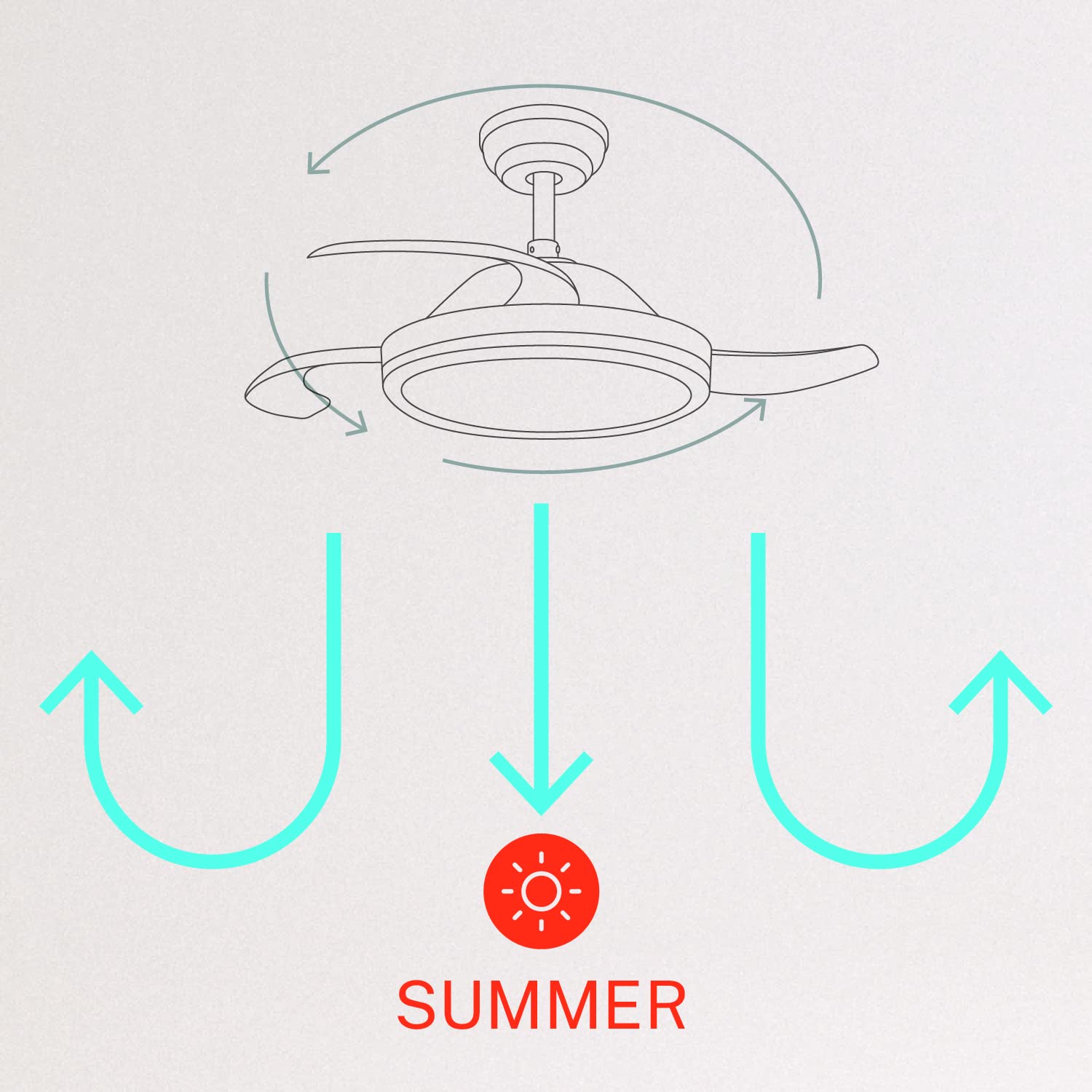
- ໂໝດລະດູໜາວ/ລະດູຮ້ອນ: Switch between forward (summer) and reverse (winter) rotation modes.

5.2 Winter and Summer Modes
The fan features a reversible motor to optimize air circulation for different seasons:
- ໂໝດລະດູຮ້ອນ (ການໝຸນຕາມເຂັມໂມງ): The fan blades rotate counter-clockwise, pushing air downwards to create a cooling breeze.
- ໂໝດລະດູໜາວ (ການໝຸນຕາມເຂັມໂມງ): The fan blades rotate clockwise, drawing air upwards to circulate warm air trapped near the ceiling, helping to distribute heat more evenly.

6. ບໍາລຸງຮັກສາ
ການບໍາລຸງຮັກສາເປັນປົກກະຕິຮັບປະກັນປະສິດທິພາບທີ່ດີທີ່ສຸດແລະອາຍຸຍືນຂອງພັດລົມເພດານຂອງທ່ານ.
- ທໍາຄວາມສະອາດ: ແຕ່ລະໄລຍະເຮັດຄວາມສະອາດແຜ່ນພັດລົມແລະທີ່ຢູ່ອາໄສຂອງມໍເຕີດ້ວຍຄວາມອ່ອນ, ງamp cloth. Do not use abrasive cleaners or solvents. Ensure the fan is turned off and power is disconnected before cleaning.
- Tightening screws: Check all mounting screws and blade attachment screws annually to ensure they are properly tightened.
- ແຫຼ່ງແສງ: The LED light source is integrated. If it requires service, contact qualified personnel.
7. ການແກ້ໄຂບັນຫາ
ຖ້າເຈົ້າພົບບັນຫາກັບພັດລົມຂອງເຈົ້າ, ໃຫ້ອ້າງອີງເຖິງບັນຫາທົ່ວໄປ ແລະວິທີແກ້ໄຂບັນຫາຕໍ່ໄປນີ້:
| ບັນຫາ | ສາເຫດທີ່ເປັນໄປໄດ້ | ການແກ້ໄຂ |
|---|---|---|
| ພັດລົມບໍ່ເລີ່ມຕົ້ນ | No power supply; Loose wiring; Remote control battery depleted | Check circuit breaker; Verify all wiring connections; Replace remote control battery. |
| ພັດລົມສັ່ນ | Loose mounting screws; Unbalanced blades | Ensure mounting bracket and fan assembly screws are tight; Check for any obstructions to blade movement. |
| ແສງສະຫວ່າງບໍ່ເຮັດວຽກ | Loose wiring; LED module fault | Check light kit wiring connections; Contact customer support if LED module is faulty. |
| ການຄວບຄຸມໄລຍະໄກບໍ່ເຮັດວຽກ | Depleted battery; Remote not paired | Replace remote control battery; Refer to pairing instructions in the full manual. |
| WiFi control issues | Poor WiFi signal; Incorrect app setup | Ensure strong WiFi signal; Reconfigure WiFi connection in the app. |
8. ຂໍ້ມູນຈໍາເພາະ
| ຄຸນສົມບັດ | ລາຍລະອຽດ |
|---|---|
| ຍີ່ຫໍ້ | ສ້າງ |
| ໝາຍເລກຕົວແບບ | 120760_254772 |
| ສີ | ສີຂາວ |
| ການອອກແບບພັດລົມໄຟຟ້າ | ພັດລົມເພດານ |
| ແຫຼ່ງພະລັງງານ | ໄຟຟ້າສາຍ |
| ແບບ | With WiFi |
| ຂະໜາດສິນຄ້າ | 107D x 107W x 39H ຊມ |
| ປະເພດຫ້ອງ | ຫ້ອງນອນ |
| ຄຸນນະສົມບັດພິເສດ | ໂມງຈັບເວລາ |
| ການນໍາໃຊ້ທີ່ແນະນໍາ | ລະບາຍອາກາດ |
| ວັດtage | 40 ວັດ |
| ອົງປະກອບລວມ | Remote, Battery |
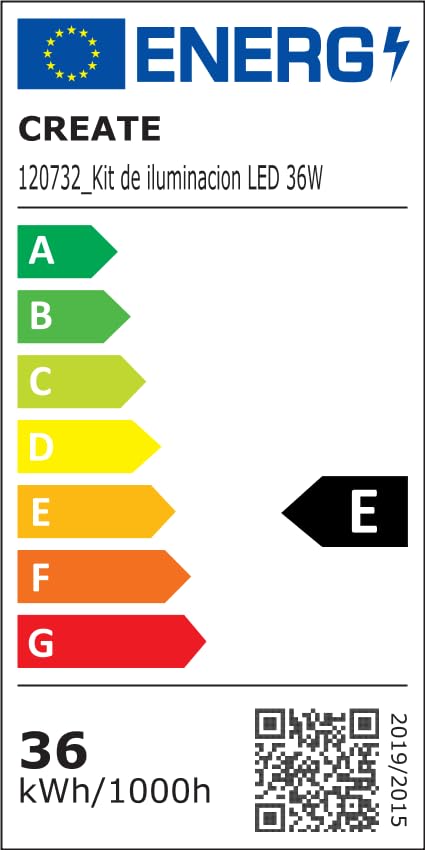
For detailed product data and energy efficiency information, please refer to the following documents:

9. ການຮັບປະກັນແລະການສະຫນັບສະຫນູນ
For warranty information, technical support, or service inquiries, please contact CREATE customer service or refer to the official CREATE webເວັບໄຊ. ຮັກສາໃບຮັບເງິນການຊື້ຂອງທ່ານໄວ້ເປັນຫຼັກຖານການຊື້.


