1. ບົດແນະນຳ
This manual provides detailed instructions for the installation, operation, and maintenance of the QttyElok Bluetooth Tuya Access Control System Kit. This system offers multiple access methods including fingerprint, RFID card, password, NFC, and control via the Tuya mobile application. It is designed for secure and convenient access management in various environments.
2. ເນື້ອໃນຊຸດ
ກວດສອບວ່າອົງປະກອບທັງຫມົດທີ່ລະບຸໄວ້ຂ້າງລຸ່ມນີ້ແມ່ນລວມຢູ່ໃນຊຸດຂອງທ່ານ:
- Access Control Keypad (Waterproof RFID Keypad Fingerprint Biometrics)
- 180KG Electric Magnetic Lock
- Power Supply Control Unit
- ປຸ່ມອອກປະຕູ
- 10pcs 13.56MHz Keyfobs

ຮູບພາບ 2.1: ຫຼາຍກວ່າview of the QttyElok Access Control System Kit components.
3. ຂໍ້ມູນຄວາມປອດໄພ
ກະລຸນາອ່ານ ແລະ ເຂົ້າໃຈຄຳແນະນຳດ້ານຄວາມປອດໄພທັງໝົດກ່ອນການຕິດຕັ້ງ ແລະ ການດຳເນີນງານ. ການບໍ່ປະຕິບັດຕາມຄຳແນະນຳເຫຼົ່ານີ້ອາດຈະເຮັດໃຫ້ເກີດໄຟຟ້າຊັອດ, ໄຟໄໝ້ ຫຼື ອັນຕະລາຍອື່ນໆ.
- Ensure the power supply is disconnected before performing any wiring or installation.
- All electrical connections should be performed by a qualified professional if you are unsure.
- Do not expose the power supply unit to moisture or extreme temperatures.
- The access control keypad is IP68 waterproof, suitable for outdoor use, but avoid submerging it in water.
4. ການຕິດຕັ້ງແລະການຕິດຕັ້ງ
4.1 ແຜນວາດສາຍ
Follow the wiring diagram carefully to connect the access controller, power supply, magnetic lock, and exit button.
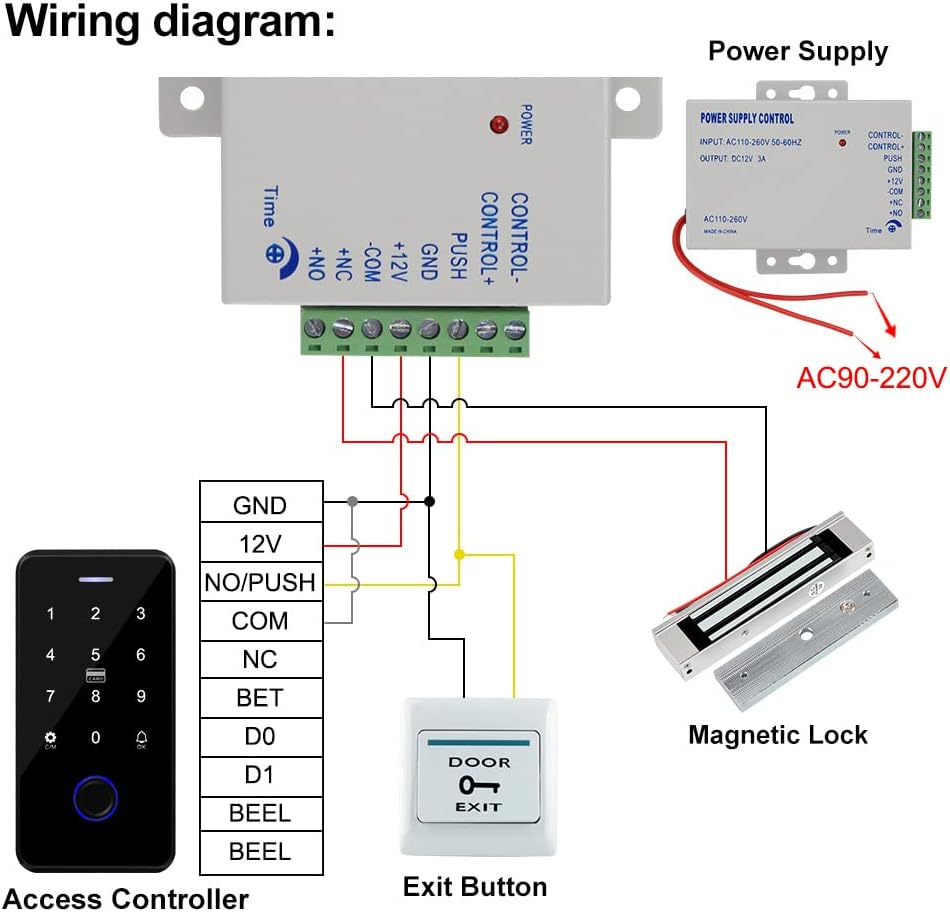
Image 4.1: Detailed wiring diagram for connecting all components of the access control system.
4.2 ການຕິດຕັ້ງອົງປະກອບ
Access Controller Keypad: Mount the keypad at a convenient height near the door. The keypad is IP68 waterproof and features a touch screen panel with backlight for visibility in low light conditions.

Image 4.2: Dimensions of the access control keypad (70mm x 140mm x 16mm).
Magnetic Lock: Install the 180KG (350lbs holding force) magnetic lock on the door frame and the armature plate on the door. This is a fail-safe (NC type) lock, meaning it locks when powered on and unlocks when power is off. It is suitable for wooden, metal, security, and glass doors.

Image 4.3: Dimensions of the 180KG magnetic lock (172mm x 40mm x 21mm for the lock, 130mm x 32mm x 11mm for the armature plate).
Power Supply Control Unit: Mount the power supply unit in a secure, dry location. Ensure proper ventilation.

Image 4.4: Dimensions of the power supply control unit (105mm x 68mm x 34mm) and its specifications.
Door Exit Button: Install the exit button on the inside of the door for convenient egress. It supports both Normally Closed (NC) and Normally Open (NO) modes.

Image 4.5: Dimensions of the door exit button (86mm x 86mm) and the included RFID keyfobs.
5. ຄໍາແນະນໍາການດໍາເນີນງານ
5.1 ວິທີການເຂົ້າເຖິງ
The system supports multiple methods for unlocking the door:
- ນີ້ວມື: Place a registered finger on the biometric sensor.
- ບັດ RFID: Present a registered 13.56MHz RFID card or keyfob to the keypad.
- ລະຫັດຜ່ານ: ໃສ່ລະຫັດຜ່ານທີ່ລົງທະບຽນຢູ່ໃນປຸ່ມກົດສໍາຜັດ.
- NFC: Use a mobile phone with NFC functionality to unlock.
- ແອັບ Tuya: Control the lock remotely via the Tuya Smart application on your smartphone.

Image 5.1: Visual representation of different access methods supported by the system.
5.2 ການເຊື່ອມໂຍງແອັບ Tuya
The access control keypad can be paired with the Tuya Smart app for remote control and advanced user management via Bluetooth. A gateway is not required for this functionality.
ດາວໂຫຼດແອັບ Tuya Smart: ສະແກນລະຫັດ QR ທີ່ສະໜອງໃຫ້ ຫຼືເຂົ້າໄປເບິ່ງ http://smart.tuya.com/download to download the Tuya Smart application.

Image 5.2: Instructions for downloading the Tuya Smart app and examples of its interface.
ການຄວບຄຸມໄລຍະໄກ: Once paired, you can unlock the door remotely using the Tuya app on your mobile phone.

Image 5.3: Demonstrates remote unlocking of the keypad using the Tuya Smart app via Bluetooth.
5.3 User Management and Programming
The Tuya app allows for comprehensive management of users, including adding fingerprints, RFID cards, and passwords. You can also generate temporary access codes and view ບັນທຶກການເຂົ້າເຖິງ.

Image 5.4: Screenshots of the Tuya app showing options for temporary password sharing, managing user settings, adding new users (fingerprint, code, card), and reviewໃນບັນທຶກການເຂົ້າເຖິງ.
6. ບໍາລຸງຮັກສາ
To ensure optimal performance and longevity of your access control system, follow these maintenance guidelines:
- Regularly clean the keypad surface with a soft, damp ຜ້າ. ຫຼີກລ້ຽງການເຮັດຄວາມສະອາດຂັດ.
- Keep the magnetic lock and armature plate free from dirt and debris to ensure proper contact and holding force.
- ກວດສອບການເຊື່ອມຕໍ່ສາຍໄຟທັງໝົດເປັນໄລຍະໆ ເພື່ອຄວາມແໜ້ນໜາ ແລະ ຮ່ອງຮອຍຂອງການສວມໃສ່.
7. ການແກ້ໄຂບັນຫາ
If you encounter issues with your access control system, refer to the following common problems and solutions:
- ລະບົບບໍ່ໄດ້ເປີດ: Check all power connections, ensure the power supply unit is receiving input voltage (AC110-260V), and verify the output DC12V.
- Magnetic lock not engaging/disengaging: Verify wiring to the magnetic lock. Ensure the power supply is providing consistent DC12V. Check for any obstructions between the lock and armature plate.
- ປຸ່ມກົດບໍ່ຕອບສະໜອງ: Check power to the keypad. Ensure all data wires are correctly connected as per the wiring diagram.
- Fingerprint/RFID/Password not working: Ensure the user is properly registered in the system or via the Tuya app. Re-register if necessary.
- ບັນຫາການເຊື່ອມຕໍ່ແອັບ Tuya: Ensure Bluetooth is enabled on your phone and the keypad is within range. Restart the app and try pairing again.
ຖ້າບັນຫາຍັງຄົງຢູ່, ໃຫ້ຕິດຕໍ່ຝ່າຍຊ່ວຍເຫຼືອລູກຄ້າເພື່ອຂໍຄວາມຊ່ວຍເຫຼືອເພີ່ມເຕີມ.
8. ຂໍ້ມູນຈໍາເພາະ
| ຍີ່ຫໍ້ | QttyElok |
| ໝາຍເລກຕົວແບບ | F20tuya Kit |
| ແຫຼ່ງພະລັງງານ | Corded Electric, DC |
| ການປ້ອນຂໍ້ມູນ Voltage (Power Supply) | 110-240VAC |
| ຜົນໄດ້ຮັບ Voltage (Power Supply) | DC12V |
| Momentary Current (Power Supply) | 3A |
| Time Delay (Power Supply) | 0~15 seconds delay locks |
| Access Controller Dimensions | 70 x 140 x 16 ມມ |
| Magnetic Lock Holding Force | 180KG / 350lbs |
| ຄວາມຖີ່ RFID | 13.56MHz (Mi-fare 1k) |
| ຄວາມອາດສາມາດຂອງຜູ້ໃຊ້ | 100 ຜູ້ໃຊ້ |
| Waterproof Rating (Keypad) | IP68 |
| ເຕັກໂນໂລຊີການເຊື່ອມຕໍ່ | ໄຮ້ສາຍ (Bluetooth) |
| ອຸປະກອນທີ່ເຂົ້າກັນໄດ້ | Smartphone (Tuya App) |
9. ການຮັບປະກັນແລະການສະຫນັບສະຫນູນ
ສຳລັບຂໍ້ມູນການຮັບປະກັນ ຫຼື ການຊ່ວຍເຫຼືອດ້ານເຕັກນິກ, ກະລຸນາອ້າງອີງໃສ່ການຫຸ້ມຫໍ່ຜະລິດຕະພັນ ຫຼື ຕິດຕໍ່ຜູ້ຂາຍໂດຍກົງ. ເກັບໃບຮັບເງິນການຊື້ຂອງທ່ານໄວ້ເປັນຫຼັກຖານການຊື້.


