ແນະນຳ
ຂອບໃຈສໍາລັບການຊື້asing the ION Audio Power Glow 300. This powerful, portable, and versatile Bluetooth speaker system is designed to deliver high-quality audio with dynamic LED lighting, perfect for any event. With its built-in handles and wheels, it offers exceptional portability. Please read this manual carefully to ensure proper use and to maximize your experience with the Power Glow 300.
ຄຸນສົມບັດ
- Bluetooth 5.0 Compatible: Stream your favorite music wirelessly from any Bluetooth-enabled device up to 100 feet.
- ION Sound XP APP: Control audio settings and lighting effects directly from your smartphone or tablet.
- ສອງ -Amplified 300-Watt Sound System: Features a 10-inch (254mm) woofer and a 1-inch (25.4mm) tweeter for lifelike sound reproduction.
- One-Touch User Interface: A simple control knob for all sound adjustments.
- ແບັດເຕີຣີທີ່ສາມາດສາກໄດ້: Provides long-lasting power for extended use.
- Wireless Stereo-Link: Connects wirelessly with additional compatible ION speakers for a wider soundstage.
- ມືຈັບ ແລະລໍ້ໃນຕົວ: Designed for easy transportation.
- ແສງຫຼາຍສີ: The woofer glows in multiple colors, synchronizing with the music.
- ເຄື່ອງປະສົມຫຼາຍຊ່ອງ: Includes a mixer with main volume control and XLR inputs.
- Aux Inputs: Easily connect non-Bluetooth devices.
- Echo Effect on Microphone: Enhance your karaoke performances.
- ການຫຼິ້ນບັດ USB/SD: Conveniently play audio material recorded on other devices.
- ການປ້ອນຂໍ້ມູນໄມໂຄຣໂຟນ: Connect your microphone for endless fun.
ແມ່ນຫຍັງຢູ່ໃນກ່ອງ
- Power Glow 300 Speaker
- ສາຍໄຟ
- ຄູ່ມືຜູ້ໃຊ້
ຕັ້ງຄ່າ
1. ການສາກແບັດເຕີຣີ
Before first use, fully charge the Power Glow 300's internal rechargeable battery. Connect the included power cable to the speaker's power input on the rear panel and plug it into a standard electrical outlet. The charging indicator light will show the charging status.
2. ເປີດ / ປິດພະລັງງານ
Locate the power switch on the rear control panel. Flip the switch to the 'ON' position to power on the speaker. Flip it to 'OFF' to power down.
3. ການຈັບຄູ່ Bluetooth
- Ensure the Power Glow 300 is powered on.
- ໃນອຸປະກອນ Bluetooth ຂອງທ່ານ (ໂທລະສັບສະຫຼາດ, ແທັບເລັດ, ແລະອື່ນໆ), ເປີດ Bluetooth ແລະຊອກຫາອຸປະກອນທີ່ມີຢູ່.
- Select 'ION Audio Power Glow 300' from the list of devices.
- Once paired, the speaker will indicate a successful connection (e.g., a chime or a steady Bluetooth indicator light).
For advanced control and settings, download the ION Sound XP APP ຈາກຮ້ານ app ຂອງອຸປະກອນຂອງທ່ານ.
4. Physical Setup and Portability
The Power Glow 300 features built-in handles and wheels for easy transport. Simply extend the retractable handle located on the top of the unit and tilt the speaker to roll it to your desired location. The robust design ensures durability for outdoor and indoor use.

ຮູບພາບ: ຂ້າງ view demonstrating the retractable handle and wheels for easy transport.
ຄໍາແນະນໍາການດໍາເນີນງານ
1. ກະດານຄວບຄຸມຫຼາຍກວ່າview
The main control panel is located on the rear of the speaker. It includes controls for playback, volume, inputs, and lighting.

ຮູບພາບ: ລາຍລະອຽດ view of the rear control panel.
2. ເຄື່ອງຫຼີ້ນສຽງ
- Bluetooth: Once paired, play audio from your connected Bluetooth device. Use the speaker's play/pause, next, and previous track buttons, or control directly from your device.
- ແຜ່ນ USB/SD: Insert a USB drive or SD card into the respective slots on the control panel. The speaker will automatically detect and play compatible audio fileໃຊ້ການຄວບຄຸມການຫຼິ້ນຄືນເພື່ອນຳທາງເພງ.
- ການປ້ອນຂໍ້ມູນຊ່ວຍ: Connect non-Bluetooth devices using a standard 3.5mm audio cable or RCA cables to the Aux Inputs on the rear panel.
- ການປ້ອນຂໍ້ມູນໄມໂຄຣໂຟນ: Plug a microphone into the XLR or 1/4-inch input. Adjust the microphone volume using the dedicated knob. The echo effect can be applied for vocal enhancement.

Image: USB/SD Card Playback Interface.
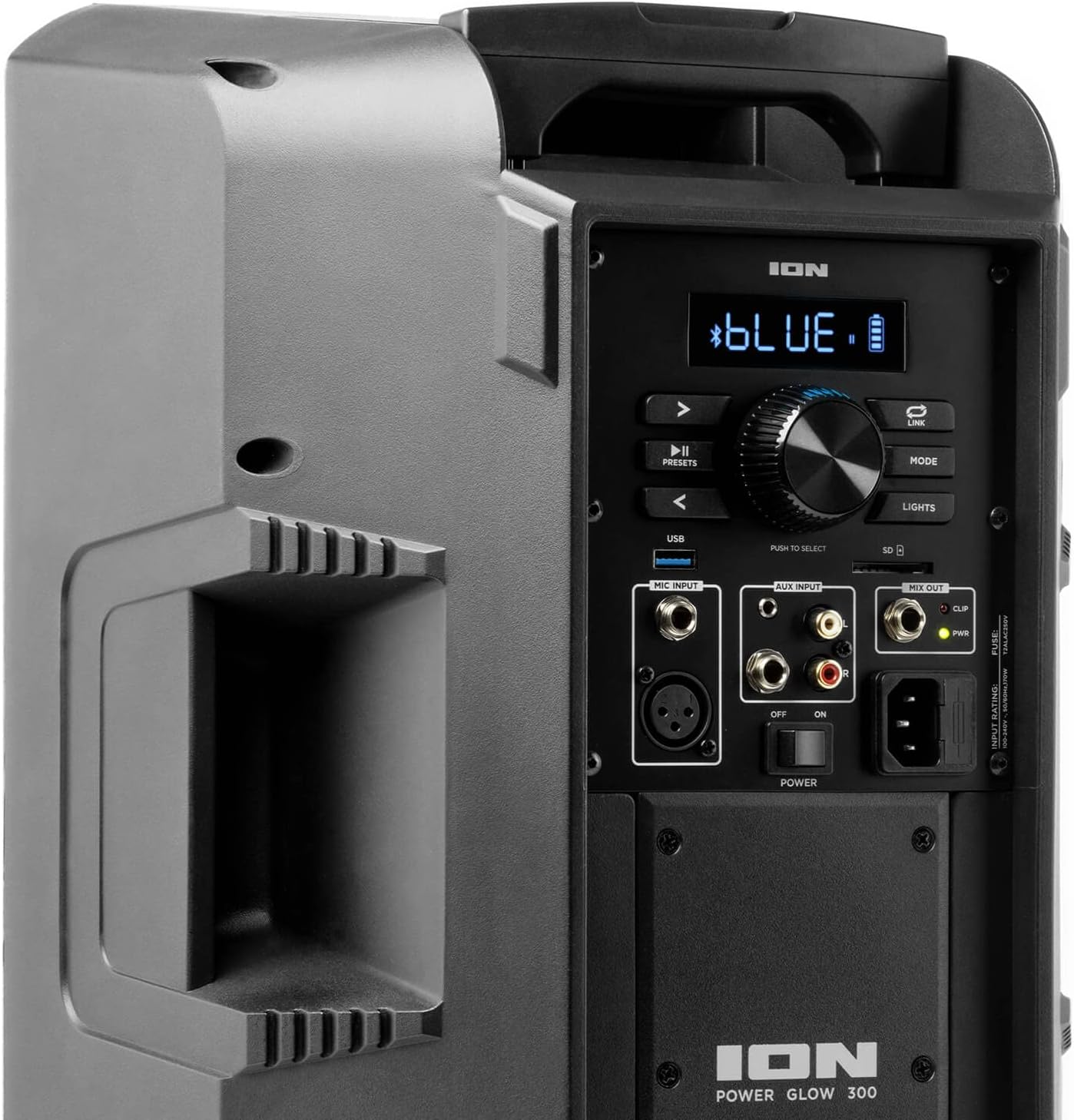
Image: Aux Inputs for external devices.
3. LED Lighting Effects
The Power Glow 300 features dynamic multi-colored LED lights on the woofer that can pulse and change with the beat of the music. Use the 'LIGHTS' button on the control panel or the ION Sound XP APP to cycle through different lighting modes or turn them off.

Image: Speaker with green LED lighting.
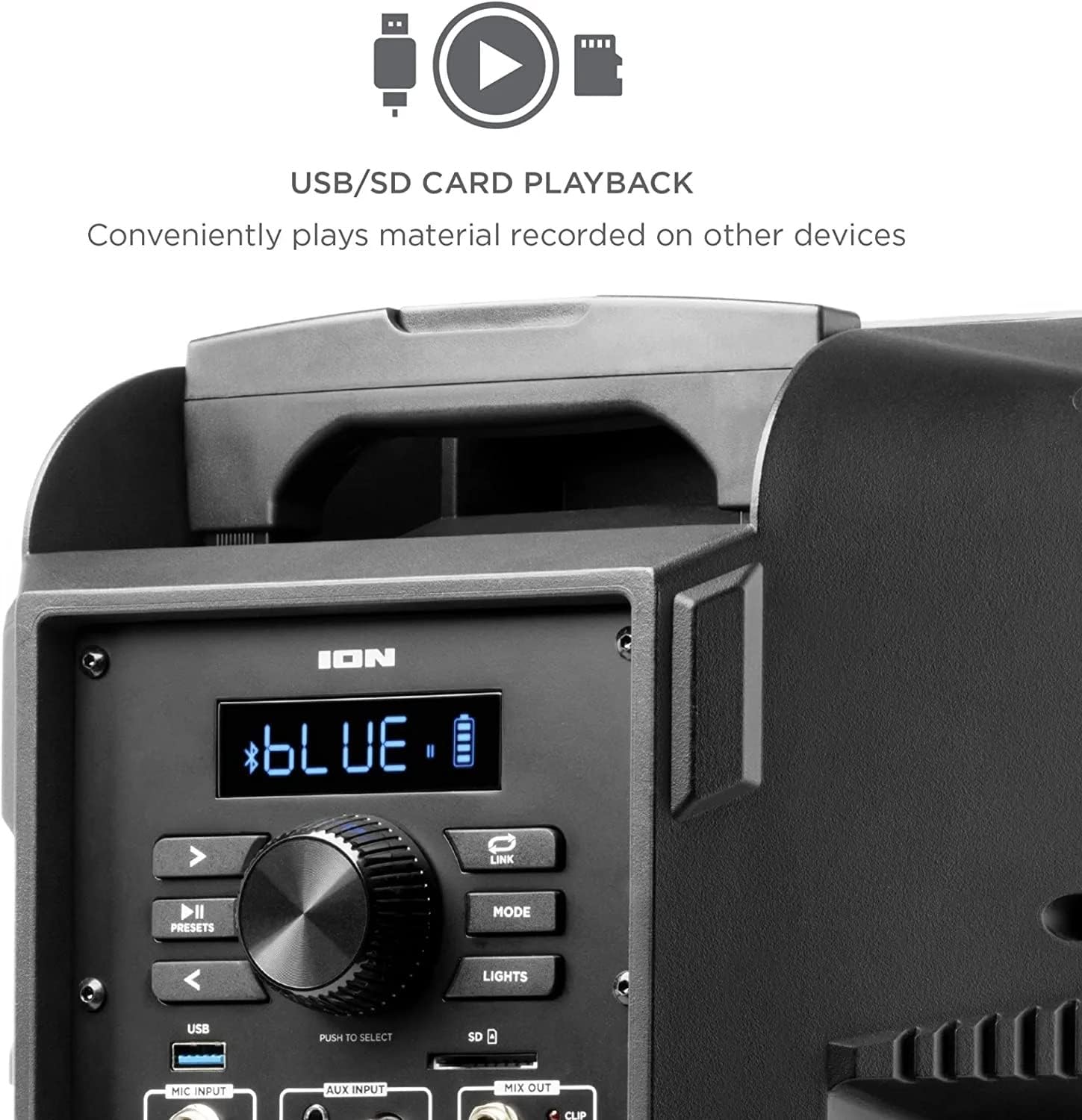
Image: Speaker with blue LED lighting.
4. Wireless Stereo-Link
To connect two Power Glow 300 speakers wirelessly for stereo sound, follow the instructions provided in the ION Sound XP APP or refer to the full product manual for detailed pairing steps.
ບໍາລຸງຮັກສາ
- ທໍາຄວາມສະອາດ: Use a soft, dry cloth to clean the exterior of the speaker. Do not use harsh chemicals or abrasive cleaners.
- ການດູແລຫມໍ້ໄຟ: ສໍາລັບອາຍຸຂອງຫມໍ້ໄຟທີ່ດີທີ່ສຸດ, ຫຼີກເວັ້ນການປະຖິ້ມຫມໍ້ໄຟຢ່າງເຕັມທີ່ເລື້ອຍໆ. ຕື່ມເງິນລໍາໂພງຢ່າງເປັນປົກກະຕິ, ໂດຍສະເພາະຖ້າມັນຈະຖືກເກັບໄວ້ເປັນໄລຍະເວລາທີ່ຍາວນານ.
- ການເກັບຮັກສາ: ເກັບຮັກສາລຳໂພງໄວ້ໃນບ່ອນທີ່ເຢັນ, ແຫ້ງ, ຫ່າງຈາກແສງແດດໂດຍກົງ ແລະ ອຸນຫະພູມທີ່ຮ້າຍກາດ.
ການແກ້ໄຂບັນຫາ
- ບໍ່ມີພະລັງງານ: Ensure the power cable is securely connected and the power switch is in the 'ON' position. Check the power outlet.
- ບໍ່ມີສຽງ: Verify that the volume is turned up on both the speaker and your audio source. Check all cable connections for auxiliary inputs. Ensure Bluetooth is properly paired.
- ການຕັດການເຊື່ອມຕໍ່ Bluetooth: Move your Bluetooth device closer to the speaker. Ensure no other devices are interfering with the Bluetooth signal. Try unpairing and re-pairing the device.
- ສຽງບິດເບືອນ: Reduce the volume on both the speaker and your audio source. Check for proper input levels.
- ໄຟບໍ່ເຮັດວຽກ: Check the 'LIGHTS' button on the control panel or within the ION Sound XP APP to ensure they are enabled.
If issues persist, please refer to the comprehensive troubleshooting guide on the ION Audio webເວັບໄຊທ໌ຫຼືຕິດຕໍ່ສະຫນັບສະຫນູນລູກຄ້າ.
ຂໍ້ມູນຈໍາເພາະ
| ຊື່ຕົວແບບ | ພະລັງງານໂກລ 300 |
| ປະເພດລຳໂພງ | ວອດເຟີ |
| ລຳໂພງກຳລັງຜົນຜະລິດສູງສຸດ | 300 ວັດ |
| Woofer ເສັ້ນຜ່າສູນກາງ | 10 ນິ້ວ |
| Tweeter ເສັ້ນຜ່າສູນກາງ | 25.4 ມິນລິແມັດ |
| ເຕັກໂນໂລຊີການເຊື່ອມຕໍ່ | Bluetooth |
| ເຕັກໂນໂລຊີການສື່ສານໄຮ້ສາຍ | Bluetooth |
| ຊ່ວງ Bluetooth | 100 ຟຸດ (30.48 ແມັດ) |
| ແຫຼ່ງພະລັງງານ | ພະລັງງານຫມໍ້ໄຟ |
| ປະເພດຫມໍ້ໄຟ | 1 Lithium Ion (ລວມ) |
| ນ້ໍາຫນັກລາຍການ | 26.3 ປອນ |
| ຂະໜາດແພັກເກັດ | 22 x 14.8 x 14.8 ນິ້ວ |
| ອົງປະກອບລວມ | Speaker, Power cable, User manual |
| UPC | 657768184574 |
| ປະເພດການຮັບປະກັນ | ຈຳກັດ |
ການຮັບປະກັນແລະການສະຫນັບສະຫນູນ
The ION Audio Power Glow 300 comes with a Limited Warranty. For detailed warranty information, product registration, and technical support, please visit the official ION Audio webເວັບໄຊ ຫຼືຕິດຕໍ່ພະແນກບໍລິການລູກຄ້າຂອງເຂົາເຈົ້າ. ຮັກສາໃບຮັບເງິນການຊື້ຂອງທ່ານໄວ້ເປັນຫຼັກຖານການຊື້ສໍາລັບການຮ້ອງຂໍການຮັບປະກັນ.


