1. ຜະລິດຕະພັນເກີນview
The Phanteks Eclipse G500A DRGB is a high-performance mid-tower chassis designed to accommodate modern PC components with excellent airflow and integrated D-RGB lighting. It features an Ultra-fine Performance Mesh on both the front and top panels, ensuring optimal cooling and dust filtration.

Figure 1: Phanteks Eclipse G500A DRGB Mid Tower Case, Matte White.
ຄຸນນະສົມບັດທີ່ສໍາຄັນ:
- ການອອກແບບກະແສລົມສູງ: Ultra-fine Performance Mesh on front and top panels for superior cooling and dust filtration.
- Integrated D-RGB Lighting: Built-in D-RGB lighting on the front and side, controllable via manual buttons or motherboard synchronization.
- ພັດລົມທີ່ຕິດຕັ້ງໄວ້ລ່ວງໜ້າ: Includes three high-performance M25-140 D-RGB fans.
- ສະຫນັບສະຫນູນຄວາມເຢັນຢ່າງກວ້າງຂວາງ: Supports up to 420mm radiators in the front and 360mm in the top.
- ພາຍໃນກວ້າງຂວາງ: Accommodates full-length GPUs and offers vertical GPU mounting options (with optional bracket).
- ການເກັບຮັກສາແບບຍືດຫຍຸ່ນ: Multiple HDD and SSD locations, including dedicated SSD brackets and stackable HDD bays.
- Modern Front I/O: Features 10Gbps USB-C, 2x USB 3.0, Microphone/Headphone Combo, Power button, and D-RGB controls.
2. ການຕິດຕັ້ງແລະການຕິດຕັ້ງ
This section provides general guidelines for installing components into your Phanteks Eclipse G500A DRGB chassis. Always refer to your component manuals for specific installation instructions.
2.1 ການກະກຽມ Chassis
Before installing components, ensure the chassis is placed on a stable, flat surface. Remove the side panels by gently pulling them open (they are hinged) to access the interior.
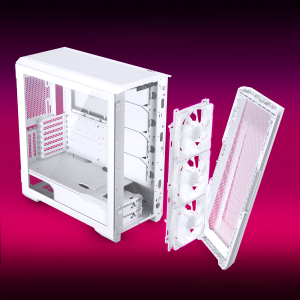
Figure 2: The removable front panel allows for easy installation of fans and radiators.
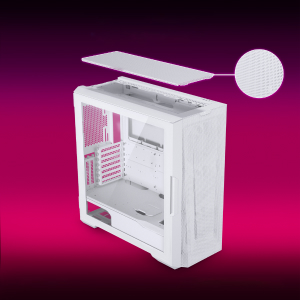
Figure 3: The removable top mesh panel facilitates fan and radiator installation.
2.2 ການຕິດຕັ້ງເມນບອດ
The G500A supports ATX, micro-ATX, mini-ITX, and E-ATX motherboards (up to 280mm wide). Install the necessary standoffs for your motherboard form factor, then secure the motherboard with screws.
2.3 ການຕິດຕັ້ງຫນ່ວຍບໍລິການພະລັງງານ (PSU).
Install the PSU at the bottom rear of the chassis. The G500A supports PSUs up to 250mm in length (195mm if all 4 bottom HDD positions are used).
2.4 ການຕິດຕັ້ງອຸປະກອນການເກັບຮັກສາ
The case offers extensive storage options:
- 2.5" SSDs: Up to 9 dedicated 2.5" drive bays are included.
- ຮາດດິດ 3.5": Two stackable 3.5" HDD bays are included, expandable up to a total of 10 HDD bays.

Figure 4: Multiple storage options for 2.5" and 3.5" drives.
2.5 ການຕິດຕັ້ງບັດກາຟິກ (GPU).
The G500A supports graphics cards up to 435mm in length. For vertical GPU mounting, an optional bracket (PH-VGPUKT4.0_03) or riser cable is required.
2.6 ການຕິດຕັ້ງລະບົບເຮັດຄວາມເຢັນ
The chassis supports various fan and radiator configurations:
- ສະຫນັບສະຫນູນແຟນ:
- Front: 3x 120mm or 3x 140mm (3x 140mm pre-installed)
- Top: 3x 120mm or 3x 140mm
- ດ້ານຫລັງ: 1x 120mm ຫຼື 1x 140mm
- Liquid Cooling Radiator Support:
- Front: Up to 360mm (120mm radiator) or 420mm (140mm radiator)
- Top: Up to 360mm (120mm radiator) or 280mm (140mm radiator)
- ດ້ານຫລັງ: 120mm
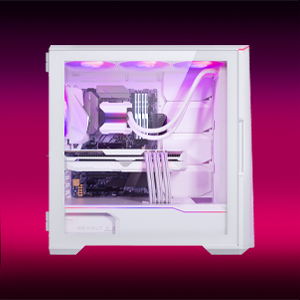
Figure 5: High-end cooling compatibility with various fan and radiator sizes.
2.7 ການຈັດການສາຍ
The G500A provides ample space and Velcro ties for efficient cable management, ensuring a clean interior and optimal airflow. Cover doors help to conceal cables on the backside of the motherboard tray.
2.8 ວິດີໂອການຕິດຕັ້ງ
Video 1: Detailed PC Build Guide in the Phanteks Eclipse G500A (13:33).
Video 2: Another comprehensive PC assembly guide featuring the Phanteks Eclipse G500A (14:01).
3. ຄໍາແນະນໍາການດໍາເນີນງານ
3.1 ແຜງ I/O ດ້ານໜ້າ
ແຜງ I/O ດ້ານໜ້າໃຫ້ການເຂົ້າເຖິງພອດ ແລະ ຕົວຄວບຄຸມທີ່ສຳຄັນໄດ້ຢ່າງສະດວກສະບາຍ:
- ປຸ່ມເປີດປິດ: ເພື່ອເປີດ / ປິດລະບົບຂອງທ່ານ.
- ຜອດ USB 3.0 (x2): ສໍາລັບການເຊື່ອມຕໍ່ອຸປະກອນ USB 3.0.
- USB-C Gen2 Port (x1): For high-speed USB-C connectivity.
- ຊ່ອງສຽບໄມໂຄຣໂຟນ/ຫູຟັງ: ສໍາລັບການປ້ອນຂໍ້ມູນສຽງແລະຜົນຜະລິດ.
- D-RGB Mode Button: Cycles through pre-programmed D-RGB lighting effects.
- D-RGB Color Button: ປ່ຽນສີຂອງໄຟ D-RGB.

Figure 6: Front I/O panel with USB-C, USB 3.0, audio, and D-RGB controls.
3.2 ການຄວບຄຸມໄຟ D-RGB
The integrated D-RGB lighting can be controlled in two ways:
- ການຄວບຄຸມຄູ່ມື: Use the D-RGB Mode and Color buttons on the front I/O panel to cycle through effects and colors without software.
- ການຊິ້ງຂໍ້ມູນຂອງເມນບອດ: Connect the D-RGB controller to a compatible motherboard's D-RGB header to enable software control and synchronization with other D-RGB components.

Figure 7: Integrated D-RGB lighting with included M25-140 D-RGB fans.
4. ບໍາລຸງຮັກສາ
ການບໍາລຸງຮັກສາເປັນປົກກະຕິຈະຊ່ວຍຮັບປະກັນການປະຕິບັດທີ່ດີທີ່ສຸດແລະອາຍຸຍືນຂອງອົງປະກອບ PC ຂອງທ່ານ.
- ການກັ່ນຕອງຝຸ່ນ: The Ultra-fine Performance Mesh on the front and top panels acts as a dust filter. Periodically remove these panels and clean the mesh to maintain optimal airflow.
- ທຳ ຄວາມສະອາດພາຍໃນ: Use compressed air to remove dust from inside the chassis, especially from fans, heatsinks, and other components. Ensure the system is powered off and unplugged before cleaning.
- ການອະນາໄມພາຍນອກ: ເຊັດພື້ນຜິວພາຍນອກດ້ວຍຜ້າອ່ອນໆ, ງamp ຜ້າ. ຫຼີກລ້ຽງການເຮັດຄວາມສະອາດຂັດຫຼືສານລະລາຍ.
5. ການແກ້ໄຂບັນຫາ
ພາກສ່ວນນີ້ແກ້ໄຂບັນຫາທົ່ວໄປທີ່ທ່ານອາດຈະພົບກັບກໍລະນີ PC ຂອງທ່ານ.
5.1 ບັນຫາພະລັງງານ
- ລະບົບບໍ່ໄດ້ເປີດ:
- Ensure all power cables (24-pin ATX, 8-pin CPU, GPU power) are securely connected to the motherboard and components.
- ກວດສອບວ່າສະວິດ PSU ຢູ່ໃນຕຳແໜ່ງ 'ເປີດ'.
- Check that the front panel power switch cable is correctly connected to the motherboard's F_PANEL header.
5.2 D-RGB Lighting Issues
- D-RGB not lighting up or incorrect colors:
- Ensure the D-RGB cables from the fans and LED strips are correctly connected to the integrated D-RGB controller.
- If using motherboard synchronization, ensure the D-RGB controller is connected to the motherboard's D-RGB header and that the motherboard's lighting software is configured correctly.
- Verify the D-RGB controller is receiving power (e.g., via SATA power connector).
- Try cycling through modes and colors using the front I/O buttons to rule out software issues.
5.3 Fan Noise or Malfunction
- ສຽງພັດລົມຫຼາຍເກີນໄປ:
- Check for dust buildup on fan blades and clean if necessary.
- Ensure fans are securely mounted and not vibrating against the chassis.
- Verify fan speeds are controlled appropriately by the motherboard or fan controller.
- ພັດລົມບໍ່ໝູນ:
- Check fan power connections to the motherboard or fan hub.
- Ensure fan headers are enabled in the BIOS/UEFI settings.
6. ຂໍ້ມູນຈໍາເພາະ
Detailed technical specifications for the Phanteks Eclipse G500A DRGB Mid Tower Case.
| ຄຸນສົມບັດ | ຂໍ້ມູນຈໍາເພາະ |
|---|---|
| ຊື່ຕົວແບບ | Eclipse G500A DRGB, White |
| ໝາຍເລກຕົວແບບ | PH-EC500GA_DMW01A |
| ປັດໄຈແບບຟອມ | ຫໍກາງ |
| ຂະໜາດ (LxWxH) | 19.69 x 9.45 x 20.28 ນິ້ວ (500 x 240 x 515 ມມ) |
| ນ້ໍາຫນັກລາຍການ | 23.2 ປອນ |
| ວັດສະດຸ | ໂຄງລົດເຫຼັກ, ແກ້ວອຸ່ນ |
| ຮອງຮັບເມນບອດ | ATX, micro-ATX, mini-ITX, E-ATX (up to 280mm wide) |
| ສະລັອດຕິງຂະຫຍາຍ | 7 |
| ຮອງຮັບ GPU ແນວຕັ້ງ | Yes (with optional bracket PH-VGPUKT4.0_03 or riser cable) |
| ຊ່ອງຂັບພາຍໃນ 3.5" | 10 (2x included, expandable) |
| ຊ່ອງຂັບພາຍໃນ 2.5" | 9 (ລວມ 9x) |
| ຫນ້າ I/O | 2x USB 3.0, USB-C Gen2, Microphone/Headphone Combo, Power Button, D-RGB Mode, D-RGB Color |
| ພັດລົມທີ່ຕິດຕັ້ງໄວ້ລ່ວງໜ້າ | 3x M25-140 D-RGB (Front) |
| ຄວາມຍາວສູງສຸດຂອງ GPU | 435 ມມ / 17.2 ນິ້ວ |
| ຄວາມສູງຂອງ CPU Cooler ສູງສຸດ | 185 ມມ |
| ຄວາມຍາວ PSU ສູງສຸດ | 195mm (if all 4 bottom HDD positions used) / 250mm (if 2 bottom HDD used) |
| ວິທີການເຮັດຄວາມເຢັນ | ພັດລົມ, ນໍ້າ |
7. ການຮັບປະກັນແລະການສະຫນັບສະຫນູນ
Phanteks products are manufactured with high-quality standards. For warranty information and technical support, please refer to the official Phanteks webເວັບໄຊ ຫຼືຕິດຕໍ່ບໍລິການລູກຄ້າຂອງເຂົາເຈົ້າ.
ຂໍ້ມູນຕິດຕໍ່:
- Webເວັບໄຊ: www.phanteks.com
- Phanteks Taiwan Inc.: 11F., ເລກທີ 150, Jian 1st Rd., Zhonghe Dist. ເມືອງໃໝ່ ໄທເປ 235
- Importer EU (Axpertec Int B.V.): Sydneystraat 33, 3047 BP Rotterdam, The Netherlands
- Importer US (Axpertec Inc.): 20465 E Walnut Dr. N, City of Industry, California 91789, United States

Figure 8: Phanteks company and importer details, along with compliance markings (CE, UKCA, RoHS).