1. ບົດແນະນຳ
Thank you for choosing the Tunturi Centuri E100 Fitness Bike. This manual provides essential information for the safe assembly, operation, and maintenance of your new fitness equipment. Please read all instructions carefully before use and retain this manual for future reference.
The Tunturi Centuri E100 is designed to provide an effective and comfortable home workout experience, featuring adjustable resistance, various programs, and smart connectivity options.
2. ຂໍ້ມູນຄວາມປອດໄພ
- ປຶກສາແພດຂອງທ່ານກ່ອນທີ່ຈະເລີ່ມໂຄງການອອກກໍາລັງກາຍໃດໆ.
- ຮັບປະກັນວ່າທຸກຊິ້ນສ່ວນໄດ້ຖືກປະກອບຢ່າງຖືກຕ້ອງ ແລະ ຮັດແໜ້ນກ່ອນການນຳໃຊ້ແຕ່ລະຄັ້ງ.
- ຮັກສາເດັກນ້ອຍ ແລະສັດລ້ຽງຢູ່ຫ່າງຈາກອຸປະກອນໃນລະຫວ່າງການປະຕິບັດງານ.
- Place the fitness bike on a flat, stable surface with adequate clearance around it.
- ໃສ່ເຄື່ອງນຸ່ງ ແລະເກີບອອກກຳລັງກາຍທີ່ເໝາະສົມ.
- The maximum user weight for this device is 135 kg (297 lbs).
- ຢຸດການອອກກໍາລັງກາຍທັນທີຖ້າທ່ານຮູ້ສຶກອ່ອນເພຍ, ວິນຫົວ, ຫຼືມີອາການປວດ.
- ຢ່າພະຍາຍາມດັດແປງອຸປະກອນ.
3. ເນື້ອໃນຊຸດ
Before assembly, ensure all components are present and undamaged. Refer to the assembly diagram in the separate assembly guide for a complete list of parts.

Image 1: The Tunturi Centuri E100 Fitness Bike, showcasinການອອກແບບສີດຳ ແລະ ສີທອງທີ່ທັນສະໄໝຂອງມັນ.
4. ການຕິດຕັ້ງແລະການປະກອບ
The Tunturi Centuri E100 is designed for straightforward assembly. Follow the detailed instructions provided in the separate assembly manual. Key adjustable components include:
- ການປັບບ່ອນນັ່ງ: The seat can be adjusted both vertically and horizontally to accommodate various user heights and preferences.
- ການປັບແຖບຈັບ: The multi-grip handlebars can be adjusted for angle to find a comfortable riding position.
- ສາຍຮັດຄັນຖີບ: Adjustable foot straps on the pedals ensure your feet remain secure during your workout.

Image 2: A user adjusting the seat of the fitness bike, demonstrating the vertical and horizontal adjustment knobs.

Image 3: Hands adjusting the angle of the handlebars on the Tunturi Centuri E100 for ergonomic comfort.
ການເຄື່ອນຍ້າຍລົດຖີບ
The Centuri E100 is equipped with transport wheels at the front base. To move the bike, carefully tilt it forward onto the wheels and roll it to your desired location. Ensure the area is clear before moving.
5. ຄໍາແນະນໍາການດໍາເນີນງານ
Console Overview
The 5.5-inch backlit LCD display provides real-time workout data. It shows:
- ເວລາ
- ໄລຍະທາງ
- ເຜົາຜານແຄລໍລີ່
- ຄວາມໄວ
- ວັດtage
- Pulse (via hand sensors or compatible Bluetooth chest strap)

Image 4: The console of the Tunturi Centuri E100, displaying workout metrics and control buttons for mode, reset, recovery, start/stop, and up/down adjustments.
Workout Programs and Resistance
The Centuri E100 offers a variety of training options:
- ລະດັບຄວາມຕ້ານທານ: Choose from 32 electronically controlled resistance levels to customize your workout intensity.
- ໂປຣແກມທີ່ຕັ້ງໄວ້ລ່ວງໜ້າ: Access 26 diverse workout programs designed for various fitness goals.
- Watt Program: Train with a constant power output, adjustable from 10 to 350 Watts in 5 Watt increments.
Bluetooth Connectivity and Apps
Enhance your training experience by connecting your Centuri E100 via Bluetooth to popular fitness applications. The integrated smartphone/tablet holder allows for convenient placement of your device.

Image 5: A tablet securely placed in the console holder, showing a virtual cycling route from a fitness application.
ຄໍາຮ້ອງສະຫມັກທີ່ສະຫນັບສະຫນູນປະກອບມີ:
- Tunturi Routes: Explore over 50,000 real-world cycling routes with automatic resistance adjustment based on terrain.
- iConsole+ Training: A versatile app for tracking workouts and setting goals.
- Kinomap: Ride along to geolocated videos from around the world.
- Zwift: Immerse yourself in virtual worlds and train with a global community.
A compatible Bluetooth heart rate chest strap (not included) can also be connected for more accurate heart rate monitoring.
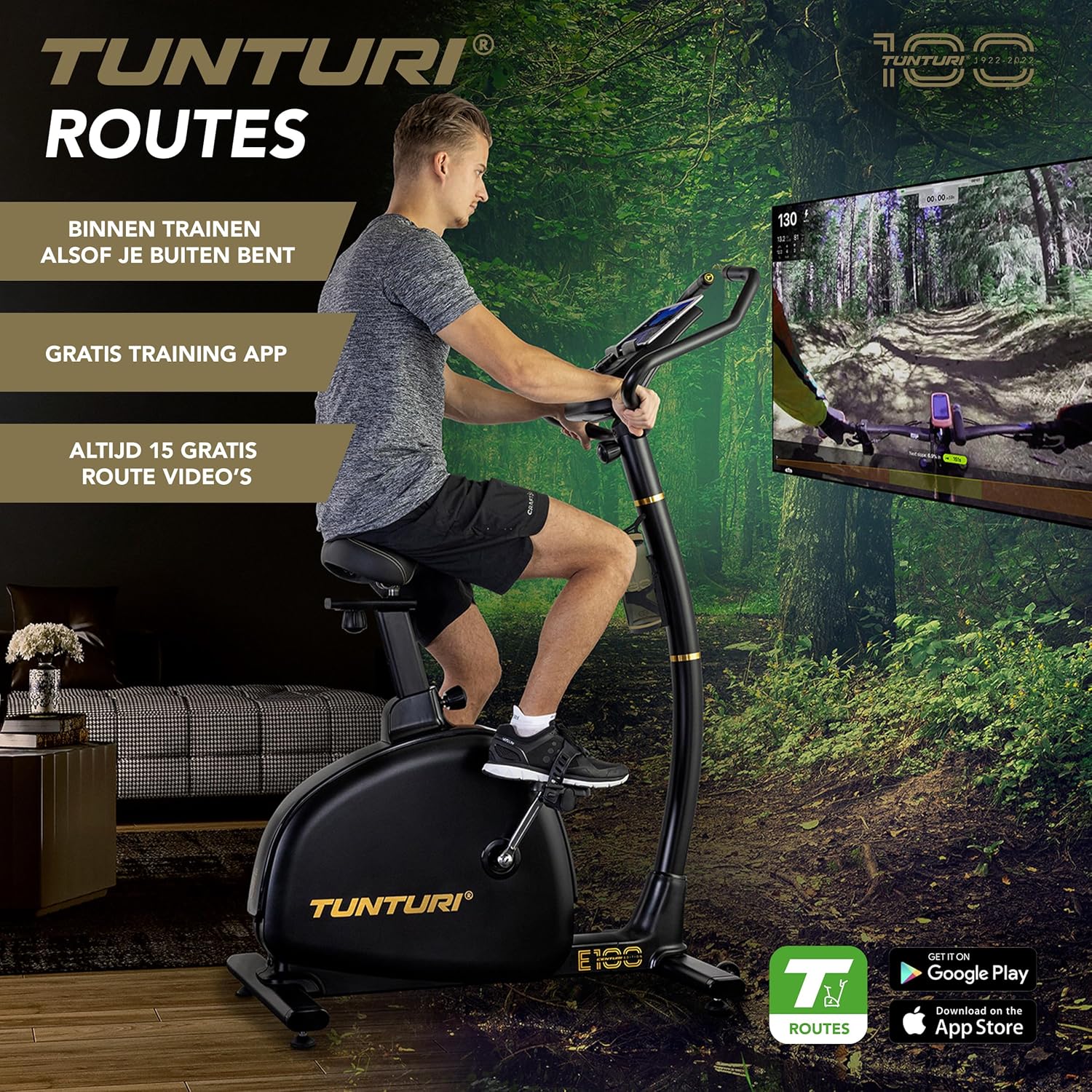
Image 6: A person using the Tunturi Centuri E100, with a large screen in the background displaying a virtual cycling route, highlighting the immersive training experience.

ຮູບພາບ 7: A ລາຍລະອຽດ view of the Tunturi Routes application interface on a tablet, showing real video footage of a cycling path and various training options.
6. ບໍາລຸງຮັກສາ
Regular maintenance ensures the longevity and safe operation of your Tunturi Centuri E100 Fitness Bike.
- ທໍາຄວາມສະອາດ: ເຊັດລົດຖີບດ້ວຍການໂຄສະນາamp ຜ້າຫຼັງຈາກແຕ່ລະການນໍາໃຊ້ເພື່ອເອົາເຫື່ອແລະຝຸ່ນ. ຫຼີກລ້ຽງການເຮັດຄວາມສະອາດຂັດ.
- ກວດສອບການເຊື່ອມຕໍ່: Periodically check all bolts, nuts, and moving parts to ensure they are securely tightened.
- ການລະບາຍສີ: No specific lubrication is required for the internal components. If you notice any squeaking, consult the troubleshooting section or contact customer support.
- ການເກັບຮັກສາ: ເກັບຮັກສາລົດຖີບໄວ້ໃນບ່ອນແຫ້ງ, ເຢັນຫ່າງຈາກແສງແດດໂດຍກົງ ແລະ ອຸນຫະພູມທີ່ຮ້າຍກາດ.
7. ການແກ້ໄຂບັນຫາ
If you encounter issues with your Tunturi Centuri E100, refer to the following common problems and solutions:
| ບັນຫາ | ສາເຫດທີ່ເປັນໄປໄດ້ | ການແກ້ໄຂ |
|---|---|---|
| ຈໍສະແດງຜົນຄອນໂຊນບໍ່ເຮັດວຽກ | Loose power connection, batteries depleted (if applicable) | Check power cable connection. If battery-operated, replace batteries. |
| ຄວາມຕ້ານທານບໍ່ປ່ຽນແປງ | Cable disconnection, motor issue | ໃຫ້ແນ່ໃຈວ່າສາຍໄຟທັງໝົດໄດ້ເຊື່ອມຕໍ່ກັນຢ່າງແໜ້ນໜາແລ້ວ. ຖ້າບັນຫາຍັງຄົງຢູ່, ໃຫ້ຕິດຕໍ່ຫາຝ່າຍສະໜັບສະໜູນລູກຄ້າ. |
| ບັນຫາການເຊື່ອມຕໍ່ Bluetooth | Device not discoverable, app issues | Ensure Bluetooth is enabled on your device. Restart the fitness bike and your device. Check app permissions. |
| ສຽງຜິດປົກກະຕິໃນລະຫວ່າງການປະຕິບັດງານ | Loose components, friction | Inspect all visible bolts and connections for tightness. If noise persists, discontinue use and contact support. |
If you cannot resolve the issue using the above table, please contact Tunturi customer support for assistance.
8. ຂໍ້ມູນຈໍາເພາະ
| ຄຸນສົມບັດ | ຂໍ້ມູນຈໍາເພາະ |
|---|---|
| ຕົວແບບ | Centuri E100 (22CBE10000) |
| ຂະໜາດ (L x W x H) | 990 x 600 x 1580 ມມ (39 x 23.6 x 62.2 ນິ້ວ) |
| ນ້ຳໜັກສິນຄ້າ | 39 ກິໂລ (86 ປອນ) |
| ນ້ ຳ ໜັກ flywheel | 11 ກິໂລ (24.2 ປອນ) |
| ລະດັບຄວາມຕ້ານທານ | 32 |
| ລະບົບເບກ | EMS (Electro-Magnetic System), Servomotor |
| Watt Program Range | 10-350 W (in 5 W increments) |
| ໂຄງການອອກກໍາລັງກາຍ | 26 |
| ປະເພດການສະແດງ | ໜ້າຈໍ LCD ມີໄຟສ່ອງທາງຫຼັງຂະໜາດ 5.5 ນິ້ວ |
| ການເຊື່ອມຕໍ່ | Bluetooth (iConsole+ Training, Kinomap, Zwift, Tunturi Routes) |
| ນ້ຳໜັກຜູ້ໃຊ້ສູງສຸດ | 135 ກິໂລ (297 ປອນ) |
| ຄຸນສົມບັດເພີ່ມເຕີມ | Adjustable seat (horizontal & vertical), adjustable handlebars, heart rate sensors, bottle holder, transport wheels |
9. ການຮັບປະກັນແລະການສະຫນັບສະຫນູນ
For warranty information, please refer to the warranty card included with your product or visit the official Tunturi webເວັບໄຊ. ຮັກສາຫຼັກຖານການຊື້ຂອງທ່ານສໍາລັບການຮ້ອງຂໍການຮັບປະກັນ.
For technical support, spare parts, or any questions not covered in this manual, please contact Tunturi customer service through their official webເວັບໄຊ ຫຼືຮ້ານຂາຍຍ່ອຍບ່ອນທີ່ທ່ານຊື້ຜະລິດຕະພັນ.


