1. ການແນະນໍາ ແລະຫຼາຍກວ່າview
This manual provides detailed instructions for the proper setup, operation, and maintenance of your Techbee TE02 Indoor Digital Electrical Outlet Timer Plug. This device is designed to automate the power supply to your electrical appliances, offering convenience, energy savings, and enhanced home security through its programmable features.
The Techbee TE02 timer plug features a large, easy-to-read display and intuitive controls, allowing for precise scheduling of up to 20 ON/OFF programs per day. It also includes advanced functions such as a countdown timer and a random ON/OFF mode for vacation security. Its built-in battery ensures that your programmed settings are retained even during power outages.
2. ຄຸນລັກສະນະຂອງຜະລິດຕະພັນ
- Extensive Programming: Supports up to 20 weekly ON-OFF timing programs for flexible scheduling.
- ໜ້າ ທີ່ນັບຖອຍຫລັງ: Allows for precise delay ON/OFF timing, from 1 second up to 99 hours, 59 minutes, and 59 seconds.
- Anti-theft Random Mode: Activates lights or other appliances at varying times to simulate occupancy, deterring potential intruders.
- ຈໍສະແດງຜົນທີ່ເປັນມິດກັບຜູ້ໃຊ້: Features a large screen for clear visibility of digits and numbers.
- ພະລັງງານ Outage ການປົກປ້ອງ: Equipped with a built-in NiMH 1.2V battery to retain programmed settings for over 30 days during power interruptions.
- Versatile Time Format: Interchangeable 12-hour (AM/PM) and 24-hour formats.
- ເຕົ້າສຽບສາຍໄຟ: Designed with a 3-prong plug and socket for safe use with a wide range of appliances.
- ການດໍາເນີນງານງຽບ: Operates completely silently, making it suitable for home use.
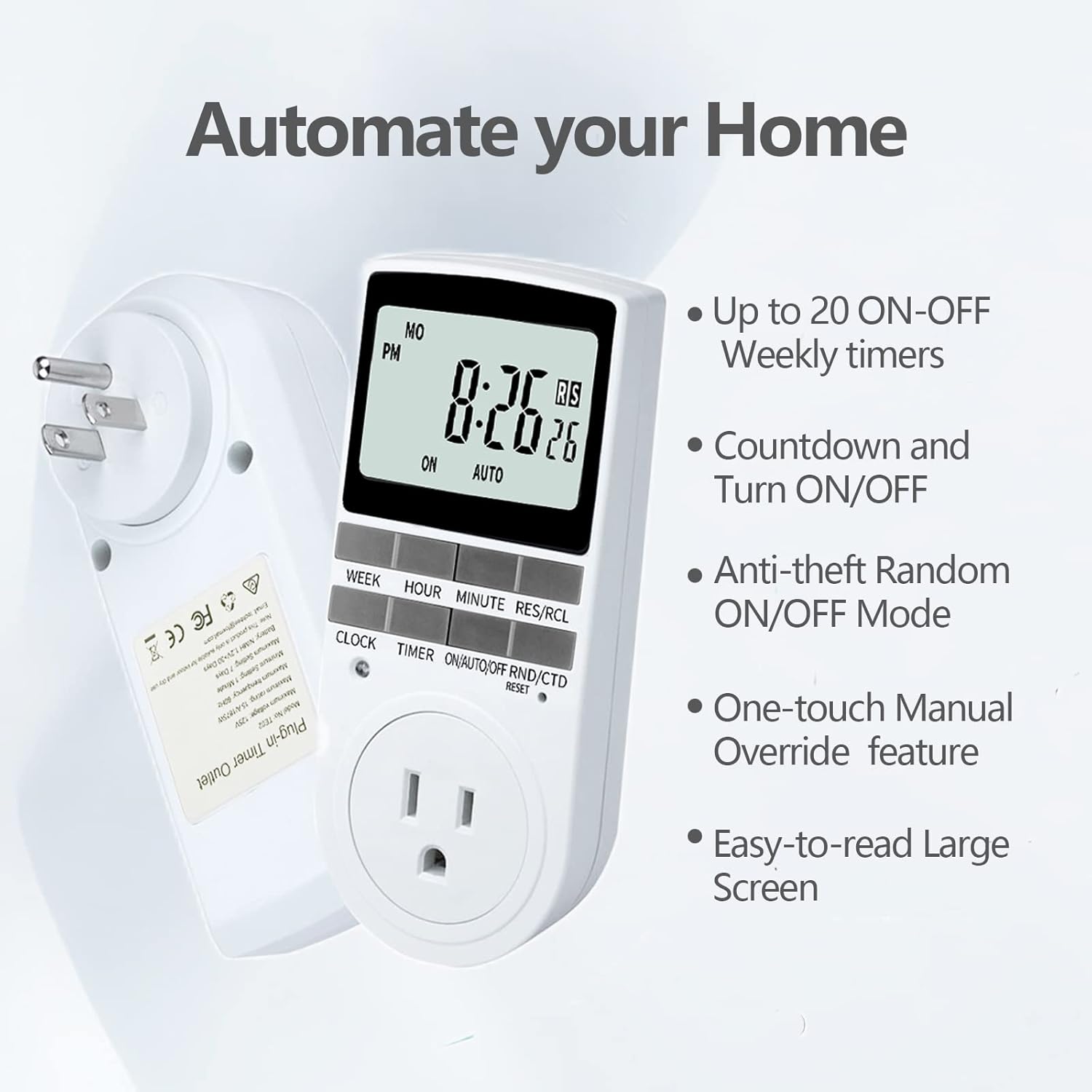
Figure 2.1: Key features of the Techbee TE02 Digital Timer Plug.
3. ຂໍ້ມູນຈໍາເພາະ
| ຂໍ້ມູນຈໍາເພາະ | ມູນຄ່າ |
|---|---|
| ໝາຍເລກຕົວແບບ | TE02 |
| ສູງສຸດ Voltage | 125V |
| ການໃຫ້ຄະແນນສູງສຸດ | 15A/1875W |
| ຄວາມຖີ່ສູງສຸດ | 60Hz |
| Minimum Setting Interval | 1 Minute (1 second for countdown) |
| Maximum Setting Duration | 7 ມື້ |
| ປະເພດຫມໍ້ໄຟ | NiMH 1.2V (retains settings >30 days) |
| ຈໍານວນການຕັ້ງຄ່າ | 20 ON-OFF programs |

Figure 3.1: Technical data and features as displayed on the product packaging.
4. ຕັ້ງຄ່າ
Before initial use, it is recommended to plug the timer into a live outlet for at least 30 minutes to charge the internal battery. This ensures that the timer retains its settings even if unplugged or during a power outage.
- Unpack the timer plug and included instruction manual.
- Locate a standard 125V grounded electrical outlet.
- Plug the Techbee TE02 timer directly into the wall outlet. The display should illuminate.
- ກົດ ຣີເຊັດ button (usually a small recessed button) using a non-metallic pointed object (like a pen tip) to clear all previous settings and ensure proper function.
- Proceed to set the current time and day as described in the 'Operating Instructions' section.

Figure 4.1: The Techbee TE02 Digital Timer Plug ready for setup.
ວິດີໂອທີ 4.1: ຈົບແລ້ວview of the Techbee TE02 timer plug, including unboxing and initial setup steps.
5. ຄໍາແນະນໍາການດໍາເນີນງານ
5.1. ການກຳນົດເວລາ ແລະ ມື້ປັດຈຸບັນ
- ກົດ ໂມງ ປຸ່ມ. ໜ້າຈໍຈະສະແດງເວລາປະຈຸບັນ.
- ໃນຂະນະທີ່ຖື ໂມງ ປຸ່ມ, ກົດ ອາທິດ to set the current day (MO, TU, WE, TH, FR, SA, SU).
- ໃນຂະນະທີ່ຖື ໂມງ ປຸ່ມ, ກົດ ຊົ່ວໂມງ ເພື່ອຕັ້ງຊົ່ວໂມງປະຈຸບັນ (ຮູບແບບ 12 ຊົ່ວໂມງ ຫຼື 24 ຊົ່ວໂມງ).
- ໃນຂະນະທີ່ຖື ໂມງ ປຸ່ມ, ກົດ ນາທີ ເພື່ອກໍານົດນາທີປະຈຸບັນ.
- ປ່ອຍຕົວ ໂມງ ກົດປຸ່ມເພື່ອບັນທຶກການຕັ້ງຄ່າ.
5.2. Programming ON/OFF Times (Up to 20 Programs)
- ກົດ ເວລາ ເພື່ອເຂົ້າສູ່ໂໝດການຂຽນໂປຣແກຣມ. ໜ້າຈໍຈະສະແດງ "1 ON".
- ກົດ ອາທິດ to select the day(s) for this program (e.g., MO, TU, WE, TH, FR, SA, SU, or various combinations).
- ກົດ ຊົ່ວໂມງ ເພື່ອຕັ້ງຊົ່ວໂມງເປີດທີ່ຕ້ອງການ.
- ກົດ ນາທີ ເພື່ອຕັ້ງນາທີເປີດທີ່ຕ້ອງການ.
- ກົດ ເວລາ ອີກເທື່ອຫນຶ່ງ. ຈໍສະແດງຜົນຈະສະແດງ "1 OFF".
- Repeat steps 2-4 to set the desired OFF time for this program.
- ສືບຕໍ່ກົດ ເວລາ to cycle through programs "2 ON", "2 OFF" up to "20 ON", "20 OFF", setting each as needed.
- ຫຼັງຈາກການຕັ້ງຄ່າໂຄງການທີ່ຕ້ອງການທັງຫມົດ, ໃຫ້ກົດປຸ່ມ ໂມງ ເພື່ອອອກຈາກໂໝດການຂຽນໂປຣແກຣມ ແລະ ກັບຄືນໄປຫາການສະແດງເວລາປັດຈຸບັນ.

Figure 5.1: Programming the timer for daily routines.
5.3. ຟັງຊັນນັບຖອຍຫຼັງ
The countdown function allows the timer to turn ON or OFF after a specified duration.
- ກົດ ON/AUTO/OFF RND/CTD button repeatedly until "CTD" appears on the display.
- ກົດ ຊົ່ວໂມງ, ນາທີ, ແລະ RES/RCL (for seconds) to set the desired countdown duration.
- ກົດ ເວລາ to start the countdown. The display will show the remaining time.
- Once the countdown reaches zero, the connected appliance will either turn ON or OFF, depending on its initial state.

Figure 5.2: Setting a countdown timer to turn an appliance ON or OFF.
5.4. Random Function (Anti-theft Mode)
The random function helps deter intruders by turning connected lights or appliances ON and OFF at irregular intervals.
- ກົດ ON/AUTO/OFF RND/CTD button repeatedly until "RND" appears on the display.
- The timer will now randomly turn the connected appliance ON and OFF within a set time window (typically 6 PM to 6 AM, but the Techbee TE02 offers random from any time).
- ເພື່ອປິດການໃຊ້ງານ, ກົດປຸ່ມ ON/AUTO/OFF RND/CTD button again until "AUTO" or "ON"/"OFF" is displayed.

Figure 5.3: Utilizing the random function for home security.
5.5. ການຍົກເລີກດ້ວຍຕົນເອງ
You can manually switch the timer's output state without affecting the programmed settings.
- ກົດ ON/AUTO/OFF RND/CTD ປຸ່ມເພື່ອຮອບວຽນຜ່ານໂຫມດ: ON (always on), ອັດຕະໂນມັດ (follows programs), ປິດ (always off), RND (random), CTD (countdown).
- ເລືອກ ON or ປິດ for immediate control. The timer will remain in this state until manually changed or switched back to ອັດຕະໂນມັດ.
6. ບໍາລຸງຮັກສາ
- ທໍາຄວາມສະອາດ: ຖອດໂມງຈັບເວລາອອກຈາກປລັກໄຟກ່ອນທຳຄວາມສະອາດ. ເຊັດພາຍນອກດ້ວຍຜ້າອ່ອນໆແຫ້ງ. ຢ່າໃຊ້ນ້ຳຢາທຳຄວາມສະອາດ ຫຼື ວັດສະດຸຂັດ.
- ການເກັບຮັກສາ: If storing the timer for an extended period, ensure the internal battery is charged by plugging it in for a few hours every few months. Store in a cool, dry place away from direct sunlight and extreme temperatures.
- ແບັດເຕີຣີ: The internal NiMH battery is designed for long-term use and retains settings for over 30 days. It is not user-replaceable.
7. ການແກ້ໄຂບັນຫາ
- ຈໍສະແດງຜົນໂມງຈັບເວລາຫວ່າງເປົ່າ:
- Ensure the timer is securely plugged into a live electrical outlet.
- The internal battery might be fully discharged. Plug the timer in for at least 30 minutes to charge it.
- Programs Not Activating:
- ກວດສອບວ່າເວລາແລະມື້ປະຈຸບັນໄດ້ຖືກຕັ້ງໄວ້ຖືກຕ້ອງ.
- Check that the timer is in ອັດຕະໂນມັດ ໂໝດ.
- Ensure the ON/OFF programs are set correctly and do not overlap in an unintended way.
- Confirm the connected appliance is functioning correctly and its power switch is in the ON position.
- Timer Not Responding to Buttons:
- Perform a full reset by pressing the ຣີເຊັດ button with a pointed object. You will need to re-enter all settings after a reset.
- Appliance Does Not Turn ON/OFF with Countdown:
- ໃຫ້ແນ່ໃຈວ່າໂມງຈັບເວລາຢູ່ໃນ CTD mode and the countdown duration is set.
- Verify the connected appliance is working and its power switch is ON.
8. ການຮັບປະກັນແລະການສະຫນັບສະຫນູນ
For warranty information, technical support, or any inquiries regarding your Techbee TE02 Digital Timer Plug, please refer to the official documentation provided with your product or visit the official Techbee store.
ທ່ານສາມາດຊອກຫາການສະຫນັບສະຫນູນແລະຂໍ້ມູນຜະລິດຕະພັນເພີ່ມເຕີມໂດຍການຢ້ຽມຢາມ Techbee Store on Amazon.
A detailed PDF instruction manual is also available for download: ຄຳແນະນຳສຳລັບການນຳໃຊ້ (PDF).


