1. ບົດແນະນຳ
This manual provides detailed instructions for the setup, operation, and maintenance of your Wings Phantom 850 Low Latency Wireless Earbuds. Please read this manual thoroughly before using the product to ensure optimal performance and longevity.

Image: The Wings Phantom 850 Wireless Earbuds shown inside their open charging case, highlighting their design and readiness for use.
2. ເນື້ອໃນຊຸດ
ກວດສອບວ່າລາຍການທັງຫມົດແມ່ນມີຢູ່ໃນການຫຸ້ມຫໍ່ຜະລິດຕະພັນຂອງທ່ານ:
- Wings Phantom 850 Earbuds
- ກໍລະນີສາກໄຟໄຮ້ສາຍ
- ສາຍສາກ USB
- ເບາະຫູ (ຂະໜາດຕ່າງໆ)
- ຄູ່ມືຜູ້ໃຊ້ (ເອກະສານນີ້)
3. ຕັ້ງຄ່າ
3.1. ການສາກຫູຟັງ ແລະ ເຄສ
ກ່ອນທີ່ຈະໃຊ້ຄັ້ງທຳອິດ, ໃຫ້ສາກຫູຟັງຫູຟັງ ແລະ ຊ່ອງສາກໃຫ້ເຕັມ.
- ໃສ່ຫູຟັງເອຍບັດໃສ່ໃນກ່ອງສາກໄຟ. ຮັບປະກັນວ່າພວກມັນຖືກວາງໄວ້ຢ່າງຖືກຕ້ອງ.
- ເຊື່ອມຕໍ່ສາຍສາກ USB ກັບພອດສາກໄຟຢູ່ບ່ອນສາກ ແລະກັບແຫຼ່ງພະລັງງານ (ເຊັ່ນ: ອະແດບເຕີຝາ USB, ພອດ USB ຂອງຄອມພິວເຕີ).
- The LED indicators on the case will show the charging status. A full charge typically takes approximately 1-2 hours.

Image: The Wings Phantom 850 Earbuds in their charging case, illustrating the charging process with illuminated LED lights.
3.2. ການຈັບຄູ່ Bluetooth
ເພື່ອເຊື່ອມຕໍ່ຫູຟັງຂອງທ່ານກັບອຸປະກອນ:
- ກວດໃຫ້ແນ່ໃຈວ່າໄດ້ສາກຫູຟັງຫູຟັງ ແລະຢູ່ພາຍໃນກ່ອງສາກ.
- ເປີດກ່ອງສາກໄຟ. ຫູຟັງຈະເຂົ້າສູ່ໂໝດຈັບຄູ່ໂດຍອັດຕະໂນມັດ (ສະແດງດ້ວຍໄຟ LED ກະພິບຢູ່ເທິງຫູຟັງ).
- ໃນອຸປະກອນຂອງທ່ານ (ໂທລະສັບສະຫຼາດ, ແທັບເລັດ, ແລັບທັອບ), ເປີດໃຊ້ Bluetooth ແລະຊອກຫາອຸປະກອນທີ່ມີຢູ່.
- Select "Wings Phantom 850" from the list of devices.
- ເມື່ອເຊື່ອມຕໍ່ແລ້ວ, ໄຟ LED ຂອງຫູຟັງຈະຢຸດກະພິບ, ແລະ ທ່ານຈະໄດ້ຍິນສຽງຢືນຢັນ.
ຄຸນສົມບັດຫູຟັງ Open and On Tech™ for quick connection upon opening the case.
3.3. Wings Sync App Installation
Enhance your experience by installing the Wings Sync App. The app allows for custom controls, EQ modes, and locating misplaced earbuds.
- Download the "Wings Sync" app from your device's app store (App Store for iOS, Google Play Store for Android).
- Open the app and follow the on-screen instructions to connect your Phantom 850 earbuds.

Image: A visual representation of the Wings Sync App dashboard, showing options for touch controls, game mode, EQ modes, and locating earbuds.
Video: A demonstration of the Wings Sync App features, including custom touch controls, EQ modes, and the earbud locator function. This video illustrates how to personalize your earbud settings and find them if misplaced.
4. ຄໍາແນະນໍາການດໍາເນີນງານ
4.1. ແຕະການຄວບຄຸມ
The Wings Phantom 850 earbuds feature intuitive touch controls. These can be customized via the Wings Sync App.
| ການປະຕິບັດ | ຟັງຊັນ (ຄ່າເລີ່ມຕົ້ນ) |
|---|---|
| ແຕະຄັ້ງດຽວ (L/R) | Volume Up/Down (Customizable) |
| ແຕະສອງເທື່ອ (L/R) | Play/Pause (Customizable) |
| ແຕະສາມເທື່ອ (ໃຫຍ່) | Previous Track (Customizable) |
| ແຕະສາມເທື່ອ (ຂວາ) | Next Track (Customizable) |
| ກົດຄ້າງ (L) | Voice Assistant (Customizable) |
| ກົດຄ້າງ (R) | Game Mode ON/OFF (Customizable) |
| Incoming Call (Single Tap) | ຮັບສາຍ |
| ສາຍໂທເຂົ້າ (ກົດຄ້າງໄວ້) | ປະຕິເສດການໂທ |
Note: Default functions may vary. Refer to the Wings Sync App for current settings and customization options.
4.2. ຮູບແບບການຫຼິ້ນເກມ
Activate Gaming Mode for ultra-low latency audio (40ms) during gameplay. This mode is designed to synchronize audio with on-screen action, providing a competitive edge.
- ການເປີດໃຊ້ງານ: Long press the right earbud (default setting) or activate via the Wings Sync App.
- ການປິດໃຊ້ງານ: Repeat the activation step.

ຮູບພາບ: ຫຼາຍກວ່າview of key features including the dedicated Gaming Mode with 40ms ultra-low latency, Bluetooth 5.3, IPX5 water resistance, and ENC Quad Mic technology.
4.3. Environmental Noise Cancellation (ENC)
The Quad ENC Mics reduce environmental noise during calls, ensuring clear communication.
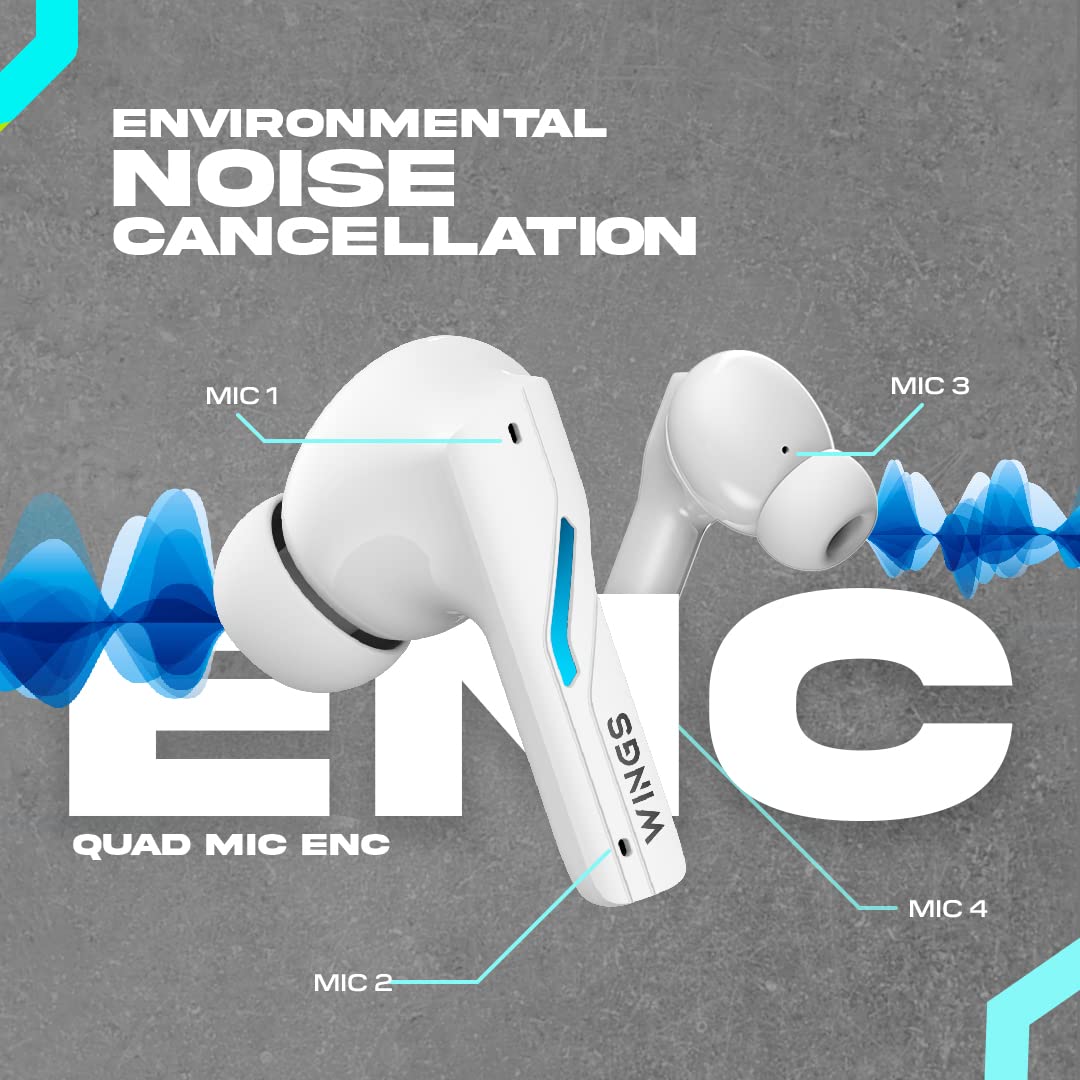
Image: A diagram illustrating the four Environmental Noise Cancellation (ENC) microphones on the Wings Phantom 850 earbuds, designed for clear call quality.
5. ບໍາລຸງຮັກສາ
5.1. ທໍາຄວາມສະອາດ
ການທໍາຄວາມສະອາດເປັນປົກກະຕິຊ່ວຍຮັກສາຄຸນນະພາບສຽງແລະສຸຂະອະນາໄມ:
- ເຊັດຫູຟັງຫູຟັງ ແລະ ກະເປົ໋າສາກໄຟດ້ວຍຜ້າແພອ່ອນໆ, ແຫ້ງ, ບໍ່ມີເຈັ້ຍ.
- ຖອດປາຍຫູອອກ ແລະເຮັດຄວາມສະອາດດ້ວຍສະບູອ່ອນໆ ແລະນໍ້າ, ຈາກນັ້ນເຊັດໃຫ້ແຫ້ງກ່ອນຕິດໃໝ່.
- ໃຊ້ສຳລີແຫ້ງເຊັດທຳຄວາມສະອາດຈຸດສາກໄຟຢູ່ທັງຫູຟັງ ແລະ ເຄສ.
5.2. Water Resistance
The Wings Phantom 850 earbuds are rated IPX5 water resistant, meaning they can withstand splashes and sweat. They are not designed for submersion in water.
- ຢ່າເອົາຫູຟັງເອຍບັດໄປໃສ່ນໍ້າ ຫຼືໃສ່ໃນເວລາລອຍ ຫຼືອາບນໍ້າ.
- ໃຫ້ແນ່ໃຈວ່າຫູຟັງແຫ້ງກ່ອນໃສ່ກັບຄືນໃນກ່ອງສາກໄຟເພື່ອປ້ອງກັນຄວາມເສຍຫາຍ.
6. ການແກ້ໄຂບັນຫາ
If you encounter issues with your Wings Phantom 850 earbuds, refer to the following common solutions:
- ບໍ່ມີບັນຫາສຽງ/ການເຊື່ອມຕໍ່:
- ກວດໃຫ້ແນ່ໃຈວ່າໄດ້ສາກຫູຟັງທັງສອງອັນແລ້ວ.
- ກວດສອບວ່າ Bluetooth ຖືກເປີດນຳໃຊ້ຢູ່ໃນອຸປະກອນຂອງທ່ານ ແລະເລືອກຫູຟັງຫູຟັງແລ້ວ.
- ລອງຍົກເລີກການຈັບຄູ່ ແລະຈັບຄູ່ຫູຟັງໃໝ່ກັບອຸປະກອນຂອງທ່ານ.
- ປິດເປີດອຸປະກອນຂອງທ່ານຄືນໃໝ່.
- ຫູຟັງໜຶ່ງໜ່ວຍບໍ່ເຮັດວຽກ:
- ວາງຫູຟັງເອຍບັດທັງສອງກັບໃສ່ກ່ອງສາກ, ປິດຝາປິດ, ລໍຖ້າສອງສາມວິນາທີ, ຈາກນັ້ນເປີດ ແລະລອງໃໝ່ອີກ.
- Clean the charging contacts on the earbud and in the case.
- ບັນຫາການສາກໄຟ:
- ໃຫ້ແນ່ໃຈວ່າສາຍສາກໄດ້ເຊື່ອມຕໍ່ຢ່າງປອດໄພ.
- ລອງໃຊ້ພອດ USB ຫຼື ອະແດບເຕີສາກໄຟແບບອື່ນ.
- ເຮັດຄວາມສະອາດລາຍຊື່ການສາກໄຟ.
- ລະດັບສຽງຕໍ່າ/ຄຸນນະພາບສຽງບໍ່ດີ:
- ປັບລະດັບສຽງຢູ່ທັງອຸປະກອນຂອງທ່ານ ແລະຫູຟັງເອຍບັດ.
- ໃຫ້ແນ່ໃຈວ່າຄໍາແນະນໍາຫູຖືກປະທັບຕາຢ່າງຖືກຕ້ອງຢູ່ໃນຊ່ອງຫູຂອງທ່ານ. ລອງໃຊ້ຄໍາແນະນໍາຫູທີ່ມີຂະຫນາດທີ່ແຕກຕ່າງກັນ.
- ອະນາໄມສິ່ງເສດເຫຼືອຕ່າງໆອອກຈາກຕາໜ່າງລຳໂພງຫູຟັງ.
- Check EQ settings in the Wings Sync App.
ສໍາລັບການຊ່ວຍເຫຼືອເພີ່ມເຕີມ, ກະລຸນາຕິດຕໍ່ຝ່າຍຊ່ວຍເຫຼືອລູກຄ້າ.
7. ຂໍ້ມູນຈໍາເພາະ
| ຄຸນສົມບັດ | ລາຍລະອຽດ |
|---|---|
| ຊື່ຕົວແບບ | Phantom 850 |
| ເຕັກໂນໂລຊີການເຊື່ອມຕໍ່ | ໄຮ້ສາຍ (Bluetooth 5.3) |
| ຊ່ວງ Bluetooth | 15 ແມັດ |
| ປະເພດໄດເວີສຽງ | Dynamic Driver (13mm Composite Drivers) |
| ອາຍຸແບັດເຕີຣີ (ຫູຟັງ) | ສູງສຸດ 10 ຊົ່ວໂມງ |
| ເວລາຫຼິ້ນທັງໝົດ (ພ້ອມກໍລະນີ) | ສູງສຸດ 50 ຊົ່ວໂມງ |
| ເທັກໂນໂລຍີການສາກໄຟ | Bullet Charge™ (15 mins charge = 100 mins playtime) |
| ຄຸນນະສົມບັດພິເສດ | ENC Quad Mic, Dedicated Gaming Mode (40ms Low Latency), App Support, Open and On Tech™ |
| ລະດັບຄວາມຕ້ານທານນ້ໍາ | IPX5 (ກັນນໍ້າ ແລະ ກັນເຫື່ອ) |
| ວິທີການຄວບຄຸມ | ແຕະ, ສຽງ |
| ອຸປະກອນທີ່ເຂົ້າກັນໄດ້ | ໂທລະສັບມືຖື, ຄອມພິວເຕີຕັ້ງໂຕະ, ເຄື່ອງຫຼິ້ນເກມ, ແລັບທັອບ, ແທັບເລັດ |
| ນ້ໍາຫນັກລາຍການ | 150 ກຣາມ |
| ຂະໜາດສິນຄ້າ | 10 x 10 x 4 cm |

ຮູບພາບ: ລະເບີດ view diagram illustrating the 13mm composite drivers responsible for high-fidelity audio output in the earbuds.

Image: Information detailing the battery life, showing 50 hours of total playtime with the charging case and 10 hours of playtime on the earbuds alone.
8. ການຮັບປະກັນແລະການສະຫນັບສະຫນູນ
Your Wings Phantom 850 Wireless Earbuds come with a ຮັບປະກັນ 1 ປີ ຈາກວັນທີ່ຊື້.
For warranty claims, technical support, or any other inquiries, please refer to the contact information provided on the official Wings webເວັບໄຊ ຫຼືເອກະສານການຊື້ຂອງທ່ານ.


