1. ບົດແນະນຳ
The LogiLink SH0125 is a 2-gang Smart Home Wi-Fi Wall Switch designed to provide convenient control over your lighting. It integrates with existing Wi-Fi networks and can be managed via the Smart Life or Megos Smart Home application. This device also supports voice control through Amazon Alexa and Google Home, offering enhanced automation for your home environment.
2. ຂໍ້ມູນຄວາມປອດໄພ
- ການຕິດຕັ້ງໄຟຟ້າ: Installation must be performed by a qualified electrician in accordance with local electrical codes and regulations. Ensure the main power supply is disconnected before installation.
- ໃຊ້ພາຍໃນເຮືອນເທົ່ານັ້ນ: This device is intended for indoor use in dry locations. Do not expose to moisture or extreme temperatures.
- ການປະເມີນພະລັງງານ: Do not exceed the maximum load rating of 230 Watts (AC 230V, 10.0 A). Overloading can cause damage to the switch and connected devices, and poses a fire hazard.
- ທໍາຄວາມສະອາດ: ຕັດການເຊື່ອມຕໍ່ໄຟຟ້າກ່ອນທີ່ຈະທໍາຄວາມສະອາດ. ໃຊ້ຜ້າອ່ອນ, ແຫ້ງ. ຫ້າມໃຊ້ນໍ້າສະອາດ ຫຼື ແອໂຣໂຊລ.
3. ເນື້ອໃນຊຸດ
ກະລຸນາກວດເບິ່ງຊຸດສຳລັບລາຍການຕໍ່ໄປນີ້:
- 1x LogiLink SH0125 Smart Home Wi-Fi Wall Switch
- 1x User Manual (French version included, English provided here)
4. ຜະລິດຕະພັນເກີນview
The LogiLink SH0125 features a sleek design with two touch-sensitive buttons for manual control. The rear of the device provides terminals for electrical wiring.

ຮູບທີ 1: ດ້ານໜ້າ view of the LogiLink SH0125 Smart Home Wi-Fi Wall Switch. It features a white glass panel with two circular touch buttons, each marked with a power symbol. The 'Powered by Tuya' logo is visible in the bottom left corner.
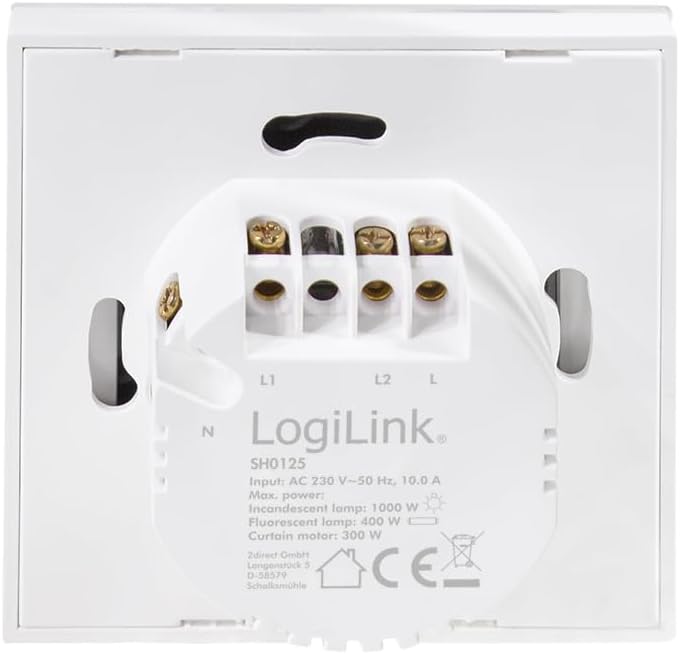
ຮູບທີ 2: ກັບຄືນໄປບ່ອນ view of the LogiLink SH0125 Smart Home Wi-Fi Wall Switch. This image displays the wiring terminals labeled L1, L2, L, and N, along with product specifications such as input voltage (AC 230V), frequency (50 Hz), and maximum power ratings for different lamp ປະເພດ.
5. ຕັ້ງຄ່າ
5.1. ການຕິດຕັ້ງໄຟຟ້າ
- ຕັດການເຊື່ອມຕໍ່ພະລັງງານ: Before beginning any electrical work, ensure the main power supply to the circuit is turned off at the circuit breaker.
- ເອົາປຸ່ມເກົ່າອອກ: ຄ່ອຍໆຖອດສະວິດໄຟຕິດຝາທີ່ທ່ານມີຢູ່ອອກຈາກກ່ອງຕິດຝາ.
- ກໍານົດສາຍ: Identify the Live (L), Neutral (N), and Load (L1, L2) wires. Refer to Figure 2 for terminal identification on the LogiLink SH0125.
- ປ່ຽນສາຍໄຟ: Connect the wires to the corresponding terminals on the LogiLink SH0125.
- Connect the Live wire to the 'L' terminal.
- ເຊື່ອມຕໍ່ສາຍໄຟທີ່ເປັນກາງເຂົ້າກັບຂົ້ວຕໍ່ 'N'.
- Connect the Load wire for the first light circuit to the 'L1' terminal.
- Connect the Load wire for the second light circuit to the 'L2' terminal.
- ຕິດສະວິດ: Carefully place the wired switch into the wall box and secure it with screws. Attach the faceplate.
- ຟື້ນຟູພະລັງງານ: ເປີດແຫຼ່ງຈ່າຍໄຟຫຼັກຄືນຢູ່ທີ່ເບຣກເກີ.
5.2. ການຈັບຄູ່ແອັບ
To control your switch via smartphone, you need to pair it with the Smart Life or Megos Smart Home app.
- ດາວໂຫລດແອັບ:: Download and install the 'Smart Life' or 'Megos Smart Home' app from your device's app store (iOS or Android).
- ລົງທະບຽນ/ເຂົ້າສູ່ລະບົບ: ເປີດແອັບ ແລະ ລົງທະບຽນບັນຊີໃໝ່ ຫຼື ເຂົ້າສູ່ລະບົບດ້ວຍບັນຊີທີ່ມີຢູ່ແລ້ວ.
- ໃສ່ໂModeດການຈັບຄູ່: With the switch powered on, press and hold one of the touch buttons for approximately 5-10 seconds until the LED indicator on the switch starts blinking rapidly. This indicates it is in pairing mode.
- ເພີ່ມອຸປະກອນໃນແອັບ: In the app, tap the '+' icon (usually in the top right corner) to add a new device. Select 'Wall Switch (Wi-Fi)' or a similar category.
- ເຊື່ອມຕໍ່ກັບ Wi-Fi: Follow the on-screen instructions to connect the switch to your 2.4GHz Wi-Fi network. Ensure your phone is also connected to the same 2.4GHz network during pairing. Note: This device does not support 5GHz Wi-Fi networks.
- ການຈັບຄູ່ສໍາເລັດ: Once the switch is successfully added, you can rename it and assign it to a room within the app.
ຮູບທີ 3: The LogiLink SH0125 Smart Home Wi-Fi Wall Switch positioned next to a smartphone displaying the 'Register' or 'Login with Existing Account' screen of the Smart Home application, illustrating the initial setup phase.
6. ການດໍາເນີນງານຂອງ Switch
6.1. ການຄວບຄຸມດ້ວຍມື
Each touch button on the switch controls one connected light circuit. Simply tap a button to toggle the corresponding light ON or OFF.
6.2. ການຄວບຄຸມແອັບ
After successful pairing, you can control the switch from the Smart Life or Megos Smart Home app:
- ເປີດ/ປິດ: Tap the virtual switch icons in the app to turn lights on or off.
- ກຳນົດເວລາ: Set schedules for your lights to turn on or off automatically at specific times.
- ສາກ: Create custom scenes to control multiple smart devices with a single command.
- ອັດຕະໂນມັດ: Set up automations based on conditions like sunrise/sunset, temperature, or other smart device statuses.

ຮູບທີ 4: ໃກ້ຊິດ view of a hand holding a smartphone, showing the Smart Life application interface. The app displays two virtual light switches, labeled 'Switch 1' and 'Switch 2', allowing for remote control of connected lighting.
6.3. Voice Control (Alexa/Google Home)
To enable voice control, link your Smart Life/Megos Smart Home account to Amazon Alexa or Google Home:
- Open Voice Assistant App: Open the Amazon Alexa app or Google Home app on your smartphone.
- Enable Skill/Link Account: ຊອກຫາ the 'Smart Life' or 'Megos Smart Home' skill/service and enable it. You will be prompted to link your account using your app credentials.
- ຄົ້ນພົບອຸປະກອນ: Once linked, ask your voice assistant to discover devices (e.g., "Alexa, discover my devices" or "Hey Google, sync my devices").
- ຄຳສັ່ງສຽງ: You can now control your lights using voice commands, such as:
- "Alexa, ເປີດໄຟຫ້ອງຮັບແຂກ."
- "Hey Google, turn off Kitchen Light."
7. ບໍາລຸງຮັກສາ
The LogiLink SH0125 requires minimal maintenance. Ensure the power is off before cleaning.
- ທໍາຄວາມສະອາດ: Use a soft, dry, lint-free cloth to wipe the surface of the switch. Do not use abrasive cleaners, solvents, or chemical sprays, as these can damage the finish or internal components.
- ການອັບເດດເຟີມແວ: Periodically check the Smart Life/Megos Smart Home app for available firmware updates to ensure optimal performance and security.
8. ການແກ້ໄຂບັນຫາ
If you encounter issues with your LogiLink SH0125, refer to the following common solutions:
| ບັນຫາ | ສາເຫດທີ່ເປັນໄປໄດ້ | ການແກ້ໄຂ |
|---|---|---|
| ສະວິດບໍ່ຕອບສະໜອງຕໍ່ການສຳຜັດ. | No power; incorrect wiring; switch malfunction. | Check circuit breaker. Verify wiring (refer to Section 5.1). If problem persists, contact support. |
| ບໍ່ສາມາດເຊື່ອມຕໍ່ກັບ Wi-Fi/App ໄດ້. | Incorrect Wi-Fi password; 5GHz Wi-Fi network; switch not in pairing mode; weak Wi-Fi signal. | Ensure correct 2.4GHz Wi-Fi password. Confirm switch is blinking rapidly (pairing mode). Move switch closer to router or improve Wi-Fi signal. |
| ການຄວບຄຸມສຽງບໍ່ເຮັດວຽກ. | Account not linked; device not discovered; incorrect voice command. | Ensure Smart Life/Megos Smart Home account is linked in Alexa/Google Home app. Ask assistant to discover devices. Use correct device names in commands. |
| Lights flicker or do not turn off completely. | Incompatible load (e.g., some LED lights); minimum load not met. | Ensure connected lights are compatible with smart switches. Some LED lights may require a bypass capacitor (not included) to prevent flickering. Consult a qualified electrician. |
9. ຂໍ້ມູນຈໍາເພາະ
| ຄຸນສົມບັດ | ຂໍ້ມູນຈໍາເພາະ |
|---|---|
| ໝາຍເລກຕົວແບບ | SH0125 |
| ຍີ່ຫໍ້ | LogiLink |
| ການປ້ອນຂໍ້ມູນ Voltage | AC 230 V ~ 50 Hz |
| ສູງສຸດ. ປະຈຸບັນ | 10.0 ກ |
| Max. Power (Total) | 230 ວັດ |
| ຂະໜາດ (L x W x H) | 8.6 x 8.6 x 3.4 cm |
| ນ້ຳໜັກ | 90 ກຣາມ |
| ວັດສະດຸ | ພາດສະຕິກ |
| ສີ | ສີຂາວ |
| ມາດຕະຖານ Wi-Fi | 2.4 GHz (IEEE 802.11b/g/n) |
| ວິທີການຄວບຄຸມ | Application, Touch Button |
| ຄວາມເຂົ້າກັນໄດ້ | Tuya, Amazon Alexa, Google Home |
| ປະເພດການຕິດຕັ້ງ | Flush-mounted |
10. ການຮັບປະກັນແລະການສະຫນັບສະຫນູນ
LogiLink products are designed and manufactured to the highest quality standards. For information regarding warranty terms and conditions, please refer to the documentation provided with your purchase or visit the official LogiLink website. For technical support or assistance with product setup and troubleshooting, please contact LogiLink customer service through their official channels.


