1. ຜະລິດຕະພັນເກີນview
The Point Wired Mini Keyboard Pt-350 is a compact and versatile keyboard designed for both gaming and general typing. It features a high-quality build and a modern design, adhering to industry standards for reliable performance. This keyboard is an ideal choice for users seeking a durable and efficient input device.
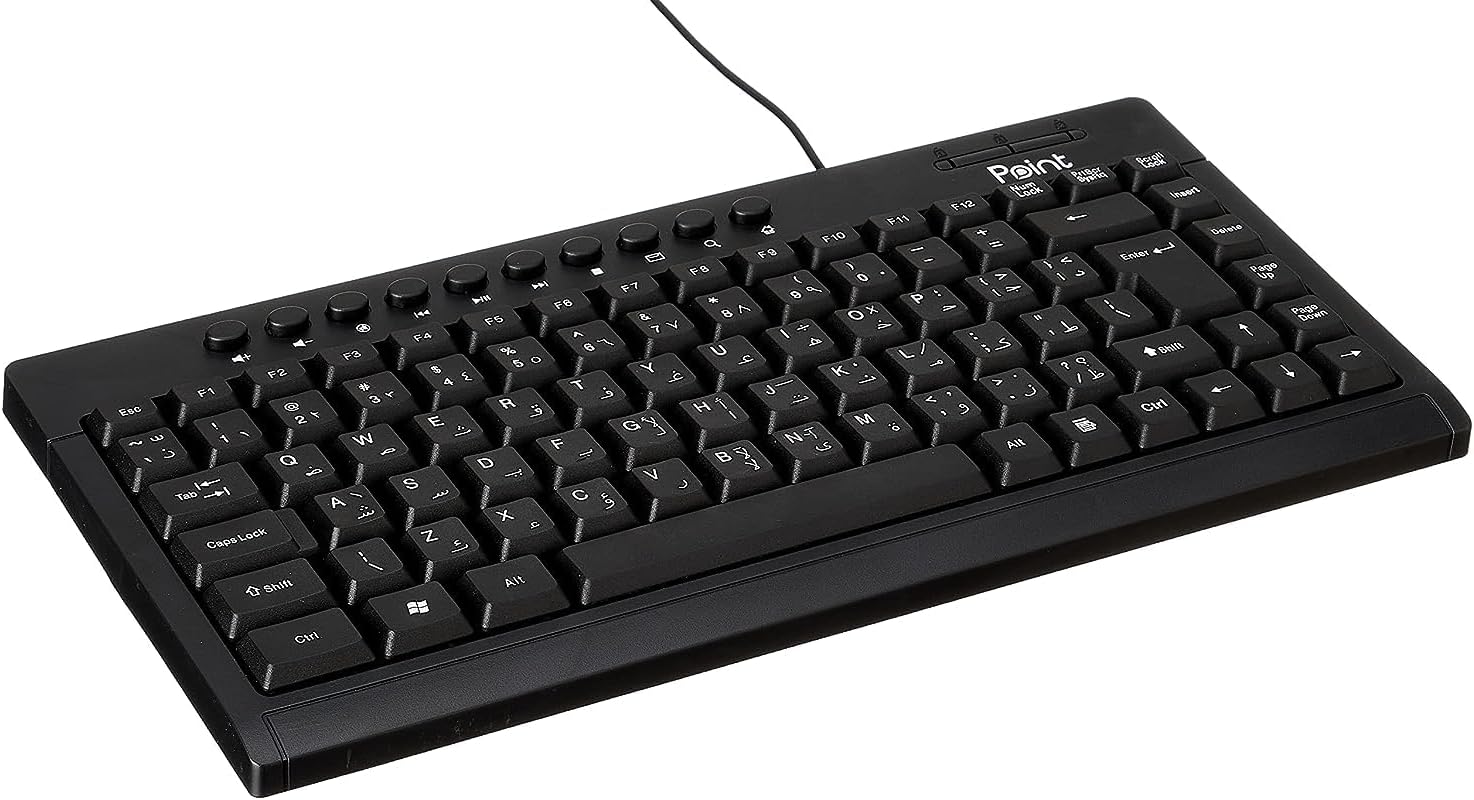
ຮູບທີ 1.1: ມຸມ view of the Point Wired Mini Keyboard Pt-350, showcasinການອອກແບບທີ່ກະທັດຮັດ ແລະ ຮູບແບບກະແຈ.
ຄຸນນະສົມບັດທີ່ສໍາຄັນ:
- Wired connectivity for stable performance.
- Compact design suitable for various setups.
- Durable construction from high-quality plastic materials.
- Designed for both gaming and typing applications.
2. ເນື້ອໃນຊຸດ
ກະລຸນາກວດເບິ່ງແພັກເກດຢ່າງລະມັດລະວັງເພື່ອຮັບປະກັນວ່າສິນຄ້າທັງໝົດມີຢູ່:
- Point Wired Mini Keyboard Pt-350
- ຄູ່ມືຜູ້ໃຊ້ (ເອກະສານນີ້)
3. ຕັ້ງຄ່າ
Follow these steps to set up your Point Wired Mini Keyboard Pt-350:
- ຖອດແປ້ນພິມ: ເອົາແປ້ນພິມອອກຈາກເຄື່ອງຫຸ້ມຫໍ່ຂອງມັນຢ່າງລະມັດລະວັງ.
- Identify the USB Connector: The keyboard comes with an integrated USB cable.
- ເຊື່ອມຕໍ່ກັບຄອມພິວເຕີຂອງທ່ານ: Locate an available USB port on your computer (desktop PC, laptop, etc.). Insert the keyboard's USB connector firmly into the USB port.
- ການຕິດຕັ້ງໄດເວີ (ປລັກ ແລະຫຼິ້ນ): The keyboard is plug-and-play compatible. Your operating system (Windows, macOS, Linux) should automatically detect and install the necessary drivers. This process usually takes a few seconds.
- ກວດສອບການທໍາງານ: Once connected, open a text editor or any application that accepts text input and test the keys to ensure proper operation.

ຮູບ 3.1: ເທິງລົງລຸ່ມ view of the keyboard, illustrating the key layout and integrated cable for connection.
4. ຄໍາແນະນໍາການດໍາເນີນງານ
The Point Wired Mini Keyboard Pt-350 operates like a standard computer keyboard. Below are general instructions and tips for use:
ການພິມພື້ນຖານ:
- Simply press the desired keys to input characters, numbers, and symbols into your active application.
- ໃຊ້ ເລື່ອນ key for uppercase letters and alternative symbols on keys.
- ໄດ້ Caps Lock key toggles permanent uppercase typing.
- ໄດ້ Backspace key deletes characters to the left of the cursor.
- ໄດ້ ເຂົ້າ key confirms input or moves to the next line.
ປຸ່ມຟັງຊັນ (F1-F12):
The function keys (F1 through F12) perform various tasks depending on the active program or operating system. Some common uses include:
- F1: Often opens help for the active program.
- F2: Renames a selected item.
- F5: ສົດຊື່ນ ກ web page or document.
- F11: Toggles full-screen mode in many browsers.
ປຸ່ມມັນຕິມີເດຍ:
The keyboard may include dedicated multimedia keys or secondary functions on the F-keys (accessed via the Fn key, if present). These typically control:
- Volume control (Mute, Volume Up, Volume Down)
- Media playback (Play/Pause, Stop, Previous Track, Next Track)
5. ບໍາລຸງຮັກສາ
ການບຳລຸງຮັກສາທີ່ຖືກຕ້ອງ ຮັບປະກັນຄວາມທົນທານ ແລະປະສິດທິພາບສູງສຸດຂອງແປ້ນພິມຂອງທ່ານ:
- ທໍາຄວາມສະອາດ: ທຳຄວາມສະອາດແປ້ນພິມເປັນປະຈຳເພື່ອປ້ອງກັນຝຸ່ນ ແລະ ສິ່ງເສດເຫຼືອທີ່ສະສົມຢູ່. ໃຊ້ຜ້າອ່ອນໆທີ່ບໍ່ມີຂົນເຊັດເບົາໆ.ampຖອກດ້ວຍນ້ໍາຫຼືການແກ້ໄຂການທໍາຄວາມສະອາດອ່ອນໆ. ຫຼີກເວັ້ນການສານເຄມີທີ່ຮຸນແຮງຫຼືວັດສະດຸຂັດ.
- ການກຳຈັດຂີ້ຝຸ່ນ: Use compressed air to blow out dust and crumbs from between the keys.
- ຫຼີກເວັ້ນການຮົ່ວໄຫຼ: Keep liquids away from the keyboard to prevent damage to internal components. In case of a spill, immediately disconnect the keyboard and allow it to dry completely before reconnecting.
- ການເກັບຮັກສາ: ເມື່ອບໍ່ໄດ້ໃຊ້, ໃຫ້ເກັບຮັກສາແປ້ນພິມໄວ້ໃນສະພາບແວດລ້ອມທີ່ສະອາດ, ແຫ້ງຫ່າງຈາກອຸນຫະພູມທີ່ຮຸນແຮງ.
6. ການແກ້ໄຂບັນຫາ
If you encounter issues with your Point Wired Mini Keyboard Pt-350, refer to the following common problems and solutions:
ແປ້ນພິມບໍ່ຕອບສະໜອງ:
- ກວດເບິ່ງການເຊື່ອມຕໍ່ USB: ກວດໃຫ້ແນ່ໃຈວ່າໄດ້ສຽບສາຍ USB ໃສ່ຢ່າງປອດໄພກັບພອດ USB ທີ່ເຮັດວຽກຢູ່ໃນຄອມພິວເຕີຂອງທ່ານ. ລອງໃຊ້ພອດ USB ອື່ນ.
- ປິດເປີດຄອມພິວເຕີຄືນໃໝ່: ການຣີສະຕາດແບບງ່າຍໆມັກຈະສາມາດແກ້ໄຂບັນຫາການເຊື່ອມຕໍ່ໄດ້.
- ທົດສອບໃນຄອມພິວເຕີອື່ນ: Connect the keyboard to another computer to determine if the issue is with the keyboard or your computer's setup.
- ກວດສອບຕົວຈັດການອຸປະກອນ (Windows): In Windows, go to Device Manager and check if the keyboard is listed under 'Keyboards' and if there are any error symbols. You might need to update or reinstall the driver.
Keys Not Working or Sticky:
- ກະແຈທີ່ສະອາດ: Dust, crumbs, or liquid residue can cause keys to stick or malfunction. Refer to the Maintenance section for cleaning instructions.
- ຄວາມເສຍຫາຍທາງກາຍ: Inspect the keys for any visible physical damage.
ຜົນຜະລິດຕົວອັກສອນບໍ່ຖືກຕ້ອງ:
- ກວດເບິ່ງການຕັ້ງຄ່າພາສາ: Ensure your operating system's keyboard language settings match the physical layout of your keyboard.
- ບັນຫາຄົນຂັບ: Reinstalling the keyboard driver might resolve this.
ຖ້າບັນຫາຍັງຄົງຢູ່ຫຼັງຈາກພະຍາຍາມຂັ້ນຕອນເຫຼົ່ານີ້, ກະລຸນາຕິດຕໍ່ຝ່າຍຊ່ວຍເຫຼືອລູກຄ້າ.
7. ຂໍ້ມູນຈໍາເພາະ
Technical specifications for the Point Wired Mini Keyboard Pt-350:

ຮູບ 7.1: ຂ້າງ view of the keyboard, highlighting its profile and compact form factor.
| ຄຸນສົມບັດ | ລາຍລະອຽດ |
|---|---|
| ຊື່ຍີ່ຫໍ້ | ຈຸດ |
| ຕົວແບບ | Pt-350 |
| ເຕັກໂນໂລຊີການເຊື່ອມຕໍ່ | ມີສາຍ |
| ອຸປະກອນທີ່ເຂົ້າກັນໄດ້ | ຄອມພິວເຕີ |
| ຄຳອະທິບາຍແປ້ນພິມ | Multifunctional |
| ການນໍາໃຊ້ທີ່ແນະນໍາ | ເກມ PC |
| ຄຸນນະສົມບັດພິເສດ | ເກມ |
| ສີ | ດຳ |
| ແບບ | ທັນສະໄຫມ |
| ວັດສະດຸ | ພາດສະຕິກ |
| ຂະໜາດການຂົນສົ່ງ | 34.5 x 26.4 x 3 cm |
| ນ້ຳໜັກ | 800 ກຣາມ |
| ວັນທີທີ່ມີໃຫ້ທໍາອິດ | ວັນທີ 4 ກັນຍາ 2022 |
| ASIN | B0BD2DM9ZJ |
8. ການຮັບປະກັນແລະການສະຫນັບສະຫນູນ
This product is covered by a standard manufacturer's warranty. Please refer to the warranty card included with your purchase for specific terms and conditions, including the warranty period and coverage details.
For technical support, troubleshooting assistance, or warranty claims, please contact Point customer service through the contact information provided on the product packaging or the official Point website. When contacting support, please have your product model (Pt-350) and purchase details ready.


