1. ບົດແນະນຳ
Welcome to the user manual for your boAt Airdopes 190 True Wireless Stereo (TWS) Earbuds. These earbuds are designed to provide a high-quality audio experience with features tailored for gaming and everyday use. This manual will guide you through the setup, operation, maintenance, and troubleshooting of your device.

Image: boAt Airdopes 190 TWS Earbuds in black and white, highlighting features such as Breathing LEDs, Quad Mics with ENx Technology, BEAST Mode for low latency, 40 hours total playback, and 10 minutes ASAP Charge for 180 minutes playtime.
2. ຕັ້ງຄ່າ
2.1. Unboxing ແລະ Package Contents
ເມື່ອເປີດຊຸດ, ໃຫ້ແນ່ໃຈວ່າອົງປະກອບທັງຫມົດມີຢູ່:
- ຫູຟັງ boAt Airdopes 190 TWS 1 ໜ່ວຍ
- 1 x ກ່ອງສາກ
- 2 x Additional Earbuds (pairs of different sizes)
- 1 x ສາຍສາກ USB Type-C
- 1 x ຄູ່ມືຜູ້ໃຊ້ (ເອກະສານນີ້)
2.2. ການສາກໄຟເບື້ອງຕົ້ນ
Before first use, fully charge the earbuds and the charging case. Connect the provided USB Type-C cable to the charging port on the case and to a power source. The LEDs on the case will indicate charging status.
- ຄ່າບໍລິການດ່ວນ: A 10-minute charge provides up to 180 minutes of playtime.
- Full charging time for the case is approximately 120 minutes.

Image: The boAt Airdopes 190 charging case open with earbuds, illustrating the 40 hours total playback time (10 hours per charge + 30 hours from case) and the ASAP Charge feature, providing 180 minutes of playback from a 10-minute charge.
2.3. ການຈັບຄູ່ກັບອຸປະກອນ
- Instant Connect (IWP™ Tech): ເປີດຝາຂອງກໍລະນີສາກໄຟ. ຫູຟັງເອຍບັດຈະເປີດເຄື່ອງອັດຕະໂນມັດ ແລະເຂົ້າສູ່ໂໝດຈັບຄູ່.
- ໃນອຸປະກອນຂອງທ່ານ (ໂທລະສັບສະຫຼາດ, ແທັບເລັດ, ແລັບທັອບ), ເປີດໃຊ້ Bluetooth.
- ຊອກຫາ ອຸປະກອນ Bluetooth ທີ່ມີຢູ່ ແລະ ເລືອກ "Airdopes 190" ຈາກລາຍຊື່.
- Once connected, you will hear an audio prompt, and the earbud LEDs will indicate a successful connection.
- ຫູຟັງຫູຟັງໃຊ້ Bluetooth v5.3 ສໍາລັບການເຊື່ອມຕໍ່ທີ່ໝັ້ນຄົງ ແລະບໍ່ມີຮອຍຕໍ່.
3. ການດໍາເນີນງານ
3.1. ແຕະການຄວບຄຸມ
The Airdopes 190 features intuitive touch controls on each earbud for managing playback, calls, and voice assistant activation.
| ຟັງຊັນ | ການປະຕິບັດ |
|---|---|
| ຫຼິ້ນ/ຢຸດຊົ່ວຄາວ | ແຕະເທື່ອດຽວໃສ່ຫູຟັງຫູຟັງ |
| ຕິດຕາມຕໍ່ໄປ | ແຕະສອງເທື່ອໃສ່ຫູຟັງເບື້ອງຂວາ |
| ເພງກ່ອນໜ້າ | ແຕະສອງເທື່ອໃສ່ຫູຟັງທາງຊ້າຍ |
| ຕອບ/ວາງສາຍ | ແຕະເທື່ອດຽວໃສ່ຫູຟັງຫູຟັງ |
| ປະຕິເສດການໂທ | ກົດຄ້າງໃສ່ຫູຟັງທັງສອງຂ້າງ |
| ເປີດໃຊ້ຜູ້ຊ່ວຍສຽງ | ແຕະສາມເທື່ອໃສ່ຫູຟັງຫູຟັງ |
| Toggle BEAST Mode | Long press on the right earbud (specific gesture may vary, refer to quick start guide) |

Image: A visual representation of key features including IPX4 splash and sweat resistance, easy touch controls on the earbuds, a Type-C charging interface, and one-touch access to voice assistants like Google Assistant and Siri.
3.2. BEAST Mode (Low Latency)
For an enhanced gaming and entertainment experience, activate BEAST Mode. This mode reduces audio latency to 50ms, ensuring synchronized audio and visuals during fast-paced activities. Refer to the touch control table for activation.
3.3. ENx™ Technology (Quad Mics)
The Airdopes 190 features quad microphones with ENx™ Technology. This technology helps to cancel out unwanted background noise during calls, ensuring your voice is heard clearly by the recipient.
3.4. Breathing LEDs
The earbuds and charging case are equipped with breathing LEDs that provide visual feedback and add to the aesthetic, especially during gaming sessions. These lights typically activate for a few seconds when the case is opened or closed.

Image: The boAt Airdopes 190 charging case and earbuds, showcasing the "Fancy Breathing LED Lights" which illuminate in blue, designed to enhance the gaming experience.
3.5. boAt Signature Sound
Experience immersive audio with the boAt Signature Sound, delivered by powerful 10mm audio drivers within the earbuds.
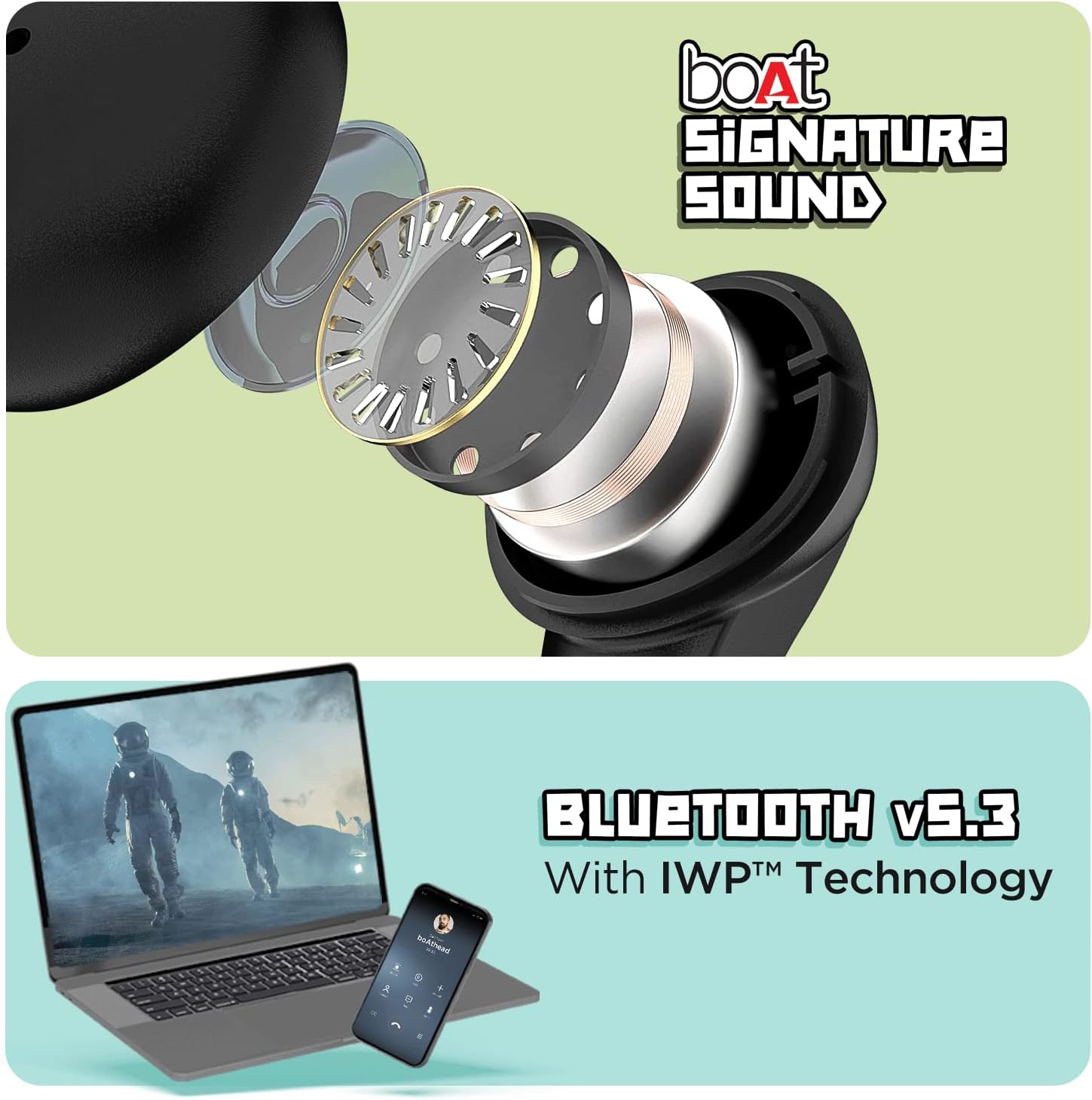
Image: The top section displays an exploded view of an earbud, illustrating the internal components responsible for delivering boAt Signature Sound. The bottom section shows a laptop and a mobile phone, symbolizing the seamless connectivity provided by Bluetooth v5.3 with IWP™ Technology.
4. ບໍາລຸງຮັກສາ
4.1. ທໍາຄວາມສະອາດ
- ເຊັດຫູຟັງຫູຟັງ ແລະ ກະເປົ໋າສາກໄຟດ້ວຍຜ້າແພອ່ອນໆ, ແຫ້ງ, ບໍ່ມີເຈັ້ຍ.
- ຢ່າໃຊ້ສານເຄມີທີ່ຮຸນແຮງ, ສານລະລາຍທໍາຄວາມສະອາດ, ຫຼືຢາຊັກຟອກທີ່ເຂັ້ມແຂງ.
- Remove ear tips and clean them separately with water if necessary, ensuring they are completely dry before reattaching.
4.2. ການເກັບຮັກສາ
ເມື່ອບໍ່ໄດ້ໃຊ້, ໃຫ້ເກັບຮັກສາຫູຟັງເອຍບັດໃສ່ໃນກະເປົ໋າສາກໄຟເພື່ອປົກປ້ອງພວກມັນຈາກຂີ້ຝຸ່ນ, ຄວາມເສຍຫາຍ, ແລະເພື່ອຮັກສາສາຍສາກ.
4.3. Water Resistance
The Airdopes 190 earbuds are marked with an ລະດັບຄວາມຕ້ານທານນ້ໍາ IPX4. This means they are resistant to splashes and sweat, making them suitable for workouts and light rain. They are not designed for submersion in water or exposure to pressurized water jets.
5. ການແກ້ໄຂບັນຫາ
5.1. ຫູຟັງບໍ່ຈັບຄູ່
- ກວດໃຫ້ແນ່ໃຈວ່າໄດ້ສາກຫູຟັງແລ້ວ.
- ໃສ່ຫູຟັງທັງສອງຂ້າງກັບຄືນໃສ່ໃນກ່ອງສາກໄຟ, ປິດຝາ, ລໍຖ້າສອງສາມວິນາທີ, ຈາກນັ້ນເປີດຝາອີກຄັ້ງເພື່ອເລີ່ມໂໝດຈັບຄູ່ຄືນໃໝ່.
- ປິດ ແລະເປີດ Bluetooth ໃນອຸປະກອນຂອງທ່ານ.
- Forget "Airdopes 190" from your device's Bluetooth list and try pairing again.
5.2. ບໍ່ມີສຽງ ຫຼືສຽງຕໍ່າ
- ກວດເບິ່ງລະດັບສຽງໃນທັງອຸປະກອນຂອງທ່ານ ແລະຫູຟັງ.
- ໃຫ້ແນ່ໃຈວ່າຫູຟັງເອຍບັດຢູ່ໃນຫູຂອງທ່ານຢ່າງຖືກຕ້ອງ.
- ທຳຄວາມສະອາດສິ່ງເສດເຫຼືອຈາກປາກຫູຟັງ ແລະ ຈຸກຫູ.
- ເຊື່ອມຕໍ່ຫູຟັງໃສ່ອຸປະກອນຂອງທ່ານຄືນໃໝ່.
5.3. ບັນຫາການສາກໄຟ
- ກວດສອບວ່າສາຍສາກໄດ້ເຊື່ອມຕໍ່ຢ່າງປອດໄພກັບທັງກໍລະນີ ແລະແຫຼ່ງໄຟ.
- ລອງໃຊ້ສາຍ USB Type-C ອື່ນ ແລະອະແດັບເຕີໄຟ.
- ກວດໃຫ້ແນ່ໃຈວ່າຕົວຕິດຕໍ່ການສາກໄຟຢູ່ຫູຟັງເອຍບັດ ແລະພາຍໃນເຄສນັ້ນສະອາດ ແລະບໍ່ມີສິ່ງກີດຂວາງ.
6. ຂໍ້ມູນຈໍາເພາະ
| ຄຸນສົມບັດ | ລາຍລະອຽດ |
|---|---|
| ຊື່ຕົວແບບ | ເຮືອບິນ Airdopes 190 |
| ເຕັກໂນໂລຊີການເຊື່ອມຕໍ່ | ໄຮ້ສາຍ (Bluetooth v5.3) |
| ການຕອບສະໜອງຕໍ່າ | 50ms (BEAST Mode) |
| ເວລາຫຼິ້ນທັງໝົດ | ສູງສຸດ 40 ຊົ່ວໂມງ |
| Playtime Per Earbud | ສູງສຸດ 10 ຊົ່ວໂມງ |
| ຄ່າບໍລິການ ASAP | ຄ່າບໍລິການ 10 ນາທີ = ເວລາຫຼິ້ນ 180 ນາທີ |
| ໄມໂຄຣໂຟນ | Quad Mics with ENx™ Technology |
| ຄົນຂັບລົດ | 10mm Audio Drivers |
| ການຕໍ່ຕ້ານນ້ໍາ | IPX4 (ກັນນໍ້າ ແລະ ເຫື່ອ) |
| ວິທີການຄວບຄຸມ | ແຕະ, ສຽງ |
| ການໂຕ້ຕອບການສາກໄຟ | USB Type-C |
| ນ້ໍາຫນັກລາຍການ | 42 ກຣາມ |
| ຂະໜາດສິນຄ້າ | 7 x 5 x 2 cm |
| ວັດສະດຸ | ພາດສະຕິກ |
| ຜູ້ຜະລິດ | ບໍລິສັດ ຈິນຕະນາການ ກາລະຕະຫຼາດ ຈຳກັດ |
| ປະເທດຕົ້ນກໍາເນີດ | China or India |
7. ການຮັບປະກັນແລະການສະ ໜັບ ສະ ໜູນ
For warranty information, technical support, or service inquiries, please refer to the official boAt webເວັບໄຊ ຫຼືຕິດຕໍ່ບໍລິການລູກຄ້າຂອງເຂົາເຈົ້າ. ຮັກສາໃບຮັບເງິນການຊື້ຂອງທ່ານໄວ້ເປັນຫຼັກຖານການຊື້ສໍາລັບການຮ້ອງຂໍການຮັບປະກັນ.


