1. ບົດແນະນຳ
This manual provides detailed instructions for the setup, operation, and maintenance of your ORIA Digital Alarm Clock (Model OUS-HY-WA109B). Please read this manual thoroughly before using the product to ensure proper function and safety.
1.1 ເນື້ອໃນຊຸດ
- ORIA Digital Alarm Clock (Model OUS-HY-WA109B)
- ສາຍໄຟ USB
- ຄູ່ມືຜູ້ໃຊ້

Figure 1: Package contents including the ORIA Digital Alarm Clock, USB cable, and user manual.
2. ຂໍ້ມູນຄວາມປອດໄພ
- ຢ່າເຮັດໃຫ້ອຸປະກອນຢູ່ໃນອຸນຫະພູມທີ່ຮຸນແຮງ, ແສງແດດໂດຍກົງ, ຫຼືຄວາມຊຸ່ມຊື່ນສູງ.
- ຮັກສາອຸປະກອນໃຫ້ຫ່າງຈາກນ້ໍາຫຼືຂອງແຫຼວອື່ນໆ.
- Use only the provided USB cable or a certified equivalent for power.
- ຢ່າພະຍາຍາມຖອດປະກອບ ຫຼືສ້ອມແປງອຸປະກອນດ້ວຍຕົນເອງ. ຕິດຕໍ່ຝ່າຍຊ່ວຍເຫຼືອລູກຄ້າເພື່ອຂໍຄວາມຊ່ວຍເຫຼືອ.
- ຖິ້ມແບດເຕີລີ່ຕາມກົດລະບຽບທ້ອງຖິ່ນ.
3. ຕັ້ງຄ່າ
3.1 ການເປີດອຸປະກອນ
The ORIA Digital Alarm Clock offers dual power options:
- DC Cable Power (Recommended): Connect the provided USB power cable to the DC 5V port on the back of the clock and plug the other end into a USB power adapter (not included) or a USB port. The display will remain continuously on.
- Battery Power (Backup/Power Saving Mode): Insert 3 AAA batteries (not included) into the battery compartment on the back of the clock. In battery mode, the screen will automatically turn off after 8 seconds to conserve power. Touch the top button to wake up the screen for 8 seconds.
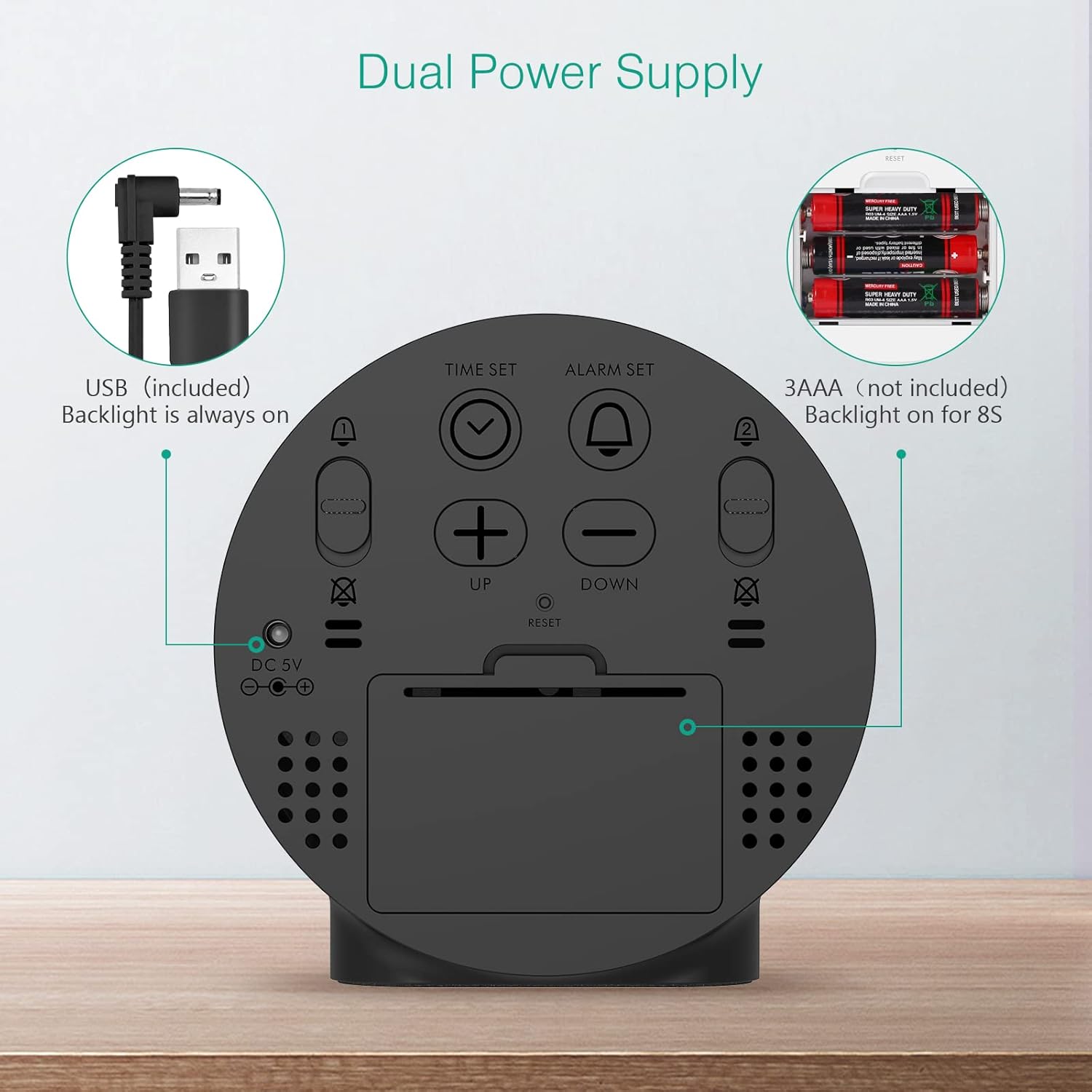
Figure 2: Back panel illustrating the USB power input and battery compartment for dual power supply.
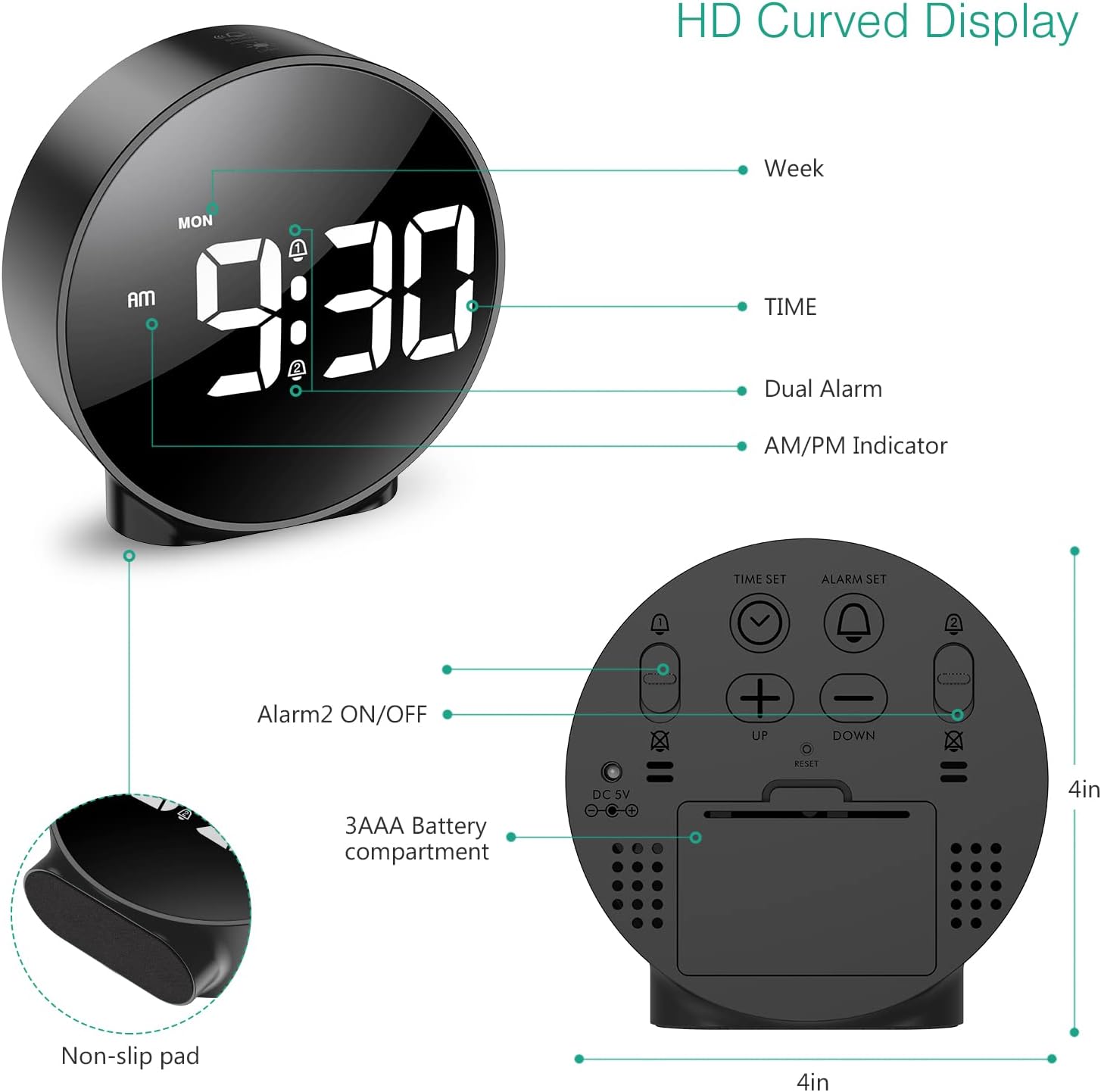
ຮູບທີ 3: ລາຍລະອຽດ view of the clock's back panel, highlighting the DC 5V input, battery compartment, and control buttons.
4. ຄໍາແນະນໍາການດໍາເນີນງານ
4.1 Setting the Time (12/24Hr Format)
- ກົດຄ້າງໄວ້ ເວລາ ກຳ ນົດ button on the back of the clock for 3 seconds to enter time setting mode. The hour digits will start flashing.
- ໃຊ້ UP or ລົງ ປຸ່ມເພື່ອປັບຊົ່ວໂມງ.
- ກົດ ເວລາ ກຳ ນົດ ອີກເທື່ອ ໜຶ່ງ ເພື່ອຢືນຢັນຊົ່ວໂມງແລະຍ້າຍໄປທີ່ການຕັ້ງຄ່ານາທີ. ຕົວເລກນາທີຈະກະພິບ.
- ໃຊ້ UP or ລົງ ປຸ່ມເພື່ອປັບນາທີ.
- ກົດ ເວລາ ກຳ ນົດ ອີກຄັ້ງເພື່ອຢືນຢັນນາທີ ແລະອອກຈາກໂໝດການຕັ້ງຄ່າເວລາ.
- ເພື່ອປ່ຽນລະຫວ່າງຮູບແບບ 12 ຊົ່ວໂມງ ແລະ 24 ຊົ່ວໂມງ, ໃຫ້ກົດທີ່ປຸ່ມ 12/24HR ປຸ່ມ.
4.2 ການຕັ້ງສັນຍານເຕືອນ (ສັນຍານເຕືອນຄູ່)
The clock supports two independent alarms (Alarm 1 and Alarm 2) with 5 alarm modes.
- ກົດຄ້າງໄວ້ ຕັ້ງໂມງປຸກ ປຸ່ມ (ສໍາລັບການປຸກ 1) ຫຼື ໂມງປຸກ 2 ເປີດ/ປິດ button (for Alarm 2) for 3 seconds to enter alarm setting mode. The hour digits will flash.
- ໃຊ້ UP or ລົງ ປຸ່ມເພື່ອປັບໂມງປຸກ.
- ກົດຕາມລໍາດັບ ຕັ້ງໂມງປຸກ or ໂມງປຸກ 2 ເປີດ/ປິດ button again to confirm the hour and move to minute setting. The minute digits will flash.
- ໃຊ້ UP or ລົງ ປຸ່ມເພື່ອປັບນາທີປຸກ.
- ກົດຕາມລໍາດັບ ຕັ້ງໂມງປຸກ or ໂມງປຸກ 2 ເປີດ/ປິດ button again to confirm the minute and select the alarm mode. The display will show the current mode (e.g., "1-1" for one day).
- ໃຊ້ UP or ລົງ buttons to cycle through the 5 alarm modes:
- 1-1: Alarm sounds once.
- 1-5: Alarm sounds Monday to Friday.
- 1-6: Alarm sounds Monday to Saturday.
- 1-7: Alarm sounds Monday to Sunday.
- 6-7: Alarm sounds Saturday to Sunday.
- ກົດຕາມລໍາດັບ ຕັ້ງໂມງປຸກ or ໂມງປຸກ 2 ເປີດ/ປິດ button one last time to confirm the alarm mode and exit alarm setting.
- To turn an alarm ON or OFF, short press the respective ຕັ້ງໂມງປຸກ or ໂມງປຸກ 2 ເປີດ/ປິດ button. An alarm icon will appear on the display when activated.
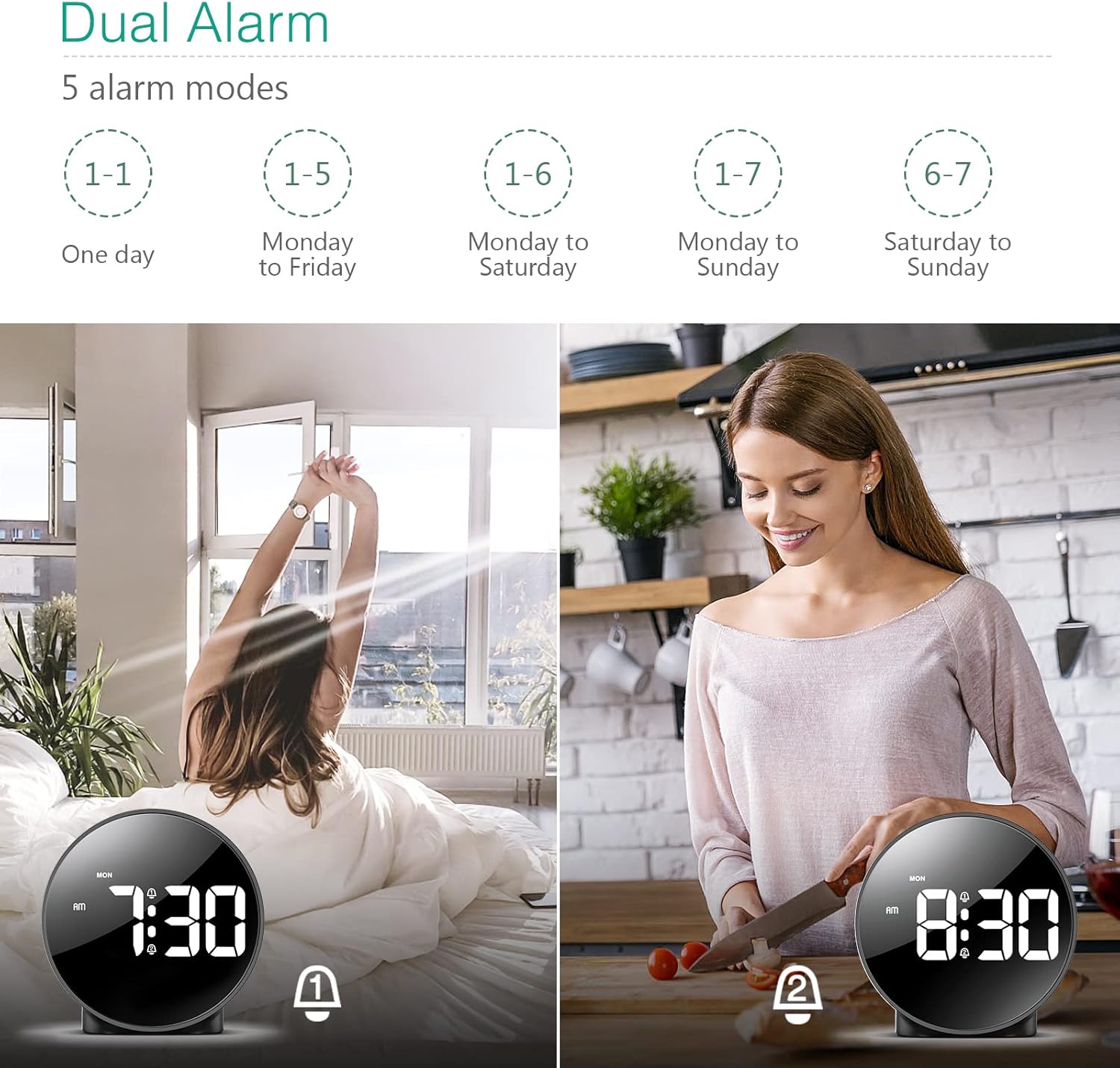
Figure 4: Illustration of the dual alarm functionality with various scheduling modes.
4.3 Snooze ຟັງຊັນ
ເມື່ອມີສຽງປຸກ, ໃຫ້ກົດໃຫຍ່ ແສງ SNOOZE / LIGHT button on the top of the clock to activate the snooze function. The alarm will pause for 5 minutes and then sound again. You can repeat this process multiple times.

Figure 5: Activating the snooze function by touching the top of the clock.
4.4 ການປັບຄວາມສະຫວ່າງ
The clock features 4 levels of adjustable brightness. Short press the ແສງ SNOOZE / LIGHT button on the top of the clock to cycle through the brightness levels (100%, 80%, 60%, and 0% (off)).

Figure 6: Visual representation of the four adjustable brightness levels of the clock display.
4.5 ເວລາປະຢັດແສງ (DST)
The clock supports Daylight Saving Time adjustment. Refer to the included mini-manual for specific instructions on how to activate or deactivate DST.
5. ຄຸນສົມບັດ
- HD LED Display: Large, high-definition curved display for clear time reading.
- Dual Alarms with 5 Modes: Set two independent alarms with flexible scheduling options (one-day, weekdays, weekends, or every day).
- ຄວາມສະຫວ່າງທີ່ສາມາດປັບໄດ້: Four levels of display brightness, including an off mode, to suit various environments and preferences.
- ຟັງຊັນ Snooze: Provides an additional 5 minutes of sleep with a simple touch.
- ຮູບແບບ 12/24 ຊົ່ວໂມງ: Easily switch between standard and military time displays.
- ການສະຫນອງພະລັງງານສອງ: Operates via USB cable for continuous display or AAA batteries for power-saving mode (display turns off after 8 seconds).
- ການອອກແບບກະທັດຮັດ: Suitable for various locations such as bedrooms, living rooms, offices, or for travel.
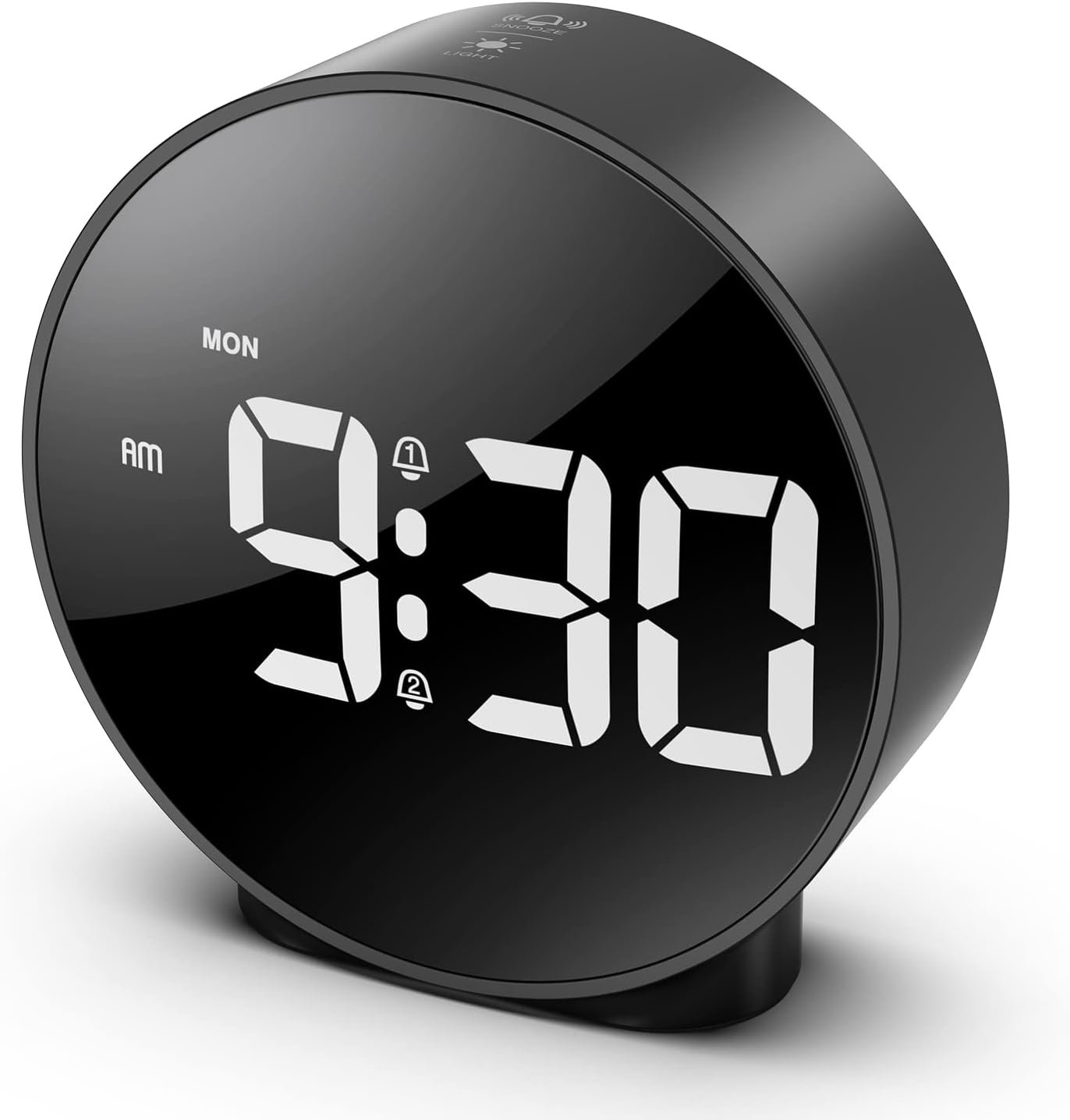
Figure 7: The ORIA Digital Alarm Clock showcasing its clear HD LED display.
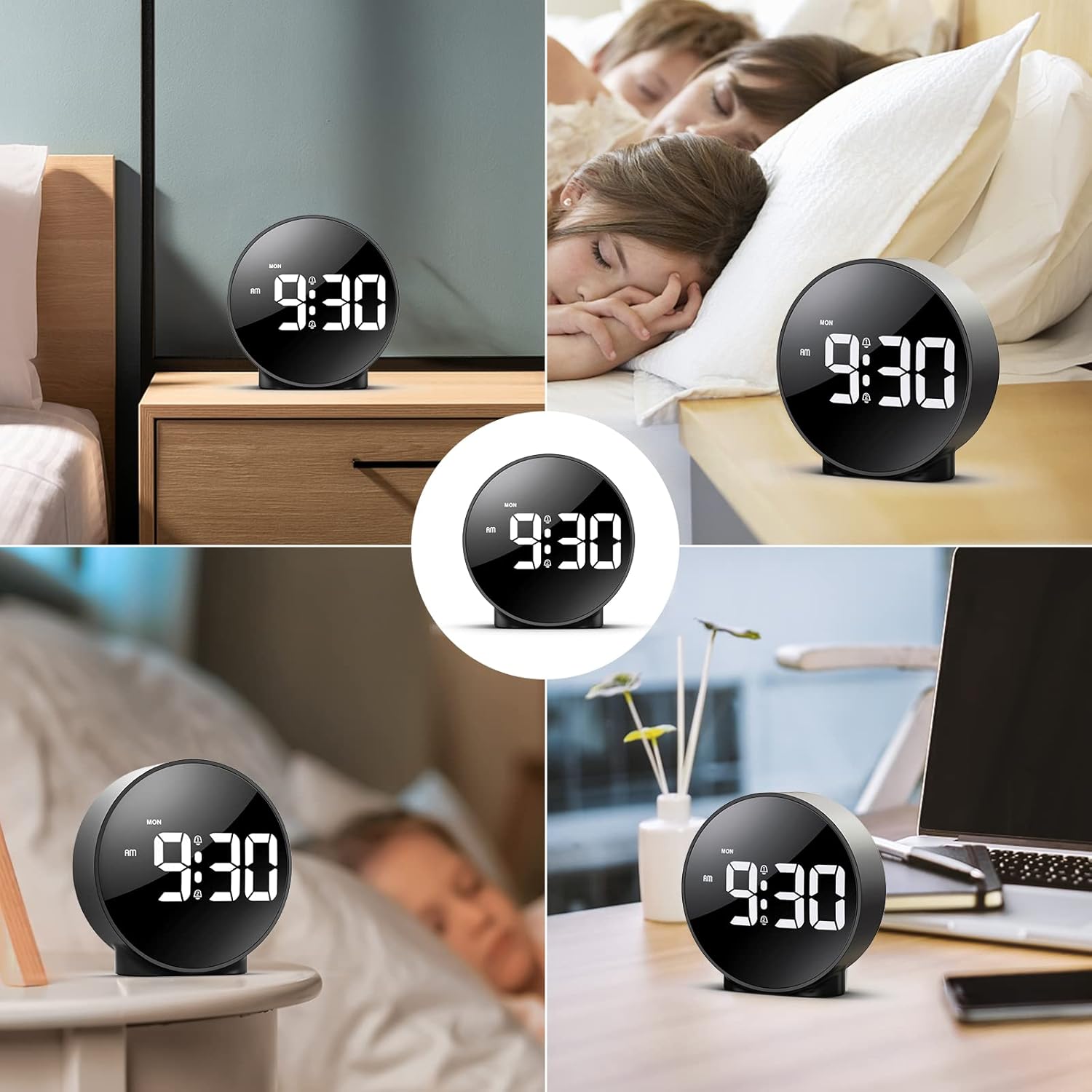
Figure 8: The versatile ORIA Digital Alarm Clock integrated into different environments like a bedroom, office, and living room.
6. ບໍາລຸງຮັກສາ
- ເຮັດຄວາມສະອາດໂມງດ້ວຍຜ້າອ່ອນໆ, ແຫ້ງ. ຢ່າໃຊ້ເຄື່ອງເຮັດຄວາມສະອາດຂັດຫຼືສານລະລາຍ.
- If not in use for an extended period, remove the batteries to prevent leakage.
7. ການແກ້ໄຂບັນຫາ
- Display is off in battery mode: This is normal for power saving. Touch the top button to activate the display for 8 seconds. For continuous display, use the USB power cable.
- ປຸ່ມບໍ່ຕອບສະໜອງ: Try resetting the clock by pressing the small ຣີເຊັດ button located on the back panel using a thin object (e.g., a paperclip).
- ໂມງປຸກບໍ່ດັງ: Ensure the alarm is activated (alarm icon visible on display) and the volume is not set to zero.
- ເວລາ/ວັນທີບໍ່ຖືກຕ້ອງ: Re-enter time setting mode and adjust the time and date as per Section 4.1.
8. ຂໍ້ມູນຈໍາເພາະ
| ຍີ່ຫໍ້ | ORIA |
| ໝາຍເລກຕົວແບບ | OUS-HY-WA109B |
| ສີ | Black Case & White Digit |
| ປະເພດການສະແດງ | LED ດິຈິຕອລ |
| ຂະໜາດສິນຄ້າ | 4.29"W x 4.8"H |
| ນ້ໍາຫນັກລາຍການ | 5.9 ອອນສ໌ (0.17 ກິໂລກຣາມ) |
| ແຫຼ່ງພະລັງງານ | Corded Electric & Battery Powered (3x AAA, not included) |
| ວັດສະດຸ | ພາດສະຕິກ |
| ຄຸນນະສົມບັດພິເສດ | Alarm, LED Display, Adjustable Brightness, Dual Alarms, Snooze |
9. ການຮັບປະກັນແລະການສະຫນັບສະຫນູນ
- ການຮັບປະກັນ 1 ປີ: ຜະລິດຕະພັນແມ່ນກວມເອົາໂດຍການຮັບປະກັນຈໍາກັດ 1 ປີ.
- 90-Day Free Replacements: Enjoy free replacements for eligible issues within 90 days of purchase.
- ສົ່ງຄືນຟຣີ 30 ມື້: Returns are accepted within 30 days of purchase.
- ຊ່ວຍເຫຼືອລູກຄ້າ 24/7: For any inquiries or assistance, please contact ORIA customer support.
- ສະຫນັບສະຫນູນດ້ານວິຊາການຕະຫຼອດຊີວິດ: Benefit from lifetime technical support for your product.
ສໍາລັບການຊ່ວຍເຫຼືອເພີ່ມເຕີມ, ກະລຸນາໄປຢ້ຽມຢາມ ORIA Store on Amazon.


