ແນະນຳ
This manual provides detailed instructions for the setup, operation, maintenance, and troubleshooting of your seenda IWG-FGM02 Rechargeable LED Wireless Mouse. Please read this manual thoroughly before using the product to ensure optimal performance and longevity.
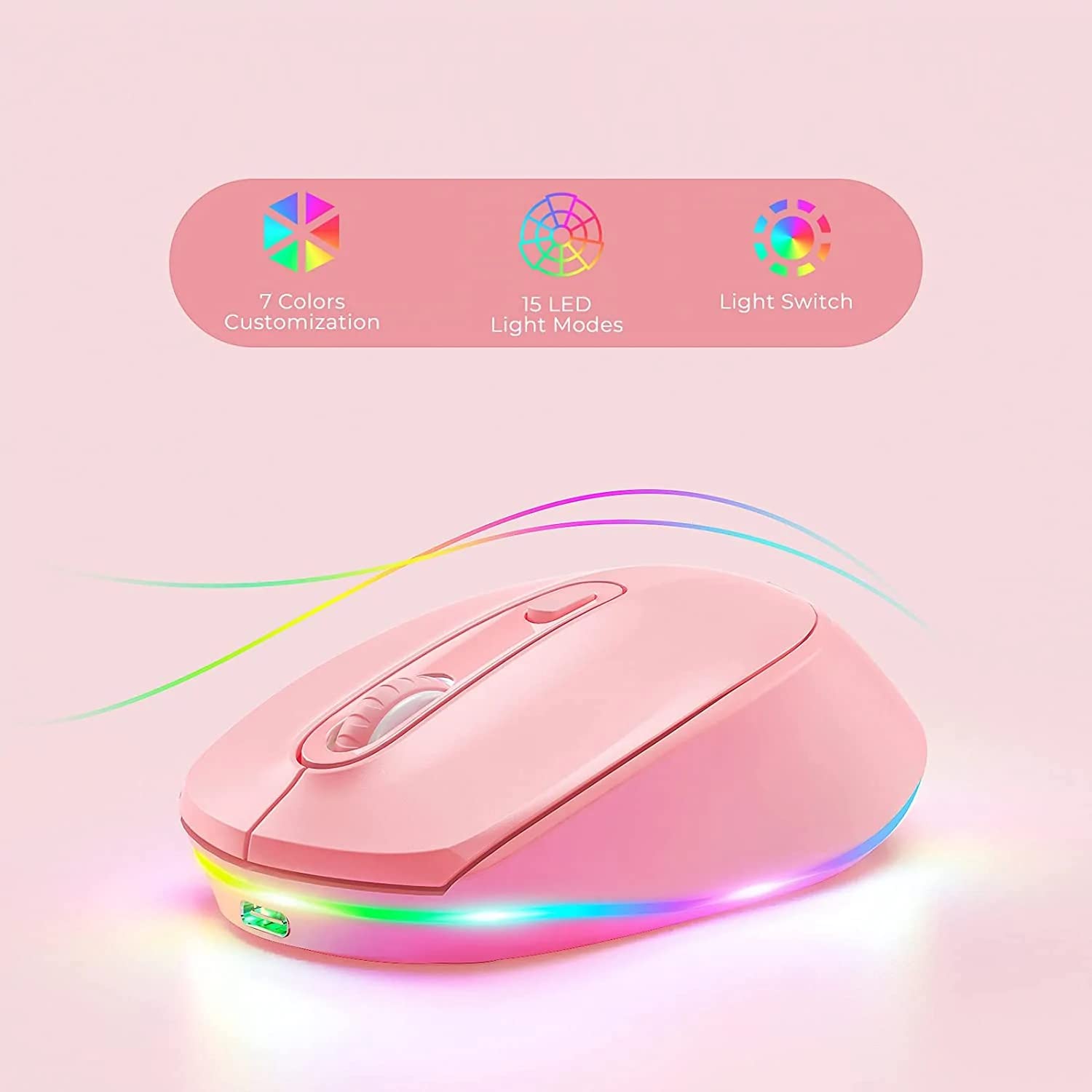
Figure 1: seenda IWG-FGM02 Rechargeable LED Wireless Mouse. This image displays the overall design of the mouse, highlighting its ergonomic shape and LED lighting.
ເນື້ອໃນຊຸດ
ໃຫ້ແນ່ໃຈວ່າທຸກລາຍການຢູ່ໃນຊຸດ:
- seenda IWG-FGM02 Rechargeable LED Wireless Mouse
- USB Receiver (typically stored in the mouse's battery compartment)
- ສາຍສາກ USB
- ຄູ່ມືຜູ້ໃຊ້ (ເອກະສານນີ້)
ຄໍາແນະນໍາການຕິດຕັ້ງ
1. ການສາກໄຟຂອງຫນູ
Before first use, fully charge the mouse. Connect the provided USB charging cable to the charging port on the front of the mouse and the other end to a USB power source (e.g., computer USB port, USB wall adapter).
- The LED indicator will typically show charging status (e.g., red light for charging, off when fully charged).
- A full charge usually takes 2-3 hours.
2. ການເຊື່ອມຕໍ່ຕົວຮັບ USB
The mouse connects wirelessly via a 2.4 GHz USB receiver.
- Locate the USB receiver, usually stored in a slot on the bottom of the mouse.
- ເອົາເຄື່ອງຮັບສັນຍານອອກ ແລະ ສຽບມັນເຂົ້າກັບພອດ USB ທີ່ມີຢູ່ໃນຄອມພິວເຕີຂອງທ່ານ.
- ຄອມພິວເຕີຂອງທ່ານຄວນຈະກວດພົບແລະຕິດຕັ້ງໄດເວີທີ່ຈໍາເປັນໂດຍອັດຕະໂນມັດ. ອັນນີ້ອາດຈະໃຊ້ເວລາເລັກນ້ອຍ.
3. ເປີດ / ປິດພະລັງງານ
Locate the power switch on the bottom of the mouse. Slide the switch to the "ON" position to activate the mouse. Slide it to "OFF" when not in use to conserve battery life.
ຄໍາແນະນໍາການດໍາເນີນງານ
1. ໜ້າທີ່ພື້ນຖານຂອງເມົ້າ
The seenda IWG-FGM02 mouse features standard left-click, right-click, and scroll wheel functions. Use these for navigation and interaction with your computer's operating system and applications.
2. ການປັບ DPI
The mouse typically includes a DPI (Dots Per Inch) button, often located near the scroll wheel, to adjust cursor sensitivity. Press this button to cycle through different DPI settings (e.g., 800, 1200, 1600 DPI). A higher DPI setting results in faster cursor movement across the screen.
3. ການຄວບຄຸມໄຟ LED
The mouse features LED lighting. Depending on the model, the lighting may be static, breathing, or switchable. Refer to the product packaging or specific model features for details on how to change or disable the LED effects. Some models may have a dedicated button for LED control, while others may integrate it with DPI or power functions.
ບໍາລຸງຮັກສາ
1. ເຮັດຄວາມສະອາດຫນູ
To maintain optimal performance and hygiene, clean your mouse regularly.
- ໃຊ້ຜ້າແພທີ່ອ່ອນໆ ທີ່ບໍ່ມີເສັ້ນດ່າງ dampຜະສົມດ້ວຍນ້ໍາຫຼືການແກ້ໄຂການທໍາຄວາມສະອາດອ່ອນໆ.
- ຫຼີກລ່ຽງການໃຊ້ສານເຄມີທີ່ຮ້າຍແຮງ, ນ້ຳສະອາດ, ຫຼືສີດນ້ຳໃສ່ຫນູໂດຍກົງ.
- Clean the optical sensor on the bottom of the mouse periodically to prevent tracking issues.
2. ການດູແລຫມໍ້ໄຟ
As a rechargeable mouse, proper battery care extends its lifespan.
- Avoid completely draining the battery frequently. Recharge when the low battery indicator appears.
- ຢ່າໃຫ້ໜູຖືກອຸນຫະພູມສູງເກີນໄປ.
- ຖ້າເກັບຮັກສາຫນູເປັນໄລຍະເວລາ, ສາກໄຟໃຫ້ປະມານ 50% ກ່ອນການເກັບຮັກສາ.
ການແກ້ໄຂບັນຫາ
If you encounter issues with your seenda IWG-FGM02 mouse, refer to the following common solutions:
1. ໜູບໍ່ຕອບສະໜອງ
- ກວດສອບພະລັງງານ: Ensure the mouse is switched "ON" and has sufficient battery charge. Recharge if necessary.
- ກວດສອບຕົວຮັບ USB: ກວດໃຫ້ແນ່ໃຈວ່າໄດ້ສຽບຕົວຮັບ USB ຢ່າງປອດໄພກັບພອດ USB ທີ່ເຮັດວຽກຢູ່ໃນຄອມພິວເຕີຂອງທ່ານ. ລອງໃຊ້ພອດ USB ອື່ນ.
- ຄູ່ໃໝ່: In some cases, you may need to re-pair the mouse with its receiver. This usually involves turning the mouse off and on, or pressing a connect button on the mouse/receiver (if available).
- ແຊກແຊງ: Move the mouse closer to the receiver or away from other wireless devices that might cause interference.
2. Cursor Movement is Erratic or Jumpy
- ເຊັນເຊີສະອາດ: ເຮັດຄວາມສະອາດເຊັນເຊີ optical ຢູ່ດ້ານລຸ່ມຂອງຫນູດ້ວຍຜ້າອ່ອນ.
- ພື້ນຜິວ: Use the mouse on a clean, non-reflective, opaque surface. Avoid glass or highly reflective surfaces. A mouse pad is recommended.
- ການຕັ້ງຄ່າ DPI: ປັບການຕັ້ງຄ່າ DPI ເປັນຄ່າທີ່ຕໍ່າກວ່າຖ້າເຄີເຊີມີຄວາມອ່ອນໄຫວເກີນໄປ.
3. ໄຟ LED ບໍ່ເຮັດວຽກ
- ລະດັບຫມໍ້ໄຟ: Ensure the mouse has enough charge. Low battery can sometimes affect LED functionality.
- ການຄວບຄຸມໄຟ LED: If your mouse has a dedicated LED control button, press it to cycle through modes or turn the lights on.
4. ບັນຫາການສາກໄຟ
- ກວດສອບສາຍ: Ensure the USB charging cable is not damaged and is securely connected. Try a different USB cable if available.
- ແຫຼ່ງພະລັງງານ: Try a different USB power source (e.g., another USB port on your computer, a different wall adapter).
ຂໍ້ມູນຈໍາເພາະ
| ຄຸນສົມບັດ | ລາຍລະອຽດ |
|---|---|
| ຍີ່ຫໍ້ | ເຊນດາ |
| ຕົວແບບ | IWG-FGM02 |
| ເຕັກໂນໂລຊີການເຊື່ອມຕໍ່ | Wireless (2.4 GHz USB Receiver) |
| ຄຸນນະສົມບັດພິເສດ | Rechargeable, LED Lighting |
| ທິດທາງມື | ຂີ້ຄ້ານ |
| ຄວາມເຂົ້າກັນໄດ້ຂອງລະບົບປະຕິບັດການ | Linux, Windows 7, Windows XP (and generally newer Windows/macOS versions) |
| ເວທີຮາດແວ | ແລັບທັອບ, ຄອມພິວເຕີສ່ວນຕົວ |
| ຂະໜາດສິນຄ້າ (LxWxH) | 10 x 6.5 x 6.5 cm |
| ນ້ໍາຫນັກລາຍການ | 140 g |
| ອາຍຸຫມໍ້ໄຟສະເລ່ຍ | Up to 12 Months (standby/usage dependent) |
ຂໍ້ມູນການຮັບປະກັນ
The seenda IWG-FGM02 Rechargeable LED Wireless Mouse comes with a ຮັບປະກັນ 1 ປີ ນັບຈາກວັນທີ່ຊື້. ການຮັບປະກັນນີ້ກວມເອົາຂໍ້ບົກພ່ອງຈາກການຜະລິດ ແລະ ຂໍ້ບົກພ່ອງຂອງວັດສະດຸພາຍໃຕ້ການນຳໃຊ້ປົກກະຕິ. ມັນບໍ່ກວມເອົາຄວາມເສຍຫາຍທີ່ເກີດຈາກການໃຊ້ຜິດວິທີ, ອຸບັດຕິເຫດ, ການດັດແປງທີ່ບໍ່ໄດ້ຮັບອະນຸຍາດ, ຫຼື ການສວມໃສ່ ແລະ ການຈີກຂາດຕາມປົກກະຕິ. ກະລຸນາເກັບຫຼັກຖານການຊື້ຂອງທ່ານໄວ້ເພື່ອການຮຽກຮ້ອງການຮັບປະກັນ.
ສະຫນັບສະຫນູນແລະຕິດຕໍ່
For further assistance, technical support, or warranty inquiries, please contact the importer or manufacturer:
- ຜູ້ນໍາເຂົ້າ: ປາກກາດິຈິຕອລtagram
- ອີເມວ: t.yadav@digitalpentagram.com
- ໂທລະສັບ: 09999325592
- ຜູ້ຜະລິດ: Seenda, Shenzen Seenda, www.seenda.com
When contacting support, please have your product model (IWG-FGM02) and proof of purchase available.


