1. ບົດແນະນຳ
This manual provides detailed instructions for the assembly, operation, and maintenance of your Pokitter Projector Floor Stand. Designed for versatility and stability, this stand is suitable for projectors, small cameras, webcams, microphones, and GoPro devices. Please read this manual thoroughly before use to ensure proper functionality and longevity of the product.

Figure 1.1: The Pokitter Projector Floor Stand, showcasing its sleek design and stable base.
2. ຄຸນລັກສະນະຂອງຜະລິດຕະພັນ
- ຄວາມສູງທີ່ສາມາດປັບໄດ້: The stand offers a versatile height range from 4.1 inches to 40.2 inches, allowing for optimal positioning of your device.
- 360-Degree Swivel Ball Head: Equipped with a pivot ball head that allows for full 360-degree rotation, enabling precise angle adjustments for your mounted device.
- ການຈັດການສາຍໄຟແບບປະສົມປະສານ: Designed with internal channels to neatly route cables, maintaining a clean and organized setup.
- Stable Floor Base: Features a weighted, circular base for enhanced stability, preventing accidental tipping.
- ຄວາມເຂົ້າກັນໄດ້ຫຼາຍອຸປະກອນ: Ideal for use with projectors, small cameras, webcams, microphones, and GoPro devices.

Figure 2.1: Illustration of the stand's adjustable height capabilities, showing various height configurations.
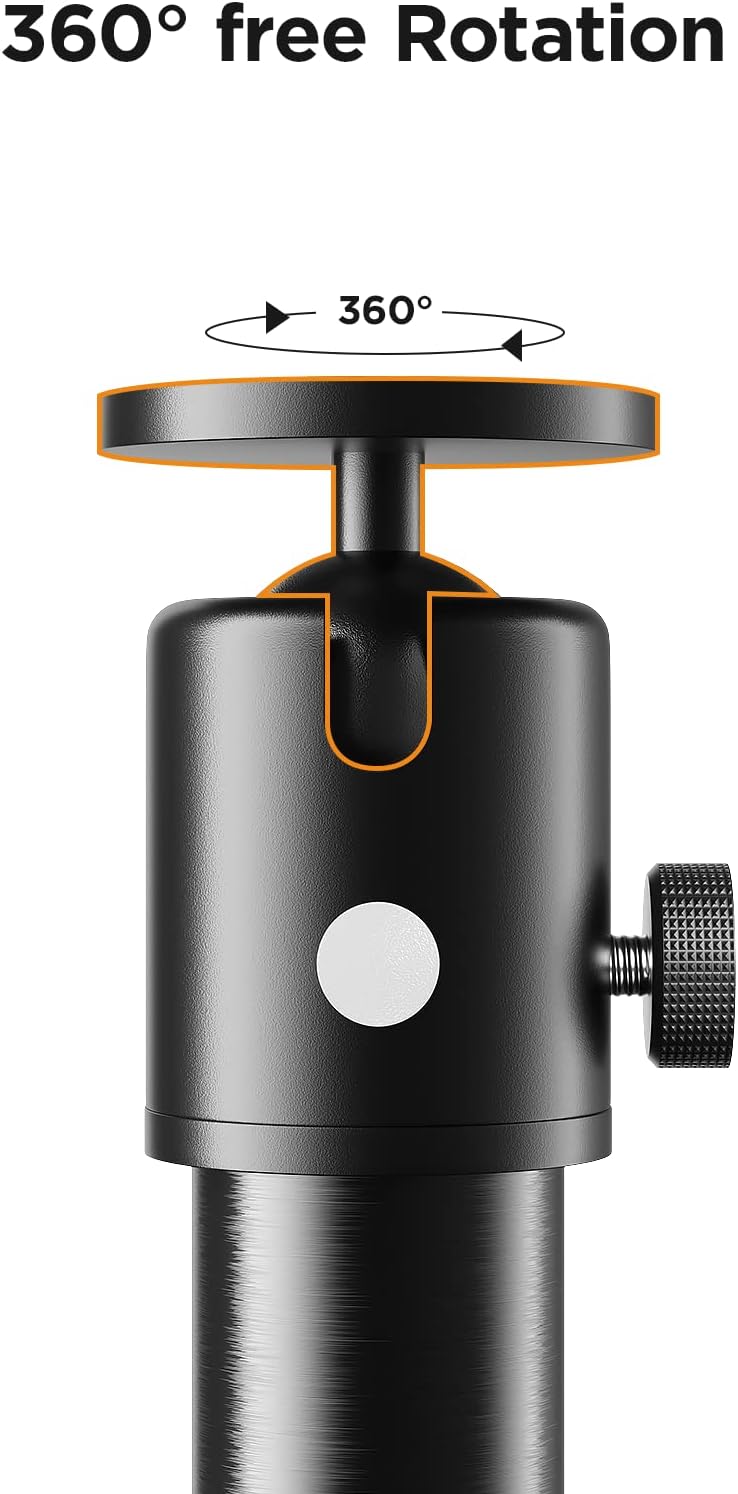
ຮູບທີ 2.2: ໄລຍະໃກ້ view of the 360-degree swivel ball head, demonstrating its rotational freedom.

Figure 2.3: The stand in use, highlighting the integrated cable management system and the stable circular base.
3. ຄໍາແນະນໍາການຕິດຕັ້ງ
Follow these steps to assemble your Pokitter Projector Floor Stand:
- Unpack ອົງປະກອບ: Carefully remove all parts from the packaging. Verify that all components shown in Figure 3.1 are present.
- ປະກອບສ່ວນຂອງເສົາ: Screw the individual pole sections together clockwise until they are securely fastened. The number of sections used will determine the initial height.
- ແນບຖານ: Screw the assembled pole onto the circular base, ensuring it is tightened firmly to provide stability.
- ຕິດຫົວບານ: Screw the 360-degree swivel ball head onto the top of the assembled pole.
- ເຊື່ອມຕໍ່ອຸປະກອນ: Attach your projector, camera, or other compatible device to the ball head's mounting screw. Ensure it is securely fastened.
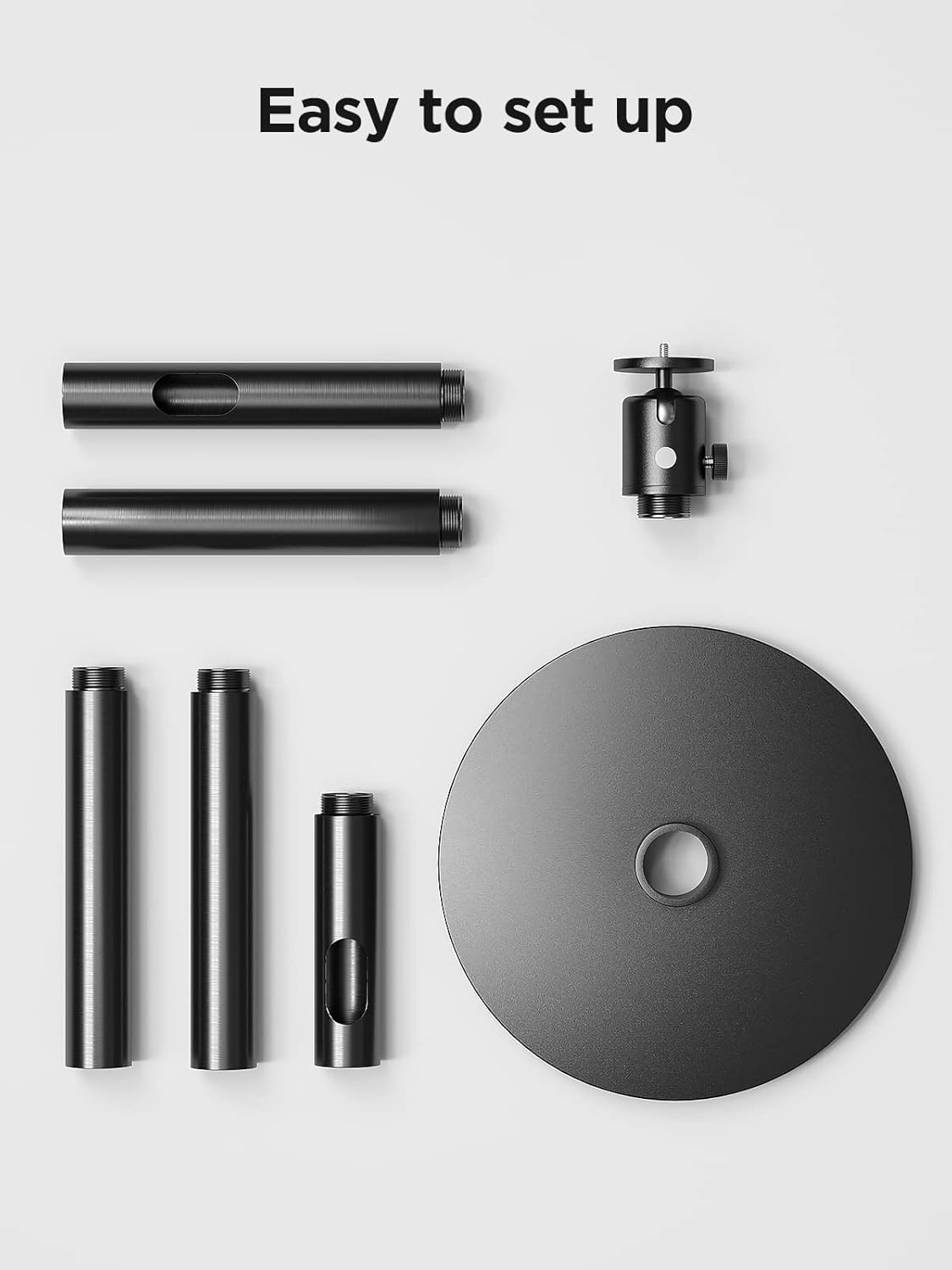
Figure 3.1: All components of the Pokitter Projector Floor Stand laid out for easy assembly.
4. ຄໍາແນະນໍາການດໍາເນີນງານ
- ປັບລະດັບຄວາມສູງ: To adjust the height, loosen the locking collars on the pole sections, extend or retract the sections to the desired height, and then tighten the collars securely.
- ການປັບມຸມ: Loosen the knob on the side of the ball head to adjust the angle of your mounted device. Once the desired angle is achieved, tighten the knob firmly to lock it in place. The ball head allows for full 360-degree rotation.
- ການຄຸ້ມຄອງສາຍໄຟ: Route your device's power and data cables through the internal channels of the stand's pole for a tidy setup.

Figure 4.1: The Pokitter Projector Stand in a typical usage scenario, demonstrating its practical application.
5. ບໍາລຸງຮັກສາ
- ທໍາຄວາມສະອາດ: Wipe the stand with a soft, dry cloth to remove dust and dirt. Avoid using abrasive cleaners or solvents.
- ກວດກາປົກກະຕິ: ກວດເບິ່ງທຸກສະກູແລະການເຊື່ອມຕໍ່ເປັນໄລຍະເພື່ອຮັບປະກັນວ່າພວກມັນແຫນ້ນແຫນ້ນແລະປອດໄພ.
- ການເກັບຮັກສາ: When not in use for extended periods, store the stand in a cool, dry place, ideally in its original packaging or a protective cover.
6. ການແກ້ໄຂບັນຫາ
| ບັນຫາ | ສາເຫດທີ່ເປັນໄປໄດ້ | ການແກ້ໄຂ |
|---|---|---|
| ທ່າຢືນຮູ້ສຶກບໍ່ໝັ້ນຄົງ. | ການເຊື່ອມຕໍ່ວ່າງຫຼືພື້ນຜິວທີ່ບໍ່ສະເຫມີກັນ. | Ensure all pole sections and the base are tightly screwed. Place the stand on a flat, stable surface. |
| Device angle slips. | Ball head knob not tightened sufficiently. | Tighten the ball head adjustment knob firmly after setting the desired angle. Ensure the device weight does not exceed the stand's capacity. |
| ຄວາມຫຍຸ້ງຍາກໃນການປັບຄວາມສູງ. | Locking collars are too tight or dirty. | Loosen locking collars sufficiently before adjusting. Clean any debris from the pole sections. |
7. ຂໍ້ມູນຈໍາເພາະ
| ຄຸນສົມບັດ | ລາຍລະອຽດ |
|---|---|
| ໝາຍເລກຕົວແບບ | 2 |
| ຍີ່ຫໍ້ | Pokitter |
| ລະດັບຄວາມສູງທີ່ສາມາດປັບໄດ້ | 4.1 ນິ້ວ ຫາ 40.2 ນິ້ວ |
| ນ້ໍາຫນັກລາຍການ | 8.72 ປອນ |
| ວັດສະດຸ | Silicone (as per product specifications) |
| ປະເພດຫົວ | 360 Degree Swivel Pivot Ball Head |
8. ການຮັບປະກັນແລະການສະຫນັບສະຫນູນ
Pokitter stands behind the quality of its products. For specific warranty information, please refer to the documentation included with your purchase or visit the official Pokitter website. For technical support, troubleshooting assistance, or any inquiries regarding your product, please contact Pokitter customer service through their official channels.
ທ່ານສາມາດຊອກຫາຂໍ້ມູນເພີ່ມເຕີມແລະລາຍລະອຽດການຕິດຕໍ່ໂດຍການຢ້ຽມຢາມ Pokitter Store on Amazon.


