ແນະນຳ
This manual provides detailed instructions for the setup, operation, maintenance, and troubleshooting of your NiPoGi AK1 PRO Mini PC. The AK1 PRO is a compact desktop computer powered by an 11th Generation Intel Celeron N5105 processor, designed for efficient daily tasks, multimedia playback, and business applications. It features 12GB DDR4 RAM, a 256GB M.2 SSD, 4K UHD video output, dual display support, Dual Band WiFi, and Bluetooth 4.2.
ແມ່ນຫຍັງຢູ່ໃນກ່ອງ
Please check the contents of your package upon arrival. The standard package includes:
- 1 x NiPoGi AK1 PRO Mini PC (12GB RAM, 256GB ROM)
- 1 x EU Power Adapter
- 1 x ສາຍ HDMI
- 1 x VESA Bracket with Screws
- 1 x ຄູ່ມືຜູ້ໃຊ້
ສິນຄ້າເກີນview
The NiPoGi AK1 PRO Mini PC is designed with various ports for connectivity and expansion. Familiarize yourself with the layout below.
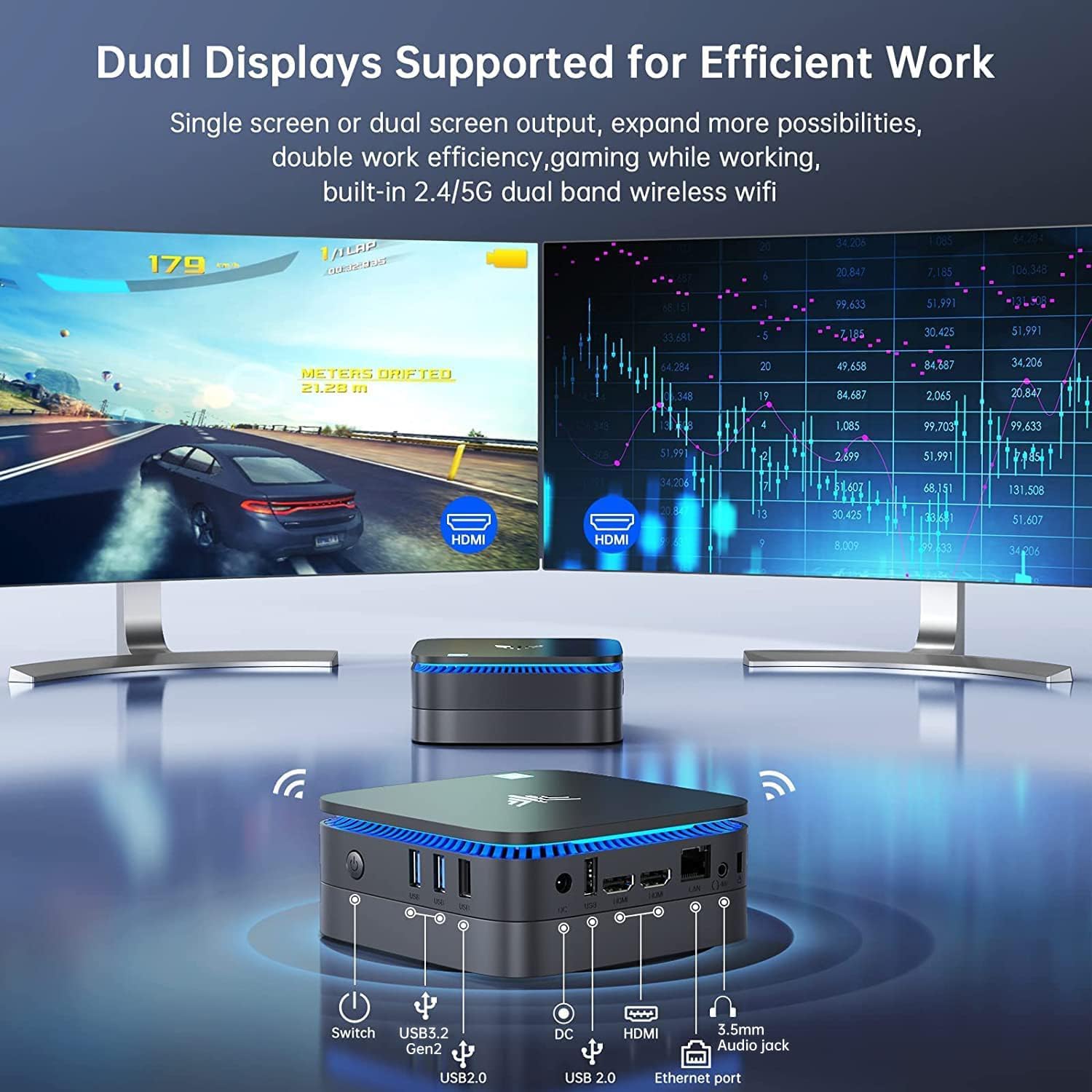
ຮູບພາບ: ດ້ານໜ້າ ແລະ ດ້ານຫຼັງ view of the NiPoGi AK1 PRO Mini PC, highlighting its various ports and compact design. The front features the power button and USB ports, while the rear includes HDMI, Ethernet, and additional USB ports.
Port Layout:
- ດ້ານໜ້າ: Power Button, 2 x USB 3.0 ports, 2 x USB 2.0 ports
- ດ້ານຫຼັງ: DC Power Input, 2 x HDMI ports, 1 x RJ45 Gigabit Ethernet port, 1 x 3.5mm Audio Jack
ຄຸນນະສົມບັດທີ່ສໍາຄັນ:
- ໜ່ວຍປະມວນຜົນ: 11th Gen Intel Celeron N5105 Quad-Core (up to 2.9 GHz)
- ຮູບພາບ: Intel UHD Graphics, supporting 4K UHD (4096x2160@60Hz)
- ໜ່ວຍຄວາມຈຳ: RAM 12GB DDR4
- ການເກັບຮັກສາ: 256GB M.2 SSD (expandable with 2.5-inch SSD/HDD up to 2TB)
- ການເຊື່ອມຕໍ່: Dual Band 2.4GHz+5GHz WiFi, Gigabit Ethernet, Bluetooth 4.2
- ສະແດງຜົນອອກ: Dual HDMI for dual screen setup
- ລະບົບປະຕິບັດການ: OS ທີ່ຕິດຕັ້ງໄວ້ລ່ວງໜ້າ
ຄູ່ມືການຕິດຕັ້ງ
Follow these steps to set up your NiPoGi AK1 PRO Mini PC for the first time.
- ເຊື່ອມຕໍ່ກັບຈໍສະແດງຜົນ: Use the provided HDMI cable to connect the Mini PC to your monitor or TV. The AK1 PRO supports dual displays, so you can connect two monitors via the two HDMI ports.
- ເຊື່ອມຕໍ່ອຸປະກອນຕໍ່ພ່ວງ: ສຽບແປ້ນພິມ ແລະເມົາສ໌ USB ຂອງທ່ານໃສ່ພອດ USB ທີ່ມີຢູ່.
- ເຊື່ອມຕໍ່ກັບພະລັງງານ: Connect the EU power adapter to the DC input port on the Mini PC, then plug the adapter into a power outlet.
- ເປີດ: Press the power button located on the front of the Mini PC. The device will boot up, and the blue light will illuminate.
- Initial OS Setup: Follow the on-screen instructions to complete the operating system setup, including language, region, and network configuration.
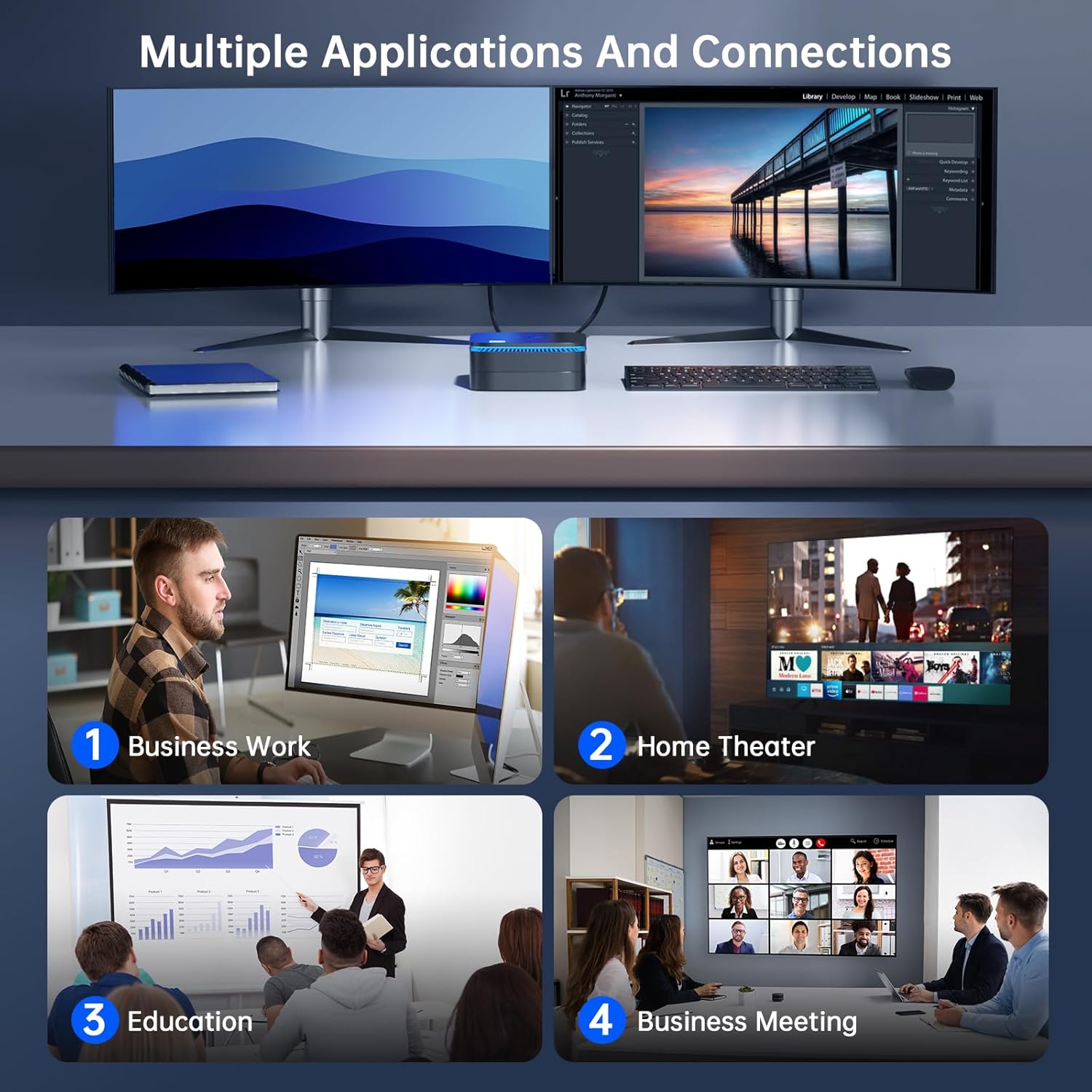
ຮູບພາບ: The NiPoGi AK1 PRO Mini PC demonstrating multiple applications and connections, including business work, home theater, education, and business meetings, showcasing versatility ຂອງມັນ.
ຄໍາແນະນໍາການດໍາເນີນງານ
ການດໍາເນີນງານພື້ນຖານ:
- ເປີດ/ປິດ: Press the front power button to turn the PC on. To turn off, use the operating system's shutdown function or press and hold the power button for a few seconds for a forced shutdown (not recommended for regular use).
- ຣີສະຕາດ: ໃຊ້ຟັງຊັນຣີສະຕາດຂອງລະບົບປະຕິບັດການ.
- ຮູບແບບການນອນ: The PC can enter sleep mode to save power. Wake it up by moving the mouse or pressing a key on the keyboard.
4K UHD Video Playback:
The integrated Intel UHD Graphics supports 4K UHD resolution (4096x2160@60Hz), providing a clear visual experience for movies, streaming, and presentations.

ຮູບພາບ: A person enjoying 4K HD video playback on a large display, powered by the NiPoGi AK1 PRO Mini PC, highlighting its multimedia capabilities and wireless Bluetooth support.
ການຕັ້ງຄ່າຈໍສະແດງຜົນຄູ່:
Connect two monitors to the two HDMI ports for an extended desktop experience. This can enhance productivity for work or provide a more immersive entertainment setup. Configure display settings within your operating system.
ການຂະຫຍາຍການເກັບຮັກສາ
The NiPoGi AK1 PRO Mini PC comes with a 256GB M.2 SSD. For additional storage, you can install a 2.5-inch SSD or HDD (not included) in the removable base, supporting up to 2TB.
ຂັ້ນຕອນການຕິດຕັ້ງ:
- ໃຫ້ແນ່ໃຈວ່າ Mini PC ໄດ້ປິດ ແລະຕັດການເຊື່ອມຕໍ່ຈາກອະແດັບເຕີໄຟ.
- Carefully open the bottom cover of the Mini PC.
- Insert your 2.5-inch SSD/HDD into the designated slot in the removable base.
- Secure the drive with screws if necessary (check the base for mounting points).
- ຕິດຝາປິດດ້ານລຸ່ມຄືນ.
- After powering on, you may need to initialize and format the new drive through your operating system's disk management tools.

ຮູບພາບ: A visual tutorial demonstrating how to install a 2.5-inch SSD or HDD into the NiPoGi AK1 PRO Mini PC by opening the bottom cover and inserting the drive into the expansion bay.
ການຕິດຕັ້ງ VESA Mount
The included VESA bracket allows you to mount the Mini PC to the back of a compatible monitor or TV, saving desk space and creating an all-in-one computing solution.
ຂັ້ນຕອນການຕິດຕັ້ງ:
- Attach the VESA bracket to the back of your monitor using the provided screws. Ensure your monitor has standard VESA mounting holes.
- Slide the NiPoGi AK1 PRO Mini PC onto the VESA bracket until it clicks securely into place.
- Connect all necessary cables (power, HDMI, peripherals) to the Mini PC.

ຮູບພາບ: The NiPoGi AK1 PRO Mini PC shown mounted on the rear of a computer monitor using a VESA bracket, illustrating how it can transform into an all-in-one computer and save desk space.
ບໍາລຸງຮັກສາ
ການບໍາລຸງຮັກສາທີ່ເຫມາະສົມຮັບປະກັນອາຍຸຍືນແລະການປະຕິບັດທີ່ດີທີ່ສຸດຂອງ Mini PC ຂອງທ່ານ.
- ທໍາຄວາມສະອາດ: Regularly clean the exterior of the Mini PC with a soft, dry cloth. Use compressed air to clear dust from ventilation openings to prevent overheating.
- ອັບເດດຊອບແວ: ຮັກສາລະບົບປະຕິບັດການ ແລະໄດເວີຂອງທ່ານອັບເດດເພື່ອຮັບປະກັນຄວາມປອດໄພ ແລະປະສິດທິພາບ.
- ເງື່ອນໄຂສິ່ງແວດລ້ອມ: Operate the Mini PC in a well-ventilated area, away from direct sunlight, excessive heat, and moisture.
- ການຄຸ້ມຄອງພະລັງງານ: Use the provided power adapter. Avoid frequent abrupt power cuts.
ການແກ້ໄຂບັນຫາ
If you encounter issues with your Mini PC, refer to the following common troubleshooting steps.
- ບໍ່ມີພະລັງງານ:
- ໃຫ້ແນ່ໃຈວ່າອະແດັບເຕີໄຟເຊື່ອມຕໍ່ຢ່າງປອດໄພກັບທັງ Mini PC ແລະປລັກສຽບໄຟທີ່ເຮັດວຽກໄດ້.
- ກວດສອບວ່າປລັກສຽບໄຟເຮັດວຽກໄດ້ໂດຍການສຽບໃສ່ອຸປະກອນອື່ນ.
- ບໍ່ມີການສະແດງຜົນ:
- Check that the HDMI cable is firmly connected to both the Mini PC and the monitor.
- ກວດໃຫ້ແນ່ໃຈວ່າເປີດໜ້າຈໍ ແລະຕັ້ງເປັນແຫຼ່ງປ້ອນຂໍ້ມູນທີ່ຖືກຕ້ອງ (HDMI 1, HDMI 2, ແລະອື່ນໆ).
- ລອງສາຍ HDMI ຫຼືຈໍພາບອື່ນຖ້າມີ.
- No Internet Connection (Wi-Fi/Ethernet):
- For Wi-Fi, ensure the Wi-Fi adapter is enabled in the operating system and you are connected to the correct network with the correct password.
- For Ethernet, ensure the Ethernet cable is securely connected to both the Mini PC and your router/modem. Check router status.
- ຣີສະຕາດເຣົາເຕີ/ໂມເດັມ ແລະ Mini PC ຂອງທ່ານ.
- ປະສິດທິພາບຊ້າ:
- ປິດແອັບພລິເຄຊັນທີ່ບໍ່ຈໍາເປັນທີ່ເຮັດວຽກຢູ່ໃນພື້ນຫຼັງ.
- Ensure there is sufficient free space on your primary drive.
- ກວດເບິ່ງ ແລະຕິດຕັ້ງການອັບເດດລະບົບປະຕິບັດການທີ່ຍັງຄ້າງຢູ່.
- Monitor CPU and RAM usage through Task Manager (Windows) to identify resource-intensive processes.
ຂໍ້ມູນຈໍາເພາະ
Detailed technical specifications for the NiPoGi AK1 PRO Mini PC.
| ຄຸນສົມບັດ | ລາຍລະອຽດ |
|---|---|
| ຍີ່ຫໍ້ | NiPoGi |
| ຊຸດຕົວແບບ | AK1PRO N5105/12GB RAM+256GB ROM |
| ໂຮງງານຜະລິດ | Intel Celeron N5105 (11th Gen, Quad-Core, up to 2.9 GHz) |
| Graphics Coprocessor | Intel UHD Graphics |
| RAM | 12GB DDR4 |
| ການເກັບຮັກສາ | 256GB M.2 SSD (Expandable with 2.5" SSD/HDD up to 2TB) |
| ລະບົບປະຕິບັດການ | OS |
| ການເຊື່ອມຕໍ່ | Dual Band Wi-Fi (802.11a/b/g/n/ac), Bluetooth 4.2, Gigabit Ethernet |
| ພອດ USB | 2 x USB 3.0, 2 x USB 2.0 |
| ພອດ HDMI | 2 (supports dual display, 4K UHD resolution) |
| ສຽງ | Jack ສຽງ 1 x 3.5 ມມ |
| ຂະໜາດ | 12.8 x 12.8 x 5.15 cm (ປະມານ 5.04 x 5.04 x 2.05 ນິ້ວ) |
| ນ້ຳໜັກ | 274 ກຣາມ |
| ສີ | ດຳ |
ການຮັບປະກັນແລະການສະຫນັບສະຫນູນ
NiPoGi provides comprehensive support and warranty services for your Mini PC.
ຕິດຕໍ່ສະຫນັບສະຫນູນ:
- Amazon Orders: Log in to Amazon, go to "Your Account", then "Your Orders", and select "Ask Product Question" for assistance.
- ສະຫນັບສະຫນູນອີເມວ: support@inipogi.com
- ສະຫນັບສະຫນູນໂທລະສັບ: +44 808 175 2348 (ວັນຈັນ-ວັນສຸກ, 9am-5pm EST)
NiPoGi offers maintenance points for exchange or repair of your mini PC during the warranty period. Please retain your proof of purchase for warranty claims.

ຮູບພາບ: Information regarding NiPoGi's "All-Around Protection" plan, including contact methods for support via Amazon, email, and phone, and details about maintenance services.


