Baseus Bowie WM02 TWS Bluetooth Earbuds
ຄູ່ມືຜູ້ໃຊ້
ແນະນຳ
Thank you for choosing the Baseus Bowie WM02 TWS Bluetooth Earbuds. These ultra-compact and lightweight earbuds are designed for comfortable, long-term wear, offering a seamless audio experience with advanced Bluetooth 5.3 technology and an impressive 25-hour battery life (with charging case). This manual will guide you through the setup, operation, and maintenance of your new earbuds.

Image: Baseus Bowie WM02 TWS Bluetooth Earbuds in white, with their charging case.
ຕັ້ງຄ່າ
1. Unboxing ແລະອົງປະກອບ
ກ່ອນການນຳໃຊ້ຄັ້ງທຳອິດ, ກະລຸນາຮັບປະກັນວ່າມີສ່ວນປະກອບທັງໝົດຢູ່ໃນຊຸດ:
- Baseus Bowie WM02 TWS Earbuds
- ກ່ອງສາກ
- ສາຍສາກ USB-C
- ປາຍຫູຫຼາຍຂະໜາດ (S, M, L)
- ຄູ່ມືຜູ້ໃຊ້
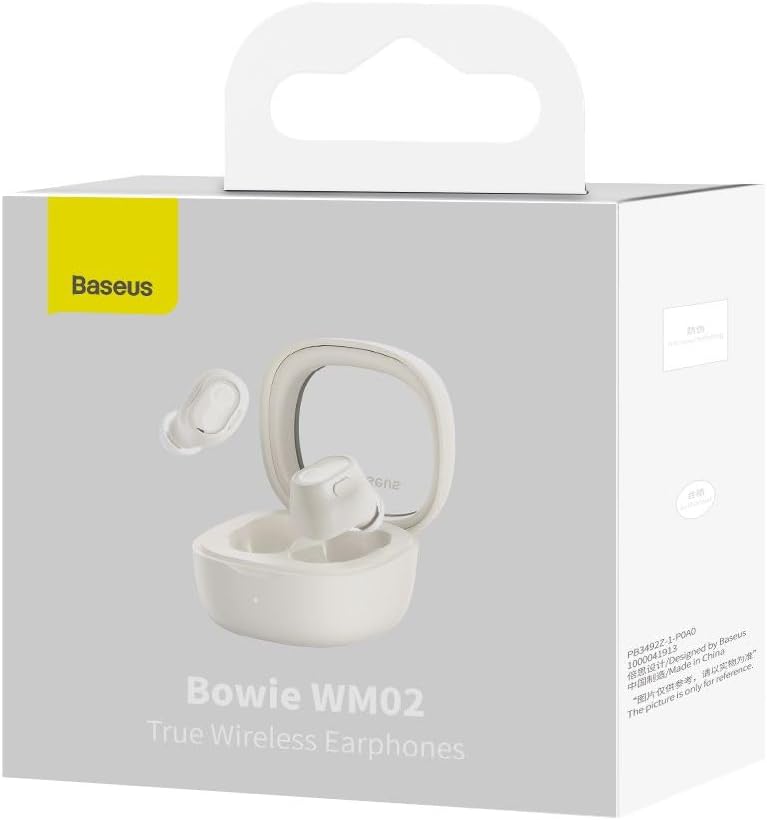
Image: The Baseus Bowie WM02 earbuds, charging case, USB-C cable, and ear tips laid out with the product packaging.
2. ການສາກຫູຟັງ ແລະ ເຄສ
For optimal performance, fully charge the earbuds and charging case before first use.
- ວາງຫູຟັງໃສ່ຊ່ອງສາກໄຟ. ໃຫ້ແນ່ໃຈວ່າເຂົາເຈົ້ານັ່ງຢ່າງຖືກຕ້ອງຢູ່ໃນຊ່ອງຂອງເຂົາເຈົ້າ.
- ເຊື່ອມຕໍ່ສາຍສາກ USB-C ເຂົ້າກັບພອດສາກໄຟຢູ່ເທິງເຄສ ແລະ ປາຍອີກດ້ານໜຶ່ງເຂົ້າກັບແຫຼ່ງພະລັງງານ USB (ເຊັ່ນ: ຄອມພິວເຕີ, ອະແດບເຕີຕິດຝາ).
- The indicator light on the charging case will show the charging status. Once fully charged, the light will typically turn solid or turn off.
A 10-minute quick charge provides approximately 2 hours of listening time, and a full charge offers up to 5 hours of continuous use, extending to 25 hours with the charging case.

Image: Graphic illustrating the 25-hour battery life of the Baseus Bowie WM02 earbuds and charging case.
3. ການຈັບຄູ່ Bluetooth
ປະຕິບັດຕາມຂັ້ນຕອນເຫຼົ່ານີ້ເພື່ອຈັບຄູ່ຫູຟັງຂອງທ່ານກັບອຸປະກອນທີ່ເປີດໃຊ້ Bluetooth:
- ເປີດກ່ອງສາກໄຟ. ຫູຟັງເອຍບັດຈະເຂົ້າສູ່ໂໝດຈັບຄູ່ໂດຍອັດຕະໂນມັດ (ໄຟຕົວຊີ້ບອກຈະກະພິບ).
- ໃນອຸປະກອນຂອງທ່ານ (ໂທລະສັບສະຫຼາດ, ແທັບເລັດ, ແລັບທັອບ), ໄປທີ່ການຕັ້ງຄ່າ Bluetooth ແລະເປີດໃຊ້ Bluetooth.
- ຊອກຫາ available devices and select "Baseus Bowie WM02" from the list.
- Once connected, the earbud indicator lights will typically turn off or show a steady light.
ຫູຟັງມີ Bluetooth 5.3 ສຳລັບການເຊື່ອມຕໍ່ທີ່ໝັ້ນຄົງ ແລະ ມີປະສິດທິພາບ.

Image: A visual representation of the Wireless 5.3 chip, highlighting fast and smooth connection.
4. Baseus App Integration
Enhance your experience by downloading the official Baseus app. The app allows you to:
- ຊອກຫາຫູຟັງຂອງທ່ານ.
- Check real-time battery levels.
- ປັບແຕ່ງການຄວບຄຸມການສໍາພັດ.
- ເຂົ້າເຖິງຄຸນສົມບັດເພີ່ມເຕີມ ແລະອັບເດດ.

Image: Screenshot of the Baseus app interface, demonstrating features like earbud location and battery status.
ຄໍາແນະນໍາການດໍາເນີນງານ
1. ໃສ່ຫູຟັງ
The Baseus Bowie WM02 earbuds are designed for a comfortable and secure fit, even for smaller ears. They weigh only 3.8g per earbud and have a 108-degree elevation angle for ergonomic wear.
- ເລືອກຄໍາແນະນໍາຫູທີ່ສະຫນອງການປະທັບຕາທີ່ດີທີ່ສຸດແລະຄວາມສະດວກສະບາຍສໍາລັບຫູຂອງທ່ານ.
- ສຽບຫູຟັງແຕ່ລະອັນໃສ່ຊ່ອງຫູຂອງເຈົ້າຄ່ອຍໆ ແລະບິດເລັກນ້ອຍເພື່ອຮັບປະກັນພວກມັນ.

Image: A woman demonstrating the comfortable and seamless fit of the Baseus Bowie WM02 earbuds.
2. ແຕະການຄວບຄຸມ
The earbuds feature intuitive touch controls. You can customize these controls via the Baseus app.
| ການປະຕິບັດ | ການຄວບຄຸມ |
|---|---|
| ຫຼິ້ນ/ຢຸດຊົ່ວຄາວ | ແຕະເທື່ອດຽວໃສ່ຫູຟັງຫູຟັງ |
| ຕິດຕາມຕໍ່ໄປ | ແຕະສອງເທື່ອໃສ່ຫູຟັງຫູຟັງເບື້ອງຂວາ |
| ເພງກ່ອນໜ້າ | ແຕະສອງເທື່ອໃສ່ຫູຟັງທາງຊ້າຍ |
| ຕອບ/ວາງສາຍ | ແຕະເທື່ອດຽວໃສ່ຫູຟັງຫູຟັງ |
| ປະຕິເສດການໂທ | ກົດຄ້າງໃສ່ຫູຟັງທັງສອງຂ້າງ |
| ເປີດໃຊ້ຜູ້ຊ່ວຍສຽງ | ແຕະສາມເທື່ອໃສ່ຫູຟັງຫູຟັງ |
| ສະຫຼັບໂໝດຄວາມໜ່ວງຕ່ຳ (ໂໝດເກມ) | Long press on either earbud (check app for specific gesture) |
3. ເປີດ/ປິດ
- ເປີດ: ເປີດກ່ອງສາກ, ແລະຫູຟັງເອຍບັດຈະເປີດອັດຕະໂນມັດ ແລະເຊື່ອມຕໍ່ກັບອຸປະກອນທີ່ຈັບຄູ່ສຸດທ້າຍ.
- ປິດພະລັງງານ: ວາງຫູຟັງເອຍບັດໃສ່ໃນກ່ອງສາກ ແລະປິດຝາປິດ. ພວກເຂົາເຈົ້າຈະຕັດການເຊື່ອມຕໍ່ອັດຕະໂນມັດແລະປິດ.
4. ໂໝດເກມ (ຄວາມໜ่วงເວລາຕ່ຳ)
The Bowie WM02 features a 60ms low-latency mode, ideal for gaming, ensuring instant response and synchronized audio. Activate this mode via the touch controls or the Baseus app for an immersive gaming experience.
ບໍາລຸງຮັກສາ
1. ທໍາຄວາມສະອາດ
ການທໍາຄວາມສະອາດເປັນປົກກະຕິຊ່ວຍຮັກສາຄຸນນະພາບສຽງແລະສຸຂະອະນາໄມ.
- ໃຊ້ຜ້າແພທີ່ອ່ອນ, ແຫ້ງ, ບໍ່ມີເສັ້ນດ່າງເພື່ອເຊັດຫູຟັງຫູຟັງ ແລະ ກ່ອງສາກ.
- For ear tips, remove them and clean with mild soap and water, then dry thoroughly before reattaching.
- ເຮັດຄວາມສະອາດບ່ອນຕິດຕໍ່ສາກໄຟຢູ່ທັງຫູຟັງຫູຟັງ ແລະ ເຄສດ້ວຍຜ້າຝ້າຍແຫ້ງ.
- Avoid using abrasive cleaners, alcohol, or solvents.
2. ການເກັບຮັກສາ
ເມື່ອບໍ່ໄດ້ໃຊ້, ໃຫ້ເກັບຮັກສາຫູຟັງໃສ່ໃນກະເປົ໋າສາກໄຟເພື່ອປົກປ້ອງພວກມັນຈາກຝຸ່ນ ແລະຄວາມເສຍຫາຍ.
3. ການດູແລຫມໍ້ໄຟ
- ຫຼີກເວັ້ນການເປີດຫູຟັງຫູຟັງ ແລະກໍລະນີໃສ່ກັບອຸນຫະພູມທີ່ຮຸນແຮງ (ຮ້ອນ ຫຼືເຢັນ).
- Do not leave the battery completely drained for extended periods. Charge them regularly.
ການແກ້ໄຂບັນຫາ
If you encounter any issues with your Baseus Bowie WM02 earbuds, please refer to the following common solutions:
| ບັນຫາ | ການແກ້ໄຂທີ່ເປັນໄປໄດ້ |
|---|---|
| ຫູຟັງບໍ່ຈັບຄູ່ | ກວດໃຫ້ແນ່ໃຈວ່າໄດ້ສາກຫູຟັງຫູຟັງແລ້ວ. ປິດ ແລະເປີດ Bluetooth ຂອງອຸປະກອນຂອງທ່ານ. ລືມອຸປະກອນໃນການຕັ້ງຄ່າ Bluetooth ແລະຈັບຄູ່ຄືນໃໝ່. |
| ບໍ່ມີສຽງຈາກຫູຟັງອັນໜຶ່ງ | Check battery level of both earbuds. Place both earbuds back in the case, close the lid, then open again. Re-pair if necessary. |
| ບັນຫາການສາກໄຟ | ໃຫ້ແນ່ໃຈວ່າສາຍສາກໄດ້ເຊື່ອມຕໍ່ຢ່າງປອດໄພ. ລອງໃຊ້ພອດ USB ຫຼືເຄື່ອງສາກອື່ນ. ເຮັດຄວາມສະອາດລາຍຊື່ຜູ້ຕິດຕໍ່ໃນຫູຟັງຫູຟັງ ແລະ ເຄສ. |
| ລະດັບສຽງຕໍ່າ ຫຼືຄຸນນະພາບສຽງບໍ່ດີ | Adjust volume on your device. Ensure ear tips provide a good seal. Clean earbud mesh to remove debris. |
| ການຄວບຄຸມການສໍາພັດບໍ່ຕອບສະຫນອງ | Ensure your fingers are clean and dry. Try resetting the earbuds (refer to Baseus app or online support for specific reset instructions). |
If the problem persists, please contact Baseus customer support.
ຂໍ້ມູນຈໍາເພາະ
| ຄຸນສົມບັດ | ລາຍລະອຽດ |
|---|---|
| ຊື່ຕົວແບບ | Bowie WM02 |
| ໝາຍເລກຕົວແບບຂອງຜູ້ຜະລິດ | NGTW180002 |
| ເຕັກໂນໂລຊີການເຊື່ອມຕໍ່ | ໄຮ້ສາຍ (Bluetooth) |
| ເຕັກໂນໂລຊີການສື່ສານໄຮ້ສາຍ | Bluetooth 5.3 |
| ຮູບແບບຫູຟັງ | ໃນຫູ |
| ການຄວບຄຸມສິ່ງລົບກວນ | ບໍ່ມີ |
| ນ້ຳໜັກສິນຄ້າ | 60 ກຣາມ |
| ຊ່ວງຄວາມຖີ່ | 20 Hz - 20,000 Hz |
| impedance | 140 ໂອມ |
| ອາຍຸການໃຊ້ງານແບັດເຕີຣີໂດຍສະເລ່ຍ (ຫູຟັງ) | 5 ຊົ່ວໂມງ |
| ອາຍຸແບັດເຕີຣີທັງໝົດ (ພ້ອມກ່ອງ) | ສູງສຸດ 25 ຊົ່ວໂມງ |
| ເວລາສາກໄຟ | ປະມານ. 1.5 ຊົ່ວໂມງ (ສໍາລັບການສາກໄຟເຕັມ) |
| ພອດສາກໄຟ | USB Type-C |
| ຄຸນນະສົມບັດພິເສດ | Fast Charging, Low Latency Mode (60ms) |
| ອຸປະກອນທີ່ເຂົ້າກັນໄດ້ | Bluetooth-enabled devices such as smartphones, tablets, laptops, and desktop computers. |
ການຮັບປະກັນແລະການສະຫນັບສະຫນູນ
ຂໍ້ມູນການຮັບປະກັນ
The Baseus Bowie WM02 TWS Bluetooth Earbuds come with a 12-month manufacturer's warranty from the official Baseus Brazil store. Please retain your proof of purchase for warranty claims.
ການຊ່ວຍເຫຼືອລູກຄ້າ
For further assistance, technical support, or warranty inquiries, please contact Baseus customer support through the official Baseus website or the Baseus app. You can also visit the ຮ້ານ Baseus ໃນ Amazon ສໍາລັບຂໍ້ມູນເພີ່ມເຕີມ.


