ແນະນຳ
This manual provides instructions for the safe and efficient operation of your Alecto Smartbaby5 WiFi Baby Monitor. Please read this manual thoroughly before use and retain it for future reference.

The Alecto Smartbaby5 baby monitor, shown next to a smartphone displaying its live video feed.
ຂໍ້ມູນຄວາມປອດໄພ
- Ensure the device is placed out of reach of children.
- ໃຊ້ພຽງແຕ່ອະແດັບເຕີໄຟທີ່ໃຫ້ມາ.
- ຢ່າປ່ອຍໃຫ້ອຸປະກອນຖືກນ້ໍາຫຼືຄວາມຊຸ່ມຊື່ນຫຼາຍເກີນໄປ.
- ຫຼີກເວັ້ນການວາງອຸປະກອນຢູ່ໃກ້ກັບແຫຼ່ງຄວາມຮ້ອນ ຫຼືແສງແດດໂດຍກົງ.
- The camera requires a 2.4 GHz Wi-Fi connection for operation.
ເນື້ອໃນຊຸດ
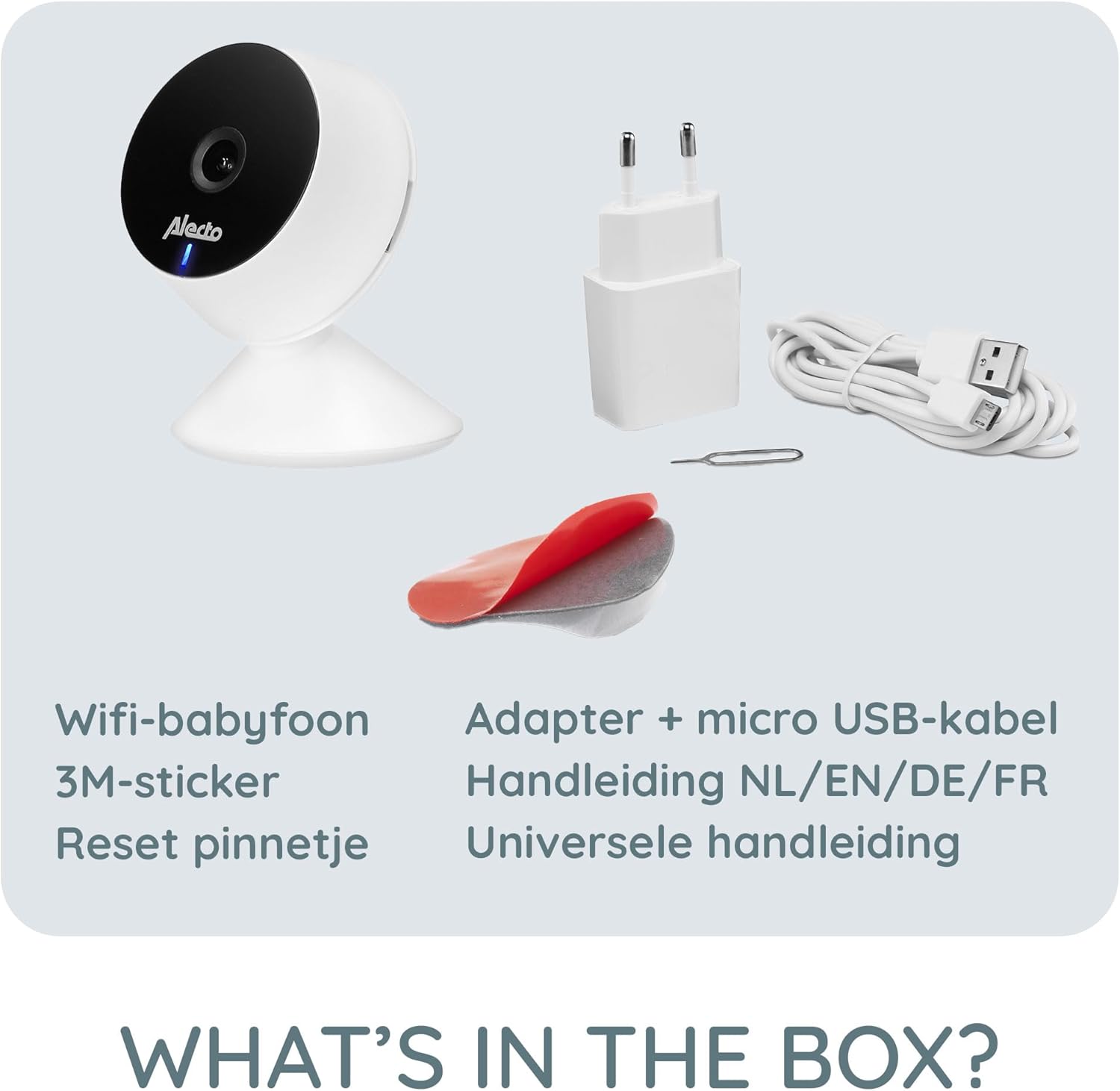
ກວດສອບວ່າລາຍການທັງຫມົດແມ່ນມີຢູ່ໃນຊຸດ:
- Alecto Smartbaby5 WiFi Baby Monitor Camera
- Power Adapter
- ສາຍ Micro USB
- ສະຕິກເກີ 3M
- ຕັ້ງ Pin
- ຄູ່ມືການນໍາໃຊ້ (ຫຼາຍພາສາ)

An illustration of the items included in the Alecto Smartbaby5 product box.
ຕັ້ງຄ່າ
1. ການເປີດກ້ອງ
- Connect the micro USB cable to the camera's power port.
- ສຽບອະແດບເຕີໄຟໃສ່ກັບປລັກສຽບໃສ່ຝາ.
- ກ້ອງຖ່າຍຮູບຈະເປີດຂຶ້ນ, ໂດຍມີໄຟ LED ສະແດງໄວ້.
2. ການຕິດຕັ້ງແອັບຯ ແລະການເຊື່ອມຕໍ່
The Alecto Smartbaby5 operates via the Smart Life application.
- ດາວນ໌ໂຫລດ ຊີວິດທີ່ສະຫຼາດ app ຈາກ App Store (iOS) ຫຼື Google Play Store (Android).
- ສ້າງບັນຊີຫຼືເຂົ້າສູ່ລະບົບຖ້າຫາກວ່າທ່ານມີແລ້ວ.
- Follow the in-app instructions to add a new device. Ensure your smartphone is connected to a ເຄືອຂ່າຍ Wi-Fi 2.4 GHz.
- The camera will guide you through the pairing process.

The Alecto Smartbaby5 requires a 2.4 GHz Wi-Fi connection for proper functionality.
3. ການຈັດວາງກ້ອງຖ່າຍຮູບ
Position the camera in a location that provides a clear view of the desired area (e.g., crib). The camera can be placed on a flat surface or mounted.
- ການຈັດວາງພື້ນຜິວ: ວາງກ້ອງຖ່າຍຮູບຢູ່ເທິງພື້ນຜິວທີ່ຮາບພຽງ.
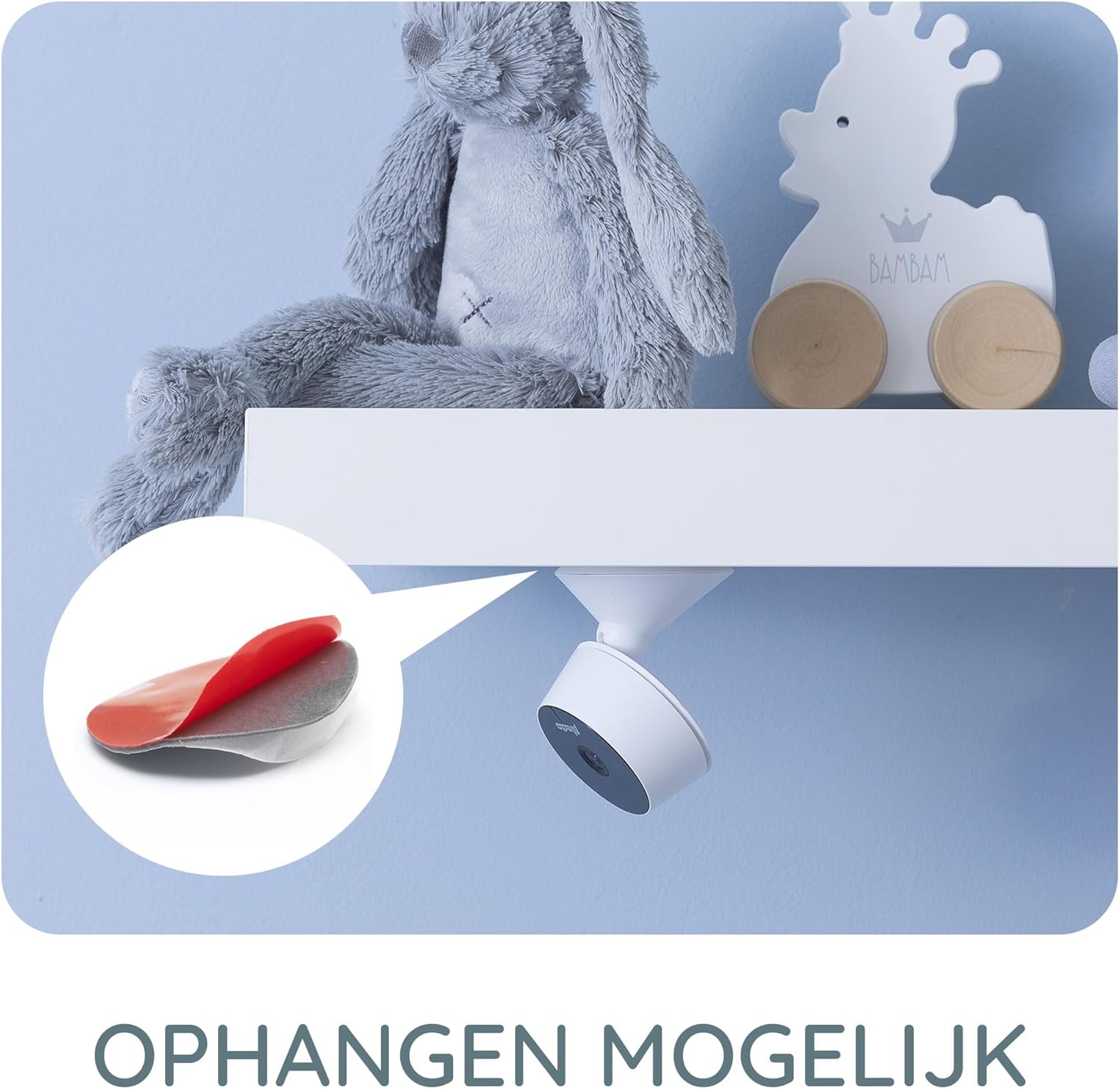
- Wall/Shelf Mounting: Use the provided 3M adhesive sticker to securely attach the camera to a wall or under a shelf. Ensure the surface is clean and dry before applying the adhesive.

The camera can be mounted under a shelf using the included 3M adhesive for optimal viewມຸມ.
ຄໍາແນະນໍາການດໍາເນີນງານ
ດໍາລົງຊີວິດ View ແລະການຕິດຕາມ
Once connected, open the Smart Life app on your smartphone or tablet to access the live video feed from the camera. The app provides a secure connection, ensuring only authorized users can view ອາຫານສັດ.
The Smart Life app interface showing various features like push notifications, recording, and MicroSD storage options.
Key Features via Smart Life App
- ຄວາມລະອຽດ HD: View live video in 1920 x 1080p HD resolution.
- ວິໄສທັດກາງຄືນອິນຟາເຣດ: The camera automatically switches to infrared night vision in low-light conditions, providing clear images in the dark.
- Motion and Sound Detection: Receive push notifications on your smartphone when movement or sound is detected in the monitored area.
- Two-Way Intercom Function: Use the built-in speaker and microphone to listen to and speak with your child remotely through the app.
- ການບັນທຶກ: Record images and videos directly to your smartphone or optionally to a MicroSD card (not included).
- Mobile Internet Access: Monitor your child via mobile internet (5G, 4G, or 3G) when away from your home Wi-Fi network.

The two-way intercom function allows remote communication with your child.
ບໍາລຸງຮັກສາ
- ທໍາຄວາມສະອາດ: ໃຊ້ຜ້າອ່ອນແລະແຫ້ງເພື່ອທຳຄວາມສະອາດເລນກ້ອງຖ່າຍຮູບ ແລະ ຕົວກ້ອງ. ຢ່າໃຊ້ນ້ຳຢາທຳຄວາມສະອາດທີ່ເປັນຂອງແຫຼວ ຫຼື ນ້ຳຢາສີດ.
- ການເກັບຮັກສາ: ຖ້າເກັບຮັກສາອຸປະກອນເປັນເວລາດົນ, ຖອດມັນອອກຈາກພະລັງງານແລະເກັບໄວ້ໃນບ່ອນທີ່ເຢັນ, ແຫ້ງ.
- ອັບເດດຊອບແວ: Regularly check the Smart Life app for available firmware updates for the camera to ensure optimal performance and security.
ການແກ້ໄຂບັນຫາ
| ບັນຫາ | ສາເຫດທີ່ເປັນໄປໄດ້ | ການແກ້ໄຂ |
|---|---|---|
| ກ້ອງຖ່າຍຮູບບໍ່ໄດ້ເຊື່ອມຕໍ່ກັບ Wi-Fi. | Incorrect Wi-Fi band (not 2.4 GHz), weak signal, incorrect password. | Ensure your router is broadcasting a 2.4 GHz signal. Move the camera closer to the router. Re-enter Wi-Fi password carefully. |
| No video feed in the app. | Camera is offline, app issue, internet connectivity problem. | Check if the camera is powered on and connected to Wi-Fi. Restart the app. Verify your smartphone's internet connection. |
| Motion/Sound detection not working. | Settings not enabled in the app, app notifications disabled. | Go to the camera settings in the Smart Life app and enable motion/sound detection. Check your phone's notification settings for the Smart Life app. |
| Intercom function not working. | Microphone/speaker issues, app permissions. | Ensure the app has microphone permissions on your phone. Check volume settings in the app. |
| ກ້ອງຖ່າຍຮູບຕົກອອກຈາກພື້ນຜິວຕິດຕັ້ງ. | Adhesive not strong enough, surface not clean. | Ensure the mounting surface is clean, dry, and smooth. Use a stronger adhesive if necessary, or consider screw mounting if available. |
ຂໍ້ມູນຈໍາເພາະ
- ໝາຍເລກຕົວແບບ: SMARTBABY5
- ວັດສະດຸຫຼັກ: ພາດສະຕິກ
- ຄຸນນະສົມບັດພິເສດ: Motion Detector, Infrared Night Vision, Two-Way Intercom
- ຄວາມເຂົ້າກັນໄດ້ຂອງອຸປະກອນ: ໂທລະສັບສະຫຼາດ (iOS, Android)
- ການສື່ສານໄຮ້ສາຍ: Wi-Fi (2.4 GHz ເທົ່ານັ້ນ)
- ປະເພດພະລັງງານ: ຂັບເຄື່ອນດ້ວຍອະແດັບເຕີ
- ແບັດເຕີຣີທີ່ຕ້ອງການ: ບໍ່
- ຄວາມລະອຽດວິດີໂອ: 1920 x 1080p (HD)
- ຂະໜາດ (L x W x H): 8 x 6 x 7.2 cm
- ນ້ຳໜັກ: 143 ກຣາມ
- ຜູ້ຜະລິດ: Commaxx
Physical dimensions of the Alecto Smartbaby5 baby monitor camera.
ການຮັບປະກັນແລະການສະຫນັບສະຫນູນ
For warranty information and technical support, please refer to the documentation provided with your product or visit the official Alecto website. Alecto Baby is committed to providing high-quality products and support.
ຜູ້ຜະລິດ: Commaxx


