ແນະນຳ
This manual provides detailed instructions for the safe and efficient operation, installation, and maintenance of your PowerDrive 2000 Watt Power Inverter, Model PWD2000P. This device converts 12V DC power from your vehicle battery into 110V AC power, allowing you to operate various AC devices and charge electronic devices on the go. Please read this manual thoroughly before using the inverter.
ຂໍ້ມູນຄວາມປອດໄພທີ່ສໍາຄັນ
Always observe the following safety precautions to prevent injury or damage to the inverter or connected devices:
- ຫ້າມເປີດ inverter ຄasing. ບໍ່ມີສ່ວນທີ່ຜູ້ໃຊ້ບໍລິການພາຍໃນ.
- ຮັບປະກັນການລະບາຍອາກາດທີ່ເໝາະສົມອ້ອມຮອບອິນເວີເຕີ. ຢ່າອຸດຕັນຊ່ອງລະບາຍຄວາມຮ້ອນ.
- ຮັກສາ inverter ຫ່າງຈາກນ້ໍາ, ຄວາມຊຸ່ມຊື່ນ, ແລະອຸປະກອນໄວໄຟ.
- ເຊື່ອມຕໍ່ອິນເວີເຕີເຂົ້າກັບແຫຼ່ງພະລັງງານ DC 12V ເທົ່ານັ້ນ.
- Do not exceed the inverter's rated power output (2000 Watts continuous, 4000 Watts surge).
- Always connect the inverter to the battery before plugging in AC devices.
- Disconnect the inverter from the battery when not in use.
- ຜະລິດຕະພັນນີ້ປະກອບດ້ວຍສານເຄມີທີ່ຮູ້ກັນໃນລັດຄາລິຟໍເນຍເພື່ອເຮັດໃຫ້ເກີດມະເຮັງແລະຄວາມຜິດປົກກະຕິໃນການເກີດລູກຫຼືເປັນອັນຕະລາຍຕໍ່ການຈະເລີນພັນອື່ນໆ. ລ້າງມືຫຼັງຈາກຈັບ.
ສ່ວນປະກອບຂອງຜະລິດຕະພັນ
The PowerDrive 2000 Watt Power Inverter comes with the following components:
- PowerDrive 2000 Watt Power Inverter unit
- 39-inch heavy-duty installation cables (red for positive, black for negative)
- ຈໍ LCD ທີ່ຖອດອອກໄດ້
- ວົງເລັບຕິດ

ຮູບທີ 1: ດ້ານໜ້າ view of the PowerDrive 2000 Watt Power Inverter, showing the digital display, power button, Bluetooth indicator, four AC 120V outlets, one USB-C port, and one USB-A port. The unit features a durable yellow and black casing with ventilation grilles.

ຮູບທີ 2: ເກີນview of the PowerDrive 2000 Watt Power Inverter with key dimensions (14.54" length, 9.8" width, 4.25" height) and included accessories. The image displays the inverter unit, red and black 39-inch battery cables, and a 12-foot remote LCD cable.
ການຕິດຕັ້ງແລະການຕິດຕັ້ງ
Proper installation is crucial for the inverter's performance and safety. Follow these steps carefully:
- ເລືອກສະຖານທີ່: Select a dry, well-ventilated area for mounting the inverter. Ensure it is away from direct sunlight, heat sources, and any flammable materials. The mounting brackets can be used to secure the unit.
- ການກະກຽມຫມໍ້ໄຟ: Ensure your vehicle's battery is a 12V DC system. Turn off the vehicle and any accessories.
- ເຊື່ອມຕໍ່ສາຍ:
- ເຊື່ອມຕໍ່ ສີແດງ (positive) cable to the ບວກ (+) terminal of the inverter.
- ເຊື່ອມຕໍ່ ສີດໍາ (negative) cable to the ລົບ (-) terminal of the inverter.
- ເຊື່ອມຕໍ່ປາຍອື່ນໆຂອງ ສີແດງ ສາຍໄຟກັບ ບວກ (+) terminal of the vehicle battery.
- ເຊື່ອມຕໍ່ປາຍອື່ນໆຂອງ ສີດໍາ ສາຍໄຟກັບ ລົບ (-) terminal of the vehicle battery.
ສຳຄັນ: Always connect the inverter terminals first, then the battery terminals. Ensure connections are tight and secure.
- Connect Remote LCD (Optional): If desired, connect the removable LCD screen to the inverter using the provided cable. This allows for remote monitoring and control.
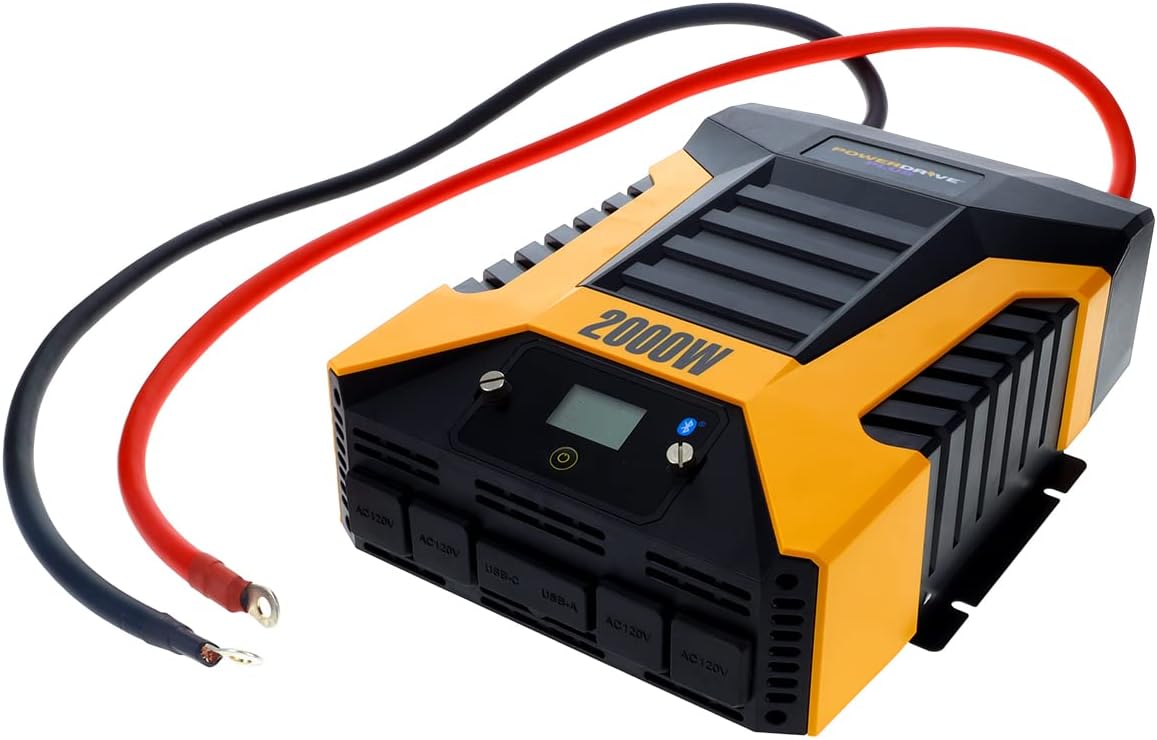
ຮູບທີ 3: The PowerDrive 2000 Watt Power Inverter with the red positive and black negative battery cables securely connected to its terminals, ready for connection to a vehicle battery. This illustrates the correct cable attachment for power input.
ຄໍາແນະນໍາການດໍາເນີນງານ
Once installed, the inverter is ready for operation:
- ກຳລັງເປີດ: Press the power button on the inverter's front panel or on the remote LCD screen. The digital display will illuminate, showing battery voltage ແລະຜົນຜະລິດ wattage.
- ອຸປະກອນເຊື່ອມຕໍ່: Plug your AC devices into the four 3-prong AC outlets. For charging smartphones and tablets, use the standard USB 2.4 Amp port or the fast-charging USB-C 3.0 Amp ທ່າເຮືອ.
- ການຕິດຕາມ: The digital display provides real-time information on battery voltage, output power (watts), and any error codes.
- ເທັກໂນໂລຍີໄຮ້ສາຍ Bluetooth:
- ດາວໂຫລດໄດ້ຟຣີ PowerDrive Plus app from your smartphone's app store (compatible with Android and iOS).
- Enable Bluetooth on your smartphone and pair it with the inverter.
- The app allows you to remotely monitor battery voltage, output power, and product temperature. You can also set up protections like undervoltage and overload, and power the inverter on/off from a distance.
- ປິດເຄື່ອງ: Press and hold the power button until the display turns off, or use the PowerDrive Plus app. Disconnect devices before turning off the inverter.

ຮູບທີ 4: ດ້ານໜ້າໃກ້ໆ view of the PowerDrive 2000 Watt Power Inverter, highlighting its four AC 120V outlets, one USB-C port, and one USB-A port. These ports provide versatile power options for various electronic devices and appliances.

ຮູບທີ 5: A smartphone screen showing the PowerDrive Plus application interface. The app displays real-time data such as output power (842 watts), battery power percentage (88%), battery voltage (12.6 VDC), and output voltage (120 VAC), along with temperature readings and control options.
ບໍາລຸງຮັກສາ
To ensure the longevity and optimal performance of your PowerDrive inverter, follow these maintenance guidelines:
- ຮັກສາຄວາມສະອາດ: Regularly wipe the exterior of the inverter with a dry, soft cloth. Do not use liquid cleaners or solvents.
- ການລະບາຍອາກາດ: Ensure the cooling fan vents are clear of dust and debris. The high-speed cooling fan automatically activates when needed and is designed for quiet operation.
- ການເຊື່ອມຕໍ່ສາຍ: Periodically check that all cable connections to the battery and inverter terminals are secure and free from corrosion.
- ການເກັບຮັກສາ: When not in use for extended periods, store the inverter in a cool, dry place, disconnected from the battery.

ຮູບທີ 6: ຫລັງ view of the PowerDrive 2000 Watt Power Inverter, showcasing its two high-speed cooling fans and the robust battery input terminals. Proper airflow through these fans is essential for maintaining optimal operating temperature.
ການແກ້ໄຂບັນຫາ
If you encounter issues with your inverter, refer to the following common problems and solutions:
| ບັນຫາ | ສາເຫດທີ່ເປັນໄປໄດ້ | ການແກ້ໄຂ |
|---|---|---|
| ບໍ່ມີພະລັງງານອອກ / ອິນເວີເຕີບໍ່ເປີດ |
|
|
| Inverter ປິດລົງເລື້ອຍໆ |
|
|
| ຈໍສະແດງຜົນດິຈິຕອນສະແດງລະຫັດຄວາມຜິດພາດ | Specific error condition (e.g., over-voltage, under-voltage, overload, short circuit) | Refer to the PowerDrive Plus app or contact customer support for specific error code interpretations and solutions. Address the underlying issue (e.g., reduce load, check battery). |
ຂໍ້ມູນຈໍາເພາະຂອງຜະລິດຕະພັນ
| ຄຸນສົມບັດ | ລາຍລະອຽດ |
|---|---|
| ຍີ່ຫໍ້ | PowerDrive |
| ໝາຍເລກຕົວແບບ | PWD2000P |
| ພະລັງງານຢ່າງຕໍ່ເນື່ອງ | 2000 ວັດ |
| ແຮງດັນ | 4000 ວັດ |
| ການປ້ອນຂໍ້ມູນ Voltage | 12V DC |
| ຜົນໄດ້ຮັບ Voltage | 110V AC |
| ເຕົ້າສຽບໄຟຟ້າ AC | Four 3-prong outlets |
| ພອດ USB | ຫນຶ່ງ USB 2.4 Amp, One USB-C 3.0 Amp |
| ການເຊື່ອມຕໍ່ | Bluetooth Wireless Technology (PowerDrive Plus App compatible) |
| ຈໍສະແດງຜົນ | Digital display (removable LCD screen) |
| ຄວາມເຢັນ | ພັດລົມຄວາມໄວສູງ |
| ນ້ໍາຫນັກລາຍການ | 9 ປອນ |
| ຂະໜາດສິນຄ້າ | 5.7 x 17 x 12 ນິ້ວ |
ການຮັບປະກັນແລະການສະຫນັບສະຫນູນ
For warranty information, technical support, or service inquiries, please contact PowerDrive customer service. Keep your purchase receipt as proof of purchase.
For additional resources and frequently asked questions, visit the official PowerDrive website or refer to the PowerDrive Plus app.


