ແນະນຳ
This manual provides instructions for the VINABTY replacement remote control, designed for seamless compatibility with various Evpad TV Box models. Please read this manual thoroughly before use to ensure proper operation and longevity of your remote control.
ຕັ້ງຄ່າ
ການຕິດຕັ້ງຫມໍ້ໄຟ
ການຄວບຄຸມໄລຍະໄກຕ້ອງການສອງຫມໍ້ໄຟ AAA (ບໍ່ລວມ).
- ຊອກຫາຊ່ອງໃສ່ຫມໍ້ໄຟຢູ່ດ້ານຫຼັງຂອງການຄວບຄຸມໄລຍະໄກ.
- ເລື່ອນຝາປິດຊ່ອງໃສ່ແບັດເຕີຣີລົງລຸ່ມເພື່ອເປີດມັນ.
- ໃສ່ໝໍ້ໄຟ AAA ສອງໜ່ວຍ, ຮັບປະກັນຈຸດບວກ (+) ແລະ ລົບ (-) ສອດຄ່ອງຖືກຕ້ອງກັບເຄື່ອງໝາຍພາຍໃນຊ່ອງ.
- ເລື່ອນຝາປິດຊ່ອງໃສ່ໝໍ້ໄຟຄືນໃສ່ບ່ອນເກົ່າຈົນກວ່າມັນຈະກົດຢ່າງປອດໄພ.
ໝາຍເຫດ: Ensure batteries are inserted with correct polarity. Incorrect insertion may prevent the remote from functioning.
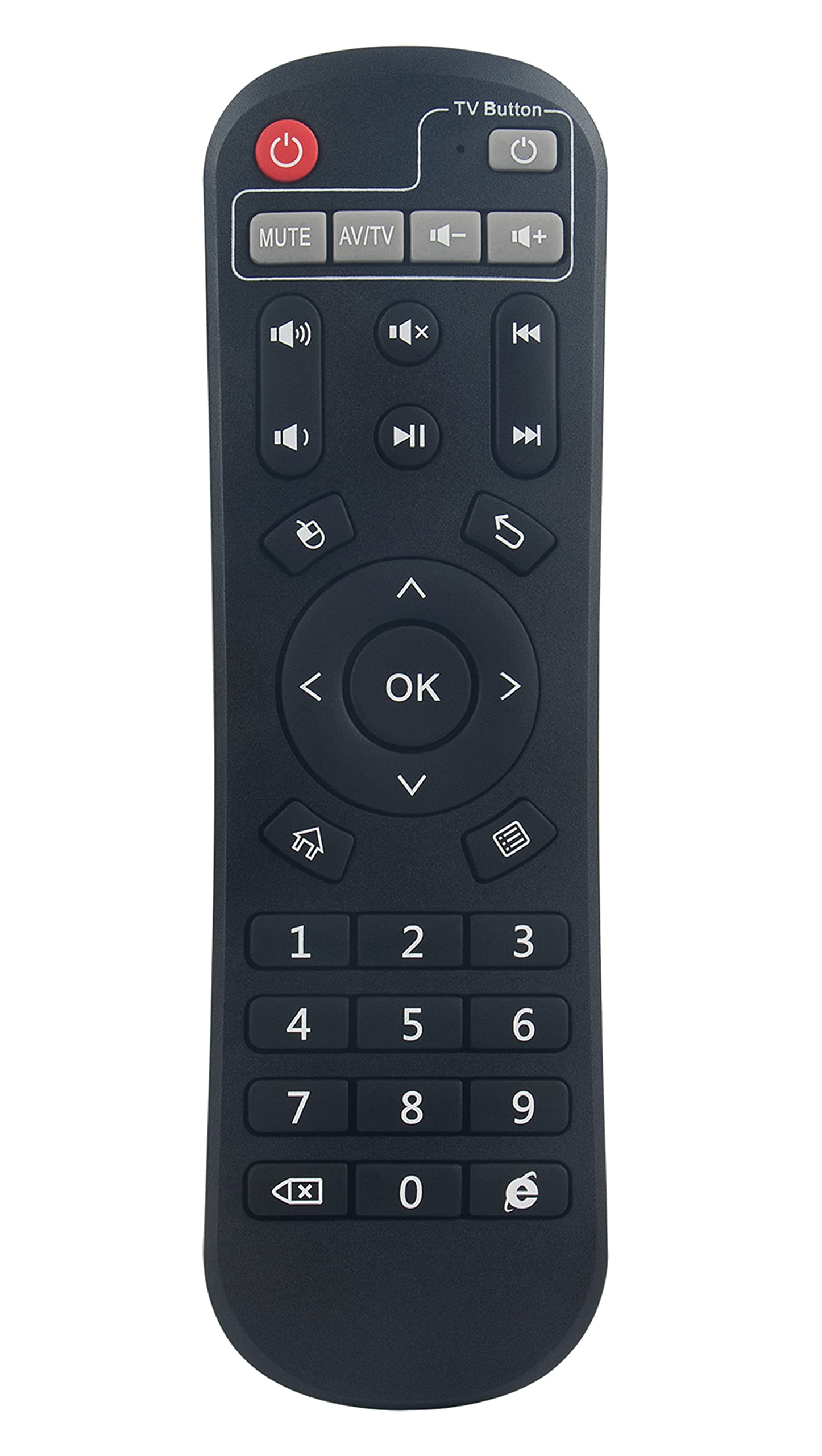
Image: A user operating the VINABTY replacement remote control with an Evpad TV Box connected to a television.
ຄໍາແນະນໍາການດໍາເນີນງານ
This remote control is pre-programmed for immediate use with compatible Evpad TV Box models. No additional setup or pairing is required.
ຟັງຊັນພື້ນຖານ
- ປຸ່ມເປີດປິດ: Turns the Evpad TV Box on or off.
- ປຸ່ມນຳທາງ (ຂຶ້ນ, ລົງ, ຊ້າຍ, ຂວາ): ໃຊ້ເພື່ອນໍາທາງເມນູແລະເລືອກທາງເລືອກ.
- ຕົກລົງ/ໃສ່ປຸ່ມ: ຢືນຢັນການເລືອກ.
- ປຸ່ມກັບຄືນ/ກັບຄືນ: ກັບຄືນໄປຫາໜ້າຈໍ ຫຼືເມນູກ່ອນໜ້າ.
- ປຸ່ມຫນ້າທໍາອິດ: Returns to the main home screen of the Evpad TV Box.
- ປະລິມານຂຶ້ນ/ລົງ: ປັບລະດັບສຽງ.
- ປິດສຽງ: ປິດສຽງ ຫຼືປິດສຽງ.
- ຊ່ອງຂຶ້ນ/ລົງ: Changes channels (if applicable to your Evpad setup).
- ປຸ່ມຕົວເລກ (0-9): ສຳລັບການປ້ອນຂໍ້ມູນຊ່ອງທາງໂດຍກົງ ຫຼື ການປ້ອນຂໍ້ມູນຕົວເລກອື່ນໆ.
ຄວາມເຂົ້າກັນໄດ້
This remote control is compatible with the following Evpad TV Box models:
- Evpad TV Box 2
- Evpad TV Box 2S
- Evpad TV Box 2T
- Evpad TV Box Pro
- Evpad TV Box Pro Plus
- Evpad TV Box Pro+ Plus
- Evpad TV Box 3
- Evpad TV Box 3s
ບໍາລຸງຮັກສາ
- ທໍາຄວາມສະອາດ: ເຊັດການຄວບຄຸມໄລຍະໄກດ້ວຍຜ້າອ່ອນ, ແຫ້ງ. ຢ່າໃຊ້ເຄື່ອງເຮັດຄວາມສະອາດຂອງແຫຼວຫຼືວັດສະດຸຂັດ.
- ການປ່ຽນແບັດເຕີຣີ: Replace batteries when the remote control's response becomes sluggish or stops working. Always replace both batteries at the same time with new ones.
- ການເກັບຮັກສາ: ຖ້າບໍ່ໄດ້ໃຊ້ຣີໂໝດຄວບຄຸມເປັນເວລາດົນ, ໃຫ້ຖອດແບັດເຕີຣີອອກເພື່ອປ້ອງກັນການຮົ່ວໄຫຼ ແລະ ຄວາມເສຍຫາຍ.
- ຫຼີກລ່ຽງການສຳຜັດເຊື້ອ: Keep the remote control away from direct sunlight, heat sources, and moisture.
ການແກ້ໄຂບັນຫາ
ການຄວບຄຸມໄລຍະໄກບໍ່ຕອບສະຫນອງ
- ກວດສອບຫມໍ້ໄຟ: Ensure batteries are inserted correctly with the correct polarity (+/-). Replace old batteries with new AAA batteries.
- Line of Sight: Ensure there is a clear line of sight between the remote control and the Evpad TV Box. Obstructions can block the infrared signal.
- ໄລຍະທາງ: Operate the remote control within the effective range of the Evpad TV Box.
- ແຊກແຊງ: Strong light sources or other infrared devices might interfere with the signal. Try operating the remote in a different environment.
ປຸ່ມສະເພາະບໍ່ເຮັດວຽກ
- ປຸ່ມທີ່ສະອາດ: ໃຫ້ແນ່ໃຈວ່າບໍ່ມີສິ່ງເສດເຫຼືອຕິດຢູ່ໃຕ້ປຸ່ມຕ່າງໆ.
- ກວດສອບຫມໍ້ໄຟ: ບາງຄັ້ງແບັດເຕີຣີຕໍ່າສາມາດເຮັດໃຫ້ປຸ່ມເຮັດວຽກບໍ່ສະໝໍ່າສະເໝີ. ໃຫ້ປ່ຽນແບັດເຕີຣີໃໝ່.
ຂໍ້ມູນຈໍາເພາະ
| ຄຸນສົມບັດ | ລາຍລະອຽດ |
|---|---|
| ຍີ່ຫໍ້ | ເຫຼົ້າແວງ |
| ອຸປະກອນທີ່ເຂົ້າກັນໄດ້ | Evpad TV Box 2, 2S, 2T, Pro, Pro Plus, Pro+ Plus, 3, 3s |
| ເຕັກໂນໂລຊີການເຊື່ອມຕໍ່ | ອິນຟາເລດ (IR) |
| ແຫຼ່ງພະລັງງານ | 2 x ຫມໍ້ໄຟ AAA (ບໍ່ລວມ) |
| ຂະໜາດສິນຄ້າ | 6.7 x 2 x 0.7 ນິ້ວ (17.0 x 5.1 x 1.8 cm) |
| ນ້ໍາຫນັກລາຍການ | 1.44 ອອນສ໌ (40.8 ກຣາມ) |
| ຄຸນນະສົມບັດພິເສດ | ການອອກແບບ Ergonomic |
| ຈຳນວນສູງສຸດຂອງອຸປະກອນທີ່ຮອງຮັບ | 1 |
| ໝາຍເລກຮຸ່ນ (ພາຍໃນ) | 1e61c098-7b6c-4015-ba66-a97cf34b2095 |
ຂໍ້ມູນການຮັບປະກັນ
This product is a replacement remote control. Please refer to the original purchase documentation or contact your retailer for specific warranty details. VINABTY typically offers a standard return/replacement policy for manufacturing defects.
ສະຫນັບສະຫນູນ
For further assistance or inquiries regarding your VINABTY replacement remote control, please contact your point of purchase or refer to the VINABTY official webເວັບໄຊທ໌ສຳລັບຕົວເລືອກການສະໜັບສະໜູນລູກຄ້າ.
ຊັບພະຍາກອນອອນໄລນ໌: ຊອກຫາ "VINABTY" and "Evpad remote control support" for additional information and FAQs.


