1. ບົດແນະນຳ
Thank you for choosing the DDPAI Z40 Dash Cam. This manual provides detailed instructions for the installation, setup, operation, and maintenance of your device. Please read this manual thoroughly before using the product to ensure proper function and safety.
The DDPAI Z40 is a high-resolution dash camera system designed to record driving footage, offering both front and rear camera views. It features 1944P resolution for the front camera, a Sony IMX335 sensor, built-in GPS, Wi-Fi connectivity, and a parking monitoring function.
2. ເນື້ອໃນຊຸດ
ກະລຸນາກວດເບິ່ງເນື້ອໃນຂອງແພັກເກັດເມື່ອ unboxing. ຖ້າລາຍການໃດຂາດຫາຍໄປ ຫຼືເສຍຫາຍ, ໃຫ້ຕິດຕໍ່ຮ້ານຂາຍຍ່ອຍຂອງເຈົ້າ.
- DDPAI Z40 Front Dash Cam Unit
- ກ້ອງຫຼັງ
- Power Cable (USB to Car Charger)
- ເຄື່ອງສາກລົດ
- ວົງເລັບຕິດຕັ້ງ
- ແຜ່ນຫນຽວ
- ເຄື່ອງມື Crowbar
- ຄູ່ມືຜູ້ໃຊ້
- Memory Card (Included with some packages)
3. ຜະລິດຕະພັນເກີນview
Familiarize yourself with the components of your DDPAI Z40 Dash Cam system.

This image displays the main DDPAI Z40 dash cam unit with labels pointing to its key components: the mounting bracket, the 2-inch LCD screen, the 6-lens Sony IMX335 camera, and the physical control buttons.
Front Camera Unit
- ເລນກ້ອງຖ່າຍຮູບ: Records front view (1944P resolution, 140° wide angle).
- ຈໍ LCD: 2.4-inch display for live view, ການຫຼິ້ນ ແລະການຕັ້ງຄ່າ.
- ປຸ່ມຄວບຄຸມ: Navigate menus and control functions.
- ລຳໂພງ/ໄມໂຄຣໂຟນ: ສຳລັບການບັນທຶກສຽງ ແລະ ການຫຼິ້ນຄືນ.
- ພອດໄຟ USB: Connects to the car charger.
- ພອດກ້ອງຫຼັງ: Connects the rear camera.
- ຊ່ອງສຽບກາດ MicroSD: Insert memory card for storage.
- ສະລັອດຕິງຕິດຕັ້ງ: Attaches to the adhesive bracket.
ຫນ່ວຍກ້ອງຖ່າຍຮູບຫລັງ
- ເລນກ້ອງຖ່າຍຮູບ: Records rear view (1080P resolution, 125° wide angle).
- ສາຍເຊື່ອມຕໍ່: Connects to the front camera unit.
4. ການຕິດຕັ້ງ
Proper installation is crucial for optimal performance and safety. Ensure the dash cam does not obstruct your view ຫຼືແຊກແຊງການຄວບຄຸມຍານພາຫະນະ.
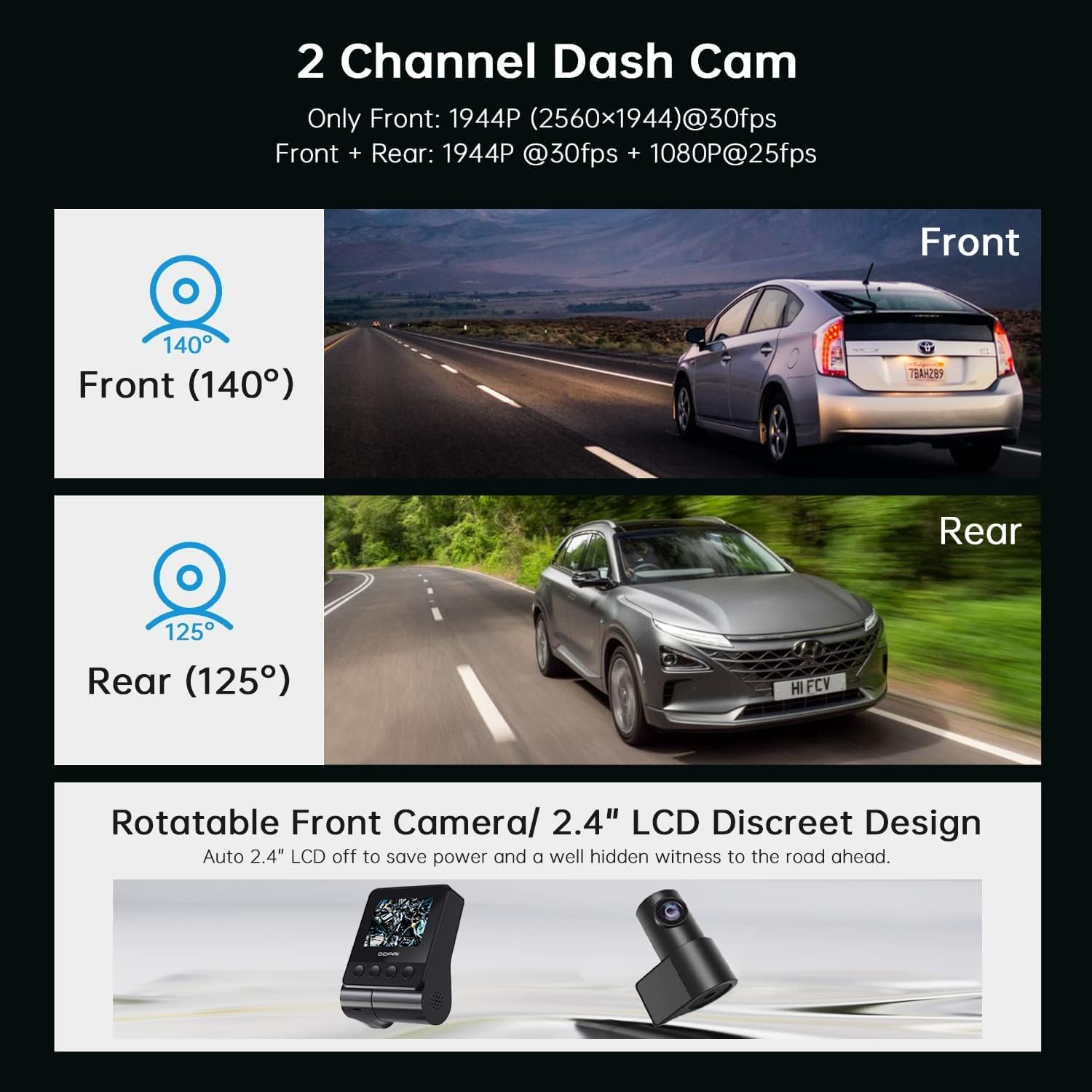
This image illustrates the dual-channel dash cam setup, showing the 140-degree front camera view and the 125-degree rear camera view, ກັບ example vehicles in each perspective.
4.1 ການໃສ່ແຜ່ນຄວາມ ຈຳ
- ກວດໃຫ້ແນ່ໃຈວ່າກ້ອງຕິດປິດ.
- Locate the MicroSD card slot on the side of the front camera unit.
- Insert a Class 10 or higher MicroSD card (up to 128GB recommended) into the slot until it clicks into place.
- ເພື່ອເອົາອອກ, ຄ່ອຍໆຍູ້ບັດເຂົ້າຈົນກ່ວາມັນອອກມາ.
4.2 Installing the Front Camera
- ເຮັດຄວາມສະອາດບໍລິເວນກະຈົກໜ້າລົດບ່ອນທີ່ທ່ານຕັ້ງໃຈຈະຕິດຕັ້ງກ້ອງວົງຈອນປິດ. ຮັບປະກັນວ່າມັນແຫ້ງ ແລະ ບໍ່ມີຝຸ່ນ.
- Attach the adhesive pad to the mounting bracket.
- Peel off the protective film from the adhesive pad and firmly press the bracket onto the windshield, ideally behind the rearview mirror, ensuring the lens has a clear view ຂອງຖະຫນົນຫົນທາງ.
- Slide the front camera unit onto the bracket until it locks securely.
- Adjust the camera angle to ensure the road ahead is centered in the frame.
4.3 ການຕິດຕັ້ງກ້ອງຫຼັງ
- ກຳນົດສະຖານທີ່ທີ່ເໝາະສົມຢູ່ເທິງກະຈົກໜ້າດ້ານຫຼັງຂອງທ່ານ, ໂດຍປົກກະຕິແລ້ວຈະຢູ່ໃຈກາງດ້ານເທິງ, ຮັບປະກັນວ່າມີພື້ນທີ່ທີ່ຊັດເຈນ view.
- ເຮັດຄວາມສະອາດພື້ນທີ່ຢ່າງລະອຽດ.
- Attach the rear camera with its adhesive pad to the chosen location.
- Connect the rear camera cable to the designated port on the front camera unit.
4.4 Power Connection and Cable Routing
- Connect the USB power cable to the front camera unit.
- ສຽບເຄື່ອງສາກໄຟລົດເຂົ້າກັບປລັກສຽບໄຟຈູດຢາສູບຂອງລົດທ່ານ.
- Carefully route the power cable and the rear camera cable along the edges of your windshield and interior trim using the provided crowbar tool to tuck them neatly away. This prevents obstruction and ensures a clean installation.
5. ຕັ້ງຄ່າ
After installation, configure your dash cam settings for optimal performance.
5.1 ການເປີດເຄື່ອງເບື້ອງຕົ້ນ
Once connected to power, the dash cam will automatically power on and begin recording when your vehicle starts. The LCD screen will display the live view from the front camera (and rear camera if connected).
5.2 DDPAI App Connection

This image shows the DDPAI mobile application interface for viewing, downloading, and sharing videos, along with a laptop screen displaying a map, illustrating the built-in GPS logger feature that records time, date, location, and speed information.
- ດາວນ໌ໂຫລດ ແອັບ DDPAI ຈາກຮ້ານແອັບໃນໂທລະສັບສະຫຼາດຂອງທ່ານ (iOS ຫຼື Android).
- ເປີດກ້ອງ dash.
- Open the DDPAI App and tap 'Add Device'.
- Select your DDPAI Z40 from the list of available Wi-Fi networks. The default Wi-Fi name usually starts with 'DDPAI_' followed by the model name or serial number. The default password is '1234567890'.
- ເມື່ອເຊື່ອມຕໍ່ແລ້ວ, ທ່ານສາມາດເຮັດໄດ້ view ດໍາລົງຊີວິດ footage, access recorded videos, and adjust settings via the app.
5.3 Basic Settings Configuration (via App or Device)
- ຄວາມລະອຽດວິດີໂອ: Set to 1944P for front and 1080P for rear for optimal clarity.
- ການບັນທຶກວົງ: Ensure this is enabled. Videos are recorded in segments (e.g., 1, 3, or 5 minutes). When the memory card is full, the oldest unlocked files ຈະຖືກຂຽນທັບ.
- ຄວາມອ່ອນໄຫວ G-Sensor: Adjust the sensitivity for emergency recording. A higher sensitivity will trigger recordings more easily during sudden impacts or braking.
- ບ່ອນຈອດລົດຕິດຕາມກວດກາ (Parking Monitor): Enable this feature for 24-hour surveillance. Requires a hardwire kit (sold separately) for continuous power.
- ວັນທີ/ເວລາ: Ensure the correct date and time are set. GPS will automatically synchronize this.
- ການບັນທຶກສຽງ: Enable or disable microphone recording.
6. ການດໍາເນີນງານ
Understand the various recording modes and features of your dash cam.
6.1 Driving Recording (Loop Recording)

This image highlights three key operational features: Emergency Recording, which locks video upon G-sensor activation; Parking Monitor, providing 24-hour surveillance; and Seamless Loop Recording, which overwrites old files ເມື່ອກາດຫນ່ວຍຄວາມຈໍາເຕັມ.
The dash cam automatically starts recording when the vehicle's ignition is turned on. Footage is saved in short segments (e.g., 1, 3, or 5 minutes) to the MicroSD card. When the card is full, the oldest unlocked files are overwritten by new recordings, ensuring continuous recording.
6.2 ການບັນທຶກສຸກເສີນ (ເຊັນເຊີ G)
In the event of a sudden impact, collision, or hard braking, the built-in G-sensor will detect the event and automatically lock the current video segment, preventing it from being overwritten by loop recording. These files are typically stored in a separate 'Event' folder on the memory card.
6.3 ຈໍຕິດຕາມສະຖານີຈອດ
When enabled and properly powered (e.g., via a hardwire kit), the dash cam can monitor your vehicle while parked. If an impact or motion is detected, it will automatically record a short video segment. This feature provides surveillance even when the vehicle is off.
6.4 GPS Logging
The built-in GPS module records your vehicle's speed, location, and route data. This information is embedded in the video files ແລະສາມາດເປັນ viewed during playback using the DDPAI App or compatible PC software.
6.5 Viewໃນແລະການດາວໂຫຼດ Footage
- Via DDPAI App: Connect your smartphone to the dash cam's Wi-Fi. Open the app, navigate to the 'Album' or 'Playback' section to view recorded videos. You can download desired clips directly to your phone.
- ຜ່ານຄອມພິວເຕີ: Remove the MicroSD card from the dash cam and insert it into a card reader connected to your computer. You can then access and copy the video files.
7. ບໍາລຸງຮັກສາ
ການບໍາລຸງຮັກສາເປັນປົກກະຕິຮັບປະກັນອາຍຸຍືນແລະການປະຕິບັດທີ່ດີທີ່ສຸດຂອງກ້ອງ dash ຂອງທ່ານ.
7.1 Memory Card Formatting
It is recommended to format the MicroSD card every 2-4 weeks to prevent data corruption and ensure smooth recording. This can be done through the DDPAI App or the dash cam's settings menu. ການຈັດຮູບແບບຈະລົບຂໍ້ມູນທັງຫມົດໃນບັດ, ສະນັ້ນສໍາຮອງຂໍ້ມູນທີ່ສໍາຄັນ files ທໍາອິດ.
7.2 ການເຮັດຄວາມສະອາດເລນ
Periodically clean the front and rear camera lenses with a soft, lint-free cloth to ensure clear video quality. Avoid using abrasive cleaners.
7.3 ການອັບເດດເຟີມແວ
Check the DDPAI App regularly for firmware updates. Updates can improve performance, add new features, or fix bugs. Follow the in-app instructions carefully when performing an update.
8. ການແກ້ໄຂບັນຫາ
If you encounter issues with your DDPAI Z40, refer to the following common problems and solutions.
- ກ້ອງວົງຈອນປິດບໍ່ເປີດ:
- Check the power cable connection to the dash cam and the car charger.
- Ensure the car charger is securely plugged into the cigarette lighter socket.
- Verify that the vehicle's cigarette lighter socket is receiving power. - ກ້ອງວົງຈອນປິດບໍ່ໄດ້ບັນທຶກ:
- Ensure a MicroSD card is inserted correctly.
- Format the MicroSD card (back up data first).
- Check if the memory card is full or corrupted. Replace if necessary.
- Verify loop recording is enabled in settings. - ຄຸນນະພາບວິດີໂອບໍ່ດີ:
- ທຳຄວາມສະອາດເລນກ້ອງຖ່າຍຮູບ.
- ໃຫ້ແນ່ໃຈວ່າຟິມປ້ອງກັນໄດ້ຖືກເອົາອອກຈາກເລນແລ້ວ.
- Check video resolution settings in the app.
- Ensure the windshield is clean where the camera is mounted. - ບັນຫາການເຊື່ອມຕໍ່ Wi-Fi:
- Ensure the dash cam is powered on.
- ເລີ່ມຕົ້ນໃໝ່ທັງກ້ອງວົງຈອນປິດ ແລະ ໂທລະສັບສະຫຼາດຂອງທ່ານ.
- Try forgetting the Wi-Fi network on your phone and reconnecting.
- Ensure you are within close proximity to the dash cam. - G-Sensor Too Sensitive/Not Sensitive Enough:
- Adjust the G-sensor sensitivity setting in the DDPAI App. - Parking Monitor Not Working:
- Ensure the parking monitor feature is enabled in settings.
- Verify that the dash cam is receiving continuous power (requires a hardwire kit).
If the problem persists, contact DDPAI customer support for further assistance.
9. ຂໍ້ມູນຈໍາເພາະ
Key technical specifications for the DDPAI Z40 Dash Cam.
| ຄຸນສົມບັດ | ຂໍ້ມູນຈໍາເພາະ |
|---|---|
| ຍີ່ຫໍ້ | DDPAI |
| ຊື່ຕົວແບບ | Z40 |
| ຄວາມລະອຽດກ້ອງໜ້າ | 1944P (2592 x 1944) @ 30fps |
| ຄວາມລະອຽດກ້ອງຫຼັງ | 1080P @ 25fps |
| ຜູ້ຜະລິດຊິບເຊັດ | ຮິຊິລິຄອນ |
| ເຊັນເຊີ | Sony IMX335 |
| ເລນ | 6-lens |
| ດ້ານໜ້າ View ມຸມ | 140° |
| ຫລັງ View ມຸມ | 125° |
| ຈໍສະແດງຜົນ | ຈໍ LCD ຂະໜາດ 2.4 ນິ້ວ |
| ການເຊື່ອມຕໍ່ | Wi-Fi |
| ຄຸນນະສົມບັດພິເສດ | Built-In GPS, Night Vision, Parking Monitor, G-Sensor, Loop Recording |
| ການເກັບຮັກສາ | MicroSD Card (Class 10 or higher, up to 128GB) |
| ແຫຼ່ງພະລັງງານ | Supercapacitor |
| ວິທີການຄວບຄຸມ | ແອັບ, ປຸ່ມທາງກາຍະພາບ |
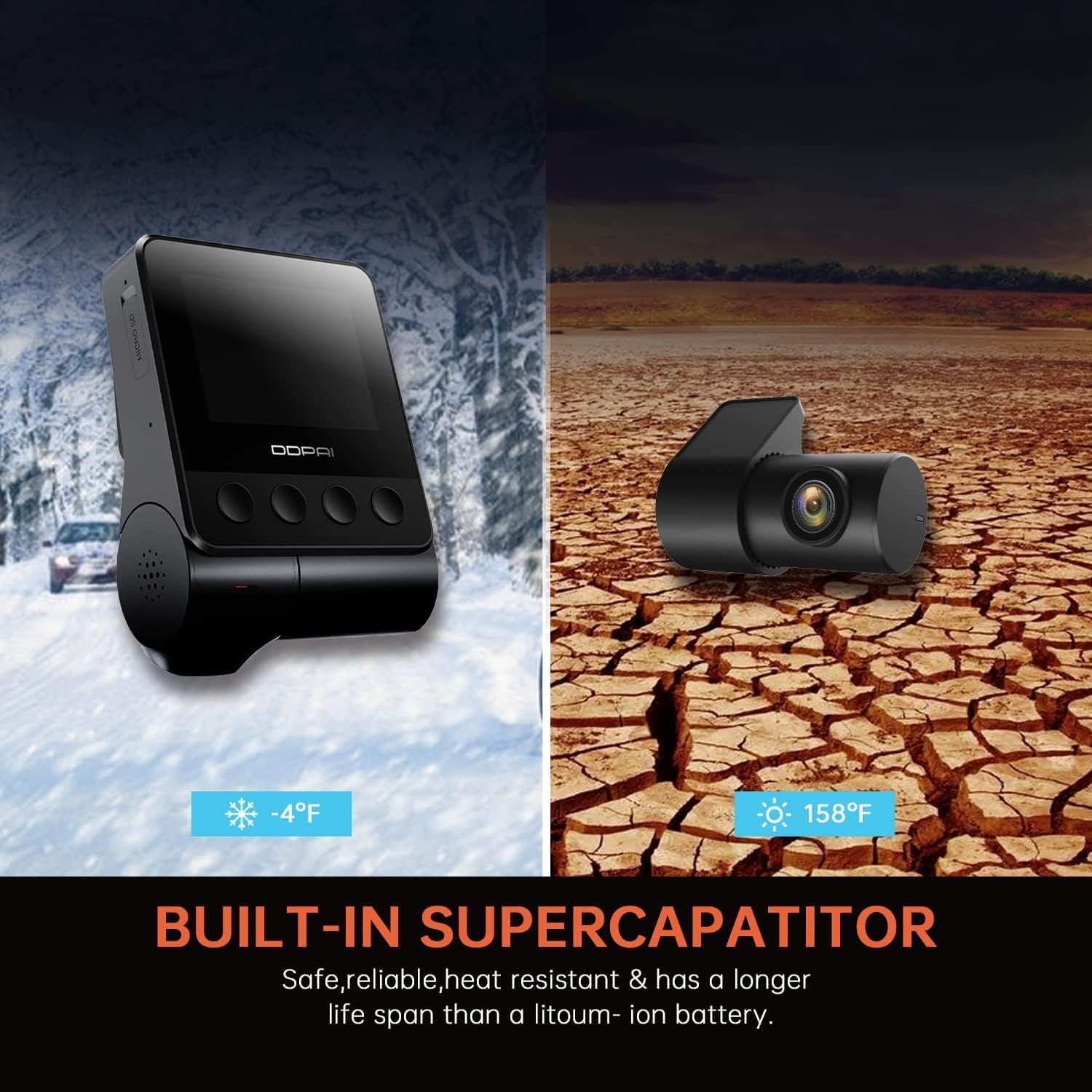
This image highlights the built-in supercapacitor, emphasizing its safety, reliability, heat resistance, and longer lifespan compared to lithium-ion batteries, with visual representations of extreme cold (-4°F) and hot (158°F) environments.
10. ການຮັບປະກັນແລະການສະຫນັບສະຫນູນ
For warranty information, please refer to the warranty card included in your product packaging or visit the official DDPAI website. For technical support, troubleshooting assistance, or inquiries about replacement parts, please contact DDPAI customer service through their official channels.


