1. ບົດແນະນຳ
This manual provides essential information for the safe and efficient assembly, operation, and maintenance of your Tempur-Pedic TP7000 Mesh Back Fabric Task Chair. Please read all instructions carefully before use and retain this manual for future reference.
2. ຂໍ້ມູນຄວາມປອດໄພ
- ຄວາມອາດສາມາດນ້ໍາຫນັກສູງສຸດ: This chair is designed to support a maximum weight of 250 pounds (113 kg). Exceeding this limit may cause damage to the chair or personal injury.
- ການນໍາໃຊ້ຈຸດປະສົງ: This chair is intended for office and task use. Do not use it for purposes other than its intended design.
- ສະພາແຫ່ງ: Ensure all components are securely fastened before using the chair. Periodically check all bolts and screws for tightness.
- ຄວາມໝັ້ນຄົງ: Avoid standing on the chair or using it as a step stool. Do not lean excessively to one side or the back, as this may cause the chair to tip over.
- ເດັກນ້ອຍ: Keep children away from the chair during assembly. Do not allow children to play on or around the chair.
3. ເນື້ອໃນຊຸດ
ກ່ອນທີ່ຈະເລີ່ມປະກອບ, ໃຫ້ກວດສອບວ່າທຸກຊິ້ນສ່ວນມີຢູ່ ແລະ ບໍ່ເສຍຫາຍ. ຖ້າມີຊິ້ນສ່ວນໃດຂາດຫາຍໄປ ຫຼື ເສຍຫາຍ, ຢ່າດຳເນີນການປະກອບຕໍ່ໄປ. ຕິດຕໍ່ຝ່າຍສະໜັບສະໜູນລູກຄ້າເພື່ອຂໍຄວາມຊ່ວຍເຫຼືອ.
- Chair Back (Mesh)
- Chair Seat (Fabric with Tempur Material)
- ທີ່ວາງແຂນ (2)
- Chair Base (5-star with casters)
- ຖັງຍົກແກັດ
- ແຜ່ນກົນໄກ
- ຊຸດຮາດແວ ( screws , washers , Allen wrench )
4. ການຕິດຕັ້ງແລະການປະກອບ
Follow these steps to assemble your Tempur-Pedic TP7000 Task Chair. It is recommended to assemble the chair on a soft, non-abrasive surface to prevent damage.
- ຄັດຕິດ Casters ກັບຖານ: ສຽບ 5 casters ເຂົ້າໄປໃນຮູໃນຕອນທ້າຍຂອງຂາຂອງເກົ້າອີ້ແຕ່ລະຄົນ. ຍູ້ແຫນ້ນຈົນກ່ວາພວກເຂົາກົດເຂົ້າໄປໃນສະຖານທີ່.
- ໃສ່ Gas Lift: ວາງກະບອກຍົກອາຍແກັສເຂົ້າໄປໃນຂຸມກາງຂອງຖານເກົ້າອີ້ທີ່ປະກອບ.
- ຕິດແຜ່ນກົນໄກໃສ່ບ່ອນນັ່ງ: Align the mechanism plate with the pre-drilled holes on the underside of the chair seat. Secure it using the provided screws and Allen wrench. Ensure the front of the mechanism faces the front of the seat.
- ຕິດທີ່ວາງແຂນໃສ່ບ່ອນນັ່ງ: Attach the armrests to the sides of the chair seat using the designated screws. Do not fully tighten yet.
- Attach Backrest to Seat/Mechanism: Align the backrest with the mounting points on the mechanism plate or seat. Secure with screws. Once the backrest is attached, fully tighten all armrest screws.
- ເຊື່ອມຕໍ່ບ່ອນນັ່ງກັບຍົກອາຍແກັສ: ຄ່ອຍໆວາງບ່ອນນັ່ງ ແລະ ພະນັກພິງຫຼັງທີ່ປະກອບເຂົ້າກັນແລ້ວໃສ່ກະບອກຍົກອາຍແກັສ, ໂດຍຮັບປະກັນວ່າປາຍຮູບຈວຍຂອງເຄື່ອງຍົກອາຍແກັສພໍດີກັບແຜ່ນກົນໄກຢ່າງແໜ້ນໜາ.


5. ຄໍາແນະນໍາການດໍາເນີນງານ (ການປັບຕົວ)
Your Tempur-Pedic TP7000 chair offers several adjustments to customize your seating experience for optimal comfort and support.
- ການປັບຄວາມສູງບ່ອນນັ່ງ: ເພື່ອຍົກບ່ອນນັ່ງ, ຍົກ lever ທີ່ຢູ່ໃຕ້ເບື້ອງຂວາຂອງບ່ອນນັ່ງໃນຂະນະທີ່ເອົານ້ໍາຫນັກຂອງທ່ານອອກຈາກເກົ້າອີ້. ເພື່ອຫຼຸດບ່ອນນັ່ງ, ໃຫ້ຍົກ lever ໃນຂະນະທີ່ນັ່ງ. ປ່ອຍ lever ໃນລະດັບຄວາມສູງທີ່ຕ້ອງການ.
- ການປັບຄວາມສູງທີ່ວາງແຂນ: Press the button on the side of each armrest and move the armrest up or down to your preferred height. Release the button to lock it in place.
- ລັອກ/ປົດລັອກການອຽງ: The chair features a single reclining position. To allow the chair to recline, pull the lever (usually the same as the height adjustment lever, or a separate one) outwards. To lock the chair in an upright position, push the lever inwards.
- ການປັບຄວາມເຄັ່ງຕຶງອຽງ: Rotate the round knob located under the front of the seat to adjust the tension of the recline. Turn clockwise to increase tension (making it harder to recline) and counter-clockwise to decrease tension (making it easier to recline).
6. ບໍາລຸງຮັກສາ
ການດູແລທີ່ເໝາະສົມຈະຊ່ວຍຍືດອາຍຸການໃຊ້ງານ ແລະ ຮູບລັກສະນະຂອງຕັ່ງອີ້ຂອງທ່ານ.
- ທໍາຄວາມສະອາດ: The fabric seat and mesh back should be spot cleaned only. Use a mild detergent and a damp cloth. Do not saturate the fabric. Test any cleaning solution on an inconspicuous area first.
- ການກວດກາ: Periodically inspect all bolts, screws, and connections to ensure they are tight. Retighten as necessary.
- ນັກສະແດງ: ຮັກສາລໍ້ໃຫ້ບໍ່ມີຜົມ ແລະ ສິ່ງເສດເຫຼືອເພື່ອຮັບປະກັນການເຄື່ອນໄຫວທີ່ລຽບງ່າຍ.
- ຫຼີກເວັ້ນສານເຄມີທີ່ຮຸນແຮງ: Do not use abrasive cleaners, solvents, or strong detergents, as these can damage the chair's materials.
7. ການແກ້ໄຂບັນຫາ
ຖ້າທ່ານພົບບັນຫາກັບເກົ້າອີ້ຂອງທ່ານ, ໃຫ້ອ້າງອີງເຖິງບັນຫາທົ່ວໄປຕໍ່ໄປນີ້ແລະວິທີແກ້ໄຂ:
- ຕັ່ງອີ້ຈົມ ຫຼື ບໍ່ຢືນ:
ການແກ້ໄຂ: The gas lift cylinder may be faulty. Contact customer support for a replacement. - Chair Squeaks:
ການແກ້ໄຂ: Check all screws and bolts and tighten them. A small amount of silicone lubricant can be applied to moving parts if the squeaking persists. - Casters Do Not Roll Smoothly:
ການແກ້ໄຂ: Remove any hair or debris wrapped around the caster wheels. Clean the wheels with a damp ຜ້າ. - Chair Does Not Recline:
ການແກ້ໄຂ: Ensure the tilt lock lever is disengaged (pulled outwards). Adjust the tilt tension knob counter-clockwise to reduce tension.
8. ຂໍ້ມູນຈໍາເພາະ
| ຄຸນສົມບັດ | ລາຍລະອຽດ |
|---|---|
| ຍີ່ຫໍ້ | Tempur-Pedic |
| ຕົວແບບ | TP7000 |
| ສີ | Cobalt (Seat), Black (Mesh Back) |
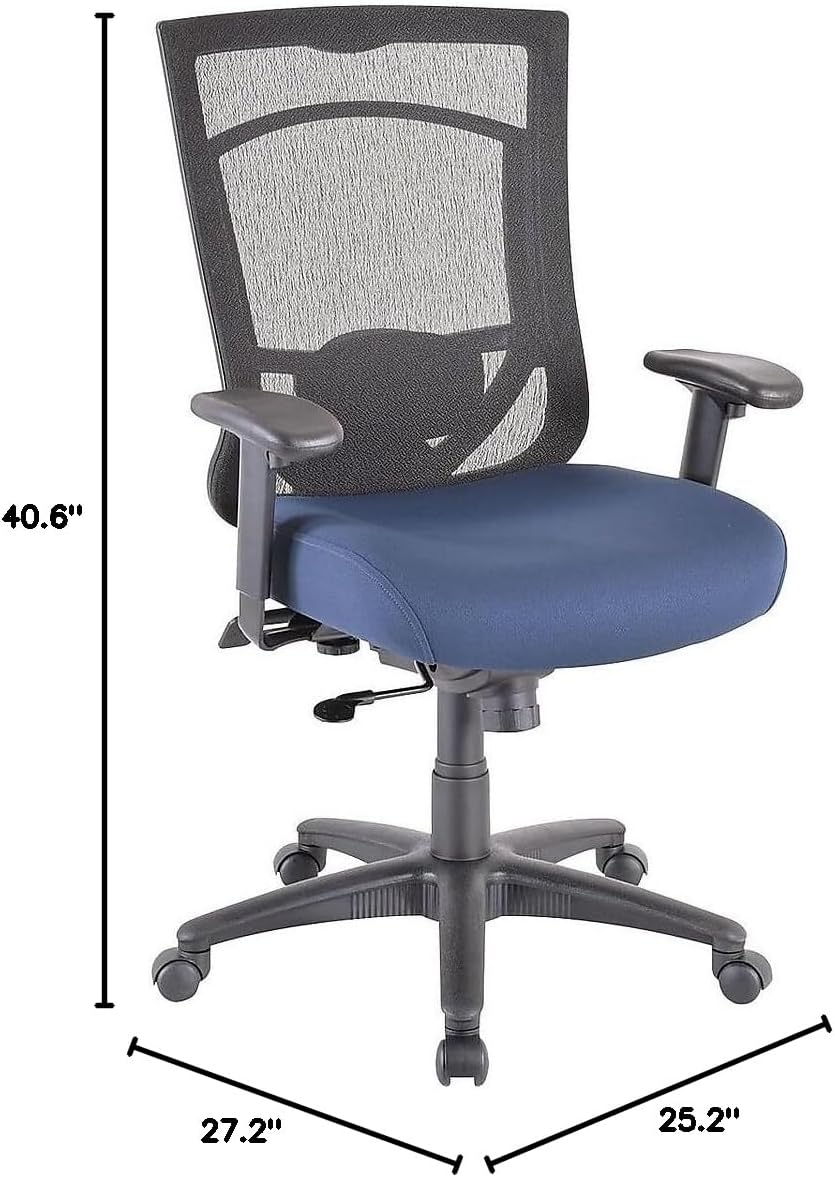
| ຂະໜາດລວມ (H x W x D) | 40.6-44.1" x 27.2" x 25.2" |
| ຂະໜາດບ່ອນນັ່ງ (ກວ້າງ x ກວ້າງ) | 20.9" x 20.1" |
| Back Dimensions (W x H) | 20.9" x 22.4" |
| ຄໍາແນະນໍານ້ໍາຫນັກສູງສຸດ | 250 lbs (113 ກິໂລ) |
| ວັດສະດຸ | Mesh Back, Fabric Seat with Authentic Tempur Material |
| ຄຸນນະສົມບັດພິເສດ | Adjustable Height, Adjustable Armrests, Tilt Lock, Tilt Tension |
| ຄໍາແນະນໍາການດູແລຜະລິດຕະພັນ | ຈຸດສະອາດ |
| ການນໍາໃຊ້ປະຈໍາວັນແນະນໍາ | 8-10 ຊົ່ວໂມງ |
9. ການຮັບປະກັນແລະການສະຫນັບສະຫນູນ
Your Tempur-Pedic TP7000 Mesh Back Fabric Task Chair is backed by a ຮັບປະກັນຕະຫຼອດຊີວິດ. This warranty covers defects in materials and workmanship under normal use. Specific terms and conditions apply.
For warranty claims, technical support, or to order replacement parts, please contact Tempur-Pedic customer service. Refer to your purchase documentation or the official Tempur-Pedic webເວັບໄຊສໍາລັບຂໍ້ມູນຕິດຕໍ່ໃນປະຈຸບັນຫຼາຍທີ່ສຸດ.
When contacting support, please have your model number (TP7000) and proof of purchase readily available.


