1. ຜະລິດຕະພັນເກີນview
The Baseus Metal Gleam Series 8-in-1 USB-C Hub is a versatile docking station designed to expand the connectivity of your USB-C enabled devices. It integrates multiple essential ports, including USB 3.0, HDMI, USB-C Power Delivery (PD), and microSD/SD card readers, into a single compact unit. This hub is ideal for enhancing productivity by connecting various peripherals, external displays, and charging your device simultaneously.

The Baseus Metal Gleam Series 8-in-1 USB-C Hub is presented in its retail box, showcasing the product and its key features on the packaging.
2. ຄຸນນະສົມບັດທີ່ສໍາຄັນ
- ການເຊື່ອມຕໍ່ 8-in-1: Provides comprehensive port expansion for modern USB-C devices.
- Triple USB 3.0 Ports: Offers high-speed data transfer up to 5Gbps for peripherals like external hard drives, keyboards, and mice.
- Dual HDMI Outputs: Supports dual-display ultra-clear expansion, enabling connection to two external monitors for enhanced multitasking.
- ການຈັດສົ່ງພະລັງງານ USB-C (PD): Allows for fast charging of your host device with up to 100W power pass-through.
- MicroSD/SD Card Readers: Facilitates quick access to photos and videos from memory cards.
- ການອອກແບບກະທັດລັດແລະ Portable: Metal gleam series design ensures durability and easy portability.
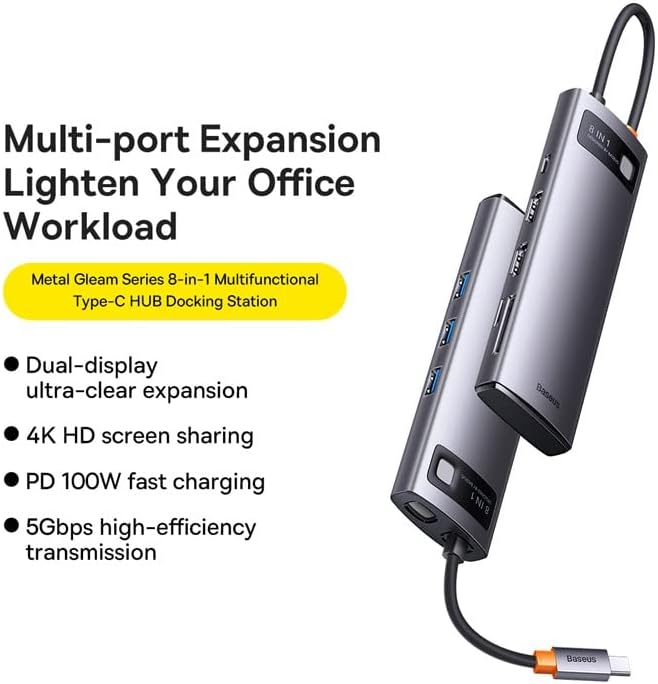
This graphic highlights the multi-port expansion capabilities of the Baseus Metal Gleam Series 8-in-1 USB-C Hub, emphasizing its ability to lighten office workload with features like dual-display, 4K HD screen sharing, PD 100W fast charging, and 5Gbps high-efficiency transmission.
3. ເນື້ອໃນຊຸດ
- 1 x Baseus Metal Gleam Series 8-in-1 USB-C Hub
- 1 x ຄູ່ມືຜູ້ໃຊ້
4. ຄໍາແນະນໍາການຕິດຕັ້ງ
- ເຊື່ອມຕໍ່ຫາອຸປະກອນໂຮສ: Plug the USB-C connector of the hub into the USB-C port of your laptop, tablet, or smartphone. Ensure the connection is secure.
- ເຊື່ອມຕໍ່ອຸປະກອນຕໍ່ພ່ວງ: Connect your USB devices (e.g., mouse, keyboard, external hard drive) to the USB 3.0 ports on the hub.
- ເຊື່ອມຕໍ່ຈໍສະແດງຜົນ: Use HDMI cables to connect your external monitors to the HDMI ports on the hub.
- ການຈັດສົ່ງພະລັງງານ (ທາງເລືອກ): If your host device requires charging, connect your original USB-C power adapter to the USB-C PD port on the hub. This will charge your device while using the hub.
- ໃສ່ກາດຫນ່ວຍຄວາມຈໍາ: Insert your microSD or SD cards into the corresponding slots for data access.

This image provides an angled perspective of the Baseus Metal Gleam Series 8-in-1 USB-C Hub, highlighting its sleek design and the three accessible USB 3.0 ports on its side.
5. ຄໍາແນະນໍາການດໍາເນີນງານ
5.1. USB 3.0 Data Transfer
Connect USB devices such as flash drives, external hard drives, or other USB peripherals to the USB 3.0 ports. The hub supports data transfer speeds of up to 5Gbps.
5.2. HDMI Display Output
Connect your monitors using HDMI cables. The hub supports dual HDMI output. For optimal performance, ensure your display settings on your computer are configured correctly for extended or mirrored displays.
- ລະບົບ Windows: Supports triple-display (A+B+C) at 1080P@60Hz in expansion mode, and (A+A+A) at 1080P@60Hz in mirroring mode.
- Apple OS Systems: Supports dual-display (A+B+B) at 4K@30Hz in expansion mode, and (A+A+A) at 4K@30Hz in mirroring mode.

This visual guide demonstrates the dual-display functionality of the Baseus Metal Gleam Series 8-in-1 USB-C Hub, showing both expansion and mirroring modes for Windows systems (1080P@60Hz) and Apple OS systems (4K@30Hz).
5.3. ການສົ່ງພະລັງງານ USB-C
The USB-C PD port allows you to charge your host device (laptop, tablet) while simultaneously using the hub's other functions. Connect your device's original USB-C power adapter to this port. The hub supports up to 100W power pass-through.
5.4. SD/MicroSD Card Reader
Insert your SD or microSD cards into the designated slots. The hub will allow your device to read and write data to these cards.
6. ບໍາລຸງຮັກສາ
- ທໍາຄວາມສະອາດ: Use a soft, dry cloth to clean the surface of the hub. Avoid using liquid cleaners or abrasive materials.
- ການເກັບຮັກສາ: ເກັບໄວ້ໃນບ່ອນທີ່ເຢັນ, ແຫ້ງ, ຫ່າງຈາກແສງແດດໂດຍກົງ ແລະອຸນຫະພູມທີ່ຮຸນແຮງ.
- ການຈັດການ: ຫຼີກລ່ຽງການຖິ້ມສູນ ຫຼື ຜົນກະທົບທີ່ຮຸນແຮງ. ຢ່າພະຍາຍາມຖອດອຸປະກອນ.

An exploded diagram of the Baseus Metal Gleam Series 8-in-1 USB-C Hub illustrates its internal electronic components and sophisticated circuit board design.
7. ການແກ້ໄຂບັນຫາ
- ບໍ່ມີການສະແດງຜົນອອກ:
- Ensure the HDMI cables are securely connected to both the hub and the monitor.
- Verify that your monitor input source is set to the correct HDMI port.
- Check your computer's display settings to ensure the external monitor is detected and configured.
- ລອງຣີສະຕາດຄອມພິວເຕີຂອງທ່ານ.
- Devices Not Recognized (USB/SD/MicroSD):
- Ensure the hub's USB-C connector is fully inserted into your host device.
- Try connecting the device directly to your computer's USB port to confirm it functions independently.
- Restart your computer and reconnect the hub.
- ບໍ່ມີການຈັດສົ່ງພະລັງງານ / ການສາກໄຟ:
- Ensure your USB-C power adapter is connected to the hub's PD port and is functioning correctly.
- Verify that your host device supports USB-C Power Delivery.
- ການເຊື່ອມຕໍ່ແບບບໍ່ຢຸດຢັ້ງ:
- ໃຫ້ແນ່ໃຈວ່າການເຊື່ອມຕໍ່ທັງຫມົດແມ່ນຫນັກແຫນ້ນແລະຫມັ້ນຄົງ.
- ຫຼີກເວັ້ນການວາງສູນກາງຢູ່ໃກ້ກັບແຫຼ່ງລົບກວນແມ່ເຫຼັກໄຟຟ້າທີ່ເຂັ້ມແຂງ.
8. ຂໍ້ມູນຈໍາເພາະ
| ຄຸນລັກສະນະ | ມູນຄ່າ |
|---|---|
| ຂະໜາດສິນຄ້າ | 3.94 x 1.97 x 1.18 ນິ້ວ |
| ນ້ໍາຫນັກລາຍການ | 5.3 ອອນ |
| ໝາຍເລກຕົວແບບ | WKWG050113 |
| ການໂຕ້ຕອບຮາດແວ | USB 3.0, HDMI, USB-C, SD, MicroSD |
| ຄຸນນະສົມບັດພິເສດ | ແບບພົກພາ |
| ອຸປະກອນທີ່ເຂົ້າກັນໄດ້ | ອຸປະກອນທີ່ມີພອດ USB-C |
| ພອດ USB ທັງໝົດ | 8 (3x USB 3.0, 2x HDMI, 1x USB-C PD, 1x MicroSD, 1x SD) |
| ຄວາມລະອຽດ HDMI | Up to 4K@30Hz (Apple OS), 1080P@60Hz (Windows) |
| ວັດສະດຸປ້ອນ USB-C PD | ສູງເຖິງ 100W |
| ຄວາມໄວການຖ່າຍໂອນຂໍ້ມູນ | ສູງສຸດ 5Gbps (USB 3.0) |
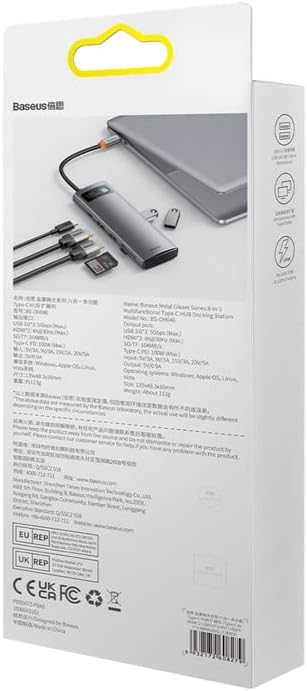
ດ້ານຫລັງ view of the product packaging displays detailed technical specifications and compliance information for the Baseus Metal Gleam Series 8-in-1 USB-C Hub.
9. ການຮັບປະກັນແລະການສະຫນັບສະຫນູນ
For warranty information, technical support, or further inquiries, please visit the official Baseus webເວັບໄຊ ຫຼືຕິດຕໍ່ບໍລິການລູກຄ້າຂອງເຂົາເຈົ້າ. ຮັກສາໃບຮັບເງິນການຊື້ຂອງທ່ານສໍາລັບການຮ້ອງຂໍການຮັບປະກັນ.
Official Baseus Webເວັບໄຊ: www.baseus.com


