ແນະນຳ
This manual provides essential information for the safe and effective operation of your Mackie Thump212XT 12-inch 1400W Enhanced Powered Loudspeaker. Please read this manual thoroughly before using the product to ensure proper setup, optimal performance, and to prevent damage.
ຂໍ້ມູນຄວາມປອດໄພທີ່ສໍາຄັນ
ປະຕິບັດຕາມຄວາມລະມັດລະວັງດ້ານຄວາມປອດໄພຂັ້ນພື້ນຖານສະເໝີເມື່ອໃຊ້ຜະລິດຕະພັນນີ້ເພື່ອຫຼຸດຜ່ອນຄວາມສ່ຽງຕໍ່ການເກີດອັກຄີໄພ, ໄຟໄໝ້, ແລະການບາດເຈັບ. ຮັກສາຄູ່ມືນີ້ໄວ້ສໍາລັບການອ້າງອີງໃນອະນາຄົດ.
- ຢ່າເຮັດໃຫ້ເຄື່ອງໃຊ້ນີ້ຖືກຝົນ ຫຼືຄວາມຊຸ່ມຊື່ນ.
- ຢ່າໃຊ້ອຸປະກອນນີ້ຢູ່ໃກ້ກັບນ້ໍາ.
- ເຮັດຄວາມສະອາດດ້ວຍຜ້າແຫ້ງເທົ່ານັ້ນ.
- ຫ້າມປິດຊ່ອງລະບາຍອາກາດໃດໆ. ຕິດຕັ້ງຕາມຄໍາແນະນໍາຂອງຜູ້ຜະລິດ.
- ຫ້າມຕິດຕັ້ງໃກ້ກັບແຫຼ່ງຄວາມຮ້ອນເຊັ່ນລັງສີ, ເຄື່ອງບັນທຶກຄວາມຮ້ອນ, ເຕົາຫຼືອຸປະກອນອື່ນໆ (ລວມທັງ. amplifiers) ທີ່ຜະລິດຄວາມຮ້ອນ.
- ປົກປ້ອງສາຍໄຟຈາກການຖືກສຽບ ຫຼື ສຽບ, ໂດຍສະເພາະຢູ່ປລັກສຽບ, ກ່ອງຮັບສະດວກ, ແລະຈຸດທີ່ພວກມັນອອກຈາກອຸປະກອນ.
- ໃຊ້ໄຟລ໌ແນບ/ອຸປະກອນເສີມທີ່ຜູ້ຜະລິດລະບຸໄວ້ເທົ່ານັ້ນ.
- ຖອດອຸປະກອນນີ້ອອກໃນລະຫວ່າງການມີພາຍຸຟ້າຜ່າ ຫຼືເມື່ອບໍ່ໄດ້ໃຊ້ເປັນເວລາດົນນານ.
- ອ້າງອີງການບໍລິການທັງໝົດໃຫ້ກັບພະນັກງານບໍລິການທີ່ມີຄຸນວຸດທິ. ການບໍລິການແມ່ນຕ້ອງການເມື່ອອຸປະກອນໄດ້ຮັບຄວາມເສຍຫາຍໃນທາງໃດກໍ່ຕາມເຊັ່ນ: ສາຍໄຟຫຼືປລັກສຽບຖືກເສຍຫາຍ, ແຫຼວຮົ່ວໄຫຼຫຼືສິ່ງຂອງຕົກເຂົ້າໄປໃນອຸປະກອນ, ອຸປະກອນຖືກຝົນຫຼືຄວາມຊຸ່ມຊື່ນ, ບໍ່ເຮັດວຽກຕາມປົກກະຕິ. , ຫຼືໄດ້ຖືກຫຼຸດລົງ.
ຂໍ້ສະເໜີ 65 ຄຳເຕືອນ: ຜະລິດຕະພັນນີ້ປະກອບດ້ວຍສານເຄມີທີ່ຮູ້ຈັກກັບລັດຄາລິຟໍເນຍເພື່ອເຮັດໃຫ້ເກີດມະເຮັງແລະຄວາມບົກຜ່ອງດ້ານການເກີດລູກຫຼືອັນຕະລາຍຕໍ່ການຈະເລີນພັນອື່ນໆ.
ສິນຄ້າເກີນview
The Mackie Thump212XT is a 12-inch 1400W enhanced powered loudspeaker designed for various audio applications. It features a robust Class-D amplifier, versatile input/output options, and advanced digital sound processing (DSP) for optimized performance.

ຮູບ 1: ດ້ານຫນ້າ view of the Mackie Thump212XT Powered Loudspeaker.
ຄຸນນະສົມບັດທີ່ສໍາຄັນ:
- 1400W ປະສິດທິພາບສູງ Class-D ampມີຊີວິດຊີວາ.
- Frequency response: 47 Hz – 20kHz.
- Max SPL: 128 dB.
- Application-specific voicing modes (Music, Live, Club, Monitor, Flat).
- Outdoor mode for enhanced performance in open environments.
- Built-in Feedback Eliminator to prevent unwanted audio feedback.
- Music Ducking mode for automatic music volume reduction during announcements.
- Bluetooth connectivity for audio streaming, speaker linking, and control via the Thump Connect 2 app.
- Durable, lightweight construction with multiple handles for easy transport.
ອົງປະກອບລວມ:
- Mackie Thump212XT Powered Loudspeaker
- ສາຍໄຟ
- Thump Connect 2 app (downloadable)
- Note: 1/8'' input cable, XLR cables, and travel bag may vary depending on the seller.
ຕັ້ງຄ່າ
1. Physical Placement and Mounting:
The Thump212XT can be used in various configurations:
- ພື້ນເຮືອນ: ວາງລຳໂພງໂດຍກົງໃສ່ພື້ນຜິວທີ່ໝັ້ນຄົງ ແລະ ຮາບພຽງ.
- ການຕິດຕັ້ງເສົາ: Utilize the integrated pole mount at the bottom of the speaker for elevated placement on a standard speaker pole.
- Monitor Wedge: Position the speaker on its side for use as a floor monitor.
- ການຕິດຕັ້ງທີ່ໂຈະ: The speaker features integrated M10 fly points for professional suspension installations. Consult a qualified installer for this method.

Figure 2: Mackie Thump212XT configured as a floor monitor.

Figure 3: Mackie Thump212XT suspended using fly points.
2. ການເຊື່ອມຕໍ່ພະລັງງານ:
Connect the supplied power cable to the IEC power input on the rear panel of the speaker and then to a grounded AC power outlet. Ensure the power switch is in the OFF position before connecting power.
3. ການເຊື່ອມຕໍ່ສຽງ:
The Thump212XT offers two input channels with combination XLR/1/4" jacks, allowing connection of microphones, line-level instruments, or mixers. An additional 1/8" AUX input is available for connecting portable media players.

Figure 4: Rear panel showing input jacks and controls.
- XLR/1/4" Inputs (Channels 1 & 2): Use these for microphones, mixers, or other audio sources. Adjust the GAIN knob for each channel to achieve an optimal signal level.
- 1/8" ຂາເຂົ້າ AUX: Connect smartphones, tablets, or other devices for audio playback.
- XLR Output (THRU): This output allows you to send the mixed signal from the Thump212XT to another powered speaker or audio device.
4. ການຈັບຄູ່ Bluetooth:
The Thump212XT supports Bluetooth for audio streaming and speaker linking.
- Ensure Bluetooth is enabled on your audio device (e.g., smartphone, tablet).
- On the Thump212XT rear panel, press the BLUETOOTH PAIR button. The Bluetooth indicator will flash.
- Select "Thump212XT" from the list of available devices on your audio device.
- Once paired, the Bluetooth indicator on the speaker will glow solid.
- For stereo operation, you can link two Thump212XT speakers wirelessly via Bluetooth. Refer to the Thump Connect 2 app for detailed instructions on speaker linking.
ຄໍາແນະນໍາການດໍາເນີນງານ
1. ເປີດ/ປິດ:
After all connections are made, turn on the Thump212XT using the power switch on the rear panel. Turn off the speaker when not in use.
2. Voicing Modes:
The Thump212XT features four application-specific voicing modes to optimize sound for different uses. Select the desired mode using the MODE button on the rear panel or via the Thump Connect 2 app.

Figure 5: Voicing Modes selection on the rear panel.
- ດົນຕີ: Optimized for general music playback.
- ສົດ: Suitable for live sound reinforcement with instruments and vocals.
- ສະໂມສອນ: Enhanced bass response for DJ applications and dance music.
- ຈໍພາບ: Tailored frequency response for use as a stage ຕິດຕາມກວດກາ.
- ແປ: Provides a neutral frequency response for custom equalization.
3. ຄຸນສົມບັດພິເສດ:
The Thump212XT includes several features to enhance your audio experience:
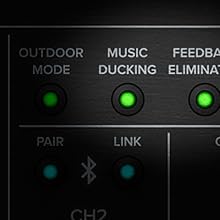
Figure 6: Controls for Outdoor Mode, Music Ducking, and Feedback Eliminator.
- ໂໝດກາງແຈ້ງ: Activates a special EQ curve for improved sound projection and clarity in outdoor environments.
- Music Ducking: Automatically lowers the music volume when a signal is detected on the microphone inputs, making announcements clearer.
- Feedback Eliminator: Automatically detects and suppresses problematic frequencies that cause audio feedback.
4. Thump Connect 2 App:
Download the Thump Connect 2 app for iOS and Android devices to wirelessly control various functions of your Thump212XT loudspeaker, including:
- System EQ adjustments.
- Input levels and mutes.
- Voicing mode selection.
- Outdoor Mode, Music Ducking, and Feedback Eliminator activation.
- Speaker linking for stereo or zone setups.

Figure 7: Thump Connect 2 App for wireless control.
ບໍາລຸງຮັກສາ
- ທໍາຄວາມສະອາດ: Clean the exterior of the speaker with a dry, lint-free cloth. Avoid using abrasive cleaners or solvents.
- ການເກັບຮັກສາ: When not in use, store the speaker in a cool, dry place, away from direct sunlight and extreme temperatures. Consider using a protective cover (if available) to prevent dust and scratches.
- ການກວດກາ: Periodically inspect power cables and audio connections for any signs of wear or damage.
ການແກ້ໄຂບັນຫາ
| ບັນຫາ | ສາເຫດທີ່ເປັນໄປໄດ້ | ການແກ້ໄຂ |
|---|---|---|
| ບໍ່ມີສຽງອອກ. | Power not connected, volume too low, incorrect input selected, faulty cable. | Check power connection and switch. Increase master volume and channel gain. Verify input source and cable integrity. |
| ສຽງບິດເບືອນ. | Input signal too high, speaker overloaded, incorrect EQ settings. | Reduce input gain. Lower master volume. Adjust EQ settings or select a different voicing mode. |
| ການຈັບຄູ່ Bluetooth ລົ້ມເຫຼວ. | ລຳໂພງບໍ່ໄດ້ຢູ່ໃນໂໝດຈັບຄູ່, ອຸປະກອນຢູ່ໄກເກີນໄປ, ມີການລົບກວນ. | Ensure speaker is in pairing mode (flashing LED). Move device closer to speaker. Minimize other wireless devices. |
| ສຽງຕິຊົມ. | ໄມໂຄຣໂຟນໃກ້ກັບລຳໂພງເກີນໄປ, ຕັ້ງຄ່າການຮັບໄດ້ສູງ. | Activate Feedback Eliminator. Reposition microphone. Reduce microphone gain. |
ຂໍ້ມູນຈໍາເພາະ
| ຄຸນສົມບັດ | ລາຍລະອຽດ |
|---|---|
| ປະເພດລຳໂພງ | Powered Loudspeaker |
| Woofer ເສັ້ນຜ່າສູນກາງ | 12 ນິ້ວ (30.48 ຊມ) |
| Ampພະລັງງານຊີວິດ | 1400 ວັດ (ສູງສຸດ) |
| ການຕອບສະໜອງຄວາມຖີ່ | 47 Hz – 20 kHz |
| ສູງສຸດ SPL | 128 dB |
| ການເຊື່ອມຕໍ່ | Bluetooth, XLR, 1/4" TRS, 1/8" Aux |
| ຂອບເຂດໄຮ້ສາຍ (Bluetooth) | ສູງສຸດ 10 ແມັດ (33 ຟຸດ) |
| ວິທີການຄວບຄຸມ | On-board controls, Thump Connect 2 App |
| ຂະໜາດ (H x W x D) | 24.2 x 14.1 x 14 ນິ້ວ |
| ນ້ໍາຫນັກລາຍການ | 32.4 ປອນ |
| ວັດສະດຸ | Metal (grille), Durable Composite (cabinet) |
ການຮັບປະກັນແລະການສະຫນັບສະຫນູນ
The Mackie Thump212XT is covered by a limited warranty. For specific warranty terms, registration, and technical support, please visit the official Mackie webເວັບໄຊ ຫຼືຕິດຕໍ່ຕົວແທນຈໍາໜ່າຍທີ່ໄດ້ຮັບອະນຸຍາດຂອງທ່ານ. ຮັກສາຫຼັກຖານການຊື້ຂອງທ່ານສໍາລັບການຮ້ອງຂໍການຮັບປະກັນ.
ສະຫນັບສະຫນູນອອນໄລນ໌: www.mackie.com/support


