1. ຜະລິດຕະພັນເກີນview
The MINLOVE 108S is a high-definition projector designed for both home theater and business presentations. It features native 1080p resolution, 5G and 2.4G WiFi connectivity for seamless screen mirroring, and Bluetooth 5.0 for audio output. With a brightness of 9800 lumens and a 10000:1 contrast ratio, it delivers clear and vibrant images up to 450 inches. This package includes a 100-inch projector screen for immediate use.
ເນື້ອໃນຊຸດ:
- MINLOVE 108S Projector x1
- ສາຍ HDMI x1
- Remote Control x1 (Batteries not included)
- 3-in-1 AV Cable x1
- ຄູ່ມືຜູ້ໃຊ້ x1
- ສາຍໄຟ x1
- 100-inch Projector Screen x1
- Lens Cap x1

Image 1.1: The MINLOVE 108S Projector, showcasing its compact design and the included 100-inch screen, along with icons representing various streaming services and connectivity options.
2. ຄູ່ມືການຕິດຕັ້ງ
2.1 ການຈັດວາງ
Position the projector on a stable, flat surface or mount it to the ceiling. Ensure there is adequate ventilation around the unit. The optimal projection distance will vary based on desired screen size, with a maximum display size of 450 inches.
2.2 ການເຊື່ອມຕໍ່ພະລັງງານ
- ເຊື່ອມຕໍ່ສາຍໄຟກັບອິນພຸດໄຟຂອງໂປເຈັກເຕີ.
- Plug the other end of the power cord into a standard electrical outlet (240 Volts).
2.3 ການເປີດເຄື່ອງເບື້ອງຕົ້ນ
Press the power button on the projector or the remote control to turn on the device. The indicator light will illuminate.
2.4 ການປັບໂຟກັດແລະ Keystone
- ຈຸດສຸມ: ໝຸນວົງແຫວນໂຟກັສໃສ່ເລນໂປເຈັກເຕີຈົນກວ່າຮູບພາບທີ່ສະແດງອອກມາຈະຄົມຊັດ ແລະ ຊັດເຈນ.
- ການແກ້ໄຂ Keystone: Use the manual keystone correction dial (typically ±15°) to adjust the image shape if it appears trapezoidal. This corrects for projection angles that are not perfectly perpendicular to the screen.
3. ຄໍາແນະນໍາການດໍາເນີນງານ
3.1 ຕົວເລືອກການເຊື່ອມຕໍ່
3.1.1 WiFi Connection (5G/2.4G) for Screen Mirroring
The projector supports dual-band 2.4G and 5G WiFi for wireless screen mirroring from iOS, Android, and Windows devices. Ensure both the projector and your device are connected to the same local WiFi network.
- Navigate to the 'Screen Mirroring' or 'WiFi Display' option in the projector's menu.
- Select your device's operating system (iOS/Android/Windows).
- ໃນອຸປະກອນມືຖື ຫຼື ຄອມພິວເຕີຂອງທ່ານ, ໃຫ້ເປີດໃຊ້ງານການສະທ້ອນ/ການສົ່ງສັນຍານໜ້າຈໍ ແລະ ເລືອກໂປເຈັກເຕີຈາກລາຍຊື່ອຸປະກອນທີ່ມີຢູ່.
ໝາຍເຫດ: Wired screen mirroring is also supported for iOS devices using a USB cable or an HDMI conversion cable.

Image 3.1: Visual representation of 5G and 2.4G WiFi connectivity, demonstrating wireless screen mirroring from laptops, tablets, and smartphones to the projector.
ການເຊື່ອມຕໍ່ Bluetooth 3.1.2 5.0
Connect the projector to external Bluetooth speakers, headphones, or other Bluetooth audio devices for an enhanced audio experience. Bluetooth connection is for audio output only.
- Go to the 'Bluetooth Settings' in the projector's menu.
- ເປີດໃຊ້ Bluetooth ແລະຊອກຫາອຸປະກອນທີ່ມີຢູ່.
- Select your Bluetooth audio device from the list to pair.

Image 3.2: The MINLOVE projector highlighting its built-in HiFi stereo speakers and its ability to connect to external Bluetooth devices like headphones and speakers.
3.1.3 ການເຊື່ອມຕໍ່ແບບມີສາຍ
The projector offers multiple wired input ports for various devices:
- HDMI (x2): Connect TV boxes, gaming consoles (PS5, Xbox), laptops, PCs, Blu-ray players.
- USB (x1): ຫຼິ້ນສື່ໂດຍກົງຈາກໄດຣຟ໌ USB.
- ຂອງ: Connect older devices using the included 3-in-1 AV cable.
- VGA: Connect to computers.
- Micro SD: Play media from Micro SD cards.

Image 3.3: An illustration of the MINLOVE projector's universal connectivity, showing its compatibility with a wide range of devices through HDMI, USB, and other ports.
3.2 ການເລືອກແຫຼ່ງປ້ອນຂໍ້ມູນ
Use the 'Source' button on the remote control or the projector's control panel to cycle through available input sources (HDMI1, HDMI2, USB, AV, Screen Mirroring).
3.3 ການ ນຳ ທາງເມນູ
Use the arrow keys and 'OK' button on the remote control to navigate the projector's on-screen menu. Adjust settings such as picture mode, sound mode, aspect ratio, and network settings.

Image 3.4: The projector's home interface, showing various applications and examples of its use in different settings, such as watching movies, exercising, and outdoor entertainment.
4. ບໍາລຸງຮັກສາ
4.1 ການອະນາໄມເລນ
Gently clean the projector lens with a soft, lint-free cloth or a lens cleaning brush. Avoid using abrasive cleaners or excessive force, which can scratch the lens.
4.2 ການເຮັດຄວາມສະອາດກອງຂີ້ຝຸ່ນ
Regularly check and clean the dust filter (if accessible) to ensure proper airflow and prevent overheating. Refer to the specific location of the filter in the product diagram if available.
4.3 ລamp ຊີວິດ
The LED light source in the MINLOVE 108S projector has an estimated lifespan of up to 60,000 hours, providing long-term performance without frequent lamp ການທົດແທນ.
4.4 ການເກັບຮັກສາ
When not in use, store the projector in a cool, dry place, away from direct sunlight and extreme temperatures. Use the lens cap to protect the lens from dust and scratches.
5. ການແກ້ໄຂບັນຫາ
- ບໍ່ມີພະລັງງານ: Ensure the power cord is securely connected to both the projector and the electrical outlet. Check if the outlet is functional.
- ບໍ່ມີຮູບພາບ:
- ກວດສອບແຫຼ່ງປ້ອນຂໍ້ມູນທີ່ຖືກຕ້ອງຖືກເລືອກ.
- Check all connected cables (HDMI, AV, etc.) for secure connections.
- ປັບວົງການໂຟກັສ.
- ຄຸນນະພາບຮູບພາບທີ່ບໍ່ດີ:
- Adjust the focus and keystone correction.
- Ensure the projection surface is flat and clean.
- Check the resolution settings on your source device.
- If a browning or multicolored spot appears, this may indicate overheating. Turn off the unit to cool down or ensure adequate ventilation.
- ບໍ່ມີສຽງ:
- ເພີ່ມລະດັບສຽງໃນທັງໂປເຈັກເຕີ ແລະອຸປະກອນແຫຼ່ງ.
- If using Bluetooth, ensure the device is properly paired and selected as the audio output. Note that Bluetooth audio may experience slight latency.
- Check audio cable connections for wired setups.
- ການຄວບຄຸມໄລຍະໄກບໍ່ເຮັດວຽກ: ປ່ຽນແບັດໃນຣີໂມດຄວບຄຸມ. ໃຫ້ແນ່ໃຈວ່າບໍ່ມີສິ່ງກີດຂວາງລະຫວ່າງທາງໄກ ແລະເຄື່ອງຮັບ IR ຂອງໂປເຈັກເຕີ.
6. ຂໍ້ມູນຈໍາເພາະ
| ຄຸນສົມບັດ | ຂໍ້ມູນຈໍາເພາະ |
|---|---|
| ໝາຍເລກຕົວແບບ | 108S |
| ຄວາມລະອຽດມາດຕະຖານ | Native 1920 x 1080 Pixels |
| ຄວາມສະຫວ່າງ | 9800 Lumens |
| ອັດຕາສ່ວນກົງກັນຂ້າມ | 10000:1 |
| Function ຊູມ | 100% - 75% |
| ການແກ້ໄຂ Keystone | ±15° ຄູ່ມື |
| ຂະໜາດໜ້າຈໍສູງສຸດ | 450 ນິ້ວ |
| ຊີວິດ LED | 60,000 ຊົ່ວໂມງ |
| ຟັງຊັນໄຮ້ສາຍ | 5G/2.4G WiFi & Bluetooth 5.0 |
| ອັດຕາສ່ວນ | 4:3 / 16:9 / ອັດຕະໂນມັດ |
| ຄວາມເຂົ້າກັນໄດ້ | iOS, Android, PC, Xbox, PS4/PS5, TV Stick, HDMI, USB |
| ປະເພດການເຊື່ອມຕໍ່ | Wi-Fi, HDMI (x2), USB (x1), AV, VGA, Micro SD |
| ຂະໜາດສິນຄ້າ | 29.97 x 19.99 x 10.01 cm |
| ນ້ໍາຫນັກລາຍການ | 3.68 ກິໂລກຣາມ |
| ສະບັບtage | 240 ໂວນ |
| ວັດtage | 50 ວັດ |

Image 6.1: Visual comparison illustrating the superior brightness, sharpness, and wider color gamut of the MINLOVE projector compared to traditional models.
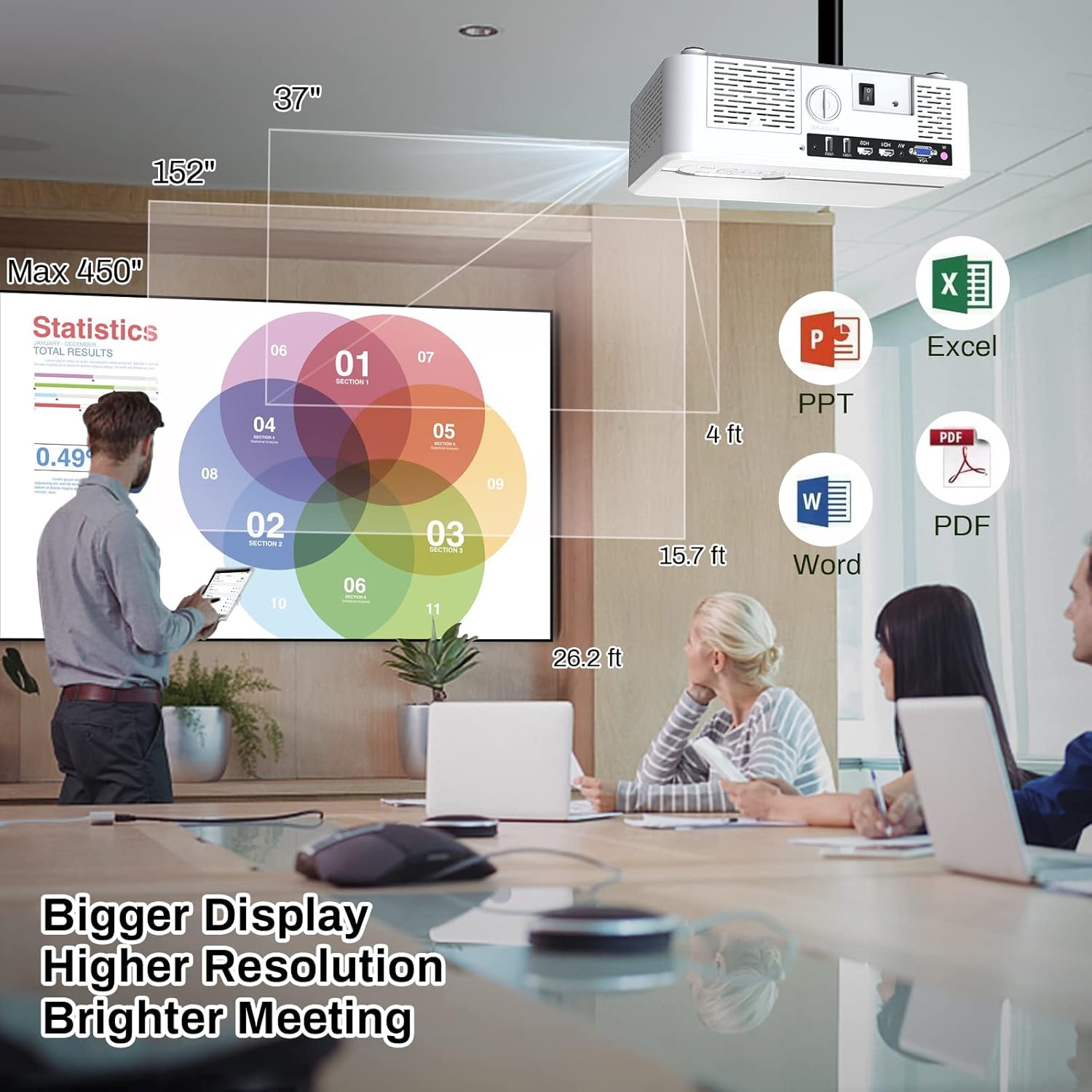
Image 6.2: The MINLOVE projector in a business environment, demonstrating its capability to project large, high-resolution displays for meetings and presentations.
7. ການຮັບປະກັນແລະການສະຫນັບສະຫນູນ
The MINLOVE 108S projector comes with a 1-year warranty. For any questions, technical assistance, or after-sales service, please contact MINLOVE customer support. Our customer service team is available 24/7 to provide satisfactory solutions.


