1. ຂໍ້ມູນຄວາມປອດໄພ
ກະລຸນາອ່ານຄໍາແນະນໍາດ້ານຄວາມປອດໄພທັງໝົດຢ່າງລະອຽດກ່ອນການຕິດຕັ້ງ ແລະ ການດໍາເນີນງານ. ການບໍ່ປະຕິບັດຕາມຄໍາແນະນໍາເຫຼົ່ານີ້ອາດຈະເຮັດໃຫ້ເກີດໄຟຟ້າຊັອດ, ໄຟໄໝ້ ຫຼື ອັນຕະລາຍອື່ນໆ.
- Always turn off the power at the circuit breaker before installing or servicing the fixture.
- Installation must be performed by a qualified electrician or a person with knowledge of electrical wiring.
- ຮັບປະກັນການສະຫນອງ voltage is correct (120 Volts) before connecting the fixture.
- ຢ່າພະຍາຍາມດັດແປງອຸປະກອນ. ການດັດແກ້ໃດໜຶ່ງອາດຈະລົບລ້າງການຮັບປະກັນ ແລະສ້າງຄວາມສ່ຽງດ້ານຄວາມປອດໄພ.
- This product is rated IP65 waterproof, suitable for outdoor use and resistant to dust and water jets. However, do not submerge the fixture in water.
- Avoid looking directly into the LED light source when the light is on, as it may cause eye strain or damage.
2. ຜະລິດຕະພັນເກີນview
The OREiN LED Flood Light is an outdoor motion sensor security light designed for enhanced illumination and security around your home. It features a 450° wide adjustable design, allowing for flexible light direction, and offers three distinct operating modes to suit various needs.

Figure 2.1: OREiN LED Flood Light, showcasing its dual adjustable heads and integrated motion sensor.
ຄຸນນະສົມບັດທີ່ສໍາຄັນ:
- 3 ຮູບແບບການໃຊ້ງານ: Security Mode, Day to Day Mode, and Manual Mode for versatile usage.
- 450° Wide Adjustable Lighting: Patented design with 3 active joints for flexible adjustment of light heads, preventing light pollution and illuminating awkward corners.
- Bright 5000K Spotlights: Equipped with 12W (150W equivalent) high power LEDs, providing 1600 lumens of 5000K daylight white light for wide and far coverage.
- Durable and IP65 Waterproof: Constructed with upgraded LEDs and high-density ABS material, ensuring performance in various weather conditions and a 50,000-hour lifetime.
- Enhanced Motion Sensor: Reliable motion detection for security and convenience.
ມີຫຍັງຢູ່ໃນກ່ອງ:
- OREiN LED Flood Light Fixture
- LED Lens (integrated)
- ຮາດແວຕິດຕັ້ງ
3. ການຕິດຕັ້ງ
The OREiN LED Flood Light is designed for hardwired installation and requires connection to a standard junction box (not included). It supports both wall mounting and soffit mounting.
ຂັ້ນຕອນການຕິດຕັ້ງ:
- ການກະກຽມດ້ານການຕິດຕັ້ງ: Ensure the power is off at the circuit breaker. Identify the location for installation, preferably a standard junction box.
- ແກ້ໄຂວົງເລັບ: Secure the provided mounting bracket to the junction box or wall using the appropriate screws. The bracket dimensions are approximately 3.54 inches (9 cm) in diameter.
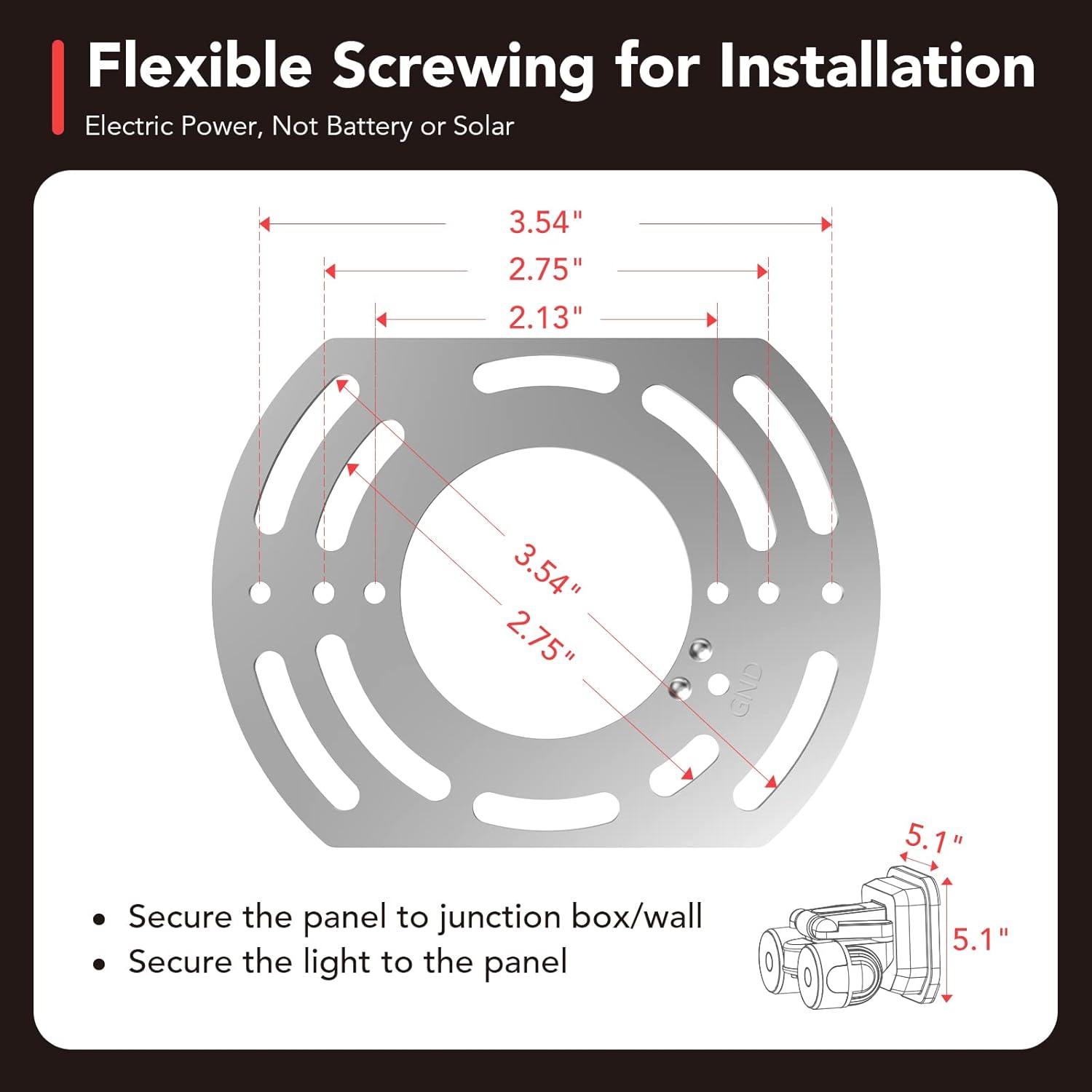
Figure 3.1: Mounting bracket dimensions and attachment to a junction box.
- ເຊື່ອມຕໍ່ສາຍໄຟ: Connect the wires from the fixture to the corresponding wires in the junction box (e.g., black to black, white to white, ground to ground). Use wire nuts to secure connections.

Figure 3.2: Wiring connections for hardwired installation.
- Mount the Light Fixture: Align the fixture with the mounting bracket and secure it with screws. Ensure a tight and stable fit.
- ປັບຫົວແສງ: Once mounted, adjust the two light heads and the motion sensor to your desired angles. The fixture offers 450° of total adjustment.

Figure 3.3: Flexible adjustment of light heads to avoid light pollution or illuminate specific areas.

Figure 3.4: Soffit ceiling mount friendly design with no angle restrictions for the sensor.
- ຟື້ນຟູພະລັງງານ: ເປີດໄຟຄືນຢູ່ທີ່ຕົວຕັດວົງຈອນ.
4. ຄໍາແນະນໍາການດໍາເນີນງານ
The OREiN LED Flood Light features an integrated red button for mode selection and control. The motion sensor has a detection range of 6.4-40 feet.

Figure 4.1: Motion activated lighting with a detection range of 6.4-40 feet.
Red Button Setting Instructions:
- ເປີດ/ປິດ: Long press the red button for 2 seconds to turn the light on or off.
- ສະຫຼັບໂໝດ: Single click the red button to cycle through the three operating modes. Observe the light's behavior to identify the current mode:
- ໂໝດຄວາມປອດໄພ: The light flashes twice slowly. In this mode, the motion sensor turns on the light to 100% brightness when motion is detected, and turns off when no motion is detected.

Figure 4.2: Security Mode operation (100% brightness on motion).
- Day to Day Mode: The light flashes twice quickly. In this mode, the light stays at 30% brightness when no motion is detected and switches to 100% brightness upon detecting motion.

Figure 4.3: Day to Day Mode operation (30% brightness, 100% on motion).
- ໂໝດຄູ່ມື: The light is fixed (no flashes). In this mode, the light turns on at night and stays on all night, controlled by a manual switch.

Figure 4.4: Manual Mode operation (controlled by external switch).
- ໂໝດຄວາມປອດໄພ: The light flashes twice slowly. In this mode, the motion sensor turns on the light to 100% brightness when motion is detected, and turns off when no motion is detected.
- ຕັ້ງຄ່າ ໃໝ່: Long press the red button for 10 seconds to reset the light to its default settings.

Figure 4.5: Red button functions for On/Off, Mode Switching, and Reset.
ການປັບທິດທາງແສງສະຫວ່າງ:
The flood light features multiple adjustable joints on its light arms, allowing you to precisely direct the light where needed. This flexibility helps in avoiding light pollution to neighbors or illuminating specific areas like walkways or blind corners.

Figure 4.6: Adjustable joints for precise light direction.
5. ບໍາລຸງຮັກສາ
The OREiN LED Flood Light is designed for long-lasting performance with minimal maintenance. Its IP65 rating ensures protection against dust and water.

Figure 5.1: IP65 Waterproof design, suitable for various weather conditions.
- ທໍາຄວາມສະອາດ: ເຊັດອຸປະກອນເປັນໄລຍະໆດ້ວຍເຄື່ອງອ່ອນ, ງamp ຜ້າເພື່ອກຳຈັດຝຸ່ນ ແລະ ສິ່ງເສດເຫຼືອ. ຢ່າໃຊ້ນໍ້າຢາເຮັດຄວາມສະອາດທີ່ມີສີຂັດ ຫຼື ຕົວລະລາຍ.
- ການກວດກາ: Regularly check the mounting and wiring for any signs of wear or damage. Ensure all connections remain secure.
- ຄວາມທົນທານ: The fixture is built with high-density ABS material and upgraded LEDs, designed to resist heat, rust, and extreme weather, ensuring a long lifespan of approximately 50,000 hours.
6. ການແກ້ໄຂບັນຫາ
If you encounter issues with your OREiN LED Flood Light, refer to the following common problems and solutions:
| ບັນຫາ | ສາເຫດທີ່ເປັນໄປໄດ້ | ການແກ້ໄຂ |
|---|---|---|
| Light stays on constantly (does not turn off or dim). | Incorrect mode setting (e.g., Manual Mode selected). Sensor sensitivity or ambient light sensor (LUX) setting. |
|
| ແສງບໍ່ເປີດເມື່ອກວດພົບການເຄື່ອນໄຫວ. | Incorrect mode setting. Sensor obstruction or incorrect angle. Power supply issue. |
|
| Motion sensor does not detect motion at close range or angles. | Sensor angle not optimized for close-range detection. | Adjust the motion sensor's angle downwards to improve close-range detection. The sensor has a 350° rotation capability. |
| ແສງສະຫວ່າງ flickers ຫຼືມືດມົວ. | Loose wiring connection. Power fluctuation. |
|
7. ຂໍ້ມູນຈໍາເພາະ
| ຄຸນສົມບັດ | ຂໍ້ມູນຈໍາເພາະ |
|---|---|
| ຍີ່ຫໍ້ | OREiN |
| ຊື່ຕົວແບບ | OL36002440 (Item Model Number: SL-1) |
| ປະເພດແຫຼ່ງແສງ | LED |
| ວັດtage | 12 ວັດ (150W ທຽບເທົ່າ) |
| ຄວາມສະຫວ່າງ | 1600 Lumens |
| ອຸນຫະພູມສີ | 5000 Kelvin (Daylight White) |
| ສະບັບtage | 120 ໂວນ |
| ວັດສະດຸ | Polycarbonate, Acrylonitrile Butadiene Styrene (ABS) |
| ສີ | ດຳ |
| ຂະໜາດສິນຄ້າ | 7"L x 5"W x 5"H (17.78ຊມ x 12.7ຊມ x 12.7ຊມ) |
| ນ້ໍາຫນັກລາຍການ | 1.67 ປອນ (0.76 ກິໂລ) |
| ລະດັບຄວາມຕ້ານທານນ້ໍາ | ກັນນໍ້າ IP65 |
| ຊີວິດສະເລ່ຍ | 50,000 ຊົ່ວໂມງ |
| ປະເພດການຕິດຕັ້ງ | Wall Mounting and Soffit Mounting |
| ວິທີການຄວບຄຸມ | Push Button (on fixture) |
| ການຢັ້ງຢືນ | CE, FCC, RoHS |
8. ການຮັບປະກັນແລະການສະຫນັບສະຫນູນ
OREiN stands behind the quality of its products. Your LED Flood Light comes with a comprehensive warranty and dedicated customer support.
- ການຮັບປະກັນ: ຜະລິດຕະພັນນີ້ແມ່ນກວມເອົາໂດຍ a ຮັບປະກັນ 24 ເດືອນ ຈາກວັນທີ່ຊື້.
- ການຊ່ວຍເຫຼືອລູກຄ້າ: For any questions, issues, or warranty claims, please contact OREiN customer service.
- ອອນລາຍ: ຕິດຕໍ່ພວກເຮົາໂດຍກົງໃນ Amazon.
- ສອບຖາມທົ່ວໄປ: ຊອກຫາ "OREiN" online to find our official contact information.
- ນະໂຍບາຍການສົ່ງຄືນ: Items purchased through Amazon can be returned via Amazon's logistics. We recommend contacting us before initiating a return for potential troubleshooting or assistance.
OREiN products are certified by FCC, CE, and ROSH, ensuring high quality standards and safety.


