ແນະນຳ
This manual provides essential information for the safe and efficient operation of your Crosley Montero Portable Rechargeable Bluetooth Speaker. Please read this manual thoroughly before using the device and retain it for future reference.
ຂໍ້ມູນຄວາມປອດໄພ
- ຢ່າໃຫ້ລຳໂພງຖືກນ້ຳ ຫຼື ຄວາມຊຸ່ມຊື່ນຫຼາຍເກີນໄປ. ຜະລິດຕະພັນນີ້ບໍ່ສາມາດກັນນ້ຳໄດ້.
- ຫຼີກລ່ຽງການວາງລຳໂພງໃກ້ກັບແຫຼ່ງຄວາມຮ້ອນເຊັ່ນ: ເຄື່ອງເຮັດຄວາມຮ້ອນ, ເຄື່ອງບັນທຶກຄວາມຮ້ອນ, ເຕົາໄຟ, ຫຼືອຸປະກອນອື່ນໆ (ລວມທັງ amplifiers) ທີ່ຜະລິດຄວາມຮ້ອນ.
- ໃຊ້ພຽງແຕ່ໄຟລ໌ແນບ/ອຸປະກອນເສີມທີ່ລະບຸໂດຍຜູ້ຜະລິດ.
- ຖອດອຸປະກອນນີ້ອອກໃນລະຫວ່າງການມີພາຍຸຟ້າຜ່າ ຫຼືເມື່ອບໍ່ໄດ້ໃຊ້ເປັນເວລາດົນນານ.
- ອ້າງເຖິງການບໍລິການທັງtoົດໃຫ້ກັບພະນັກງານບໍລິການທີ່ມີຄຸນວຸດທິ. ຕ້ອງການການບໍລິການເມື່ອອຸປະກອນໄດ້ຮັບຄວາມເສຍຫາຍໃນທາງໃດທາງ ໜຶ່ງ.
ແມ່ນຫຍັງຢູ່ໃນກ່ອງ
- Crosley Montero Portable Rechargeable Bluetooth Speaker
- ສາຍ Micro-USB
- ສາຍ Aux 3.5mm
ສິນຄ້າເກີນview
The Crosley Montero speaker features a classic design with modern connectivity options. It includes controls for mode selection, track navigation, and volume adjustment on the top panel. The rear panel houses the input/output ports.
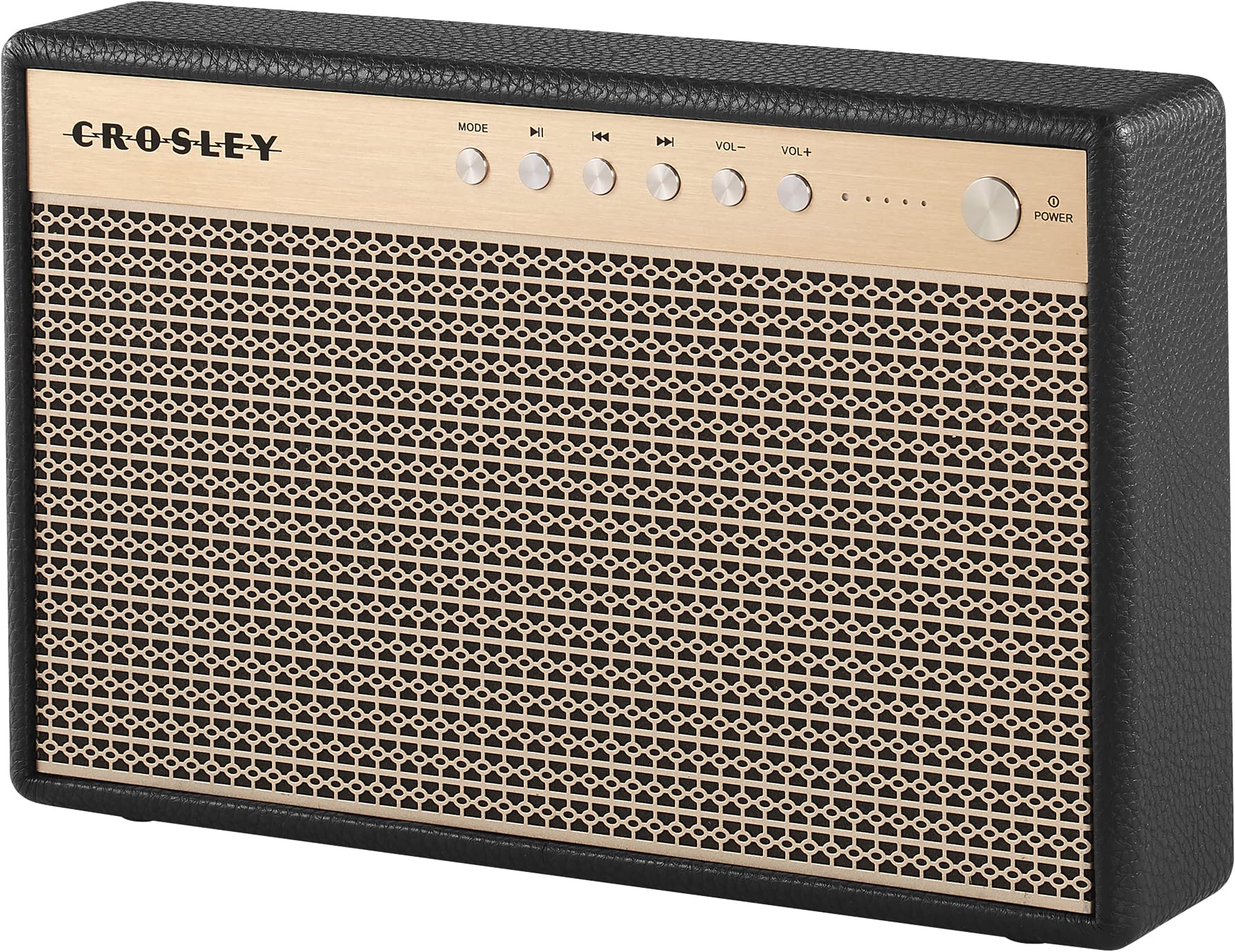
ຮູບທີ 1: ດ້ານໜ້າ view of the Crosley Montero speaker, showing the speaker grille and control panel.

ຮູບທີ 2: ຫລັງ view of the Crosley Montero speaker, highlighting the AUX input, USB OTG (input port), Phone Charging (output: 5V 1A), and DC 5V power input ports.
ຕັ້ງຄ່າ
ກຳລັງສາກລຳໂພງ
Before initial use, fully charge the speaker using the provided Micro-USB cable. Connect the Micro-USB cable to the DC 5V port on the rear of the speaker and the other end to a compatible USB power adapter (not included). The charging indicator lights will illuminate during charging and turn off when fully charged.
ເປີດ/ປິດ
- To power on: Press and hold the Power button on the control panel.
- To power off: Press and hold the Power button. The speaker must be disconnected from external power before shutting off.
ຄໍາແນະນໍາການດໍາເນີນງານ
ການຈັບຄູ່ Bluetooth
- Power on the speaker. The Bluetooth indicator light will flash, indicating it is in pairing mode.
- ໃນອຸປະກອນທີ່ເປີດໃຊ້ Bluetooth ຂອງທ່ານ (ໂທລະສັບສະຫຼາດ, ແທັບເລັດ, ແລະອື່ນໆ), ເປີດໃຊ້ Bluetooth ແລະຄົ້ນຫາອຸປະກອນທີ່ມີຢູ່.
- Select "Crosley Montero" from the list of devices.
- Once paired, the Bluetooth indicator light on the speaker will remain solid. You can now stream audio from your device.
ການປ້ອນຂໍ້ມູນຊ່ວຍ
ເພື່ອເຊື່ອມຕໍ່ອຸປະກອນຜ່ານອິນພຸດຊ່ວຍ:
- Connect one end of the 3.5mm Aux In cable to the AUX port on the rear of the speaker.
- ເຊື່ອມຕໍ່ສົ້ນອື່ນຂອງສາຍກັບຊ່ອງສຽບຫູຟັງ ຫຼືສຽງອອກຂອງອຸປະກອນພາຍນອກຂອງທ່ານ.
- Press the "MODE" button on the speaker's control panel until the AUX mode is selected.
- ປັບລະດັບສຽງໃນທັງລຳໂພງ ແລະ ອຸປະກອນພາຍນອກຂອງທ່ານ.
USB Phone Charging
The speaker features a USB port for charging external devices. Connect your phone's USB charging cable to the "Phone Charging (Output: 5V 1A)" port on the rear of the speaker. This feature allows you to charge your phone while the speaker is in use or on standby.
ການຄວບຄຸມພື້ນຖານ
- ແບບ: ກົດເພື່ອສະຫຼັບລະຫວ່າງໂໝດປ້ອນຂໍ້ມູນ Bluetooth ແລະ AUX.
- ຫຼິ້ນ/ຢຸດ: Press to play or pause audio during Bluetooth playback.
- ຕິດຕາມກ່ອນ ໜ້າ ນີ້: Press to go to the beginning of the current track or the previous track during Bluetooth playback.
- ເພງຕໍ່ໄປ: Press to skip to the next track during Bluetooth playback.
- VOL-: ກົດເພື່ອຫຼຸດລະດັບສຽງ.
- VOL+: ກົດເພື່ອເພີ່ມລະດັບສຽງ.
ວິດີໂອ 1: An official video demonstrating the features and operation of the Crosley Montero Portable Rechargeable Bluetooth Speaker.
ວິດີໂອ 2: A concise official video showcasing the Crosley Montero Portable Rechargeable Bluetooth Speaker.
ບໍາລຸງຮັກສາ
- Clean the speaker with a soft, dry cloth. Do not use liquid cleaners or aerosol sprays.
- Keep the speaker away from dust and direct sunlight.
- ເກັບຮັກສາລຳໂພງໄວ້ໃນບ່ອນເຢັນ ແລະແຫ້ງເມື່ອບໍ່ໄດ້ໃຊ້ເປັນເວລາດົນ.
ການແກ້ໄຂບັນຫາ
| ບັນຫາ | ການແກ້ໄຂ |
|---|---|
| ລຳໂພງບໍ່ເປີດ. | Ensure the speaker is charged. Connect it to a power source using the Micro-USB cable. |
| ບໍ່ມີສຽງຈາກ ລຳ ໂພງ. | Check volume levels on both the speaker and the connected device. Ensure the correct mode (Bluetooth/AUX) is selected. |
| ອຸປະກອນ Bluetooth ບໍ່ສາມາດຈັບຄູ່ໄດ້. | Ensure the speaker is in pairing mode (flashing Bluetooth indicator). Turn off and on Bluetooth on your device. Move the device closer to the speaker. |
| Phone not charging via USB. | Verify the USB cable is securely connected to the "Phone Charging" port and your phone. Ensure the speaker has sufficient battery charge. |
ຂໍ້ມູນຈໍາເພາະ

ຮູບທີ 3: Overall dimensions of the Crosley Montero speaker: 10.25" W x 6.5" H x 2.25" D.
- ຊື່ຕົວແບບ: ມອນເຕໂຣ
- ປະເພດລຳໂພງ: ລຳ ໂພງແບບພະກະພາ
- ເຕັກໂນໂລຍີການເຊື່ອມຕໍ່: Bluetooth, USB
- ເຕັກໂນໂລຊີການສື່ສານໄຮ້ສາຍ: Bluetooth
- ລຳໂພງກຳລັງຜົນຜະລິດສູງສຸດ: 30 ວັດ
- ການຕອບສະໜອງຄວາມຖີ່: 18 KHz
- ແຫຼ່ງພະລັງງານ: ແບດເຕີຣີ້ໃຊ້ພະລັງງານ (ມີຫມໍ້ໄຟ Lithium Ion 1 ໜ່ວຍ)
- ຂະໜາດຜະລິດຕະພັນ: 10.25"D x 6.5"W x 2.25"H
- ນ້ໍາຫນັກລາຍການ: 2.8 Pounds (approximately 2.76 pounds)
- ວັດສະດຸ: ພາດສະຕິກ
- ອົງປະກອບລວມ: Speaker, Micro-USB Cable, 3.5mm Aux In Cable
ການຮັບປະກັນແລະການສະຫນັບສະຫນູນ
This Crosley product comes with a limited warranty. For specific warranty details, please refer to the warranty card included with your purchase or visit the official Crosley website. For technical support or customer service, please contact Crosley's USA-based customer support.


