ແນະນຳ
This manual provides detailed instructions for the installation, operation, and maintenance of your MYPIN Solar Wireless PTZ Security Camera. Please read this manual thoroughly before using the product to ensure proper function and safety. Keep this manual for future reference.
ສິນຄ້າເກີນview
ມີຫຍັງແດ່
- MYPIN PTZ Security Camera
- ແຜງແສງອາທິດ
- Rechargeable Lithium-ion Battery (pre-installed or included separately)
- Mounting Bracket ແລະ screws
- ສາຍສາກ USB
- ຄູ່ມືຜູ້ໃຊ້
ຄຸນນະສົມບັດທີ່ສໍາຄັນ
- ວິດີໂອ 1080p Full HD: ໃຫ້ foo ວິດີໂອທີ່ຊັດເຈນແລະລາຍລະອຽດtage.
- ວິໄສທັດກາງຄືນສີ: Equipped with infrared LEDs and white light for clear night vision, including full-color options.
- Solar Powered & Rechargeable Battery: Continuous power supply through the solar panel, with a built-in rechargeable battery for uninterrupted operation.
- AI Smart Recognition & PIR Motion Detection: Advanced AI technology distinguishes between humans, pets, and vehicles, reducing false alarms.
- ສຽງສອງທາງ: Built-in speaker and anti-noise microphone allow for real-time two-way communication.
- ໜ້າທີ່ຂອງ PTZ: Pan 335°, Tilt 90°, and 4x digital zoom for flexible viewມຸມ.
- IP65 ກັນອາກາດ: ອອກແບບມາໃຫ້ທົນທານຕໍ່ສະພາບອາກາດຕ່າງໆ, ເໝາະສຳລັບການນຳໃຊ້ກາງແຈ້ງ.
- ການເຊື່ອມຕໍ່ແບບໄຮ້ສາຍ: Supports 2.4 GHz Wi-Fi for easy installation (5 GHz Wi-Fi not supported).
- ທາງເລືອກໃນການເກັບຮັກສາຫຼາຍອັນ: Supports cloud storage (7-day free playback, max 1GB) and local storage via Micro SD card (up to 128GB, not included).
- ການເຊື່ອມໂຍງເຮືອນອັດສະລິຍະ: Compatible with Amazon Alexa for voice control and live view.

Image: MYPIN Solar Wireless PTZ Security Camera with its solar panel.
ຕັ້ງຄ່າ
1. ການສາກໄຟເບື້ອງຕົ້ນ
Before first use, fully charge the camera's built-in battery using the provided USB cable and a 5V/2A power adapter (not included). A full charge ensures optimal performance, especially during initial setup and periods of low sunlight.
2. App Installation & Account Creation
- ດາວນ໌ໂຫລດ VicoHome app ຈາກ app store ຂອງໂທລະສັບສະຫຼາດຂອງທ່ານ (iOS ຫຼື Android).
- ເປີດ app ແລະປະຕິບັດຕາມຄໍາແນະນໍາໃນຫນ້າຈໍເພື່ອສ້າງບັນຊີໃຫມ່ຫຼືເຂົ້າສູ່ລະບົບຖ້າຫາກວ່າທ່ານມີແລ້ວ.
3. Camera Pairing with App
- Ensure your camera is powered on.
- In the VicoHome app, tap the "+" icon to add a new device.
- ເລືອກຮຸ່ນກ້ອງຖ່າຍຮູບຂອງທ່ານຈາກລາຍການ.
- Follow the app's instructions to connect the camera to your 2.4 GHz Wi-Fi network. You may need to scan a QR code displayed on your phone with the camera lens.
- ເມື່ອເຊື່ອມຕໍ່ແລ້ວ, ຕັ້ງຊື່ກ້ອງຂອງເຈົ້າ ແລະເຮັດສຳເລັດຂັ້ນຕອນການຕິດຕັ້ງ.
4. Solar Panel and Camera Mounting
The camera and solar panel can be installed in two ways: integrated or separated. Choose a location that provides optimal sunlight exposure for the solar panel and a clear view ສໍາລັບກ້ອງຖ່າຍຮູບ.
- ການຈັດວາງແຜງແສງອາທິດ: Mount the solar panel in a location that receives direct sunlight for several hours daily. Ensure the cable can reach the camera.
- ການບັນຈຸກ້ອງຖ່າຍຮູບ: Use the provided mounting bracket and screws to securely attach the camera to a wall or other stable surface. Adjust the camera angle for optimal surveillance coverage.

Image: Illustration of two installation methods for the solar panel and camera, showing both integrated and separate mounting options.
ຄໍາແນະນໍາການດໍາເນີນງານ
1. ມີຊີວິດ View ແລະ Playback
- Open the VicoHome app and select your camera to view ອາຫານສົດ.
- ການເຂົ້າເຖິງບັນທຶກ footage through the playback feature in the app.
2. ການຄວບຄຸມ PTZ
ໃນສົດ view interface, use the on-screen controls to pan (335° horizontally) and tilt (90° vertically) the camera lens. You can also use the digital zoom feature to get a closer look.
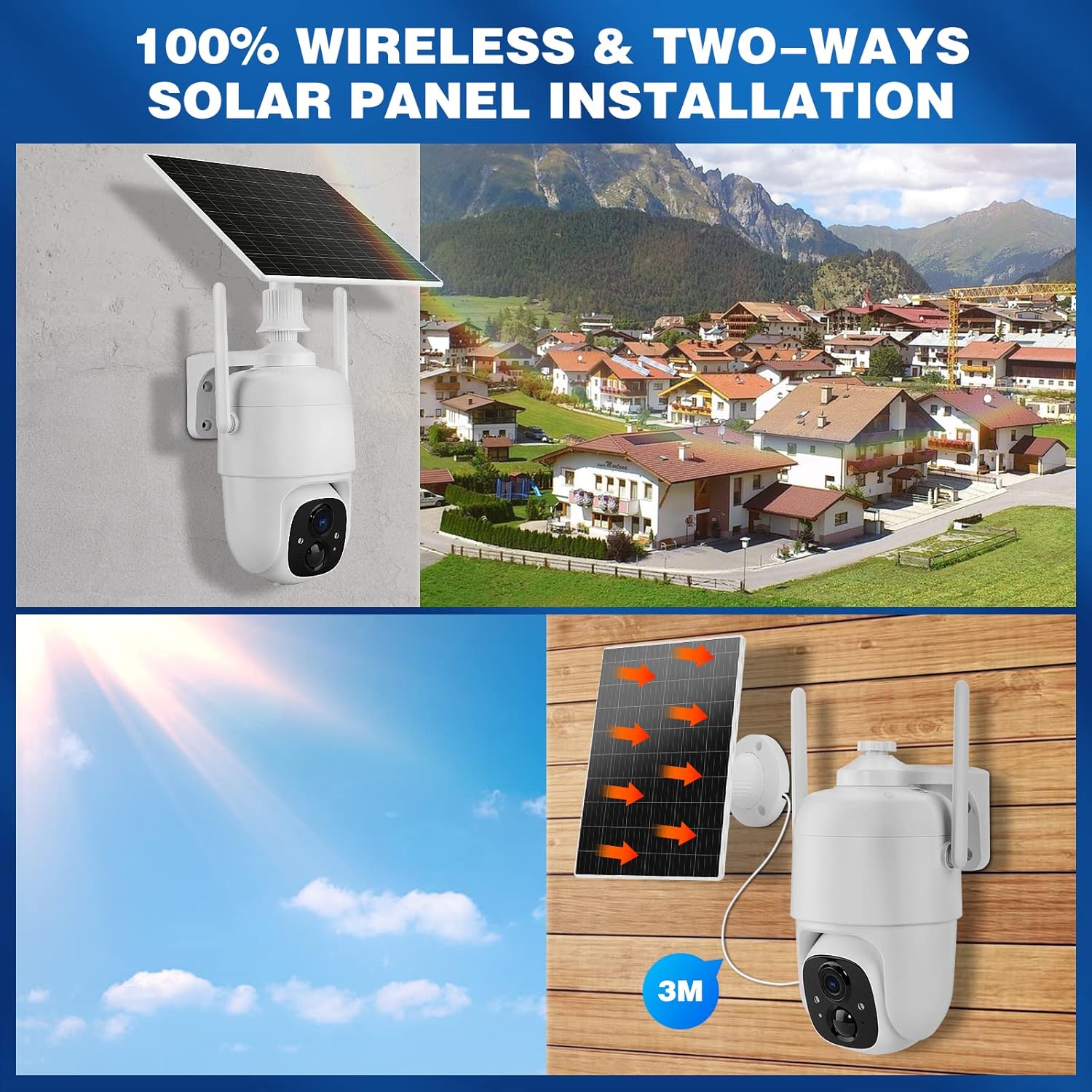
Image: Demonstrates controlling the camera's pan and tilt functions using a smartphone app.
3. ສຽງສອງທາງ
ແຕະໄອຄອນໄມໂຄຣໂຟນໃນການຖ່າຍທອດສົດຂອງແອັບ view to speak through the camera's speaker. The camera's built-in microphone will capture audio from the camera's vicinity, allowing for two-way communication.

Image: A person speaking through the camera to a delivery person, demonstrating the two-way audio feature.
4. ກວດຈັບການເຄື່ອນໄຫວ ແລະການແຈ້ງເຕືອນ
- Configure motion detection sensitivity and activity zones within the VicoHome app.
- Enable AI Smart Recognition to differentiate between humans, pets, and vehicles for more accurate alerts.
- ຮັບການແຈ້ງເຕືອນທັນທີໃນໂທລະສັບສະຫຼາດຂອງທ່ານເມື່ອກວດພົບການເຄື່ອນໄຫວ.

Image: A person walking past a gate, triggering a PIR human detection alert on a smartphone.
5. ໂໝດວິໄສທັດກາງຄືນ
The camera offers both infrared (IR) night vision and full-color night vision. You can switch between these modes in the app settings based on your preference and lighting conditions.

ຮູບພາບ: ຮອຍແຍກ view showing the difference between color night vision and standard IR night vision at night.
6. ທາງເລືອກໃນການເກັບຮັກສາ
- Cloud Storage: The camera offers 7 days of free cloud playback (up to 1GB). Additional cloud plans may be available through the app.
- ບັດ Micro SD: Insert a Micro SD card (up to 128GB, not included) into the designated slot for local video storage.
7. ການເຊື່ອມໂຍງ Amazon Alexa
To integrate with Amazon Alexa, enable the VicoHome skill in the Alexa app and link your VicoHome account. You can then use voice commands to view your camera's live feed on compatible Alexa-enabled devices.

Image: A MYPIN camera and an Amazon Echo Show displaying the camera's live feed, illustrating Alexa integration.
ບໍາລຸງຮັກສາ
1. ທໍາຄວາມສະອາດ
- ເຊັດເລນກ້ອງຖ່າຍຮູບ ແລະ ແຜງໂຊລາເຊວຢ່າງເປັນປະຈໍາດ້ວຍເຄື່ອງອ່ອນ, ງamp ຜ້າເພື່ອເອົາຂີ້ຝຸ່ນແລະສິ່ງເສດເຫຼືອ.
- ຢ່າໃຊ້ສານເຄມີທີ່ຮຸນແຮງຫຼືນໍ້າຢາ ທຳ ຄວາມສະອາດທີ່ຫຍາບຄາຍ.
2. ການດູແລຫມໍ້ໄຟ
- Ensure the solar panel is free from obstructions to maximize charging efficiency.
- If the camera is stored for an extended period, charge the battery periodically to prevent deep discharge.
3. ອັບເດດເຟີມແວ
Check the VicoHome app regularly for firmware updates. Keeping your camera's firmware updated ensures optimal performance, security, and access to new features.
ການແກ້ໄຂບັນຫາ
| ບັນຫາ | ການແກ້ໄຂ |
|---|---|
| ກ້ອງຖ່າຍຮູບບໍ່ໄດ້ເຊື່ອມຕໍ່ກັບ Wi-Fi | Ensure your Wi-Fi is 2.4 GHz. Check Wi-Fi signal strength. Restart your router and camera. Re-pair the camera in the app. |
| ຄຸນນະພາບວິດີໂອບໍ່ດີ | Check your Wi-Fi connection speed. Clean the camera lens. Ensure adequate lighting for optimal image capture. |
| ແບັດເຕີຣີບໍ່ໄດ້ສາກ | Ensure the solar panel is clean and receives direct sunlight. Check the connection cable between the solar panel and camera. Charge directly via USB if necessary. |
| ການແຈ້ງເຕືອນການເຄື່ອນໄຫວທີ່ບໍ່ຖືກຕ້ອງ | Adjust motion detection sensitivity in the app. Utilize AI Smart Recognition to filter out non-human movements. Define specific activity zones. |
| ສຽງສອງທາງບໍ່ເຮັດວຽກ | Check microphone and speaker settings in the app. Ensure your phone's volume is up. Verify network connection stability. |
ຂໍ້ມູນຈໍາເພາະ
- ຕົວແບບ: HS0366
- ຄວາມລະອຽດວິດີໂອ: ຄວາມລະອຽດ Full HD 1080p
- Pan Angle: 335°
- ມຸມອຽງ: 90°
- ຊູມດິຈິຕອນ: 4x
- ວິໄສທັດກາງຄືນ: Infrared and Color Night Vision
- ການເຊື່ອມຕໍ່ແບບໄຮ້ສາຍ: Wi-Fi 2.4 GHz (IEEE 802.11b/g/n)
- ແຫຼ່ງພະລັງງານ: Solar Powered, Rechargeable Lithium-ion Battery (5 Watt-hours)
- ຄວາມຕ້ານທານສະພາບອາກາດ: IP65
- ອຸນຫະພູມປະຕິບັດການ: -10°C ຫາ 45°C (14°F ຫາ 113°F)
- ການເກັບຮັກສາ: Cloud Storage (up to 1GB free for 7 days), Micro SD Card (up to 128GB, not included)
- ສຽງ: ສຽງສອງທາງ (ໄມໂຄຣໂຟນ ແລະ ລຳໂພງໃນຕົວ)
- ກວດຈັບການເຄື່ອນໄຫວ: PIR with AI Human/Pet/Vehicle Recognition
- ວັດສະດຸ: ໂລຫະ
- ຂະໜາດ: ຂະໜາດປະມານ 20.2 x 19.7 x 13.9 cm
- ນ້ຳໜັກ: ປະມານ 1.27 ກິໂລ

Image: The MYPIN camera and solar panel installed outdoors during winter, highlighting its IP65 waterproof rating and operating temperature range.
ການຮັບປະກັນແລະການສະຫນັບສະຫນູນ
For warranty information and technical support, please refer to the contact details provided with your purchase or visit the official MYPIN webເວັບໄຊ. ຮັກສາໃບຮັບເງິນການຊື້ຂອງທ່ານໄວ້ເປັນຫຼັກຖານການຊື້ສໍາລັບການຮ້ອງຂໍການຮັບປະກັນ.


