1. ບົດແນະນຳ
This user manual provides detailed instructions for the LiNKFOR UHF Handheld Rechargeable Microphone System. This all-metal dual cordless microphone system is designed for various applications including karaoke, conferences, parties, and public speaking, offering clear sound and reliable wireless performance.

Figure 1: LiNKFOR UHF Handheld Rechargeable Microphone System
2. ເນື້ອໃນຊຸດ
ກະລຸນາກວດເບິ່ງຊຸດດັ່ງກ່າວຢ່າງລະມັດລະວັງເພື່ອຮັບປະກັນວ່າສິນຄ້າທັງໝົດມີຢູ່ ແລະຢູ່ໃນສະພາບດີ:
- 1 x ຜູ້ຮັບ
- ໄມໂຄຣໂຟນ 2 x ໄຮ້ສາຍ
- ສາຍສຽງ 1 x 6.35 ມມ
- 2 x ສາຍ RCA
- 1 x 6.35mm ກັບ 3.5mm ອະແດບເຕີ
- ສາຍສາກ 1 x 2-in-1
- 1 x Power Adapter
- 1 x ຄູ່ມືຜູ້ໃຊ້
- 2 x Microphone Sponges
- 2 x Microphones Anti-Rolling Rings
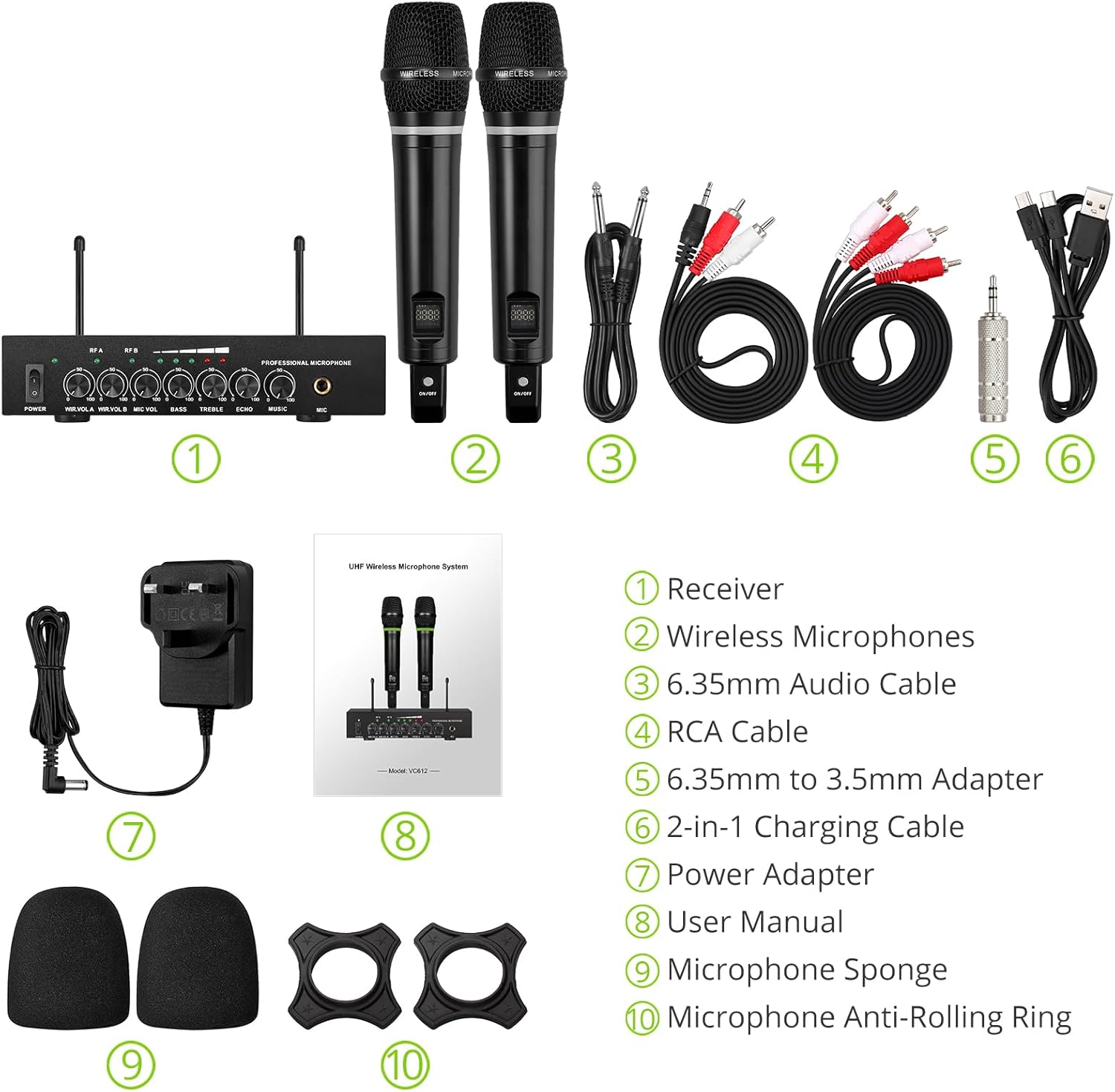
ຮູບທີ 2: ເນື້ອໃນຊຸດຄົບຖ້ວນ
3. ຄໍາແນະນໍາການຕິດຕັ້ງ
3.1 ການເຊື່ອມຕໍ່ຕົວຮັບ
- ການເຊື່ອມຕໍ່ພະລັງງານ: Connect the included power adapter to the DC 12V INPUT port on the receiver and plug it into a power outlet.
- ສຽງອອກ:
- For RCA connection: Use the provided RCA cables to connect the "OUTPUT" ports (L/R) on the receiver to the audio input (e.g., AUX, PC) of your sound system (soundbar, amplifier, mixer, or speakers).
- For 6.35mm connection: Use the 6.35mm audio cable to connect the "6.35mm MIC Output" on the receiver to a 6.35mm microphone input on your sound system.
- External Audio Input (Optional):
- For RCA input: Use RCA cables to connect external audio sources (e.g., DVD player, TV) to the "INPUT" ports (L/R) on the receiver.
- For Bluetooth input: Enable Bluetooth on your mobile device (smartphone, tablet) and search for "X168" to pair and connect.

Figure 3: Receiver Connections (RCA Input/Output, 6.35mm MIC Output)

Figure 4: Bluetooth Connection Setup
3.2 Preparing the Microphones
- ການສາກໄຟ: The microphones are rechargeable. Use the provided 2-in-1 charging cable to charge both microphones simultaneously. The LED light ring on the microphone will turn red when charging and green when fully charged or in use. A full charge takes approximately 3-4 hours and provides up to 10 hours of play time.
- ເປີດ/ປິດ: Locate the ON/OFF switch on each microphone and slide it to the "ON" position to power on. The display screen on the microphone will light up.
- Anti-Rolling Rings & Sponges: Attach the anti-rolling rings to the base of the microphones and place the microphone sponges over the mesh heads for protection and improved sound quality.

Figure 5: Charging the Microphones
4. ຄໍາແນະນໍາການດໍາເນີນງານ
- ລະບົບເປີດເຄື່ອງ: Ensure the receiver is powered on (POWER switch on the front panel). The indicator lights for RF A and RF B should illuminate when the corresponding microphone is turned on and connected.
- ປັບລະດັບສຽງ: Use the "WIR.VOL A" and "WIR.VOL B" knobs on the receiver to adjust the individual volume levels of Microphone A and Microphone B.
- ການຄວບຄຸມສຽງ: The receiver features independent controls for BASS, TREBLE, and ECHO to customize the sound output. Adjust these knobs to achieve your desired audio effect.
- ລະດັບສຽງເພງ: The "MUSIC" knob controls the volume of the external audio input (e.g., Bluetooth, RCA input).
- ຊ່ວງໄຮ້ສາຍ: The UHF wireless range for the microphones is approximately 165 feet (50 meters). The Bluetooth range for audio input is approximately 32 feet (10 meters).

Figure 6: Wireless Range Overview

Figure 7: Sound Control Features
4.1 ວິດີໂອຜະລິດຕະພັນຢ່າງເປັນທາງການ
Video 1: LiNKFOR Rechargeable UHF Wireless Microphone System Overview. This video demonstrates the setup, features, and usage of the microphone system, including connections and sound adjustments.
5. ບໍາລຸງຮັກສາ
- Keep the receiver and microphones clean by wiping them with a soft, dry cloth.
- ຫຼີກເວັ້ນການເປີດເຜີຍອຸປະກອນກັບອຸນຫະພູມທີ່ຮຸນແຮງ, ຄວາມຊຸ່ມຊື່ນ, ຫຼືແສງແດດໂດຍກົງ.
- ເກັບຮັກສາລະບົບໄວ້ໃນບ່ອນແຫ້ງ ແລະ ເຢັນເມື່ອບໍ່ໄດ້ໃຊ້ງານ.
- Ensure microphones are fully charged before extended use to maximize battery life.
6. ການແກ້ໄຂບັນຫາ
| ບັນຫາ | ສາເຫດທີ່ເປັນໄປໄດ້ | ການແກ້ໄຂ |
|---|---|---|
| ບໍ່ມີສຽງອອກ. |
|
|
| ໄມໂຄຣໂຟນບໍ່ໄດ້ສາກໄຟ. |
|
|
| ບັນຫາການເຊື່ອມຕໍ່ Bluetooth. |
|
|

Figure 8: Compatibility and Common Questions
7. ຂໍ້ມູນຈໍາເພາະ
| ຄຸນສົມບັດ | ລາຍລະອຽດ |
|---|---|
| ຍີ່ຫໍ້ | LinkFOR |
| ຊື່ຕົວແບບ | S-105 |
| ໝາຍເລກຕົວແບບ | ULKVC613us-US |
| ເຕັກໂນໂລຊີການເຊື່ອມຕໍ່ | UHF Wireless, Bluetooth 5.0 |
| ຕົວປະກອບແບບຟອມໄມໂຄຣໂຟນ | ມືຖື |
| ວັດສະດຸ | ໂລຫະ |
| ແຫຼ່ງພະລັງງານ | ພະລັງງານຫມໍ້ໄຟ (ສາມາດສາກໄຟໄດ້ Lithium Ion) |
| ເວລາຫຼິ້ນ | Up to 10 hours (after 3-4 hours charge) |
| UHF Wireless Range | ປະມານ. 165 ຟຸດ (50 ແມັດ) |
| ຊ່ວງ Bluetooth | ປະມານ. 32 ຟຸດ (10 ແມັດ) |
| ອັດຕາສ່ວນສັນຍານເຖິງສຽງດັງ | 95 dB |
| impedance | 600 ໂອມ |
| ການຕອບສະໜອງຄວາມຖີ່ | 1 KHz (Min/Max) |
| ຈໍານວນຊ່ອງ | 2 |
| ຂະໜາດລາຍການ (L x W x H) | 16.54 x 12.99 x 3.31 ນິ້ວ |
| ນ້ໍາຫນັກລາຍການ | 4.84 ປອນ (2.2 ກິໂລກຣາມ) |
| ອຸປະກອນທີ່ເຂົ້າກັນໄດ້ | Amplifier, Audio Mixer, Karaoke Machine, TV, Laptop, Smartphones (not Bluetooth Speakers) |

ຮູບທີ 9: ຂະໜາດຜະລິດຕະພັນ
8. ການຮັບປະກັນແລະການສະຫນັບສະຫນູນ
For warranty information or technical support, please refer to the contact details provided in your product packaging or visit the official LiNKFOR webເວັບໄຊ. ຮັກສາໃບຮັບເງິນການຊື້ຂອງທ່ານສໍາລັບການຮ້ອງຂໍການຮັບປະກັນ.
LiNKFOR is committed to providing innovative products and reliable connectivity solutions. For further assistance, please contact customer service.


