ແນະນຳ
This manual provides comprehensive instructions for the safe and efficient use of your Shargeek STORM2 Slim Portable Charger. Please read this manual thoroughly before operating the device and retain it for future reference.
The Shargeek STORM2 Slim is a high-capacity portable power bank featuring a unique transparent design and an IPS display screen. It offers 130W max output with 100W USB-C and 30W USB-A ports, suitable for charging various devices including laptops, tablets, and smartphones.

Image: The Shargeek STORM2 Slim portable charger, showcasing its transparent design that reveals internal components and the included yellow USB-C to USB-C cables.
ຄຸນສົມບັດຜະລິດຕະພັນ
- ການອອກແບບໂປ່ງໃສ: The see-through casing reveals the internal battery and circuit layout, highlighting the device's engineering.
- IPS Display Screen: A clear screen provides real-time information on battery life, output distribution, temperature, operation hours, and active ports.
- ຄວາມອາດສາມາດສູງ: 20000mAh battery capacity, capable of multiple charges for various devices.
- ການສາກໄວ: Features a 100W USB-C PD port and a 30W USB-A port, supporting 130W max output for rapid charging.
- ຄວາມເຂົ້າກັນໄດ້ທົ່ວໂລກ: Charges laptops, phones, tablets, and other devices with USB-C or USB ports.

ຮູບພາບ: A ລາຍລະອຽດ view of the Shargeek STORM2 Slim's IPS LCD screen, showing various data points such as input/output wattage, voltage, current, battery level, and temperatures.
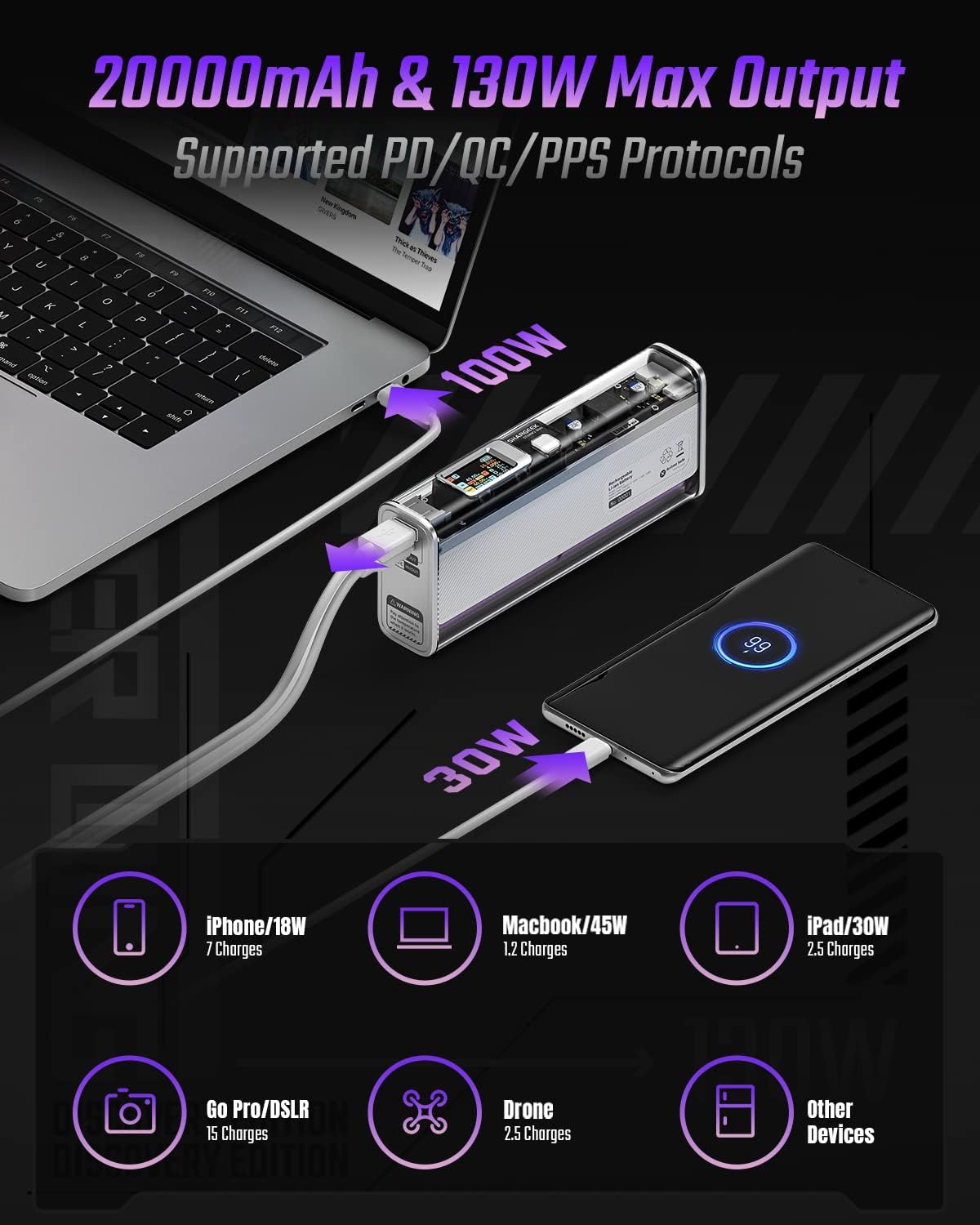
Image: The Shargeek STORM2 Slim connected via USB-C to a laptop for 100W charging and via USB-A to a smartphone for 30W charging, demonstrating its dual-port capability.
ການຕັ້ງຄ່າແລະການນໍາໃຊ້ຄັ້ງທໍາອິດ
ເນື້ອໃນຊຸດ:
- Shargeek STORM2 Slim Portable Charger
- ສາຍ USB-C ຫາ USB-C
- ຄູ່ມືຜູ້ໃຊ້ (ເອກະສານນີ້)
ການສາກໄຟເບື້ອງຕົ້ນ:
- Before first use, fully charge your STORM2 Slim.
- Connect the provided USB-C to USB-C cable to the USB-C port on the STORM2 Slim.
- Connect the other end of the cable to a compatible USB-C power adapter (not included) with a minimum of 100W output for fastest charging.
- The IPS screen will display charging status and battery percentage. The device is fully charged when the screen indicates 100%.
- A full recharge typically takes approximately 90 minutes with a 100W power adapter.
ຄໍາແນະນໍາການດໍາເນີນງານ
ອຸປະກອນສາກໄຟ:
- Identify the appropriate charging cable for your device (USB-C to USB-C or USB-A to device-specific cable).
- Connect one end of the cable to your device and the other end to the corresponding port (USB-C or USB-A) on the STORM2 Slim.
- The IPS screen will automatically activate and display the charging output (watts, volts, amps) for the connected device(s).
- The STORM2 Slim can charge two devices simultaneously using both the USB-C and USB-A ports.
Understanding the IPS Screen:
The IPS screen provides detailed real-time information. Use the physical button on the side of the power bank to navigate through different display modes or access settings.
- Input/Output Dashboard: Shows power input (IN) when charging the power bank and power output (OUT) when charging devices, including wattage, voltage, and current for each port.
- ລະດັບຫມໍ້ໄຟ: ສະແດງເປີເຊັນແບັດເຕີຣີທີ່ເຫຼືອtage and a visual icon.
- ສະບັບtage & ປະຈຸບັນ: Detailed readings for the internal battery cells.
- ອຸນຫະພູມ: Shows the internal circuit board and battery temperatures.
- ເວລາແລ່ນ: A resettable timer indicating the duration of current operation.
To access menus: Long-press the button. ເພື່ອນຳທາງ: Short-press. ເພື່ອເລືອກ: Long-press.
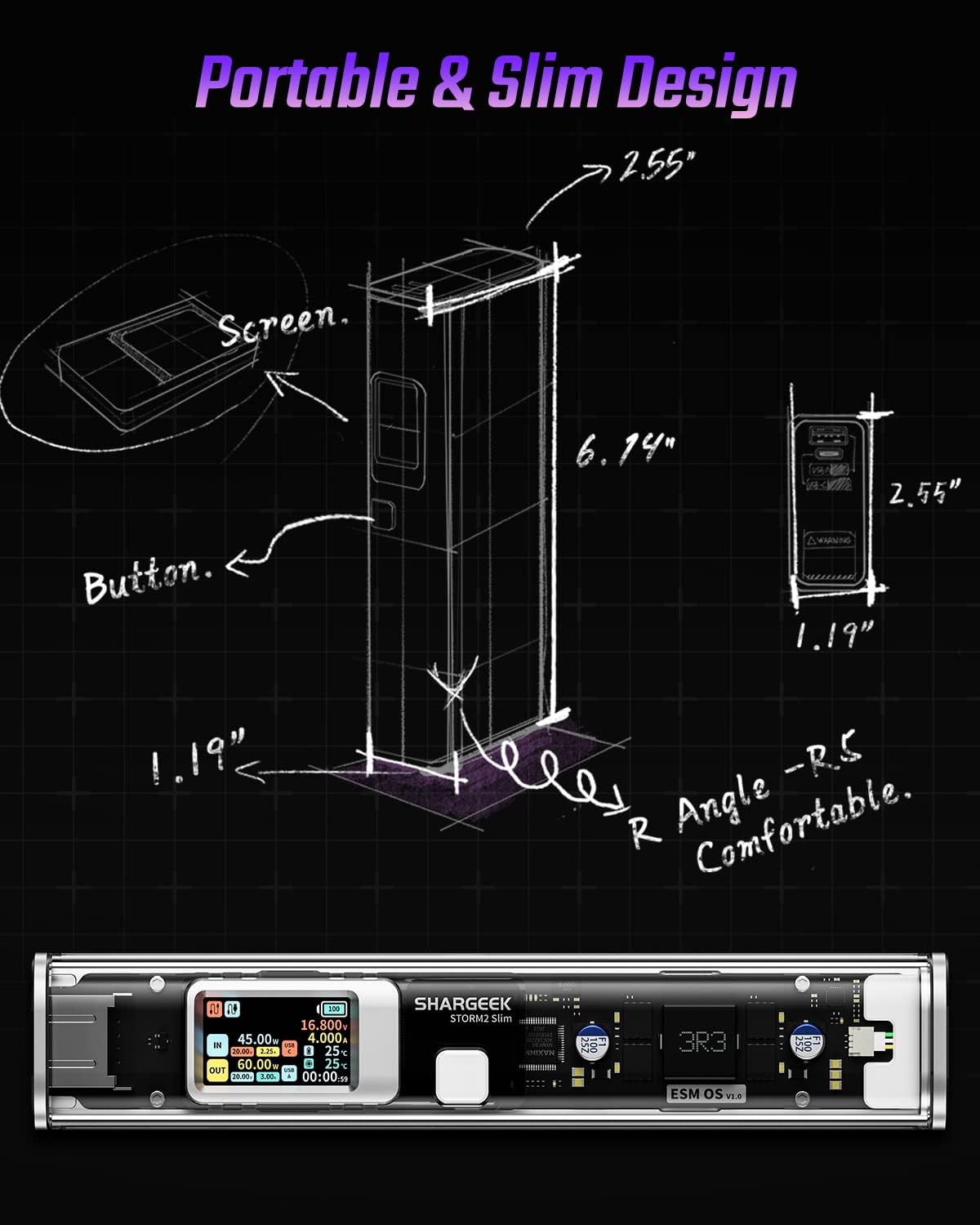
Image: A technical drawing illustrating the dimensions of the Shargeek STORM2 Slim and pointing out the screen and button locations.
ບໍາລຸງຮັກສາ
- ທໍາຄວາມສະອາດ: ໃຊ້ຜ້າປຽກແຫ້ງເພື່ອເຮັດຄວາມສະອາດດ້ານນອກຂອງ power bank. ຫຼີກເວັ້ນການນໍາໃຊ້ສານເຄມີທີ່ຮຸນແຮງຫຼືວັດສະດຸຂັດ.
- ການເກັບຮັກສາ: ເກັບຮັກສາອຸປະກອນໄວ້ໃນບ່ອນທີ່ເຢັນ, ແຫ້ງ, ຫ່າງຈາກແສງແດດໂດຍກົງ, ອຸນຫະພູມທີ່ຮຸນແຮງ, ແລະຄວາມຊຸ່ມຊື່ນສູງ.
- ການດູແລຫມໍ້ໄຟ: To prolong battery life, avoid fully discharging the power bank frequently. Recharge it when the battery level is low. If storing for extended periods, charge it to approximately 50-70% every 3-6 months.
- ຫຼີກລ້ຽງການຫຼຸດລົງ: While designed with an aluminum alloy frame for durability, avoid dropping the device as it may damage internal components or the transparent casing.
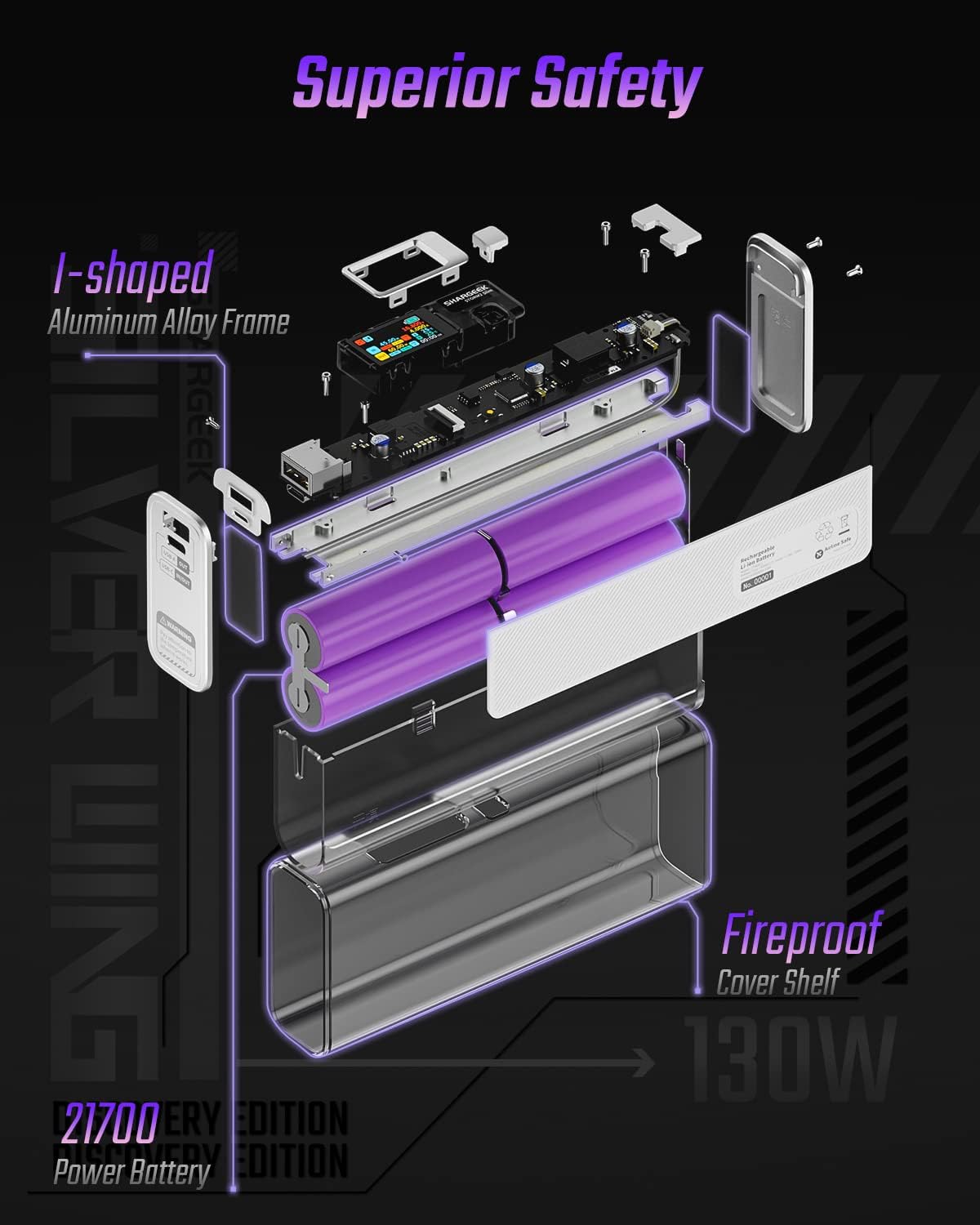
Image: An exploded diagram of the Shargeek STORM2 Slim, illustrating its internal structure including the I-shaped aluminum alloy frame, fireproof cover shelf, and 21700 power batteries, highlighting its robust construction.
ການແກ້ໄຂບັນຫາ
| ບັນຫາ | ສາເຫດທີ່ເປັນໄປໄດ້ | ການແກ້ໄຂ |
|---|---|---|
| ອຸປະກອນບໍ່ໄດ້ສາກໄຟຈາກ power bank. | Low power bank battery; incompatible cable; device not properly connected; device requires more power than available. | Recharge the STORM2 Slim. Ensure cable is fully inserted and compatible. Check device power requirements against power bank output. Try a different cable or port. |
| Power bank ບໍ່ໄດ້ສາກໄຟ. | Charging cable or adapter faulty; power bank port damaged. | Try a different USB-C cable and power adapter. Ensure the adapter meets the recommended power output (e.g., 100W). If problem persists, contact support. |
| IPS screen is blank or unresponsive. | Power bank is off; temporary software glitch. | Press the button to activate the screen. If unresponsive, try connecting a device to charge or connecting the power bank to a charger to see if it activates. If problem persists, contact support. |
| ການສາກໄຟຊ້າ. | Cable not supporting fast charging; device not supporting fast charging; multiple devices connected. | Ensure you are using a high-quality USB-C PD cable. Verify your device supports fast charging. Charging multiple devices simultaneously may reduce individual charging speeds. |
ຂໍ້ມູນຈໍາເພາະ
- ໝາຍເລກຕົວແບບ: STM2E-1
- ຄວາມອາດສາມາດຫມໍ້ໄຟ: 20000mAh
- ຜົນຜະລິດສູງສຸດ: 130W
- USB-C Output: Up to 100W Power Delivery (PD)
- ຜົນໄດ້ຮັບ USB-A: ສູງເຖິງ 30W
- ປ້ອນຂໍ້ມູນ: USB-C (up to 100W PD)
- ຈໍສະແດງຜົນ: ໜ້າຈໍ IPS
- ຂະໜາດ: 3 x 6.5 x 15.59 cm (ປະມານ 1.18 x 2.56 x 6.14 ນິ້ວ)
- ນ້ຳໜັກ: ປະມານ 689 g (1.52 lbs)
- ປະເພດຫມໍ້ໄຟ: ລີທຽມໄອອອນ
ການຮັບປະກັນແລະການສະຫນັບສະຫນູນ
ຂໍ້ມູນການຮັບປະກັນ:
Shargeek products are covered by a limited warranty against defects in materials and workmanship. Please refer to the warranty card included with your purchase or visit the official Shargeek webເວັບໄຊສໍາລັບເງື່ອນໄຂການຮັບປະກັນລາຍລະອຽດ.
ການຊ່ວຍເຫຼືອລູກຄ້າ:
For technical assistance, troubleshooting, or warranty claims, please contact Shargeek customer support through their official webເວັບໄຊ ຫຼືຂໍ້ມູນການຕິດຕໍ່ທີ່ສະໜອງໃຫ້ຢູ່ໃນການຫຸ້ມຫໍ່ຜະລິດຕະພັນຂອງທ່ານ.
Official Shargeek Store Link: Shargeek Official Store
ຂໍ້ມູນຄວາມປອດໄພ
- ຢ່າປ່ອຍໃຫ້ອຸປະກອນຖືກນໍ້າ, ຄວາມຊຸ່ມຊື່ນ, ຫຼືອຸນຫະພູມທີ່ຮຸນແຮງ.
- Do not disassemble, modify, or attempt to repair the device yourself. This will void the warranty and may cause damage or injury.
- ຮັກສາໃຫ້ໄກຈາກເດັກນ້ອຍ.
- ໃຊ້ພຽງແຕ່ສາຍສາກ ແລະອະແດັບເຕີທີ່ຮອງຮັບ ແລະເຂົ້າກັນໄດ້ເທົ່ານັ້ນ.
- ຫຼີກລ້ຽງການຫຼຸດລົງຫຼືການອຸປະກອນທີ່ມີຜົນກະທົບທີ່ເຂັ້ມແຂງ.
- Dispose of the device responsibly according to local regulations for electronic waste.