1. ບົດແນະນຳ
The ECLER WARM2 is a professional two-channel analogue rotary DJ mixer, meticulously designed and manufactured by ECLER in Barcelona. It is engineered to deliver a warm and crystal-clear analogue sound, a characteristic hallmark of ECLER mixers. This manual provides essential information for the proper setup, operation, and maintenance of your WARM2 mixer, ensuring optimal performance and longevity.
2. ຄໍາແນະນໍາຄວາມປອດໄພ
Please read and follow these safety instructions carefully to prevent damage to the unit and ensure user safety:
- ການສະຫນອງພະລັງງານ: Only connect the mixer to a power source with the specified voltagອ. ຮັບປະກັນວ່າສາຍໄຟບໍ່ເສຍຫາຍ ຫຼື ຖືກບີບ.
- ການລະບາຍອາກາດ: ຢ່າອຸດຕັນຊ່ອງລະບາຍອາກາດ. ຮັບປະກັນໃຫ້ມີກະແສລົມໄຫຼວຽນພຽງພໍອ້ອມຮອບເຄື່ອງເພື່ອປ້ອງກັນຄວາມຮ້ອນເກີນໄປ.
- ຄວາມຊຸ່ມ: Keep the unit away from water, rain, and excessive humidity. Do not operate with wet hands.
- ທໍາຄວາມສະອາດ: Disconnect the power before cleaning. Use a dry, soft cloth. Do not use liquid cleaners or aerosols.
- ການບໍລິການ: ຢ່າພະຍາຍາມໃຫ້ບໍລິການຫນ່ວຍງານດ້ວຍຕົວເອງ. ອ້າງອີງການບໍລິການທັງໝົດໃຫ້ກັບພະນັກງານບໍລິການທີ່ມີຄຸນວຸດທິ.
- ການຈັດວາງ: Place the mixer on a stable, level surface. Avoid placing it near heat sources or in direct sunlight.
3. ສິ່ງທີ່ຢູ່ໃນກ່ອງ
Upon unpacking your ECLER Warm2 mixer, please ensure all the following items are present:
- ECLER Warm2 2-Channel Rotary DJ Mixer
- IEC Main Connector (Power Cable)
- 8x ຫມວກກັນກະທົບ RCA
- ຄໍາແນະນໍາຂັ້ນຕອນທໍາອິດ
ຖ້າລາຍການໃດຂາດຫາຍໄປຫຼືເສຍຫາຍ, ກະລຸນາຕິດຕໍ່ຕົວແທນຈໍາຫນ່າຍຂອງທ່ານທັນທີ.
4. ຜະລິດຕະພັນເກີນview
The ECLER Warm2 mixer features a robust design with intuitive controls for a seamless DJ experience. Familiarize yourself with the various components:

ເປັນມຸມ view of the ECLER Warm2 rotary DJ mixer, showcasing its compact design, wooden side panels, and the layout of its controls on the top and front panels.
4.1. ແຜງຄວບຄຸມສູງສຸດ

ເທິງລົງລຸ່ມ view of the ECLER Warm2 mixer's control surface, highlighting the two main channels with their input selectors, gain, EQ (BASS, MID, HIGH), and rotary volume controls. The central section features the Isolator controls (BASS, MID, HIGH) and master output level. The microphone/line input controls are also visible.
- Input Selectors (Channels 1 & 2): Switches between PHONO, LINE, and MICRO inputs for each channel.
- GAIN (Channels 1 & 2): ປັບລະດັບອິນພຸດສຳລັບແຕ່ລະຊ່ອງ.
- EQ (BASS, MID, HIGH - Channels 1 & 2): Three-band equalizer for frequency manipulation on each channel.
- Rotary Volume (Channels 1 & 2): Main volume control for each channel.
- ISOLATOR (BASS, MID, HIGH): A 4th order frequency isolator for creative sound shaping across the master output.
- ແມ່ບົດ: ຄວບຄຸມປະລິມານຜົນຜະລິດໂດຍລວມຂອງເຄື່ອງປະສົມ.
- REC/LINE Input (Channel 3): Additional input for recording or an extra line source.
4.2. ແຜງຄວບຄຸມດ້ານໜ້າ
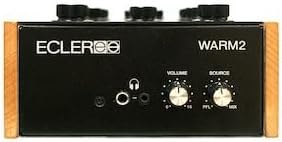
The front panel of the ECLER Warm2 mixer, showing the headphone output jacks (6.3mm and 3.5mm), headphone volume control, and the PFL/MIX selector for headphone monitoring.
- Headphone Outputs (6.3mm & 3.5mm): ເຊື່ອມຕໍ່ຫູຟັງຂອງທ່ານທີ່ນີ້.
- VOLUME (Headphones): Adjusts the headphone output level.
- SOURCE (PFL/MIX): Selects between pre-fader listen (PFL) for individual channels or the mixed master output for headphone monitoring.
4.3. ການເຊື່ອມຕໍ່ແຜງດ້ານຫລັງ
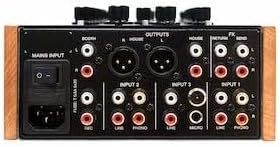
The rear panel of the ECLER Warm2 mixer, displaying all input and output connections. This includes the IEC main power input, Booth Output (XLR and RCA), House Output (XLR and RCA), Return/Send for effects, and various inputs for PHONO, LINE, and MICRO sources across the two channels.
- ວັດສະດຸປ້ອນຫຼັກ: IEC power connector for the main power cable.
- HOUSE OUTPUTS (XLR & RCA): Main stereo outputs for connecting to your primary sound system.
- BOOTH OUTPUTS (XLR & RCA): Stereo outputs for connecting to booth monitors.
- FX SEND/RETURN: Stereo RCA connections for integrating external effects processors.
- INPUTS (Channels 1 & 2):
- PHONO (RCA): Inputs for turntables.
- LINE (RCA): Inputs for CDJs, media players, or other line-level sources.
- MICRO (XLR/TRS Combo): Inputs for microphones.
5. ຕັ້ງຄ່າ
Follow these steps to correctly set up your ECLER Warm2 mixer:
5.1. ການເຊື່ອມຕໍ່ພະລັງງານ
- ໃຫ້ແນ່ໃຈວ່າສະວິດໄຟຂອງເຄື່ອງປະສົມຢູ່ໃນຕໍາແຫນ່ງ OFF.
- Connect the supplied IEC main connector cable to the MAINS INPUT on the rear panel of the mixer.
- ສຽບປາຍສາຍໄຟອີກດ້ານໜຶ່ງໃສ່ບ່ອນສຽບໄຟ AC ທີ່ເໝາະສົມ.
5.2. ການເຊື່ອມຕໍ່ສຽງ
- ແຫຼ່ງປ້ອນຂໍ້ມູນ: Connect your turntables to the PHONO inputs and your CDJs or other line-level devices to the LINE inputs using RCA cables. Ensure you match the left and right channels.
- ໄມໂຄຣໂຟນ: Connect microphones to the MICRO inputs using XLR or TRS cables.
- ຜົນໄດ້ຮັບຕົ້ນຕໍ: Connect your main sound system (e.g., power amplifier, active speakers) to the HOUSE OUTPUTS (XLR or RCA).
- Booth Monitors: Connect your booth monitors to the BOOTH OUTPUTS (XLR or RCA).
- ຜົນກະທົບພາຍນອກ: If using external effects, connect the SEND output of the mixer to the input of your effects unit, and the output of your effects unit to the RETURN input of the mixer.
6. ຄໍາແນະນໍາການດໍາເນີນງານ
This section details the basic operation of your ECLER Warm2 mixer.
6.1. ເປີດ / ປິດພະລັງງານ
- Ensure all volume controls (channel and master) are set to their minimum position before powering on.
- ເລື່ອນສະວິດໄຟຢູ່ແຜງດ້ານຫຼັງໄປທີ່ຕຳແໜ່ງ ON.
- To power off, reverse the process: lower all volumes, then flip the power switch to OFF.
6.2. Channel Operation
- ເລືອກການປ້ອນຂໍ້ມູນ: Use the Input Selector switch for each channel to choose between PHONO, LINE, or MICRO.
- ປັບ GAIN: Play your audio source and slowly increase the GAIN knob until the signal level is healthy but not clipping (indicated by the level meters).
- Use EQ: Adjust the BASS, MID, and HIGH knobs to shape the frequency response of your audio.
- ປະລິມານການຄວບຄຸມ: Use the large Rotary Volume knob for each channel to control its output level into the mix.
6.3. Master and Isolator Controls
- ລະດັບສຽງຫຼັກ: Once your channels are mixed, slowly raise the MASTER volume knob to control the overall output level to your main sound system.
- ISOLATOR: The 4th order ISOLATOR allows for dramatic frequency cuts or boosts across BASS, MID, and HIGH frequencies of the master output, providing powerful creative mixing capabilities.
6.4. ການຕິດຕາມຫູຟັງ
- Connect your headphones to either the 6.3mm or 3.5mm jack on the front panel.
- Use the SOURCE switch to select between PFL (Pre-Fader Listen) to monitor individual channels before they enter the main mix, or MIX to listen to the master output.
- Adjust the HEADPHONE VOLUME knob to a comfortable listening level.
7. ບໍາລຸງຮັກສາ
Proper maintenance will extend the life of your ECLER Warm2 mixer:
- ທໍາຄວາມສະອາດ: Regularly wipe the unit with a soft, dry, lint-free cloth. For stubborn dirt, a slightly damp cloth can be used, but ensure no moisture enters the unit. Avoid abrasive cleaners.
- ການລະບາຍອາກາດ: Ensure the ventilation slots are clear of dust and debris. Use compressed air to gently clear them if necessary.
- ການເກັບຮັກສາ: ເມື່ອບໍ່ໄດ້ໃຊ້ງານເປັນເວລາດົນ, ໃຫ້ເກັບຮັກສາເຄື່ອງປະສົມໄວ້ໃນບ່ອນທີ່ເຢັນແລະແຫ້ງ, ດີທີ່ສຸດຄວນເກັບໄວ້ໃນກ່ອງບັນຈຸເດີມ ຫຼື ກ່ອງປ້ອງກັນ.
- Knobs and Faders: Avoid excessive force when operating knobs and switches.
8. ການແກ້ໄຂບັນຫາ
If you encounter issues with your ECLER Warm2 mixer, refer to the following common problems and solutions:
| ບັນຫາ | ສາເຫດທີ່ເປັນໄປໄດ້ | ການແກ້ໄຂ |
|---|---|---|
| ບໍ່ມີສຽງອອກ | Power off; cables disconnected; volume down; incorrect input selected. | Check power, all audio connections, master and channel volumes, and input selectors. |
| ສຽງບິດເບືອນ | Input GAIN too high; master volume too high; faulty cable. | Reduce GAIN and master volume. Test with different cables. |
| ສຽງດັງ ຫຼື ສຽງດັງ | ພື້ນດິນ; ສາຍໄຟຜິດພາດ; ການແຊກແຊງຈາກເອເລັກໂຕຣນິກອື່ນໆ. | Ensure proper grounding. Use shielded cables. Try isolating the mixer from other electronics. |
| ຫູຟັງບໍ່ເຮັດວຽກ | Headphone volume down; SOURCE switch incorrect; faulty headphones. | Increase headphone volume. Check SOURCE switch. Test with another pair of headphones. |
If the problem persists after trying these solutions, please contact ECLER customer support or a qualified service technician.
9. ຂໍ້ມູນຈໍາເພາະ
Key technical specifications for the ECLER Warm2 2-Channel Rotary DJ Mixer:
- ໝາຍເລກຕົວແບບ: WARM-2
- ຈຳນວນຊ່ອງ: 2
- ເຕັກໂນໂລຍີການເຊື່ອມຕໍ່: ອະນາລັອກ
- ແຫຼ່ງພະລັງງານ: ໄຟຟ້າສາຍ
- ສີ: ດຳ
- ນ້ໍາຫນັກລາຍການ: 7.9 ປອນ
- ວັດສະດຸປ້ອນ: 2x PHONO (RCA), 2x LINE (RCA), 1x MICRO (XLR/TRS Combo), 1x REC/LINE (RCA)
- ຜົນໄດ້ຮັບ: 1x HOUSE (XLR & RCA), 1x BOOTH (XLR & RCA), 1x FX SEND (RCA), 1x FX RETURN (RCA), 2x Headphone (6.3mm & 3.5mm)
- EQ: 3-band per channel
- ຕົວແຍກ: 4th order, 3-band (BASS, MID, HIGH)
10. ການຮັບປະກັນແລະການສະຫນັບສະຫນູນ
ECLER products are manufactured to the highest standards and come with a limited warranty against defects in materials and workmanship. Please refer to the 'First Steps Guide' included in your package for specific warranty terms and conditions applicable to your region.
For technical support, service, or warranty claims, please contact your authorized ECLER dealer or visit the official ECLER website for contact information and support resources. When contacting support, please have your product model number (WARM-2) and purchase information ready.
ECLER Official Webເວັບໄຊ: www.ecler.com


