1. ຄໍາແນະນໍາຄວາມປອດໄພທີ່ສໍາຄັນ
ກະລຸນາອ່ານຄໍາແນະນໍາທັງໝົດຢ່າງລະອຽດກ່ອນທີ່ຈະນໍາໃຊ້ເຄື່ອງໃຊ້ໄຟຟ້ານີ້. ເກັບຄູ່ມືນີ້ໄວ້ເພື່ອອ້າງອີງໃນອະນາຄົດ.
- ຮັບປະກັນ voltage ຊີ້ບອກຢູ່ໃນປ້າຍການຈັດອັນດັບແມ່ນກົງກັບຫົວຂໍ້ຕົ້ນຕໍຂອງທ່ານtage.
- ຢ່າເອົາພັດລົມ, ປລັກສຽບ ຫຼືສາຍໄຟໃສ່ໃນນໍ້າ ຫຼືຂອງແຫຼວອື່ນໆ.
- Unplug from the outlet when not in use, before cleaning, or before moving the fan.
- ຫ້າມໃຊ້ອຸປະກອນທີ່ມີສາຍໄຟ ຫຼືປລັກສຽບເສຍຫາຍ.
- Keep the fan out of reach of children.
- ຢ່າເອົານິ້ວມື ຫຼືສິ່ງຂອງອື່ນໆເຂົ້າໄປຜ່ານເຕົາໄຟເມື່ອພັດລົມເຮັດວຽກ.
- ວາງພັດລົມຢູ່ເທິງພື້ນຜິວທີ່ມີລະດັບຄວາມຫມັ້ນຄົງ.
- Do not use the fan near windows, as rain may create an electrical hazard.
- ເຄື່ອງໃຊ້ນີ້ແມ່ນໃຊ້ໃນຄົວເຮືອນເທົ່ານັ້ນ.
2. ຜະລິດຕະພັນເກີນview
The Mistral MLF3508DR is a 14-inch slide fan designed for efficient air circulation and cooling in home environments. It features a brushless DC motor, multiple speed settings, and convenient remote control operation.
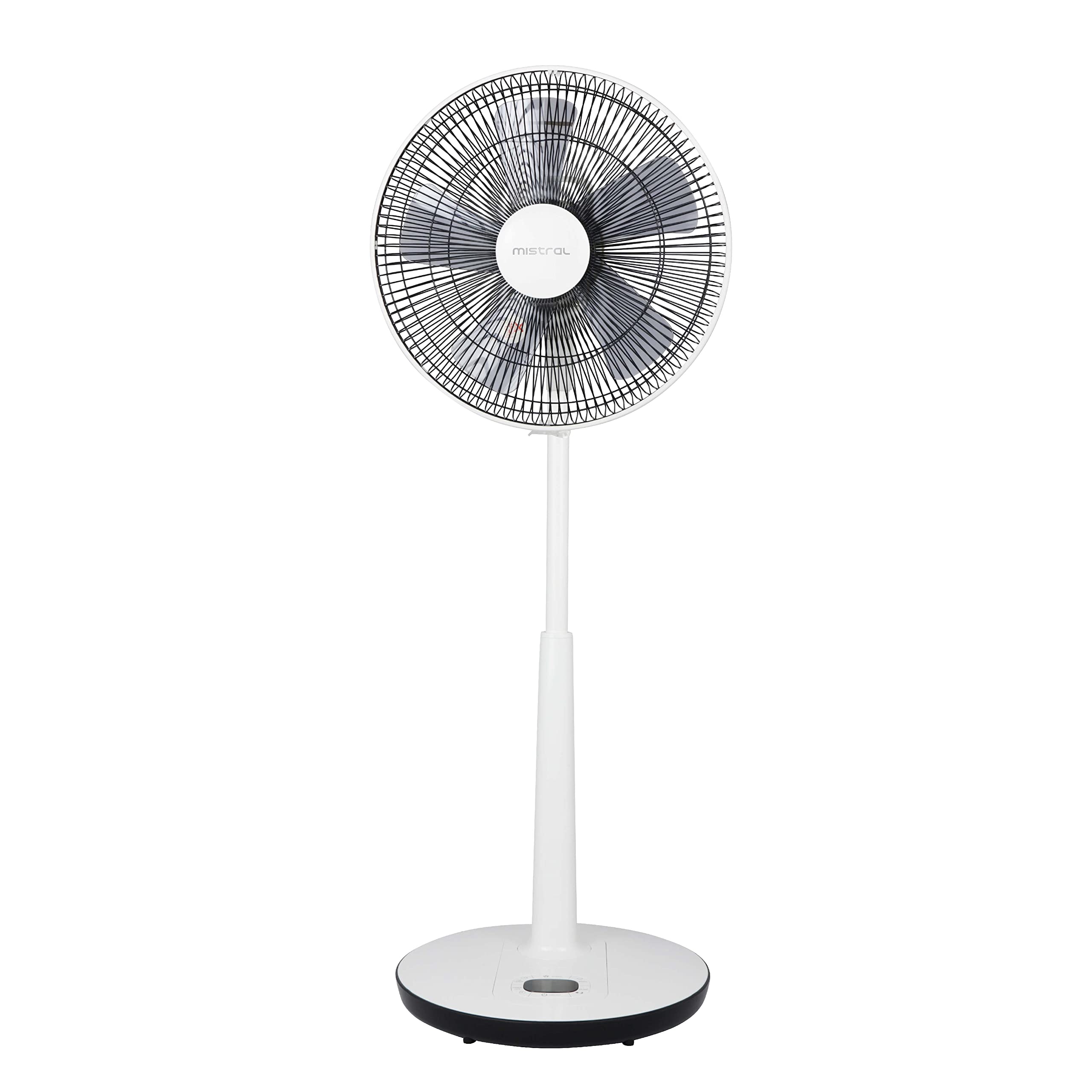
ຮູບທີ 1: ດ້ານໜ້າ view of the Mistral MLF3508DR 14-inch Slide Fan. This image shows the fan's overall design, including the grille, blades, and adjustable stand.
3. ການຕິດຕັ້ງແລະການປະກອບ
The Mistral MLF3508DR fan requires minimal assembly. It is designed for floor mounting and comes with all necessary components for immediate use.
3.1 ການຫຸ້ມຫໍ່
- ເອົາພັດລົມ ແລະອຸປະກອນເສີມທັງໝົດອອກຈາກເຄື່ອງຫຸ້ມຫໍ່ຢ່າງລະມັດລະວັງ.
- Verify that all included components are present: 1 x Slide Fan with Remote Control, 14".
- ຮັກສາການຫຸ້ມຫໍ່ສໍາລັບການເກັບຮັກສາຫຼືການຂົນສົ່ງໃນອະນາຄົດ.
3.2 ການຈັດວາງ
- ວາງພັດລົມໃສ່ພື້ນຜິວທີ່ແຫນ້ນຫນາ.
- Ensure there is adequate space around the fan for optimal airflow and oscillation.
- The fan is designed for floor mounting.
3.3 ການເຊື່ອມຕໍ່ພະລັງງານ
- Ensure the fan is switched off before plugging it into a power outlet.
- Connect the power cord to a standard electrical outlet. The fan operates on corded electric power.
3.4 ຫມໍ້ໄຟຄວບຄຸມໄລຍະໄກ
The remote control requires batteries (not specified in product data, typically AAA or CR2032). Open the battery compartment on the back of the remote control and insert the batteries, observing the correct polarity (+/-).
4. ຄໍາແນະນໍາການດໍາເນີນງານ
The Mistral MLF3508DR fan can be operated using the control panel on the base or the included remote control.
4.1 ກະດານຄວບຄຸມຫຼາຍກວ່າview
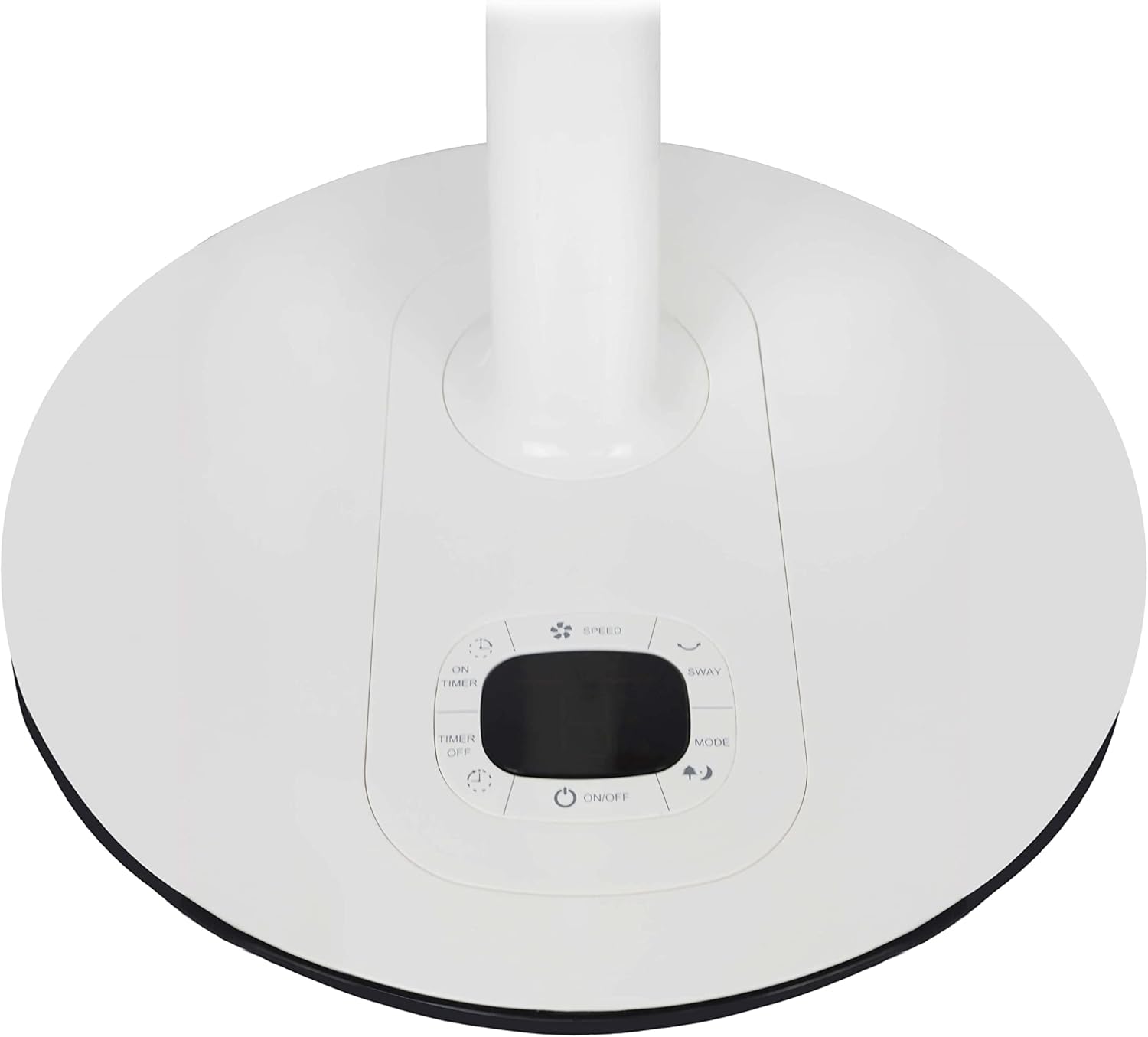
ຮູບທີ 2: ໃກ້ຊິດ view of the control panel located on the fan's base. This image highlights the buttons for power, speed, timer, oscillation, and mode selection.
- ປຸ່ມເປີດ/ປິດ: ເປີດ ຫຼື ປິດພັດລົມ.
- ປຸ່ມຄວາມໄວ: Adjusts the fan speed (8 selections available).
- ປຸ່ມ OSCILLATION: Activates or deactivates the 90º auto left-right oscillation.
- ປຸ່ມ MODE: Cycles through Normal, Natural, and Sleep modes.
- ປຸ່ມເປີດ/ປິດໂມງຈັບເວລາ: Sets the 8-hour timer function.
- ຈໍສະແດງຜົນ LED: ສະແດງການຕັ້ງຄ່າປັດຈຸບັນ.
4.2 ການດໍາເນີນງານການຄວບຄຸມໄລຍະໄກ
The remote control duplicates the functions of the control panel, allowing convenient operation from a distance.
- ຊີ້ຣີໂມດຄວບຄຸມໂດຍກົງໃສ່ເຄື່ອງຮັບຂອງພັດລົມ.
- Press the corresponding buttons to control power, speed, oscillation, mode, and timer settings.
4.3 ໂໝດພັດລົມ
- ໂໝດປົກກະຕິ: ສະຫນອງການໄຫຼວຽນຂອງອາກາດຄົງທີ່ໃນຄວາມໄວທີ່ເລືອກ.
- ໂໝດທຳມະຊາດ: Simulates natural breezes by varying fan speed intermittently.
- ຮູບແບບການນອນ: ເຮັດວຽກດ້ວຍຄວາມໄວທີ່ຕ່ຳກວ່າ, ງຽບກວ່າ, ມັກຈະຄ່ອຍໆຫຼຸດລົງasing speed over time for comfortable sleep.
4.4 ຟັງຊັນຈັບເວລາ
The fan features an 8-hour timer. Use the TIMER ON/OFF buttons to set the desired operating duration. The fan will automatically turn off after the set time.
4.5 ການປັບຄວາມສູງ
The fan's height can be adjusted up to a maximum of 110 cm. Locate the height adjustment mechanism on the stand, typically a collar or knob, and adjust to the desired height before securing it firmly.
5. ການບໍາລຸງຮັກສາແລະການທໍາຄວາມສະອາດ
ການທໍາຄວາມສະອາດເປັນປົກກະຕິຮັບປະກັນປະສິດທິພາບທີ່ດີທີ່ສຸດແລະຍືດອາຍຸຂອງພັດລົມຂອງທ່ານ. ຖອດພັດລົມອອກສະເໝີກ່ອນທຳຄວາມສະອາດ.
- ການອະນາໄມພາຍນອກ: ເຊັດພື້ນຜິວພາຍນອກຂອງພັດລົມໃຫ້ອ່ອນໆ, ງamp ຜ້າ. ຢ່າໃຊ້ເຄື່ອງເຮັດຄວາມສະອາດຂັດຫຼືສານລະລາຍ.
- Grille ທໍາຄວາມສະອາດ: Dust and debris can accumulate on the fan grille and blades. Use a vacuum cleaner with a brush attachment or a soft, dry cloth to clean the grille. For thorough cleaning, the front grille may be removable (refer to specific instructions if provided on the unit itself).
- ການເກັບຮັກສາ: ເມື່ອບໍ່ໄດ້ໃຊ້ເປັນເວລາດົນ, ໃຫ້ເກັບຮັກສາພັດລົມໄວ້ໃນບ່ອນທີ່ເຢັນ, ແຫ້ງ, ດີກວ່າຢູ່ໃນບັນຈຸພັນຕົ້ນສະບັບຂອງມັນ.
- ຄໍາແນະນໍາການດູແລ: The manufacturer recommends "Wipe and Clean" for maintenance.
6. ການແກ້ໄຂບັນຫາ
If you encounter issues with your Mistral MLF3508DR fan, refer to the following common problems and solutions.
| ບັນຫາ | ສາເຫດທີ່ເປັນໄປໄດ້ | ການແກ້ໄຂ |
|---|---|---|
| ພັດລົມບໍ່ເປີດ. | ບໍ່ມີການສະຫນອງພະລັງງານ. ບໍ່ໄດ້ກົດປຸ່ມເປີດປິດ. | ກວດເບິ່ງວ່າສາຍໄຟຖືກສຽບຢ່າງປອດໄພກັບປລັກສຽບທີ່ເຮັດວຽກຫຼືບໍ່. Press the ON/OFF button on the control panel or remote. |
| ອາກາດອ່ອນ ຫຼື ບໍ່ມີກະແສລົມ. | ຕັ້ງຄວາມໄວພັດລົມຕໍ່າເກີນໄປ. Grille or blades are dirty. | ເພີ່ມຄວາມໄວພັດລົມໂດຍໃຊ້ປຸ່ມ SPEED. Unplug the fan and clean the grille and blades as per maintenance instructions. |
| ພັດລົມເຮັດໃຫ້ສຽງຜິດປົກກະຕິ. | ພາກສ່ວນວ່າງ. ການອຸດຕັນໃນໃບພັດລົມ. | Unplug the fan and check for any loose components. Ensure no foreign objects are caught in the blades or grille. |
| ການຄວບຄຸມໄລຍະໄກບໍ່ເຮັດວຽກ. | ໝໍ້ໄຟຕາຍ. ການຂັດຂວາງລະຫວ່າງຫ່າງໄກສອກຫຼີກແລະພັດລົມ. | ປ່ຽນແບັດໃນຣີໂມດຄວບຄຸມ. ຮັບປະກັນສາຍສາຍຕາທີ່ຊັດເຈນລະຫວ່າງຣີໂໝດ ແລະເຄື່ອງຮັບພັດລົມ. |
ຖ້າບັນຫາຍັງຄົງຢູ່ຫຼັງຈາກພະຍາຍາມແກ້ໄຂເຫຼົ່ານີ້, ກະລຸນາຕິດຕໍ່ຝ່າຍຊ່ວຍເຫຼືອລູກຄ້າ.
7. ຂໍ້ມູນຈໍາເພາະ
| ຕົວແບບ: | MLF3508DR |
| ຍີ່ຫໍ້: | MISTRAL |
| ປະເພດ: | 14-inch Slide Floor Fan |
| ແຫຼ່ງພະລັງງານ: | ໄຟຟ້າສາຍ |
| ວັດtage: | 25 ວັດ |
| ຄວາມໄວ: | 8 ການຄັດເລືອກ |
| ໂມງຈັບເວລາ: | 8 ຊົ່ວໂມງ |
| ການສັ່ນ: | Auto left-right 90º |
| ໂໝດ: | ປົກກະຕິ, ທໍາມະຊາດ, ນອນ |
| ປະເພດມໍເຕີ: | Brushless DC Motor |
| ພັດລົມ Blades: | 5 ABS blades |
| ຄວາມສູງສູງສຸດ: | 110 ຊຕມ |
| ຂະໜາດສິນຄ້າ (DxWxH): | 17.5D x 43W x 73H ຊມ |
| ປະສິດທິພາບ: | 1.08 m³ / ນາທີ |
| ລະດັບສຽງລົບກວນ: | <65dBA |
| ອົງປະກອບລວມ: | 1 x Slide Fan with Remote Control, 14" |
| ຄໍາແນະນໍາການດູແລ: | ເຊັດ ແລະ ທຳຄວາມສະອາດ |
8. ຂໍ້ມູນການຮັບປະກັນ
This product is covered by a manufacturer's warranty. Please refer to the warranty card included with your purchase or contact Mistral customer support for detailed warranty terms and conditions. Keep your proof of purchase for warranty claims.
9. ການຊ່ວຍເຫຼືອລູກຄ້າ
For technical assistance, troubleshooting beyond this manual, or warranty inquiries, please contact Mistral customer support. Visit the official Mistral webເວັບໄຊທ໌ສຳລັບລາຍລະອຽດການຕິດຕໍ່ ແລະ ຂໍ້ມູນເພີ່ມເຕີມ.
ສະຫນັບສະຫນູນອອນໄລນ໌: www.mistral.com.sg


