1. ບົດແນະນຳ
This manual provides detailed instructions for the proper use and care of your Samyang 135mm F1.8 Full Frame Telephoto Lens for Sony E-mount cameras. Please read this manual thoroughly before using the product to ensure optimal performance and longevity.
The Samyang 135mm F1.8 AF Full Frame Telephoto Lens is designed for high-performance imaging, offering sharp detail, pleasing bokeh, and advanced focus control. Its 135mm focal length is suitable for portraiture, close-ups, landscapes, and astrophotography, providing a focused field of view and subject separation. The wide F1.8 aperture, combined with a sophisticated optical design, ensures sharp results with smooth background blur.
2. ສິ່ງທີ່ຢູ່ໃນກ່ອງ
ກວດສອບວ່າລາຍການທັງຫມົດແມ່ນມີຢູ່ໃນຊຸດ:
- Samyang 135mm F1.8 Lens
- Lens Hood
- Lensາແວ່ນ ໜ້າ
- ກ້ອງຫລັງເລນ
- ກະເປົາຖື
- ຄູ່ມືຜູ້ໃຊ້ (ເອກະສານນີ້)
- ບັດຮັບປະກັນ
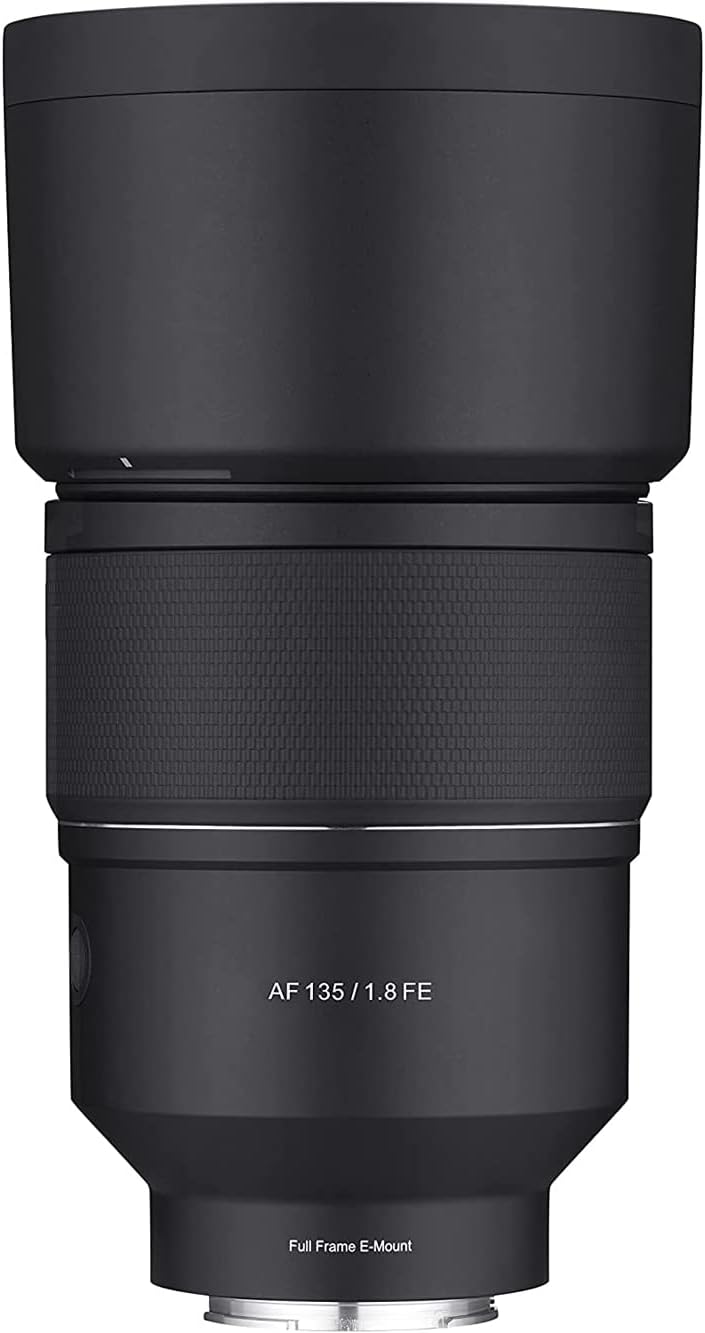
Image: Samyang 135mm F1.8 lens with its included lens hood, shown from a front-facing perspective.
3. ຕັ້ງຄ່າ
3.1 ການຕິດເລນ
- ກວດໃຫ້ແນ່ໃຈວ່າກ້ອງຂອງເຈົ້າປິດຢູ່.
- ຖອດຝາປິດກ້ອງຫຼັງອອກຈາກເລນ ແລະຝາປິດຕົວອອກຈາກກ້ອງຂອງທ່ານ.
- ວາງເຄື່ອງໝາຍດັດຊະນີສີຂາວຢູ່ກ້ອງເລນດ້ວຍເຄື່ອງໝາຍດັດຊະນີສີຂາວທີ່ສອດຄ້ອງກັນຢູ່ກ້ອງເລນຂອງກ້ອງຂອງທ່ານ.
- ສຽບເລນໃສ່ກ້ອງຕິດກ້ອງ ແລະ ໝຸນຕາມເຂັມໂມງຈົນກວ່າມັນຈະກົດໃສ່ບ່ອນ. ຢ່າບັງຄັບເລນ.
- ແນບຮູເລນໂດຍການວາງເຄື່ອງໝາຍຂອງມັນກັບເຄື່ອງໝາຍຢູ່ດ້ານໜ້າຂອງເລນ ແລະບິດຈົນກວ່າມັນຈະລັອກ.

Image: The Samyang 135mm F1.8 lens, displaying its rear optical element and the camera mount. Control switches are visible on the side of the lens barrel.
3.2 ການຖອດເລນ
- ກວດໃຫ້ແນ່ໃຈວ່າກ້ອງຂອງເຈົ້າປິດຢູ່.
- ກົດປຸ່ມປ່ອຍເລນຢູ່ໃນຕົວກ້ອງຖ່າຍຮູບຂອງທ່ານຄ້າງໄວ້.
- ໝຸນເລນຕາມເຂັມໂມງຈົນກວ່າມັນຈະແຍກອອກຈາກຕົວກ້ອງ.
- Immediately attach the rear lens cap to the lens and the body cap to your camera to protect the sensor and lens elements.
4. ການເຮັດວຽກຂອງເລນ
4.1 Autofocus (AF) System
The lens features a Linear STM autofocus motor, providing fast, smooth, and quiet autofocus performance. This is beneficial for both still photography and video recording, minimizing focus breathing.
4.2 ປຸ່ມກົດຄ້າງໄວ້
The Focus Hold Button allows you to lock the focus at a specific distance. This button can often be customized via your camera's menu to perform other functions, such as Eye AF activation.
4.3 Custom Switch
The Custom Switch provides additional control options. In its default setting, it may control aperture silently, which is useful for video. Refer to your camera's manual for potential customization options for this switch.
4.4 Focus Range Limiter
The Focus Range Limiter switch optimizes autofocus speed by restricting the focus range. This is particularly useful when you know your subject will be within a certain distance, preventing the lens from hunting across its full focus range.
- ເຕັມ: ອະນຸຍາດໃຫ້ມີການໂຟກັສທົ່ວທຸກລະດັບ (0.69 ມ ຈົນເຖິງອະນັນ).
- 0.69m - 2m: Limits focus to close-up distances (0.69 meters to 2 meters).
- 1.5 ມ - ∞: Limits focus to longer distances (1.5 meters to infinity).

Image: An illustration of the Samyang 135mm F1.8 lens, pointing out the locations of the Focus Hold Button, Custom Switch, and Focus Range Limiter for user reference.
4.5 ການສຸມໃສ່ດ້ວຍມື (MF)
To use manual focus, set your camera to MF mode. Rotate the focus ring on the lens to adjust focus. The lens features a micro-pattern focus ring for enhanced grip and precise control.
4.6 Aperture ແລະ Bokeh
The wide F1.8 aperture allows for significant light gathering and shallow depth of field, producing smooth, aesthetically pleasing background blur (bokeh). The optical design, including an ultra-precision aspherical lens, contributes to refined and natural bokeh.

ຮູບພາບ: A sample portrait photograph demonstrating the shallow depth of field and smooth background blur achievable with the Samyang 135mm F1.8 lens.
4.7 Minimum Focusing Distance
The lens has a minimum focusing distance of 0.69 meters (2.26 feet) and a maximum magnification of 0.243x, enabling detailed close-up photography.
5. ການບໍາລຸງຮັກສາແລະການດູແລ
- ທໍາຄວາມສະອາດ Lens: Use a soft, lint-free cloth or a lens brush to remove dust. For smudges or fingerprints, use a specialized lens cleaning solution and a microfiber cloth. Apply solution to the cloth, not directly to the lens.
- ການເກັບຮັກສາ: When not in use, always attach the front and rear lens caps. Store the lens in a cool, dry place, away from direct sunlight and extreme temperatures. Use the provided carrying pouch for added protection.
- ການຜະນຶກສະພາບອາກາດ: The lens features weather sealing to protect against dust and light moisture. While it offers protection, avoid exposing the lens to heavy rain or submerging it in water.

Image: An internal diagram of the lens highlighting the weather-sealed areas, indicating protection against environmental elements.
6. ການແກ້ໄຂບັນຫາ
| ບັນຫາ | ສາເຫດທີ່ເປັນໄປໄດ້ | ການແກ້ໄຂ |
|---|---|---|
| ກ້ອງບໍ່ຮັບຮູ້ເລນ | Improper attachment; dirty electrical contacts. | Re-attach the lens securely. Clean the lens and camera electrical contacts with a clean, dry cloth. Ensure camera firmware is up to date. |
| ໂຟກັສອັດຕະໂນມັດຊ້າ ຫຼືບໍ່ຖືກຕ້ອງ | Low light conditions; Focus Range Limiter set incorrectly; dirty lens elements. | Ensure adequate lighting. Adjust the Focus Range Limiter to "FULL" or the appropriate range. Clean the front and rear lens elements. Update lens firmware if available. |
| ຮູບພາບແມ່ນມົວ | ຈຸດສຸມທີ່ບໍ່ຖືກຕ້ອງ; ກ້ອງຖ່າຍຮູບສັ່ນ; ເລນເປື້ອນ. | Verify focus settings. Use a faster shutter speed or tripod. Clean lens elements. |
7. ຂໍ້ມູນຈໍາເພາະ
| ຄຸນສົມບັດ | ລາຍລະອຽດ |
|---|---|
| ຍີ່ຫໍ້ | ສົມຫວັງ |
| ໝາຍເລກຕົວແບບ | SYIO13518-E |
| ຄວາມຍາວໂຟກັສ | 135ມມ |
| ຮູຮັບແສງສູງສຸດ | F1.8 |
| ປະເພດເລນ | Telephoto Prime |
| ການຕິດຕັ້ງທີ່ເຂົ້າກັນໄດ້ | Sony E-mount |
| ໄລຍະການໂຟກັສຕໍ່າສຸດ | 0.69m (2.26ft) |
| ການຂະຫຍາຍສູງສຸດ | 0.243x |
| ການອອກແບບ Optical | 13 elements in 11 groups (including 3 ED, 2 HR, 1 U-ASP) |
| ມໍເຕີໂຟກັສອັດຕະໂນມັດ | Linear STM |
| ການຜະນຶກສະພາບອາກາດ | ແມ່ນແລ້ວ |
| ຂະໜາດສິນຄ້າ | 7.87 x 3.94 x 1.97 ນິ້ວ |
| ນ້ໍາຫນັກລາຍການ | 2.64 ປອນ (ປະມານ 1.2 ກິໂລ) |
8. ການຮັບປະກັນແລະການສະຫນັບສະຫນູນ
For warranty information, please refer to the Warranty Card included with your product. Keep your proof of purchase for warranty claims.
A digital version of this user manual is available for download. For further assistance or technical support, please visit the official Samyang webເວັບໄຊ ຫຼືຕິດຕໍ່ບໍລິການລູກຄ້າຂອງເຂົາເຈົ້າ.
ຄູ່ມືຜູ້ໃຊ້ທີ່ເປັນທາງການ (PDF): ດາວໂຫລດ PDF


