ແນະນຳ
Thank you for choosing the Senicare Digital LED Alarm Clock. This manual provides detailed instructions for setting up, operating, and maintaining your new alarm clock. Please read this manual thoroughly before use to ensure proper functionality and to maximize your experience with its features, including dual alarms, a 7-color night light, a dimmable display, and a convenient USB charging port.
ຂໍ້ມູນຄວາມປອດໄພ
- Ensure the power adapter is compatible with your local power supply (100-240V AC).
- ຢ່າປ່ອຍໃຫ້ອຸປະກອນຖືກນ້ໍາຫຼືຄວາມຊຸ່ມຊື່ນຫຼາຍເກີນໄປ.
- Avoid placing the clock in direct sunlight or near heat sources.
- ໃຊ້ພຽງແຕ່ອະແດັບເຕີໄຟທີ່ໃຫ້ມາ.
- ຮັກສາໃຫ້ໄກຈາກເດັກນ້ອຍນ້ອຍໆ.
- ຢ່າພະຍາຍາມຖອດປະກອບ ຫຼືສ້ອມແປງອຸປະກອນດ້ວຍຕົນເອງ. ຕິດຕໍ່ຝ່າຍຊ່ວຍເຫຼືອລູກຄ້າຖ້າມີບັນຫາເກີດຂຶ້ນ.
- Insert batteries correctly, observing polarity (+/-).
ເນື້ອໃນຊຸດ
- Senicare Digital LED Alarm Clock (Model KT279)
- Power Adapter
- ສາຍສາກ USB
- ຄູ່ມືຜູ້ໃຊ້ (ເອກະສານນີ້)

Figure 1: Senicare Digital LED Alarm Clock and included accessories.
ສິນຄ້າເກີນview
ດ້ານໜ້າ View
The front of the clock features a large LED display for time, and indicators for PM, Alarm 1, and Alarm 2.
ເທິງ View (ການຄວບຄຸມ)
The top panel houses the main control buttons and the integrated night light bar.
- ALT SET: Alarm 1 Set button.
- AL2 SET: Alarm 2 Set button.
- ເວລາ: ປຸ່ມຕັ້ງເວລາ.
- ສີ: Night light color selection button.
- SNOOZE / LIGHT: Snooze function and night light on/off.
- HOUR +: Adjusts hour, increases alarm volume.
- MIN -: Adjusts minute, decreases alarm volume.
ຂ້າງ View (Ports & Dimmer)
The side of the clock includes the power input, USB charging port, and display dimmer slider.
- ພອດໄຟ DC 5V: ເຊື່ອມຕໍ່ກັບອະແດບເຕີພະລັງງານ.
- USB Charging Port (5V-1A): ສໍາລັບການສາກໄຟອຸປະກອນພາຍນອກ.
- ຈໍສະແດງຜົນ DIMMER: Slider to adjust the brightness of the time display (0-100%).
ລຸ່ມ View (Battery Compartment)
The bottom of the clock contains the battery compartment for backup power.

ຮູບ 2: ດ້ານຫລັງ view highlighting the USB charging port and power input.

Figure 3: Battery compartment for backup power.
ຕັ້ງຄ່າ
1. ການເຊື່ອມຕໍ່ພະລັງງານ
- Connect the provided power adapter to the DC 5V Power Port on the back of the clock.
- Plug the power adapter into a standard 100-240V AC wall outlet.
- The LED display will light up, indicating the clock is powered on.
2. ແບັດເຕີຣີສຳຮອງ (ທາງເລືອກ)
ສໍາລັບພະລັງງານ outage protection, install 2 x AAA batteries (not included) into the battery compartment on the bottom of the clock. This will preserve time and alarm settings during a power interruption, though the display will go black.

Figure 4: The clock retains settings during power outages with battery backup.
ຄໍາແນະນໍາການດໍາເນີນງານ
1. ກຳ ນົດເວລາ
- ກົດຄ້າງໄວ້ TIME ກົດປຸ່ມຈົນກ່ວາຕົວເລກຊົ່ວໂມງເລີ່ມກະພິບ.
- ກົດ HOUR + ປຸ່ມເພື່ອປັບຊົ່ວໂມງ.
- ກົດ MIN - ປຸ່ມເພື່ອປັບນາທີ.
- ກົດ TIME ກົດປຸ່ມອີກຄັ້ງເພື່ອຢືນຢັນ ແລະອອກຈາກໂໝດການຕັ້ງຄ່າເວລາ.
2. Setting Dual Alarms (Alarm 1 & Alarm 2)
The clock features two independent alarms for different schedules.

ຮູບທີ 5: ຕົວຢ່າງample of dual alarm functionality.
- To Set Alarm 1: ກົດຄ້າງໄວ້ ALT SET button until the hour digits for Alarm 1 flash.
- ໃຊ້ HOUR + ແລະ MIN - ປຸ່ມເພື່ອຕັ້ງເວລາປຸກທີ່ຕ້ອງການ.
- ກົດ ALT SET again to confirm and activate Alarm 1. The Alarm 1 indicator will appear on the display.
- To Set Alarm 2: Follow the same steps using the ຊຸດ AL2 ປຸ່ມ.
- To turn an alarm on or off, briefly press the corresponding ALT SET or ຊຸດ AL2 button. The alarm indicator will appear/disappear.
3. ຟັງຊັນ Snooze
ເມື່ອມີສຽງປຸກ, ໃຫ້ກົດໃຫຍ່ ສະໂນ / ແສງ button on top of the clock to activate the 9-minute snooze function. The alarm will sound again after 9 minutes.

Figure 6: The SNOOZE / LIGHT button for snooze functionality.
4. ການປັບຄວາມສະຫວ່າງຂອງຈໍສະແດງຜົນ
The clock features a 0-100% full-range dimmer for the LED time display. Use the ສະແດງ DIMMER slider located on the side of the clock to adjust the brightness to your preference.

Figure 7: Adjusting display brightness with the dimmer slider.
5. Night Light Features
The integrated night light offers 7 different colors and adjustable brightness.

Figure 8: The 7-color night light feature.
- ການປ່ຽນແປງສີ: ແຕະທີ່ສັ້ນໆ ສີ button to cycle through the 7 available colors.
- Color Loop Mode: ກົດຄ້າງໄວ້ ສີ button for 2 seconds to enter a continuous color-changing loop.
- Turning Off Night Light: ກົດ ສະໂນ / ແສງ button to turn the night light off.
- ການປັບຄວາມສະຫວ່າງຂອງໄຟກາງຄືນ: The night light brightness can also be adjusted from 0-100% using the ສະແດງ DIMMER slider, similar to the main display.
6. ການປັບລະດັບສຽງເຕືອນ
The alarm volume has 5 adjustable levels, ranging from 45dB to 85dB.
- While an alarm is sounding, or when setting an alarm, press the HOUR + ປຸ່ມເພື່ອເພີ່ມປະລິມານ.
- ກົດ MIN - ປຸ່ມເພື່ອຫຼຸດລະດັບສຽງ.

Figure 9: Volume adjustment using HOUR + and MIN - buttons.
7. ພອດສາກ USB
The clock includes a 5V-1A USB charging port on its side, allowing you to charge small electronic devices like smartphones or tablets while the clock is plugged into power.
ບໍາລຸງຮັກສາ
- ເຮັດຄວາມສະອາດໂມງດ້ວຍຜ້າອ່ອນໆ, ແຫ້ງ. ຢ່າໃຊ້ເຄື່ອງເຮັດຄວາມສະອາດຂັດຫຼືສານລະລາຍ.
- Keep the clock away from dust and moisture.
- If not in use for an extended period, remove the backup batteries to prevent leakage.
ການແກ້ໄຂບັນຫາ
| ບັນຫາ | ສາເຫດທີ່ເປັນໄປໄດ້ | ການແກ້ໄຂ |
|---|---|---|
| ຈໍສະແດງຜົນໂມງປິດ. | No power, or display dimmer set to 0%. | Check power connection. Adjust DISPLAY DIMMER slider. |
| ໂມງປຸກບໍ່ມີສຽງ. | Alarm not set, alarm volume too low, or alarm turned off. | Ensure alarm is set and activated (indicator visible). Increase alarm volume. |
| ເວລາ/ການຕັ້ງຄ່າເສຍຫຼັງຈາກພະລັງງານ outage. | No backup batteries installed, or batteries are dead. | Install fresh 2 x AAA batteries for backup. |
| ການສາກ USB ບໍ່ເຮັດວຽກ. | Clock not powered by AC, or device requires more than 1A. | Ensure clock is plugged into AC power. Check device's charging requirements. |
ຂໍ້ມູນຈໍາເພາະ
| ຄຸນສົມບັດ | ລາຍລະອຽດ |
|---|---|
| ຕົວແບບ | KT279 |
| ປະເພດການສະແດງ | LED |
| ແຫຼ່ງພະລັງງານ | Corded Electric (100-240V AC) |
| ແບັດເຕີຣີສຳຮອງ | 2 x ຫມໍ້ໄຟ AAA (ບໍ່ລວມ) |
| ພອດສາກໄຟ USB | 5V-1A |
| ສີແສງກາງຄືນ | 7 ສີ |
| ສະແດງ Dimmer | 0-100% ປັບໄດ້ |
| ລະດັບສຽງປຸກ | 5 levels (45dB to 85dB) |
| ເລື່ອນໄລຍະເວລາ | 9 ນາທີ |
| ຂະໜາດສິນຄ້າ | 5.91"ກ x 3.15"ສ (ປະມານ 150 ມມ x 80 ມມ) |
| ນ້ໍາຫນັກລາຍການ | 11.7 ອອນ |
| ວັດສະດຸ | ພາດສະຕິກ |
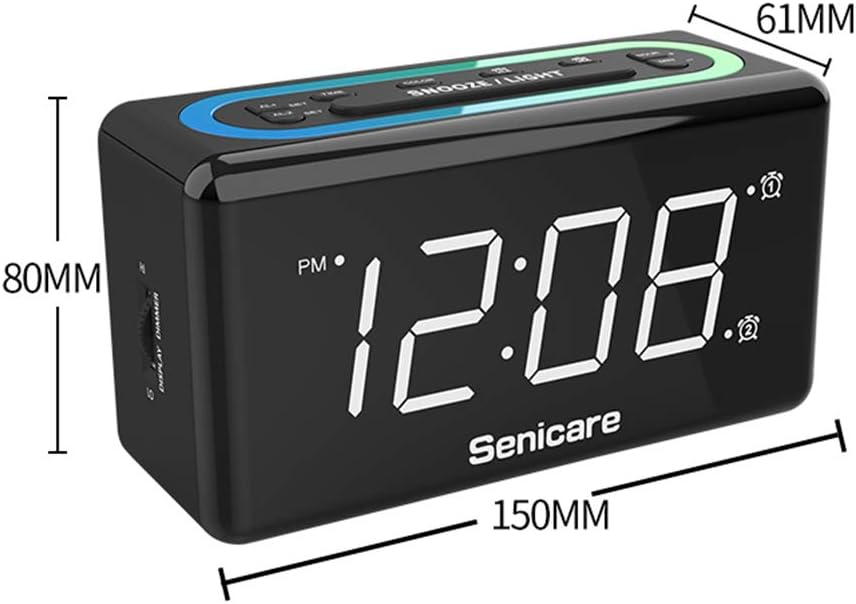
ຮູບທີ 10: ຂະໜາດຜະລິດຕະພັນ.
ການຮັບປະກັນແລະການສະຫນັບສະຫນູນ
The Senicare Digital LED Alarm Clock comes with a ການຮັບປະກັນຫນຶ່ງປີພວກເຮົາຍັງສະເໜີ ຮັບປະກັນການຄືນເງິນ 30 ວັນ. For any questions or assistance, please contact our customer service team, available 24 ຊົ່ວໂມງ a day. Your satisfaction is our priority.