1. ບົດແນະນຳ
ຂອບໃຈສໍາລັບການຊື້asing the Muse MT-106 BT Stereo Turntable. This manual provides essential information for the safe and efficient operation of your new device. Please read it thoroughly before use and retain it for future reference.
The Muse MT-106 BT is a versatile 3-speed (33/45/78 RPM) stereo turntable featuring a Bluetooth receiver, a USB port for playback and encoding, and two integrated speakers. It is designed to play vinyl records and can also stream music from any Bluetooth-compatible device such as a tablet, smartphone, or laptop.
2. ຄໍາແນະນໍາຄວາມປອດໄພ
- ແຫຼ່ງພະລັງງານ: ຮັບປະກັນການສະຫນອງພະລັງງານ voltage ກົງກັບລະດັບການໃຫ້ຄະແນນທີ່ລະບຸໄວ້ໃນຫົວໜ່ວຍ.
- ນ້ໍາແລະຄວາມຊຸ່ມ: Do not expose the unit to rain, moisture, or dripping water. Do not place objects filled with liquids, such as vases, on the unit.
- ການລະບາຍອາກາດ: ຮັບປະກັນການລະບາຍອາກາດທີ່ພຽງພໍ. ຫ້າມປິດຊ່ອງລະບາຍອາກາດ.
- ຄວາມຮ້ອນ: ເກັບຮັກສາເຄື່ອງໃຫ້ຫ່າງຈາກແຫຼ່ງຄວາມຮ້ອນ ເຊັ່ນ: ໝໍ້ນ້ຳ, ເຄື່ອງບັນທຶກຄວາມຮ້ອນ, ເຕົາໄຟ ຫຼື ເຄື່ອງໃຊ້ໄຟຟ້າທີ່ຜະລິດຄວາມຮ້ອນອື່ນໆ.
- ທໍາຄວາມສະອາດ: ຖອດປລັກໜ່ວຍອອກຈາກປລັກສຽບໃສ່ຝາກ່ອນທຳຄວາມສະອາດ. ໃຊ້ຜ້າອ່ອນ, ແຫ້ງ. ຢ່າໃຊ້ເຄື່ອງເຮັດຄວາມສະອາດຂອງແຫຼວຫຼືເຄື່ອງເຮັດຄວາມສະອາດ aerosol.
- ການບໍລິການ: ຢ່າພະຍາຍາມບໍລິການຜະລິດຕະພັນນີ້ດ້ວຍຕົນເອງ. ອ້າງເຖິງການບໍລິການທັງtoົດໃຫ້ກັບພະນັກງານບໍລິການທີ່ມີຄຸນວຸດທິ.
- ການຈັດວາງ: Place the unit on a stable, flat surface to prevent damage from falling.
3. ເນື້ອໃນຊຸດ
ກະລຸນາກວດເບິ່ງວ່າລາຍການຕໍ່ໄປນີ້ແມ່ນລວມຢູ່ໃນຊຸດຂອງທ່ານ:
- Muse MT-106 BT Stereo Turntable
- ຄູ່ມືຜູ້ໃຊ້
- Power Adapter
- ອະແດັບເຕີ 45 RPM
4. ຜະລິດຕະພັນເກີນview
Familiarize yourself with the components and controls of your Muse MT-106 BT Turntable.

ຮູບທີ 4.1: ໂດຍລວມ view of the Muse MT-106 BT Stereo Turntable. This image displays the turntable from an angled perspective, with its transparent dust cover lifted. The wooden base and integrated speakers are visible, along with the black platter, tonearm, and control knobs on the right side.
4.1 ອົງປະກອບດ້ານຫນ້າແລະດ້ານເທິງ
- ການປົກຫຸ້ມຂອງຝຸ່ນ: Protects the platter and tonearm from dust.
- ຈານ: The rotating platform where records are placed.
- Spindle: Holds the record in place on the platter.
- ອະແດັບເຕີ 45 RPM: ໃຊ້ສຳລັບຫຼິ້ນແຜ່ນສຽງຂະໜາດ 7 ນິ້ວທີ່ມີຮູໃຫຍ່ຢູ່ກາງ.
- ໂຕນ: ຖືປາກກາ stylus ແລະຕິດຕາມຮ່ອງບັນທຶກ.
- ປາກກາ (ເຂັມ): The part that reads the record grooves.
- Cue Lever: ຍົກ ແລະ ຫຼຸດລົງໂທນອາມ.
- ຕົວເລືອກຄວາມໄວ: ປ່ຽນໄປເລືອກ 33, 45, ຫຼື 78 RPM.
- ລໍາໂພງປະສົມປະສານ: ລໍາໂພງໃນຕົວສໍາລັບການອອກສຽງ.

ຮູບທີ 4.2: ແຜງຄວບຄຸມ. ຮູບພາບນີ້ໃຫ້ລາຍລະອຽດ view of the control panel located on the right side of the turntable. It shows three rotary knobs for volume and function selection, along with several buttons for playback control and mode switching.
4.2 ກະດານຄວບຄຸມ
- ປຸ່ມພະລັງງານ/ປະລິມານ: Turns the unit on/off and adjusts the volume.
- ປຸ່ມເລືອກຟັງຊັນ: Switches between Phono, Bluetooth, USB, and Aux-in modes.
- ປຸ່ມຄວບຄຸມການຫຼິ້ນ: Play/Pause, Skip Forward, Skip Backward (for USB mode).
- ສະວິດຢຸດອັດຕະໂນມັດ: Enables or disables the automatic stop function for vinyl playback.
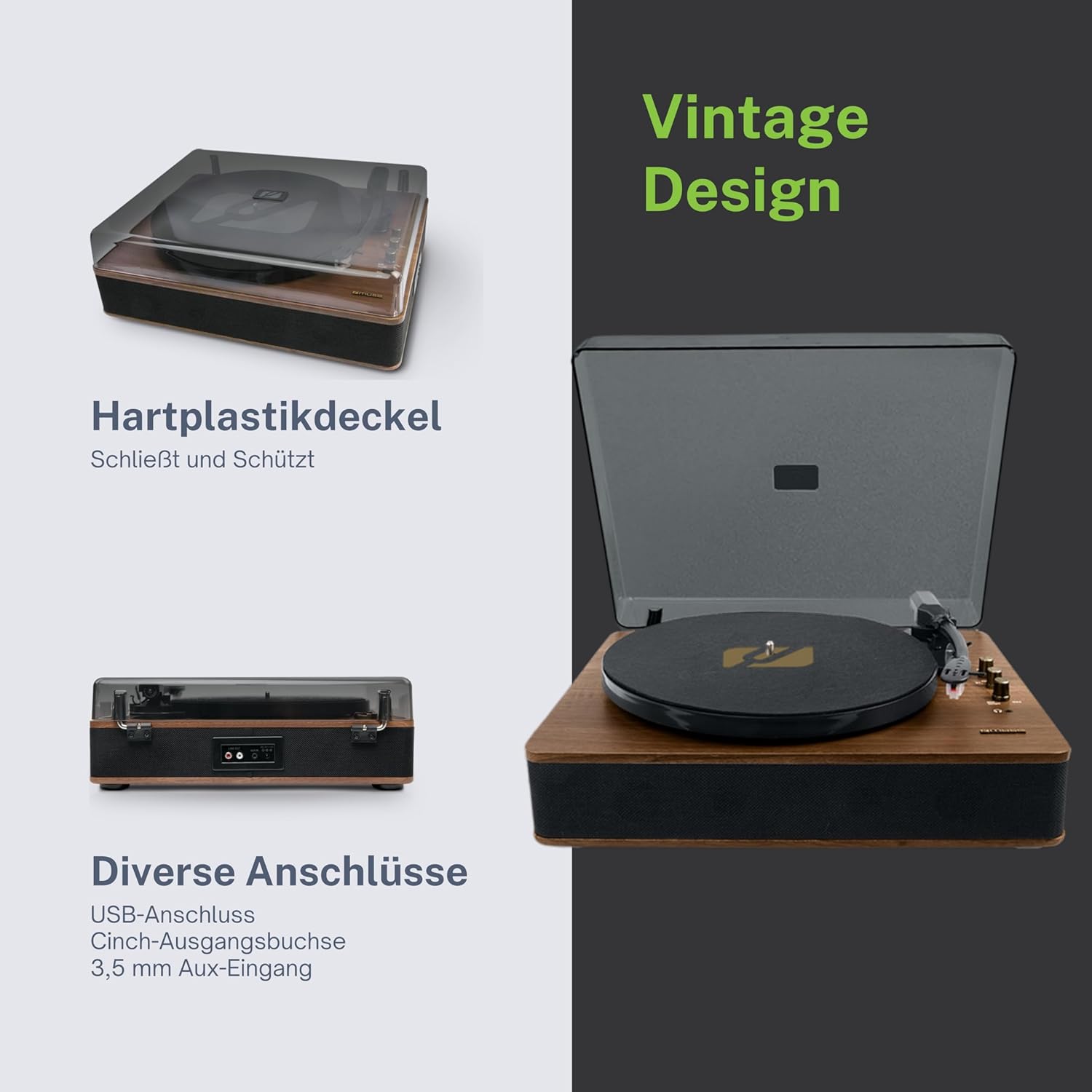
Figure 4.3: Rear Connections. The rear panel of the turntable is shown, featuring various connection ports including RCA audio outputs, a USB port, and an auxiliary input jack, allowing connection to external audio systems or devices.
4.3 ການເຊື່ອມຕໍ່ດ້ານຫຼັງ ແລະ ດ້ານຂ້າງ
- RCA Output Jacks (L/R): ເຊື່ອມຕໍ່ກັບພາຍນອກ amplifier ຫຼືລໍາໂພງພະລັງງານ.
- ພອດ USB: ສໍາລັບການຫຼິ້ນ MP3 files from a USB drive or encoding vinyl to USB.
- AUX IN Jack (3.5mm): ເຊື່ອມຕໍ່ອຸປະກອນສຽງພາຍນອກ.
- DC ໃນ Jack: ເຊື່ອມຕໍ່ອະແດບເຕີໄຟ.
- Jack ຫູຟັງ (3.5mm): ສໍາລັບການຟັງສ່ວນຕົວ.

Figure 4.4: Key Functions Overview. An illustrative graphic highlighting the key functions and connectivity options of the turntable. Icons represent features such as USB encoding, MP3 playback via USB, RCA output, auto-stop, integrated speakers, headphone jack, auxiliary input, and AC power input.
5. ຕັ້ງຄ່າ
5.1 ການຫຸ້ມຫໍ່
- ລະມັດລະວັງເອົາເຄື່ອງອອກຈາກການຫຸ້ມຫໍ່ຂອງມັນ.
- ເອົາວັດສະດຸຫຸ້ມຫໍ່ແລະແຜ່ນປ້ອງກັນທັງຫມົດອອກ.
- Keep the packaging for future transport or storage.
5.2 ການຈັດວາງ
- Place the turntable on a flat, stable, and level surface.
- Avoid placing it near strong magnetic fields, direct sunlight, or heat sources.
- ໃຫ້ແນ່ໃຈວ່າມີພື້ນທີ່ພຽງພໍຮອບຫນ່ວຍສໍາລັບການລະບາຍອາກາດທີ່ເຫມາະສົມ.
5.3 ການເຊື່ອມຕໍ່ພະລັງງານ
- Connect the supplied power adapter to the DC IN jack on the rear of the turntable.
- ສຽບອະແດບເຕີໄຟເຂົ້າໄປໃນບ່ອນສຽບຝາທີ່ເຫມາະສົມ.
5.4 ການຕິດຕັ້ງຝາປິດຝຸ່ນ
- ລະມັດລະວັງຕິດຝາຂີ້ຝຸ່ນໃສ່ກັບ hinges ຢູ່ດ້ານຫລັງຂອງ turntable ໄດ້.
- The dust cover protects the unit when not in use. Remove it or lift it fully when playing records.
6. ຄໍາແນະນໍາການດໍາເນີນງານ
6.1 ການຫຼິ້ນບັນທຶກ Vinyl
- ຍົກຝາປິດຂີ້ຝຸ່ນ.
- Rotate the Power/Volume knob clockwise to turn on the unit.
- Set the Function Selector knob to 'Phono'.
- Place a record on the platter. If playing a 45 RPM single, place the 45 RPM adapter on the spindle first.
- Select the correct speed (33, 45, or 78 RPM) using the Speed Selector switch.
- ເອົາຕົວປ້ອງກັນສະໄຕລັດອອກຈາກສະໄຕລັດ.
- Lift the tonearm using the cue lever.
- Move the tonearm over the desired starting point of the record.
- Gently lower the tonearm onto the record using the cue lever. The music will begin to play.
- ປັບລະດັບສຽງໂດຍໃຊ້ປຸ່ມເປີດ/ປິດສຽງ.
- At the end of the record, if the Auto Stop switch is ON, the platter will stop rotating. If OFF, the platter will continue to rotate. Manually lift the tonearm and return it to its rest.
6.2 ແບບບູທູດ
- Rotate the Power/Volume knob clockwise to turn on the unit.
- Set the Function Selector knob to 'BT' (Bluetooth). The Bluetooth indicator will flash, indicating pairing mode.
- ເປີດໃຊ້ Bluetooth ໃນອຸປະກອນພາຍນອກຂອງທ່ານ (ໂທລະສັບສະຫຼາດ, ແທັບເລັດ, ແລະອື່ນໆ) ແລະຄົ້ນຫາອຸປະກອນທີ່ມີຢູ່.
- Select 'MUSE MT-106 BT' from the list of devices. Once connected, the Bluetooth indicator will stop flashing and remain solid.
- You can now play music from your external device through the turntable's speakers. Adjust volume using both the turntable's knob and your external device.
6.3 USB Playback and Encoding
6.3.1 ການຫຼິ້ນ USB
- Rotate the Power/Volume knob clockwise to turn on the unit.
- Set the Function Selector knob to 'USB'.
- Insert a USB flash drive into the USB port. The unit will automatically detect and begin playing MP3 files.
- Use the Playback Control Buttons (Play/Pause, Skip Forward, Skip Backward) to navigate tracks.
6.3.2 USB Encoding (Recording Vinyl to USB)
The MT-106 BT allows you to convert your vinyl records into digital MP3 files on a USB drive.
- ໃຫ້ແນ່ໃຈວ່າໄດຣຟ໌ USB ຖືກສຽບເຂົ້າໄປໃນພອດ USB.
- Set the Function Selector knob to 'Phono'.
- Start playing your vinyl record as described in section 6.1.
- Press the 'Record' button (refer to Figure 4.2 for button location, typically indicated by a circle or 'REC' label). The recording indicator will illuminate.
- To stop recording, press the 'Record' button again. The recording indicator will turn off.
- The recorded audio will be saved as an MP3 file on your USB drive.
6.4 ຊ່ອງສຽບເສີມ (AUX IN)
- Rotate the Power/Volume knob clockwise to turn on the unit.
- Set the Function Selector knob to 'AUX'.
- Connect an external audio device (e.g., MP3 player, CD player) to the AUX IN jack (3.5mm) on the rear of the turntable using an audio cable (not supplied).
- Play audio from your external device. The sound will be output through the turntable's speakers.
6.5 RCA Output
To connect your turntable to an external ampລຳໂພງໄຟຟ້າ ຫຼື ລຳໂພງທີ່ໃຊ້ພະລັງງານ:
- Ensure the turntable and the external audio system are turned off.
- Connect an RCA audio cable (not supplied) from the RCA Output Jacks (L/R) on the rear of the turntable to the corresponding audio input jacks on your amplifier ຫຼືລໍາໂພງພະລັງງານ.
- Turn on both the turntable and your external audio system.
- Select the appropriate input on your external audio system.
7. ບໍາລຸງຮັກສາ
7.1 ການທຳຄວາມສະອາດປາກກາ
- Use a soft brush, specifically designed for stylus cleaning, to gently brush the stylus from back to front.
- ຢ່າໃຊ້ແຮງ ຫຼື ແປງຫຼາຍເກີນໄປຈາກຂ້າງໜຶ່ງຫາອີກຂ້າງໜຶ່ງ, ເພາະສິ່ງນີ້ສາມາດເຮັດໃຫ້ປາກກາເສຍຫາຍໄດ້.
- Replace the stylus approximately every 300-500 hours of playback, or if you notice a degradation in sound quality.
7.2 ການທໍາຄວາມສະອາດຫນ່ວຍງານ
- Wipe the exterior of the turntable with a soft, dry, lint-free cloth.
- ຢ່າໃຊ້ເຄື່ອງເຮັດຄວາມສະອາດຂັດ, ຂີ້ເຜີ້ງ, ຫຼືສານລະລາຍເພາະວ່າພວກມັນສາມາດທໍາລາຍການສໍາເລັດຮູບ.
- For the dust cover, use a soft cloth and a mild, non-abrasive cleaner if necessary.
8. ການແກ້ໄຂບັນຫາ
If you experience issues with your turntable, please consult the following table before contacting support.
| ບັນຫາ | ສາເຫດທີ່ເປັນໄປໄດ້ | ການແກ້ໄຂ |
|---|---|---|
| ບໍ່ມີພະລັງງານ | ອະແດບເຕີໄຟບໍ່ໄດ້ເຊື່ອມຕໍ່ ຫຼືປລັກສຽບເກີດຄວາມຜິດພາດ. | ໃຫ້ແນ່ໃຈວ່າອະແດບເຕີໄຟເຊື່ອມຕໍ່ຢ່າງປອດໄພ ແລະປລັກສຽບໃຊ້ໄດ້. |
| ບໍ່ມີສຽງ | Volume too low; incorrect function mode; external speakers not connected/powered. | Increase volume; select correct function (Phono, BT, USB, AUX); check external speaker connections and power. |
| Poor sound quality (vinyl) | Dirty or worn stylus; dirty record; incorrect speed selected. | Clean or replace stylus; clean record; select correct RPM. |
| Bluetooth ບໍ່ເຊື່ອມຕໍ່ | Turntable not in pairing mode; device too far; already connected to another device. | Ensure turntable is in BT mode and flashing; move device closer; disconnect from other devices. |
| ການຫຼິ້ນ USB ບໍ່ເຮັດວຽກ | USB drive ບໍ່ຖືກໃສ່ຢ່າງຖືກຕ້ອງ; ບໍ່ຮອງຮັບ file ຮູບແບບ; USB drive ຜິດພາດ. | Reinsert USB drive; ensure files are MP3 format; try a different USB drive. |
9. ຂໍ້ມູນຈໍາເພາະ
| ຍີ່ຫໍ້ | MUSE |
| ຊື່ຕົວແບບ | MT-106 BT |
| ສີ | ໄມ້ |
| ວັດສະດຸ | ໄມ້ |
| ນ້ໍາຫນັກລາຍການ | 4.3 ກິໂລກຣາມ |
| ຄວາມໄວການຫມຸນ | 33, 45, 78 RPM |
| ການເຊື່ອມຕໍ່ | Bluetooth, USB, RCA Output, 3.5mm AUX Input, 3.5mm Headphone Jack |
| ຄຸນນະສົມບັດພິເສດ | Integrated Speaker, Dust Protection, Adjustable Speed, USB Encoding |
| ອຸປະກອນທີ່ເຂົ້າກັນໄດ້ | ໂທລະສັບສະຫຼາດ, ແທັບເລັດ |
| ແຫຼ່ງພະລັງງານ | AC Adapter (1 AAAA battery required for unspecified function, likely remote or internal clock) |
| ປະເທດຕົ້ນກໍາເນີດ | ຈີນ |
10. ການຮັບປະກັນແລະການສະຫນັບສະຫນູນ
This product is covered by a manufacturer's warranty. Please refer to the warranty card included with your purchase or visit the official MUSE webເວັບໄຊສໍາລັບເງື່ອນໄຂການຮັບປະກັນລາຍລະອຽດ.
For technical support, troubleshooting assistance, or inquiries regarding spare parts, please contact MUSE customer service through their official channels. Information regarding spare parts availability is currently not available.


