ແນະນຳ
This manual provides detailed instructions for the operation and maintenance of your Midland T10 FRS Walkie Talkie. The T10 is a compact and user-friendly two-way radio designed for reliable communication in various settings, including family activities, camping, and hiking. It features 22 FRS channels, NOAA Weather Alert, and eVOX hands-free operation. Please read this manual thoroughly to ensure proper use and to maximize the performance of your device.
ສິນຄ້າເກີນview
ຄຸນນະສົມບັດທີ່ສໍາຄັນ:
- 22 FRS Channels for clear communication.
- 38 CTCSS Privacy Codes to minimize interference.
- eVOX (Easy Voice and Sound Activated Transmission) ສໍາລັບການເຮັດວຽກແບບແຮນຟຣີ.
- NOAA Weather Scan + ແຈ້ງເຕືອນການອັບເດດສະພາບອາກາດທີ່ຮຸນແຮງ.
- Channel Scan and Monitor Mode functions.
- Keystroke Tones and Silent Operation options.
- Up to 20-mile range in open areas.
ມີຫຍັງຢູ່ໃນກ່ອງ:
- Midland T10 Two-Way Radios (quantity as purchased, e.g., 4 radios)
- Belt Clips (one per radio)
- ຄູ່ມືເຈົ້າຂອງ (ເອກະສານສະບັບນີ້)
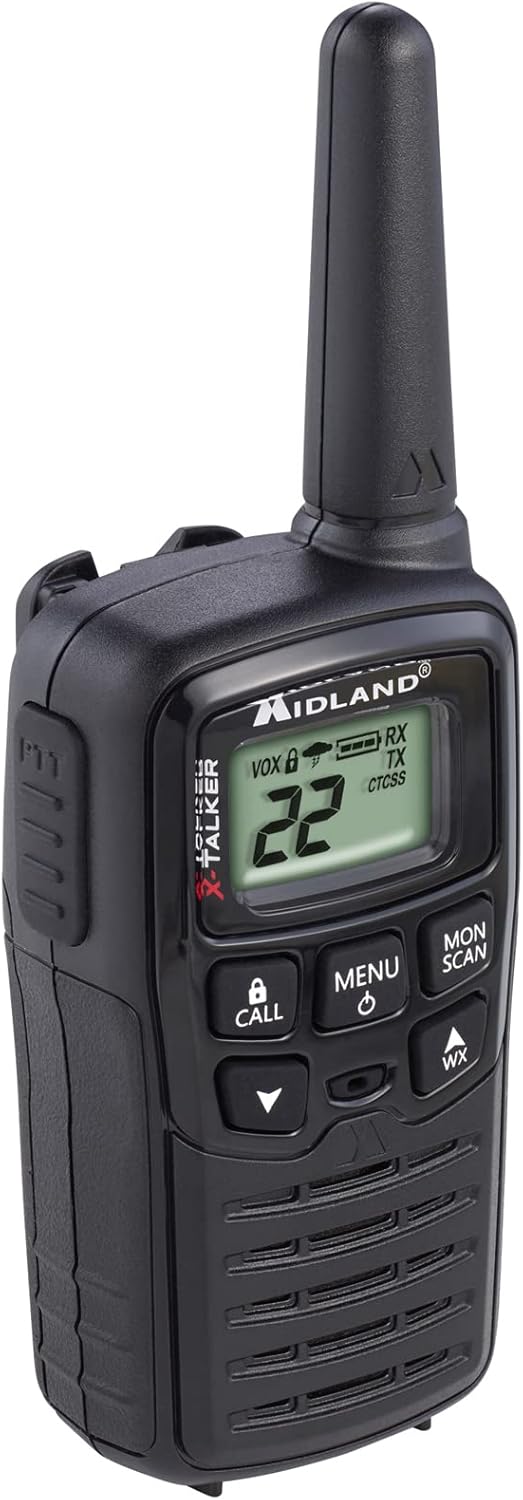
Figure 1: Midland T10 Walkie Talkie, angled front view showing display and buttons.
ຕັ້ງຄ່າ
1. ການຕິດຕັ້ງຫມໍ້ໄຟ
- ໃຫ້ແນ່ໃຈວ່າວິທະຍຸຖືກປິດ.
- ຊອກຫາຝາປິດຊ່ອງໃສ່ຫມໍ້ໄຟຢູ່ດ້ານຫຼັງຂອງວິທະຍຸ.
- ກົດລົງໃສ່ແຖບ ແລະ ເລື່ອນຝາປິດລົງເພື່ອເອົາມັນອອກ.
- Insert 3 AAA alkaline batteries (not included) into the compartment, observing the correct polarity (+/-) as indicated.
- ປ່ຽນຝາປິດຊ່ອງໃສ່ໝໍ້ໄຟໂດຍການເລື່ອນມັນຂຶ້ນເທິງຈົນກວ່າມັນຈະກົດໃສ່ບ່ອນ.
ສຳຄັນ: Use only AAA alkaline batteries. Do not mix old and new batteries, or different types of batteries.
2. ການແນບ ໜີບ ສາຍພານ
- ວາງສາຍເຂັມຂັດກັບຮ່ອງຢູ່ດ້ານຫຼັງຂອງວິທະຍຸ.
- Slide the belt clip upwards until it locks securely into position.
- To remove, push the release tab on the belt clip and slide it downwards.

ຮູບ 2: ຂ້າງ view of the Midland T10 Walkie Talkie with the belt clip attached.
ຄໍາແນະນໍາການດໍາເນີນງານ
1. ເປີດ/ປິດ
- ເພື່ອເປີດເຄື່ອງ: ກົດຄ້າງໄວ້ ເມນູ/ພະລັງງານ button until the display illuminates and you hear a tone.
- ປິດເຄື່ອງ: ກົດຄ້າງໄວ້ ເມນູ/ພະລັງງານ ກົດປຸ່ມຈົນກ່ວາຈໍສະແດງຜົນປິດ.
2. ປັບລະດັບສຽງ
- ກົດ UP (▲) button to increase the volume.
- ກົດ ລົງ (▼) button to decrease the volume.
- The current volume level (1-8) will be displayed.
3. ການເລືອກຊ່ອງ
- ດ້ວຍການເປີດວິທະຍຸ, ກົດປຸ່ມ ເມນູ ປຸ່ມຫນຶ່ງຄັ້ງ. ໝາຍເລກຊ່ອງຈະກະພິບ.
- ໃຊ້ UP (▲) ຫຼື ລົງ (▼) buttons to select one of the 22 FRS channels.
- ກົດ ເມນູ button again to confirm your selection, or wait 5 seconds for the selection to be automatically saved.
4. ການສົ່ງແລະການຮັບ
- ສົ່ງ: ກົດຄ້າງໄວ້ PTT (Push-To-Talk) button located on the side of the radio. Speak clearly into the microphone. Release the PTT button to stop transmitting.
- ເພື່ອຮັບ: ໃຫ້ແນ່ໃຈວ່າບໍ່ໄດ້ກົດປຸ່ມ PTT. ວິທະຍຸຈະຮັບສັນຍານໂດຍອັດຕະໂນມັດໃນຊ່ອງທາງທີ່ເລືອກ.
5. ລະຫັດຄວາມເປັນສ່ວນຕົວ (CTCSS)
Privacy Codes help reduce interference from other users on the same channel. Your radio has 38 CTCSS codes.
- ຫຼັງຈາກເລືອກຊ່ອງ, ກົດປຸ່ມ ເມນູ ປຸ່ມສອງເທື່ອ. ໝາຍເລກລະຫັດຄວາມເປັນສ່ວນຕົວຈະກະພິບ.
- ໃຊ້ UP (▲) ຫຼື ລົງ (▼) buttons to select a privacy code (01-38). Code 00 means no privacy code is active.
- ກົດ ເມນູ button again to confirm, or wait 5 seconds.
ໝາຍເຫດ: Both radios must be set to the same channel and privacy code to communicate.
6. eVOX (ການໃຊ້ງານແບບບໍ່ຕ້ອງໃຊ້ມື)
eVOX allows you to transmit without pressing the PTT button.
- ກົດ ເມນູ button three times. The eVOX sensitivity level will flash (oF, 1-3).
- ໃຊ້ UP (▲) ຫຼື ລົງ (▼) buttons to select a sensitivity level (1 being highest sensitivity, 3 being lowest). Select "oF" to turn eVOX off.
- ກົດ ເມນູ button again to confirm, or wait 5 seconds.
7. NOAA Weather Scan + Alert
Your radio can receive NOAA Weather Radio alerts.
- To Activate Weather Scan: ກົດ WX button. The radio will scan 10 NOAA weather channels and lock onto the strongest signal.
- To Activate Weather Alert: While in Weather Scan mode, press the ເມນູ button. The "AL" icon will flash. Use UP (▲) ຫຼື ລົງ (▼) to turn the alert ON or OFF. Press ເມນູ to confirm. When activated, the radio will sound an alarm if a severe weather alert is broadcast.
- To Exit Weather Mode: ກົດ WX ປຸ່ມອີກເທື່ອຫນຶ່ງ.
8. ການແຈ້ງເຕືອນການໂທ
ກົດ ໂທ button to send an audible call tone to other radios on the same channel and privacy code.
9. ໜ້າທີ່ຂອງຈໍພາບ
The Monitor function allows you to temporarily disable the squelch to listen for weak signals or to check for activity on a channel.
- ກົດຄ້າງໄວ້ MON/SCAN button to activate the Monitor function.
- Release the button to deactivate.
10. ໜ້າ ທີ່ສະແກນ
The Scan function allows you to scan all 22 channels for activity.
- ກົດ MON/SCAN button once (do not hold). The radio will begin scanning.
- ເມື່ອກວດພົບການເຄື່ອນໄຫວ, ການສະແກນຈະຢຸດຊົ່ວຄາວໃນຊ່ອງນັ້ນ.
- ກົດ MON/SCAN ກົດປຸ່ມອີກເທື່ອຫນຶ່ງເພື່ອຢຸດການສະແກນ.
ບໍາລຸງຮັກສາ
- ທໍາຄວາມສະອາດ: ໃຊ້ອ່ອນ, ງamp cloth to clean the radio's exterior. Do not use abrasive cleaners or solvents.
- ການດູແລຫມໍ້ໄຟ: ຖອດແບດເຕີຣີອອກຖ້າວິທະຍຸຈະບໍ່ຖືກໃຊ້ເປັນໄລຍະເວລາເພີ່ມເຕີມເພື່ອປ້ອງກັນການຮົ່ວໄຫຼ.
- ການເກັບຮັກສາ: ເກັບຮັກສາວິທະຍຸໃນບ່ອນທີ່ເຢັນ, ແຫ້ງ, ຫ່າງຈາກແສງແດດໂດຍກົງແລະອຸນຫະພູມທີ່ສຸດ.
- ຄວາມຕ້ານທານນ້ໍາ: This radio is not water-resistant. Avoid exposure to water or high humidity.
ການແກ້ໄຂບັນຫາ
| ບັນຫາ | ການແກ້ໄຂທີ່ເປັນໄປໄດ້ |
|---|---|
| ບໍ່ມີພະລັງງານ. |
|
| Poor range or static. |
|
| ບໍ່ສາມາດສົ່ງຕໍ່ໄດ້. |
|
| Hearing other conversations. |
|
ຂໍ້ມູນຈໍາເພາະ
| ໝາຍເລກຕົວແບບ | FBA-4PK-T10 |
| ຊ່ອງ | 22 ຊ່ອງ FRS |
| ລະຫັດຄວາມເປັນສ່ວນຕົວ | 38 ລະຫັດ CTCSS |
| ຊ່ວງຄວາມຖີ່ | 462.5625 MHz - 462.7250 MHz |
| ໄລຍະການເວົ້າສູງສຸດ | Up to 20 Miles (in open areas) |
| ແຫຼ່ງພະລັງງານ | 3 AAA Alkaline Batteries (not included) |
| ນ້ໍາຫນັກລາຍການ | 1.23 ປອນ (ສຳລັບ 4 ຊອງ) |
| ຂະໜາດສິນຄ້າ | 7 x 7 x 4 ນິ້ວ |
| ລະດັບຄວາມຕ້ານທານນ້ໍາ | ບໍ່ທົນທານຕໍ່ນ້ໍາ |
ການຮັບປະກັນແລະການສະຫນັບສະຫນູນ
The Midland T10 FRS Walkie Talkie comes with an industry-leading ຮັບປະກັນ 3 ປີ against defects in materials and workmanship. This warranty covers normal use and service. For warranty claims or technical support, please refer to the contact information provided with your purchase or visit the official Midland webເວັບໄຊ.
For additional information, FAQs, or to register your product, please visit www.midlandusa.com.