ຂໍ້ມູນຄວາມປອດໄພທີ່ສໍາຄັນ
Please read this manual carefully before assembly and use to ensure safe operation and to prevent damage to the product or injury to yourself.
- ບໍ່ເກີນຄວາມສາມາດໂຫຼດສູງສຸດຂອງ 100 ກິໂລການໂຫຼດເກີນສາມາດເຮັດໃຫ້ເກີດຄວາມບໍ່ໝັ້ນຄົງ ແລະ ຄວາມເສຍຫາຍ.
- ຮັບປະກັນວ່າສາຍທັງໝົດຖືກຈັດການຢ່າງຖືກຕ້ອງ ແລະ ປອດໄພເພື່ອປ້ອງກັນອັນຕະລາຍຈາກການຍ່າງ ຫຼື ຄວາມເສຍຫາຍໃນລະຫວ່າງການປັບຄວາມສູງ.
- ໃຫ້ເດັກນ້ອຍ ແລະສັດລ້ຽງຢູ່ຫ່າງຈາກໂຕະເຮັດວຽກໃນລະຫວ່າງການເຮັດວຽກ.
- Do not place hands or other body parts near moving parts of the desk frame during height adjustment.
- Only use the desk for its intended purpose as a workstation.
- Regularly check all screws and bolts to ensure they are tightened.
ສິນຄ້າເກີນview
The FLEXISPOT E1B Electric Standing Desk is designed to provide a versatile and ergonomic workspace. It features a robust dual-motor system for smooth height adjustments and a durable tabletop.
ຄຸນນະສົມບັດທີ່ສໍາຄັນ:
- ລະບົບມໍເຕີຄູ່: Ensures stable and efficient height adjustment at 25 mm/s.
- ຊ່ວງຄວາມສູງ: Adjustable from 70 cm to 119 cm to suit various user heights and work preferences.
- ຄວາມອາດສາມາດໂຫຼດ: Supports up to 100 kg, accommodating multiple monitors and office equipment.
- ໜ່ວຍຄວາມຈຳທີ່ຕັ້ງໄວ້ລ່ວງໜ້າ: Control panel with memory functions for saving preferred height settings.
- High-Quality Tabletop: 160x80cm black tabletop, made in the EU from FSC-certified MDF with scratch-resistant high-pressure laminate.
ເນື້ອໃນຊຸດ
Before starting assembly, verify that all components listed below are present and undamaged. If any parts are missing or damaged, please contact customer support.
- Desk Frame (E1B) components (legs, feet, crossbar, motor, control box)
- Tabletop (DT1608-BLACK-EU18)
- ແຜງຄວບຄຸມທີ່ມີໜ້າທີ່ໜ່ວຍຄວາມຈຳ
- ອະແດບເຕີສາຍໄຟ ແລະສາຍ
- Assembly Hardware (screws, bolts, Allen keys)
- ອຸປະກອນເສີມການຈັດການສາຍ
- ຄູ່ມືຜູ້ໃຊ້
ຄໍາແນະນໍາການຕິດຕັ້ງແລະການປະກອບ
Assembly is designed to be straightforward. It is recommended to assemble the desk on a soft, clean surface to prevent scratches. Two people are recommended for easier assembly.
ຂັ້ນຕອນທີ 1: Unpack ອົງປະກອບ
ເອົາພາກສ່ວນທັງຫມົດອອກຈາກການຫຸ້ມຫໍ່ຢ່າງລະມັດລະວັງແລະຈັດວາງພວກມັນອອກ. ກວດເບິ່ງລາຍການເນື້ອໃນຊຸດ.
ຂັ້ນຕອນທີ 2: ປະກອບ Desk Frame
- Attach the lifting columns to the crossbar using the provided screws.
- Secure the desk feet to the bottom of the lifting columns.
- Mount the control box to the designated area on the frame.
- Connect the motor cables from the lifting columns to the control box.
- Connect the control panel cable to the control box.

Image: The FLEXISPOT E1B desk frame in black and white, illustrating the height adjustment range from 70cm to 119cm, highlighting the dual motor system, 25mm/s adjustment speed, and low noise operation (less than 50dB).
ຂັ້ນຕອນທີ 3: ຄັດຕິດ Tabletop
Carefully place the tabletop upside down on a soft surface. Position the assembled desk frame onto the tabletop, aligning the pre-drilled holes. Secure the tabletop to the frame using the provided screws.

Image: A FLEXISPOT desk with a black tabletop, featuring a laptop, books, and a pen holder, demonstrating a functional and organized workspace.
Step 4: Connect Power and Cable Management
Connect the power adapter to the control box and then to a power outlet. Use the included cable management accessories to organize and secure all cables, preventing them from interfering with the desk's movement.
ຄໍາແນະນໍາການດໍາເນີນງານ
ແຜງຄວບຄຸມຜ່ານview:
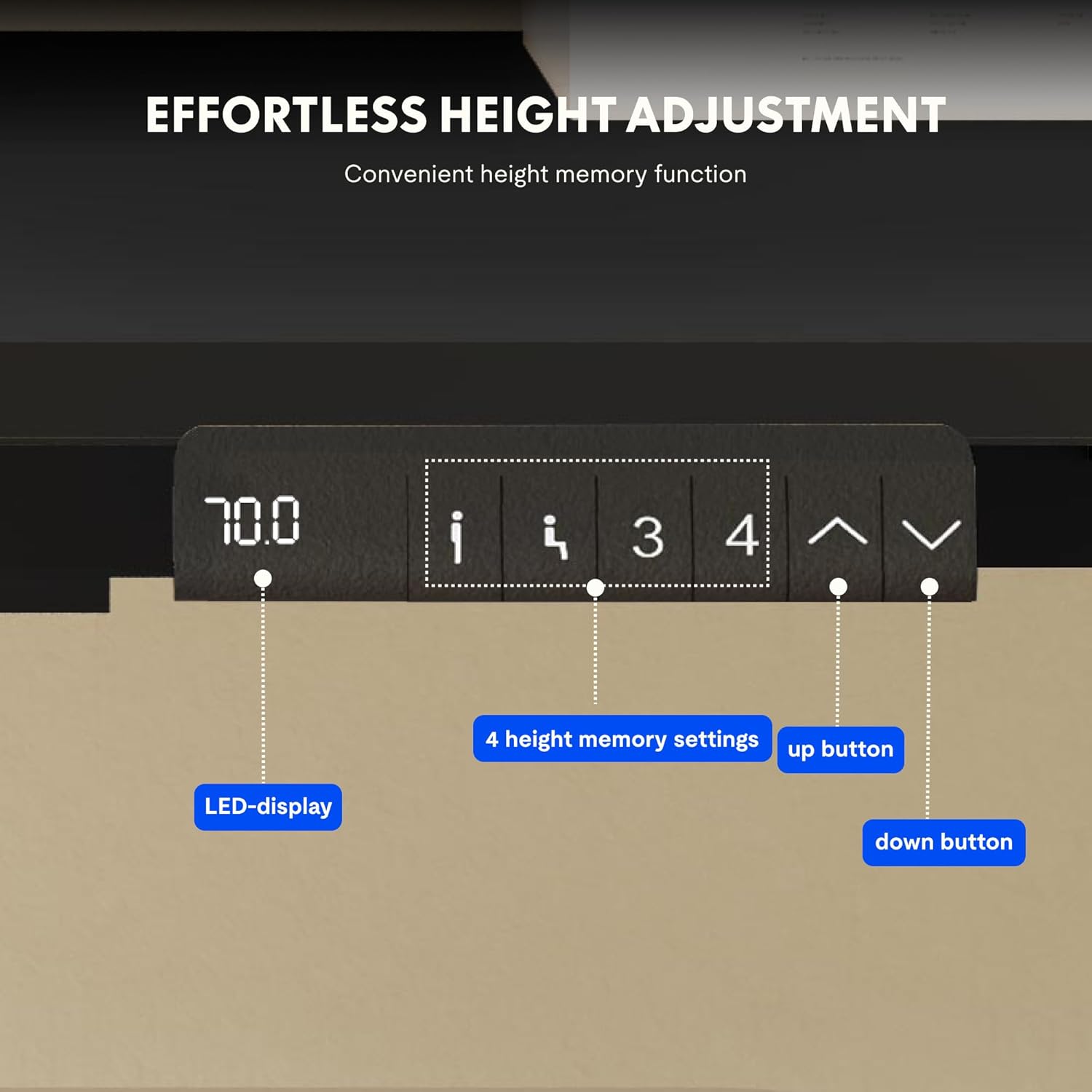
Image: Close-up of the FLEXISPOT desk control panel, showing the LED display for current height, up and down arrow buttons for manual adjustment, and four numbered buttons for saving and recalling height memory presets.
Manual Height Adjustment:
- ກົດຄ້າງໄວ້ Up arrow (^) ປຸ່ມເພື່ອຍົກໂຕະຂຶ້ນ.
- ກົດຄ້າງໄວ້ Down arrow (v) ປຸ່ມເພື່ອຫຼຸດໂຕະລົງ.
- ປ່ອຍປຸ່ມຕາມຄວາມສູງທີ່ທ່ານຕ້ອງການ. ຈໍສະແດງຜົນ LED ຈະສະແດງຄວາມສູງໃນປະຈຸບັນ.
ການຕັ້ງຄ່າຄວາມຈຳລ່ວງໜ້າ:
- ປັບໂຕະກັບຄວາມສູງທີ່ທ່ານຕ້ອງການໂດຍໃຊ້ລູກສອນຂຶ້ນ/ລົງ.
- ກົດ "M" or "ຕັ້ງຄ່າ" ປຸ່ມ (ຖ້າມີ, ຖ້າບໍ່ດັ່ງນັ້ນໃຫ້ດຳເນີນການຕໍ່ໄປຂັ້ນຕອນທີ 3).
- ກົດປຸ່ມໜ່ວຍຄວາມຈຳທີ່ມີຕົວເລກໜຶ່ງ (1, 2, 3, ຫຼື 4) within 3 seconds. The display will show "S-" followed by the number, indicating the height is saved.
ການລະນຶກເຖິງຄ່າທີ່ຕັ້ງໄວ້ລ່ວງໜ້າຂອງໜ່ວຍຄວາມຈຳ:
Simply press the desired numbered memory button (1, 2, 3, ຫຼື 4). ໂຕະຈະຍ້າຍໄປທີ່ລະດັບຄວາມສູງທີ່ບັນທຶກໄວ້ໂດຍອັດຕະໂນມັດ.
ຣີເຊັດຟັງຊັນ:
If the desk encounters an error or does not move smoothly, a reset may be required. Press and hold the "ລົງ" button until the desk reaches its lowest position, then release and press it again for 5-10 seconds until the display shows "RST" or "E-1" and then returns to the lowest height. The desk will then reset to its factory lowest position.
ບໍາລຸງຮັກສາ
- ທໍາຄວາມສະອາດ: ເຊັດໜ້າໂຕະ ແລະກອບດ້ວຍຜ້າອ່ອນ, ງamp ຜ້າ. ຫຼີກລ້ຽງການເຮັດຄວາມສະອາດຂັດຫຼືສານເຄມີທີ່ຮຸນແຮງ.
- ການກວດກາ: ກວດເບິ່ງທຸກສະກູແລະການເຊື່ອມຕໍ່ເປັນໄລຍະເພື່ອຮັບປະກັນວ່າພວກມັນແຫນ້ນ. ຮັດແໜ້ນ ຖ້າຈຳເປັນ.
- ການຄຸ້ມຄອງສາຍໄຟ: Ensure cables remain tidy and do not obstruct the desk's movement.
- ການແຜ່ກະຈາຍນ້ໍາຫນັກ: ແຈກຢາຍນ້ຳໜັກໃຫ້ເທົ່າກັນເທິງໜ້າໂຕະເພື່ອປ້ອງກັນຄວາມກົດດັນຕໍ່ມໍເຕີ ແລະ ໂຄງ.
ການແກ້ໄຂບັນຫາ
| ບັນຫາ | ສາເຫດທີ່ເປັນໄປໄດ້ | ການແກ້ໄຂ |
|---|---|---|
| ໂຕະບໍ່ຍ້າຍ. | Power cable disconnected; control box error; overloaded desk. | Check power connections. Perform a reset (see Operating Instructions). Reduce weight on the desk. |
| ໂຕະເຄື່ອນທີ່ບໍ່ສະໝ່ຳສະເໝີ ຫຼືມີສຽງດັງຜິດປົກກະຕິ. | Loose connections; obstruction; uneven weight distribution. | Check all screws and connections. Remove any obstructions. Redistribute weight evenly. Perform a reset. |
| ຈໍສະແດງຜົນສະແດງລະຫັດຂໍ້ຜິດພາດ (e. g. E01, E02). | ຄວາມຜິດພາດພາຍໃນຂອງລະບົບ. | Perform a reset. If the error persists, contact customer support. |
| ໜ່ວຍຄວາມຈຳທີ່ຕັ້ງໄວ້ລ່ວງໜ້າບໍ່ເຮັດວຽກ. | Presets ບໍ່ໄດ້ບັນທຶກໄວ້ຢ່າງຖືກຕ້ອງ. | Re-save the memory presets following the instructions. |
ຂໍ້ມູນຈໍາເພາະ
| ຄຸນສົມບັດ | ລາຍລະອຽດ |
|---|---|
| ຍີ່ຫໍ້ | FLEXISPOT |
| ໝາຍເລກຕົວແບບ | E1B+DT1608-BLACK-EU18 |
| ຂະໜາດໂຕະ (ຍາວ x ກວ້າງ) | 160ຊມ x 80ຊມ |
| ຊ່ວງການປັບຄວາມສູງ | 70ຊມ-119ຊມ |
| ຄວາມອາດສາມາດໂຫຼດ | 100 ກິໂລ |
| ຄວາມໄວການປັບ | 25 ມມ/ວິນາທີ |
| ປະເພດມໍເຕີ | ມໍເຕີຄູ່ |
| ວັດສະດຸຕັ້ງໂຕະ | FSC-certified MDF with high-pressure laminate |
| ວັດສະດຸກອບ | ເຫຼັກໂລຫະປະສົມ |
| ສີ | Black Tabletop + Black Frame |
ການຮັບປະກັນແລະການສະຫນັບສະຫນູນ
FLEXISPOT products are manufactured to high-quality standards. For warranty information and customer support, please refer to the official FLEXISPOT webເວັບໄຊ ຫຼືຕິດຕໍ່ຮ້ານຂາຍຍ່ອຍຂອງທ່ານ.
- ການຮັບປະກັນ: Specific warranty terms may vary by region and product. Please check your purchase documentation or the manufacturer's webເວັບໄຊທ for ສໍາລັບລາຍລະອຽດ.
- ການຊ່ວຍເຫຼືອລູກຄ້າ: For technical assistance, missing parts, or operational questions, please visit the FLEXISPOT Brand Store ຫຼືຕິດຕໍ່ຊ່ອງທາງການສະຫນັບສະຫນູນຢ່າງເປັນທາງການຂອງພວກເຂົາ.


