1. ບົດແນະນຳ
This manual provides essential instructions for the proper use and maintenance of your LOTUS Smartwatch Model 50003/A. Please read this guide thoroughly before using your smartwatch to ensure optimal performance and longevity.
The LOTUS Smartwatch 50003/A features an intuitive interface and elegant design, offering a variety of smart functions. It is equipped with Bluetooth connectivity, allowing seamless synchronization with your mobile devices. This synchronization enables features such as call and message notifications, music control, and other practical functions for daily life.
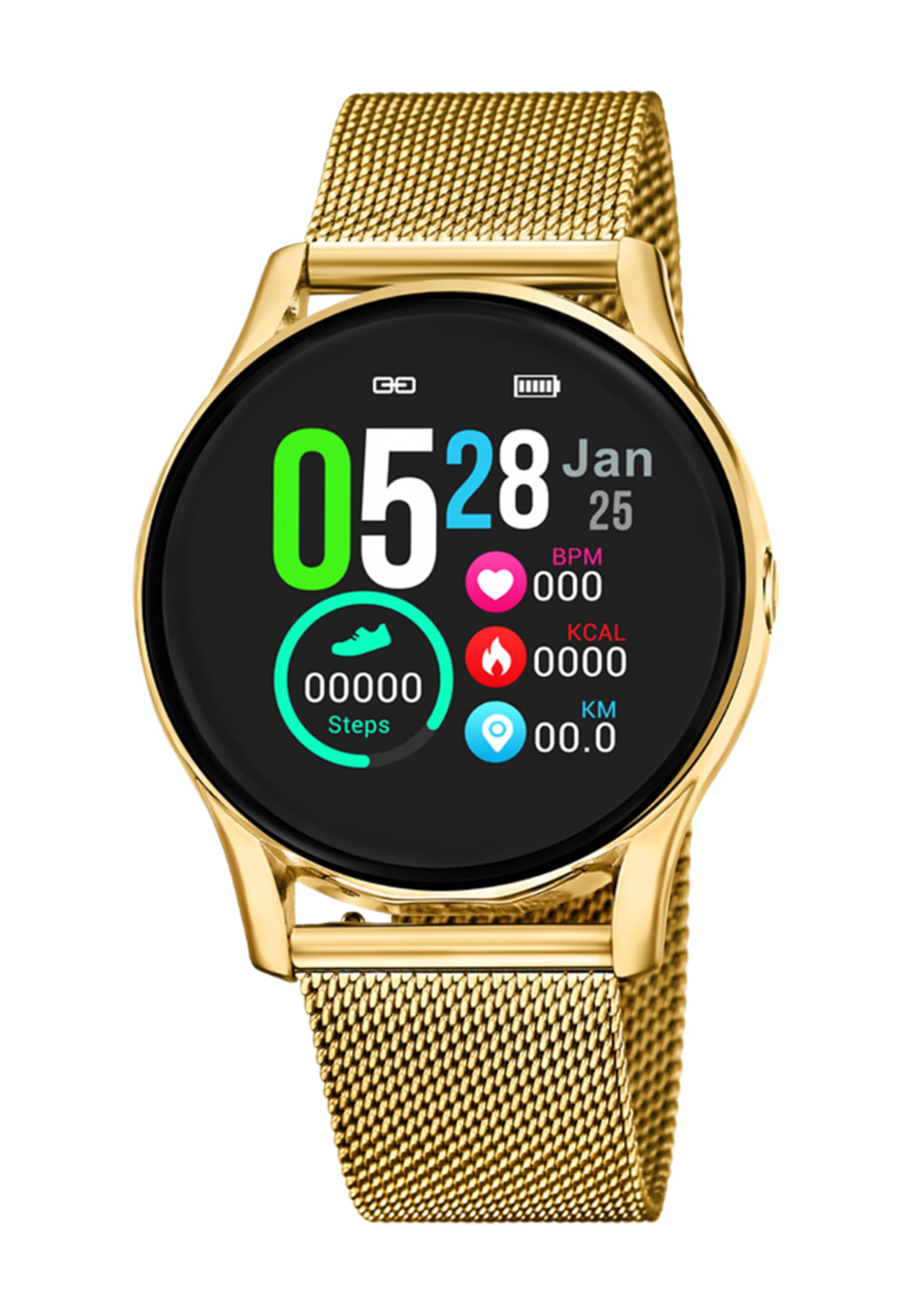
ຮູບພາບ 1.1: ດ້ານຫນ້າ view of the LOTUS Smartwatch 50003/A.
2. ເນື້ອໃນຊຸດ
Please check the package contents upon unboxing. The standard package for the LOTUS Smartwatch 50003/A should include:
- LOTUS Smartwatch 50003/A
- ສາຍສາກ
- ຄູ່ມືຜູ້ໃຊ້ (ເອກະສານນີ້)
3. ຄູ່ມືການຕິດຕັ້ງ
3.1. ການສາກ Smartwatch
ກ່ອນການນຳໃຊ້ຄັ້ງທຳອິດ, ໃຫ້ສາກໂມງອັດສະລິຍະຂອງທ່ານໃຫ້ເຕັມ.
- ເຊື່ອມຕໍ່ສາຍສາກໄຟເຂົ້າກັບພອດສາກໄຟຢູ່ດ້ານຫຼັງຂອງໂມງອັດສະລິຍະ.
- Plug the other end of the charging cable into a USB power adapter (not included) or a computer's USB port.
- ໜ້າຈໍໂມງຈະສະແດງສະຖານະການສາກໄຟ. ລໍຖ້າປະມານ 2-3 ຊົ່ວໂມງເພື່ອສາກໄຟໃຫ້ເຕັມ.
3.2. ການຕິດຕັ້ງແອັບ Companion
To unlock all features and synchronize your smartwatch with your smartphone, you need to install the official LOTUS Connected app.
- Scan the QR code provided in the watch packaging or search for "LOTUS Connected" in your smartphone's app store (Google Play Store for Android, Apple App Store for iOS).
- ດາວນ໌ໂຫລດແລະຕິດຕັ້ງ app ໄດ້.
- ປະຕິບັດຕາມຄໍາແນະນໍາໃນຫນ້າຈໍເພື່ອສ້າງບັນຊີຫຼືເຂົ້າສູ່ລະບົບ.

Image 3.2: Synchronizing the smartwatch with the companion app on a smartphone.
3.3. ການຈັບຄູ່ກັບໂທລະສັບສະຫຼາດຂອງທ່ານ
Ensure Bluetooth is enabled on your smartphone and the smartwatch is charged.
- Open the LOTUS Connected app on your smartphone.
- ປະຕິບັດຕາມຄໍາແນະນໍາຂອງແອັບເພື່ອເພີ່ມອຸປະກອນໃໝ່.
- The app will search for available smartwatches. Select "LOTUS 50003/A" from the list.
- Confirm the pairing request on both your smartphone and smartwatch if prompted.
- ເມື່ອຈັບຄູ່ແລ້ວ, ໂມງຈະ synchronize ເວລາ ແລະຂໍ້ມູນກັບໂທລະສັບຂອງທ່ານ.
4. ຄໍາແນະນໍາການດໍາເນີນງານ
4.1. ການນໍາທາງພື້ນຖານ
- ໜ້າຈໍສຳຜັດ: ປັດຊ້າຍ/ຂວາ, ຂຶ້ນ/ລົງເພື່ອນຳທາງຜ່ານເມນູ ແລະ ຄຸນສົມບັດຕ່າງໆ. ແຕະເພື່ອເລືອກ.
- ປຸ່ມຂ້າງ: The smartwatch may have one or more physical buttons. Typically, one button serves as a power on/off, back, or home button. Refer to the on-screen prompts for specific button functions.

ຮູບພາບ 4.1: ຕົວຢ່າງample of a smartwatch display showing activity data.
4.2. ຄຸນນະສົມບັດທີ່ສໍາຄັນ
- ການແຈ້ງເຕືອນ: Receive alerts for incoming calls, messages, and app notifications directly on your wrist. Manage notification settings via the LOTUS Connected app.
- ການຄວບຄຸມດົນຕີ: Control music playback on your connected smartphone (play, pause, skip tracks, adjust volume).
- ການຕິດຕາມການເຄື່ອນໄຫວ: Monitor steps, distance, calories burned, and sleep patterns. View ສະຖິຕິລະອຽດໃນແອັບ companion.
- ຄວາມຕ້ານທານນ້ໍາ: The smartwatch is water resistant. Avoid prolonged submersion or use in hot water/steam. Refer to specifications for exact water resistance rating.
5. ບໍາລຸງຮັກສາ
5.1. ທໍາຄວາມສະອາດ Smartwatch ຂອງທ່ານ
- ເຊັດໜ້າຈໍໂມງ ແລະຕົວເຄື່ອງດ້ວຍຜ້າອ່ອນໆ, ບໍ່ມີສານຂັດ.
- ສໍາລັບຝຸ່ນ stubborn, ເລັກນ້ອຍ dampen ຜ້າທີ່ມີນ້ໍາ. ຫຼີກເວັ້ນການສານເຄມີທີ່ຮຸນແຮງຫຼືວັດສະດຸຂັດ.
- ກວດໃຫ້ແນ່ໃຈວ່າບ່ອນຕິດຕໍ່ສາກໄຟສະອາດ ແລະແຫ້ງກ່ອນການສາກໄຟ.
5.2. ການດູແລຫມໍ້ໄຟ
- Charge the smartwatch regularly. Avoid letting the battery completely drain for extended periods.
- Do not expose the smartwatch to extreme temperatures, as this can affect battery life and performance.
- If the watch will not be used for a long time, charge it to about 50% before storing.
6. ການແກ້ໄຂບັນຫາ
6.1. ບັນຫາທົ່ວໄປ ແລະການແກ້ໄຂ
- ໂມງບໍ່ເປີດ: ກວດໃຫ້ແນ່ໃຈວ່າໂມງຖືກສາກເຕັມແລ້ວ. ເຊື່ອມຕໍ່ມັນກັບສາຍສາກ ແລະລໍຖ້າສອງສາມນາທີກ່ອນທີ່ຈະພະຍາຍາມເປີດມັນ.
- ບໍ່ສາມາດຈັບຄູ່ກັບສະມາດໂຟນໄດ້:
- ໃຫ້ແນ່ໃຈວ່າ Bluetooth ຖືກເປີດໃຊ້ຢູ່ໃນໂທລະສັບສະຫຼາດຂອງທ່ານ.
- ໃຫ້ແນ່ໃຈວ່າໂມງອັດສະລິຍະນັ້ນຢູ່ພາຍໃນຂອບເຂດຂອງໂທລະສັບຂອງທ່ານ.
- ຣີສະຕາດທັງສະມາດໂຟນ ແລະໂມງອັດສະລິຍະຂອງທ່ານ.
- ລອງຍົກເລີກການຈັບຄູ່ ແລະຈັບຄູ່ອຸປະກອນຄືນໃໝ່ຜ່ານແອັບ.
- ບໍ່ໄດ້ຮັບການແຈ້ງເຕືອນ:
- Check notification settings in the LOTUS Connected app.
- Ensure the app has necessary permissions on your smartphone.
- Verify that the smartwatch is properly connected via Bluetooth.
- ຊີວິດຫມໍ້ໄຟສັ້ນ:
- ຫຼຸດຄວາມສະຫວ່າງໜ້າຈໍ.
- ປິດການແຈ້ງເຕືອນ ຫຼື ຄຸນສົມບັດທີ່ບໍ່ຈຳເປັນ.
- ໃຫ້ແນ່ໃຈວ່າໂມງໄດ້ຖືກສາກໄຟເຕັມກ່ອນການນຳໃຊ້.
6.2. ຣີເຊັດເປັນຄ່າໂຮງງານ
If issues persist, a factory reset may resolve them. This will erase all data on the smartwatch and restore it to its original settings.
- Navigate to the "Settings" menu on your smartwatch.
- Look for an option like "System," "Reset," or "Factory Reset."
- ຢືນຢັນການຣີເຊັດເມື່ອຖືກຖາມ.
- After resetting, you will need to re-pair the smartwatch with your phone and set it up again.
7. ຂໍ້ມູນຈໍາເພາະ
| ຄຸນສົມບັດ | ລາຍລະອຽດ |
|---|---|
| ຍີ່ຫໍ້ | Lotus |
| ໝາຍເລກຕົວແບບ | 50003/ກ |
| ສີ | ດຳ |
| ຄວາມເຂົ້າກັນໄດ້ຂອງລະບົບປະຕິບັດການ | Android, iOS |
| ຂະໜາດໜ້າຈໍ | 39.65 ມິນລິແມັດ |
| ຄຸນນະສົມບັດພິເສດ | ກັນນ້ຳ |
| ອຸປະກອນທີ່ເຂົ້າກັນໄດ້ | ໂທລະສັບສະຫຼາດ |
| ອົງປະກອບຫມໍ້ໄຟ | ໂລຫະ Lithium |
| ການມີອາໄຫຼ່ | 5 ປີ |
8. ການຮັບປະກັນແລະການສະຫນັບສະຫນູນ
Your LOTUS Smartwatch 50003/A comes with a manufacturer's warranty. Please refer to the warranty card included in your product packaging for specific terms and conditions.
ອາໄຫຼ່ສຳລັບລຸ້ນນີ້ແມ່ນມີໃຫ້ໃຊ້ໄດ້ເຖິງ 5 ປີນັບຈາກວັນທີ່ຊື້.
For technical support, service, or warranty claims, please contact LOTUS customer service through their official webເວັບໄຊ ຫຼືຂໍ້ມູນການຕິດຕໍ່ທີ່ສະໜອງໃຫ້ຢູ່ໃນເອກະສານການຮັບປະກັນຂອງທ່ານ.


