1. ບົດແນະນຳ
This manual provides essential information for the safe and efficient use of your new Hyundai 43-inch 4K Ultra HD Smart LED TV, model UHDHY43WSR4BYI5. Please read these instructions thoroughly before operating the television and retain them for future reference. This guide covers setup, operation, maintenance, and troubleshooting to ensure you get the best experience from your device.

Image: Hyundai 43-inch 4K Smart LED TV front view ກັບ Webການໂຕ້ຕອບຂອງ OS.
2. ຂໍ້ມູນຄວາມປອດໄພ
ເພື່ອຫຼຸດຜ່ອນຄວາມສ່ຽງຕໍ່ການເກີດໄຟຊັອດ, ໄຟໄໝ້, ຫຼືຄວາມເສຍຫາຍຕໍ່ໂທລະທັດ, ຈົ່ງປະຕິບັດຕາມຂໍ້ຄວນລະວັງດ້ານຄວາມປອດໄພພື້ນຖານເຫຼົ່ານີ້ສະເໝີ:
- ແຫຼ່ງພະລັງງານ: ເຊື່ອມຕໍ່ໂທລະພາບພຽງແຕ່ກັບປລັກສຽບໄຟ AC ທີ່ມີ vol ທີ່ຖືກຕ້ອງtage ຕາມທີ່ລະບຸໄວ້ໃນປ້າຍຜະລິດຕະພັນ.
- ການລະບາຍອາກາດ: Ensure adequate ventilation around the TV. Do not block ventilation openings or place the TV on soft surfaces that may block airflow.
- ນ້ໍາແລະຄວາມຊຸ່ມ: ຢ່າເຮັດໃຫ້ໂທລະທັດຖືກຝົນຫຼືຄວາມຊຸ່ມຊື່ນ. ຫ້າມວາງສິ່ງຂອງທີ່ເຕັມໄປດ້ວຍຂອງແຫຼວເຊັ່ນ: ກະເປົ໋າ, ໃສ່ໂທລະພາບ.
- ທໍາຄວາມສະອາດ: ຖອດສາຍໂທລະພາບອອກກ່ອນທຳຄວາມສະອາດ. ໃຊ້ຜ້າອ່ອນ, ແຫ້ງ. ຢ່າໃຊ້ເຄື່ອງເຮັດຄວາມສະອາດຂອງແຫຼວຫຼືເຄື່ອງເຮັດຄວາມສະອາດ aerosol.
- ການຈັດວາງ: ວາງໂທລະທັດຢູ່ເທິງພື້ນຜິວທີ່ມີລະດັບຄວາມຫມັ້ນຄົງ. ຫຼີກລ້ຽງການວາງມັນໄວ້ໃນບ່ອນທີ່ມີແສງແດດໂດຍກົງ ຫຼືໃກ້ກັບແຫຼ່ງຄວາມຮ້ອນ.
- ເດັກນ້ອຍ: Supervise children to ensure they do not climb on the TV or furniture it is placed on.
3. ເນື້ອໃນຊຸດ
ກວດສອບວ່າລາຍການທັງຫມົດແມ່ນມີຢູ່ໃນຊຸດ:
- 1 x Hyundai 43-inch LED TV
- 1 x Remote Control (Magic Remote)
- 1 x ຄູ່ມືຜູ້ໃຊ້
- 1 x ບັດຮັບປະກັນ
- 1 x Pair of Table Stand
- ຊຸດຕິດຝາ 1 x
4. ການຕັ້ງຄ່າທາງດ້ານຮ່າງກາຍ
4.1. ການຕິດຕັ້ງໂທລະພາບ
Your TV supports both table-top placement and wall mounting. Choose the method that best suits your environment.
ການຕິດຕັ້ງໂຕະໂຕະ:
- ວາງໂທລະທັດລົງຢ່າງລະມັດລະວັງໃນພື້ນຜິວທີ່ສະອາດ, ອ່ອນໆເພື່ອປ້ອງກັນຄວາມເສຍຫາຍຂອງໜ້າຈໍ.
- Attach the provided table stands to the designated slots on the bottom of the TV using the screws included in the kit. Ensure they are securely fastened.
- ວາງໂທລະທັດໄວ້ເທິງພື້ນຜິວທີ່ໝັ້ນຄົງ ແລະ ຮາບພຽງ.
ການຕິດຕັ້ງຕິດຝາ:
Use the included wall mount kit. Follow the instructions provided with the wall mount kit for safe and secure installation. It is recommended to have professional assistance for wall mounting.

Image: Diagram illustrating the dimensions of the Hyundai 43-inch Smart LED TV, showing width, height, and depth with stand. Also indicates screen size and weights.
4.2. ສາຍເຊື່ອມຕໍ່
Connect the power cord to the TV and then to a wall outlet. Connect your external devices (e.g., set-top box, gaming console, Blu-ray player) to the appropriate ports.
- HDMI: For high-definition audio and video. Your TV has multiple HDMI ports.
- USB: For connecting USB storage devices for media playback. Your TV has 2 USB ports.
- RF ໃນ: ສໍາລັບການເຊື່ອມຕໍ່ເສົາອາກາດຫຼືສາຍໂທລະພາບ.
- ອີເທີເນັດ (RJ45): ສໍາລັບການເຊື່ອມຕໍ່ອິນເຕີເນັດແບບມີສາຍ.
- AV ໃນ: ສໍາລັບການເຊື່ອມຕໍ່ອຸປະກອນເກົ່າໂດຍໃຊ້ວິດີໂອປະກອບແລະສາຍສຽງສະເຕີລິໂອ.
- Optical: For digital audio output to a soundbar or home theater system.

ຮູບພາບ: ດ້ານຫລັງ view of the Hyundai 43-inch Smart LED TV, showing the mounting points and general layout of the back panel.
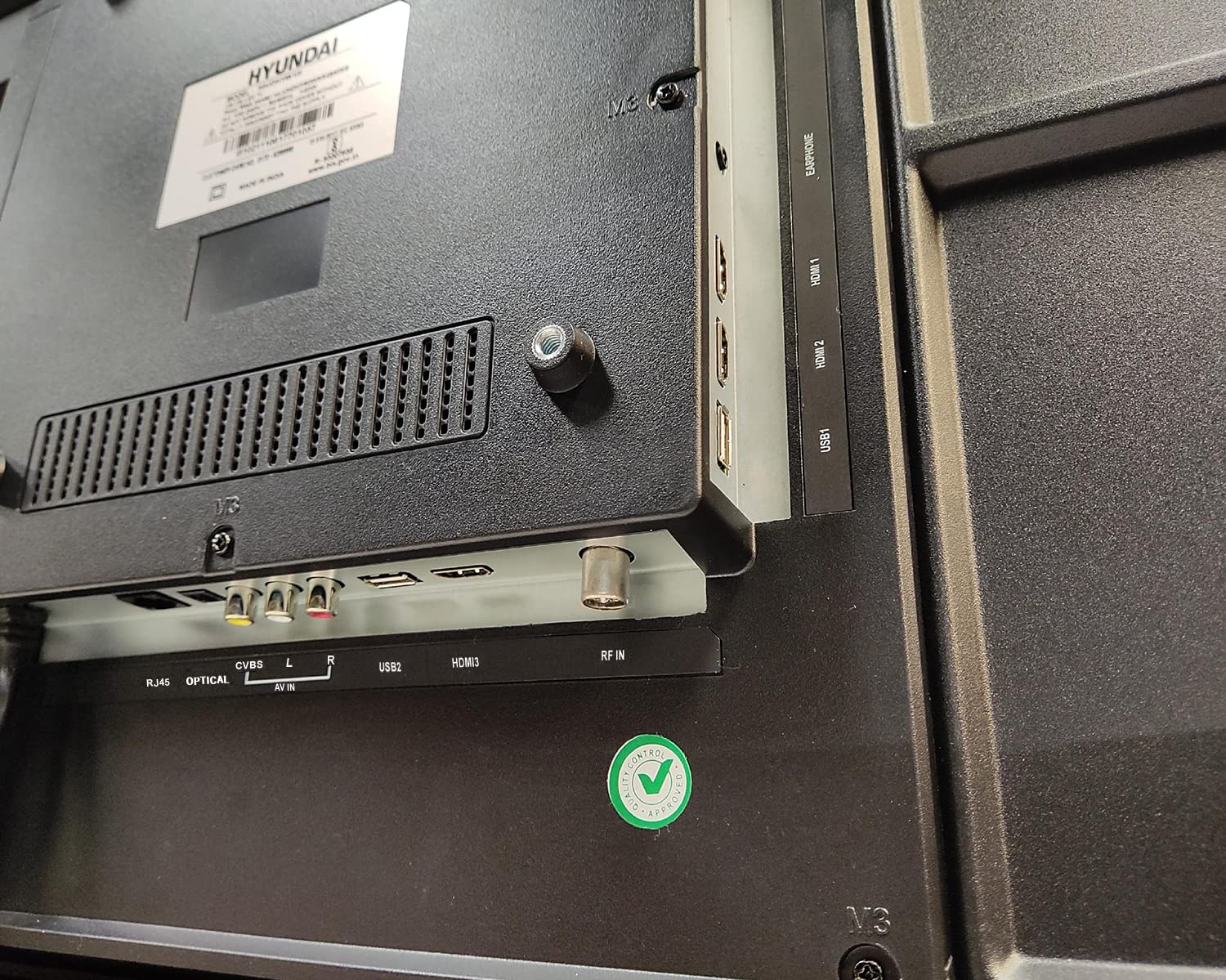
ຮູບພາບ: ໃກ້ຊິດ view of the connectivity ports on the rear of the Hyundai 43-inch Smart LED TV, including HDMI, USB, RF IN, AV IN, Optical, and RJ45 Ethernet.
5. Initial Power On & Basic Operation
5.1. ການຕັ້ງຄ່າຄັ້ງທໍາອິດ
ຫຼັງຈາກການເຊື່ອມຕໍ່ພະລັງງານ, ໃຫ້ກົດປຸ່ມເປີດປິດໃນການຄວບຄຸມຫ່າງໄກສອກຫຼີກຫຼືໂທລະພາບ. ໂທລະພາບຈະແນະນຳທ່ານຜ່ານຂັ້ນຕອນການຕັ້ງຄ່າເບື້ອງຕົ້ນ, ເຊິ່ງລວມມີ:
- ການເລືອກພາສາ
- ການເລືອກປະເທດ/ພາກພື້ນ
- ການເຊື່ອມຕໍ່ເຄືອຂ່າຍ (Wi-Fi ຫຼື Ethernet)
- Channel scanning (for antenna/cable TV)
- ຍອມຮັບຂໍ້ກໍານົດແລະເງື່ອນໄຂ
5.2. ການນໍາໃຊ້ໄລຍະໄກ Magic
Your Hyundai TV comes with a Magic Remote, offering intuitive control through pointing, clicking, scrolling, and voice commands.

Image: Diagram detailing the features of the Hyundai Magic Remote, including Air Mouse, Single Click Access, Scroll wheel, Voice Control, Universal Control, and Hot Keys for Netflix and Prime Video.
- ຫນູອາກາດ: ຊີ້ຣີໂໝດຢູ່ໜ້າຈໍເພື່ອຍ້າຍເຄີເຊີ.
- ລໍ້ເລື່ອນ: Use the wheel to scroll through menus and web pages, or zoom in/out.
- ການຄວບຄຸມດ້ວຍສຽງ: Press the microphone button and speak your commands to search for content or control the TV.
- ກະແຈຮ້ອນ: Dedicated buttons for popular streaming services like Netflix and Prime Video for quick access.
- ການຄວບຄຸມທົ່ວໄປ: The Magic Remote can control compatible external devices such as set-top boxes and sound systems.

Image: Front and angled side view of the Hyundai Magic Remote, showcasing ການອອກແບບ ergonomic ແລະຮູບແບບປຸ່ມຂອງມັນ.
6. ຄຸນສົມບັດໂທລະທັດ Smart (WebOS)
Your Hyundai TV is powered by WebOS, offering a user-friendly interface and access to a wide range of smart features.
6.1. ກຳລັງເຊື່ອມຕໍ່ອິນເຕີເນັດ
For smart features, connect your TV to the internet:
- Wi-Fi: Go to Settings > Network > Wi-Fi Connection, select your network, and enter the password. The TV supports 5 GHz / 2.4 GHz Dual Band Wi-Fi.
- ອີເທີເນັດ: Connect an Ethernet cable from your router to the RJ45 port on the TV.
6.2. ກຳລັງນຳທາງ WebOS and Apps
ໄດ້ WebOS launcher bar provides quick access to installed applications, inputs, and settings. Use the Magic Remote to navigate.
- ແອັບທີ່ຕິດຕັ້ງໄວ້ລ່ວງໜ້າ: Enjoy popular streaming services like Netflix, Prime Video, Disney+ Hotstar, YouTube, ZEE5, SonyLIV, Voot, ALT Balaji, and Hungama.
- Content Store: Download additional applications from the WebOS Content Store.
- ThinQ AI: ໃຊ້ຄຸນສົມບັດ AI ສໍາລັບການແນະນໍາສ່ວນບຸກຄົນແລະການເຊື່ອມໂຍງກັບເຮືອນອັດສະລິຍະ.
- ການເຊື່ອມຕໍ່ມືຖື Magic: Easily connect your smartphone to the TV for content sharing.
- ການຄວບຄຸມການແບ່ງປັນ: ແບ່ງປັນເນື້ອຫາຈາກອຸປະກອນມືຖືຂອງທ່ານໄປຫາໂທລະພາບ.
- Miracast: Wirelessly mirror your compatible device's screen to the TV.

Image: Hyundai 43-inch Smart TV displaying WebOS home screen with various smart features like ThinQ AI, 4K Upscaling, HDR10, Magic Remote, MEMC, Miracast, Bezel-less design, Dual Band Wi-Fi, Dolby Audio, Bluetooth 5.0, Real Cinema Experience, and Alexa.

ຮູບພາບ: ເທິງລົງລຸ່ມ view of the Hyundai 43-inch Smart TV screen showing popular streaming app logos including Netflix, Disney+ Hotstar, Prime Video, ZEE5, SonyLIV, Voot, YouTube, ALT Balaji, and Hungama.
7. ບໍາລຸງຮັກສາ
7.1. ທໍາຄວາມສະອາດໂທລະພາບ
ຖອດປລັກໂທລະທັດທຸກຄັ້ງກ່ອນທຳຄວາມສະອາດ.
- ໜ້າຈໍ: ເຊັດໜ້າຈໍຢ່າງອ່ອນໂຍນດ້ວຍຜ້າອ່ອນໆ, ບໍ່ມີເຈັ້ຍ. ສໍາລັບຮອຍແຂງ, ເບົາບາງ dampເຊັດຜ້າດ້ວຍນໍ້າ ຫຼື ນໍ້າຢາເຊັດໜ້າຈໍພິເສດ (ຮັບປະກັນວ່າມັນປອດໄພສຳລັບໜ້າຈໍ LED) ແລະ ເຊັດອອກຢ່າງລະມັດລະວັງ. ຢ່າສີດນໍ້າຢາໃສ່ໜ້າຈໍໂດຍກົງ.
- ຮ່າງກາຍ: Wipe the TV frame and back panel with a soft, dry cloth. Avoid using abrasive cleaners or solvents.
7.2. ການປັບປຸງຊອບແວ
Your TV may receive software updates to improve performance and add new features. It is recommended to keep your TV connected to the internet to receive these updates automatically or check for them manually in the settings menu.
8. ການແກ້ໄຂບັນຫາ
ຖ້າຫາກທ່ານພົບບັນຫາກັບໂທລະພາບຂອງທ່ານ, ເບິ່ງບັນຫາທົ່ວໄປດັ່ງຕໍ່ໄປນີ້ແລະການແກ້ໄຂ:
| ບັນຫາ | ການແກ້ໄຂທີ່ເປັນໄປໄດ້ |
|---|---|
| ບໍ່ມີພະລັງງານ | Check if the power cord is securely plugged into both the TV and the wall outlet. Ensure the outlet is working. Try a different power outlet. |
| ບໍ່ມີຮູບພາບຫຼືສຽງ | Verify that the correct input source is selected. Check all cable connections (HDMI, AV, etc.). Ensure external devices are powered on. |
| ການຄວບຄຸມໄລຍະໄກບໍ່ເຮັດວຽກ | Check the batteries and replace them if necessary. Ensure there are no obstructions between the remote and the TV. Re-pair the Magic Remote if it has become disconnected. |
| ບັນຫາການເຊື່ອມຕໍ່ Wi-Fi | Restart your router and modem. Check the Wi-Fi password. Ensure the TV is within range of your Wi-Fi router. Try a wired Ethernet connection. |
| ຄຸນສົມບັດອັດສະລິຍະບໍ່ຕອບສະໜອງ | Check your internet connection. Restart the TV by unplugging it for a few minutes and plugging it back in. Ensure the TV's software is up to date. |
ຖ້າບັນຫາຍັງຄົງຢູ່ຫຼັງຈາກພະຍາຍາມແກ້ໄຂເຫຼົ່ານີ້, ກະລຸນາຕິດຕໍ່ຝ່າຍຊ່ວຍເຫຼືອລູກຄ້າ.
9. ຂໍ້ມູນຈໍາເພາະ
Key technical specifications for the Hyundai UHDHY43WSR4BYI5 TV:
- ຕົວແບບ: UHDHY43WSR4BYI5
- ຂະໜາດໜ້າຈໍ: 109 ຊມ (43 ນິ້ວ)
- ຄວາມລະອຽດ: 4K Ultra HD (3840 x 2160 ພິກເຊລ)
- ເທັກໂນໂລຍີການສະແດງ: LED, A+ ປະເພດຈໍສະແດງຜົນ
- ລະບົບປະຕິບັດການ: WebOS
- ໜ່ວຍປະມວນຜົນ: ARM CA55 1.1 GHz Quad Core Processor
- RAM: 1.5 GB
- ROM: 8 GB
- ອັດຕາການໂຫຼດຂໍ້ມູນຄືນໃໝ່: 60 Hz
- ສຽງອອກ: 20 Watts Box Speakers, Dolby Ultra Surround
- ການເຊື່ອມຕໍ່: Wi-Fi (Dual Band 5 GHz / 2.4 GHz), Bluetooth 5.0, HDMI (multiple), USB (2 ports), Ethernet (RJ45), Headphone, AV In, Optical
- ຄຸນນະສົມບັດພິເສດ: Simplink (HDMI CEC), Magic Mobile Connection, Share Control, ThinQ AI, Magic Remote with Voice Control and Air Mouse, HDR10, 4K Upscaling, MEMC, Miracast, Bezel-less design, Alexa built-in.
- ຂະໜາດສິນຄ້າ (LxWxH): 96.2 x 56.7 x 9 cm (ບໍ່ມີຂາຕັ້ງ)
- ນ້ໍາຫນັກລາຍການ: 6.7 kg (without stand), 6.8 kg (with table stand)
- ແຫຼ່ງພະລັງງານ: AC 130 ໂວນ, 108 ວັດ
- Viewໃນມຸມ: 178 ອົງສາ
10. ການຮັບປະກັນແລະການສະຫນັບສະຫນູນ
Your Hyundai 43-inch 4K Ultra HD Smart LED TV comes with a ຮັບປະກັນ 1 ປີ from the date of purchase. Please retain your purchase receipt and warranty card for any warranty claims.
For technical support, service requests, or further assistance, please contact Goldenarch Consumer Electronics Pvt. Ltd., the manufacturer, at smiles@Hyundaice.in or call 0172 52-99-999.


