ແນະນຳ
Thank you for choosing the Xtorm XP300U Portable Power Station. This device is designed to provide reliable and portable power for various applications, from home use to outdoor camping. With a 300W output and multiple charging options, it ensures your devices stay powered wherever you are. This manual provides essential information on the safe operation, setup, maintenance, and troubleshooting of your power station.
ຂໍ້ມູນຄວາມປອດໄພ
ກະລຸນາອ່ານຄຳເຕືອນ ແລະ ຄຳແນະນຳດ້ານຄວາມປອດໄພທັງໝົດກ່ອນທີ່ຈະໃຊ້ຜະລິດຕະພັນນີ້ເພື່ອຮັບປະກັນການເຮັດວຽກທີ່ປອດໄພ ແລະ ປ້ອງກັນຄວາມເສຍຫາຍ. ເກັບຄູ່ມືນີ້ໄວ້ເພື່ອອ້າງອີງໃນອະນາຄົດ.
- ຫ້າມຖອດປະກອບ, ສ້ອມແປງ ຫຼື ດັດແປງຕົວເຄື່ອງ. ການປະກອບຄືນໃໝ່ທີ່ບໍ່ຖືກຕ້ອງອາດເຮັດໃຫ້ເກີດໄຟໄໝ້ ຫຼື ການບາດເຈັບໄດ້.
- ຢ່າໃຫ້ເຄື່ອງຖືກໄຟ ຫຼື ອຸນຫະພູມສູງ (ສູງກວ່າ 60°C/140°F).
- ຫ້າມໃຊ້ ຫຼື ເກັບຮັກສາເຄື່ອງໄວ້ໃນແສງແດດໂດຍກົງ ຫຼື ໃນສະພາບແວດລ້ອມທີ່ຮ້ອນ.
- ຫ້າມໃຊ້ ຫຼືເກັບຮັກສາເຄື່ອງໃຊ້ໃນຫ້ອງນ້ຳ ຫຼື ບໍລິເວນທີ່ມີນ້ຳ ຫຼື ຄວາມຊຸ່ມຊື່ນ.
- ຫ້າມຕົກ, ຕີ ຫຼື ກະທົບໃສ່ເຄື່ອງຢ່າງແຮງ.
- ຮັກສາໃຫ້ໄກຈາກເດັກນ້ອຍ.
- ໃຊ້ສາຍສາກໄຟ ແລະ ອະແດບເຕີຕົ້ນສະບັບ ຫຼື ທີ່ໄດ້ຮັບການຮັບຮອງເທົ່ານັ້ນ.
- ຮັບປະກັນການລະບາຍອາກາດທີ່ເໝາະສົມໃນລະຫວ່າງການໃຊ້ງານ ແລະ ການສາກໄຟ. ຫ້າມປິດບັງເຄື່ອງ.
- In case of leakage from the battery, do not allow the liquid to come into contact with skin or eyes. If contact occurs, wash with plenty of water and seek medical advice.

Image: Safety features of the Xtorm XP300U, highlighting Pure Sine Wave, Short Circuit Protection, Temperature Control, Overcharge Protection, APM Chip, A-Class Batteries, and High Efficiency.
ເນື້ອໃນຊຸດ
ກະລຸນາກວດເບິ່ງເນື້ອໃນຂອງແພັກເກດເມື່ອເປີດ. ຖ້າລາຍການໃດຂາດຫາຍໄປ ຫຼືເສຍຫາຍ, ໃຫ້ຕິດຕໍ່ຮ້ານຂາຍຍ່ອຍຂອງເຈົ້າ.
- Xtorm XP300U Portable Power Station
- ເຄື່ອງສາກໄຟ AC Wall
- ສາຍສາກລົດ
- MC4 to DC Cable (for solar panel connection, solar panel not included)
- ຄູ່ມືຜູ້ໃຊ້

Image: The Xtorm XP300U Portable Power Station displayed with its included accessories: AC wall charger, car charger cable, and MC4 to DC cable.
ສິນຄ້າເກີນview
Familiarize yourself with the different parts of your Xtorm XP300U Power Station.
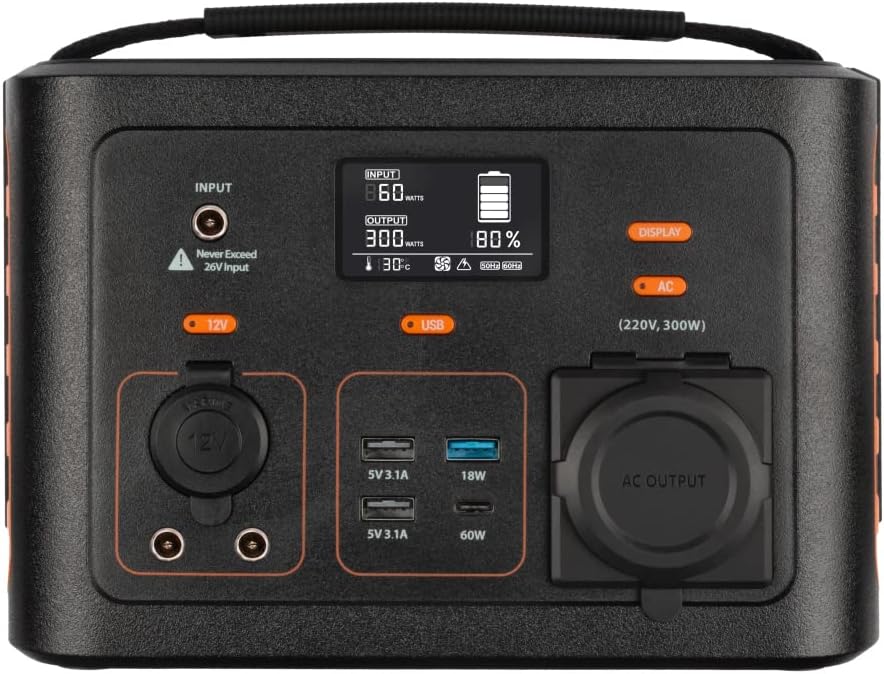
ຮູບພາບ: ໃກ້ຊິດ view of the Xtorm XP300U's front panel, showing the digital display, input port, 12V DC output, USB-A and USB-C ports, and AC output socket.
ຄຸນນະສົມບັດຫນ້າຈໍ:
- ຈໍ LCD: ສະແດງລະດັບແບັດເຕີຣີ, ພະລັງງານເຂົ້າ/ອອກ ແລະ ຕົວຊີ້ບອກສະຖານະ.
- ຜອດປ້ອນ: ສຳລັບການສາກໄຟສະຖານີພະລັງງານຜ່ານອະແດບເຕີ AC, ເຄື່ອງສາກໄຟລົດ ຫຼື ແຜງໂຊລາເຊວ.
- 12V DC Output: For powering 12V devices.
- ພອດ USB-A: Multiple USB-A outputs for charging various devices (e.g., 5V 3.1A, 18W Quick Charge).
- USB-C PD Port: High-speed USB-C Power Delivery output (up to 60W).
- ເຕົ້າຮັບ AC Output: Standard AC outlet for powering household appliances (220V, 300W).
- ປຸ່ມຄວບຄຸມ: Buttons for turning on/off specific outputs (e.g., AC, DC, USB).

ຮູບພາບ: ເທິງ view of the Xtorm XP300U, highlighting its integrated carrying handle for portability.

ຮູບພາບ: ດ້ານຫລັງ view of the Xtorm XP300U, featuring the Xtorm brand logo and "Portable Power Station 300" text.
ຕັ້ງຄ່າ
Before first use, it is recommended to fully charge your Xtorm XP300U Power Station.
- ແກະກ່ອງ: ເອົາສະຖານີໄຟຟ້າ ແລະ ອຸປະກອນເສີມທັງໝົດອອກຈາກການຫຸ້ມຫໍ່ຢ່າງລະມັດລະວັງ.
- Initial Charge (AC Wall Charger):
- Connect the AC wall charger to the input port on the power station.
- Plug the AC wall charger into a standard wall outlet.
- The LCD display will show the charging status. Charge until the battery indicator shows 100%.
- ການຈັດວາງ: Place the power station on a stable, flat surface in a well-ventilated area, away from direct sunlight or heat sources.
ຄໍາແນະນໍາການດໍາເນີນງານ
The Xtorm XP300U offers multiple ways to charge and power your devices.
ການສາກໄຟສະຖານີ:
The XP300U can be recharged using four different methods:
Image: Visual representation of the four charging methods for the Xtorm XP300U: via wall socket, USB-C PD, solar panel (not included), and 12V car charger.
- Via Wall Socket (AC Charger): Connect the included AC wall charger to the input port and a wall outlet.
- Via USB-C PD: Use a compatible USB-C Power Delivery charger (not included) to charge the unit via its USB-C port.
- ຜ່ານ Solar Panel: Connect a compatible solar panel (not included) to the input port using the provided MC4 to DC cable. Ensure the solar panel is placed in direct sunlight for optimal charging.
- Via 12V Car Charger: Connect the included car charger cable to the input port and your vehicle's 12V cigarette lighter socket.
ຈໍສະແດງຜົນ LCD ຈະສະແດງຄ່າອິນພຸດtage and battery charge status during charging. You can use the outputs even while the power station is charging (pass-through charging).
Using the Outputs:
The XP300U provides various output ports to power different types of devices.

Image: The Xtorm XP300U demonstrating its universal compatibility with icons representing various devices and output types: 1x AC 300W/220V, 1x USB-C PD 60W, 2x DC 5.5mm 60W, 2x USB QC3.0 18W, 1x USB 18W, and 1x 12V Car 120W.
- AC Output (220V, 300W):
- Press the "AC" button to activate the AC output. The AC indicator on the display will light up.
- ສຽບສາຍໄຟຂອງອຸປະກອນຂອງທ່ານເຂົ້າກັບປລັກໄຟ AC.
- Ensure your device's power consumption does not exceed 300W.
- Press the "AC" button again to turn off the AC output when not in use.
- DC Output (12V):
- Press the "12V" button to activate the DC output. The DC indicator will light up.
- Connect your 12V device to the DC port.
- Press the "12V" button again to turn off the DC output.
- USB Outputs (USB-A, USB-C PD):
- The USB outputs are typically always active when the unit is on.
- Connect your USB-powered devices to the appropriate USB-A or USB-C PD ports.
- The display will show the output wattage for connected devices.
The power station can provide power for extended periods, depending on the connected devices' power consumption.

ຮູບພາບ: Examples of device runtimes with the Xtorm XP300U: 17.5 hours for a 10W LED light, 5.5 hours for a 30W small TV, 4 hours for a 40W small coolbox, and 6 hours for a 40W small coolbox (via 12V carplug output).
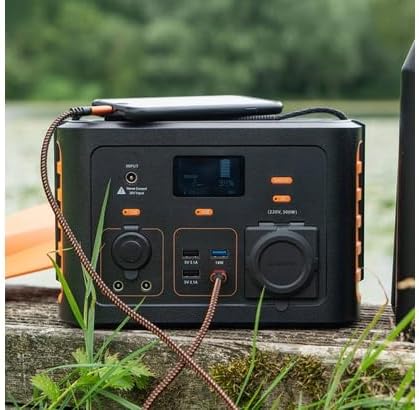
Image: The Xtorm XP300U Portable Power Station being used outdoors on a wooden surface, charging a smartphone, demonstrating its portability and utility in various environments.
ບໍາລຸງຮັກສາ
ການບຳລຸງຮັກສາທີ່ເໝາະສົມຮັບປະກັນອາຍຸການໃຊ້ງານທີ່ຍາວນານ ແລະ ປະສິດທິພາບທີ່ດີທີ່ສຸດຂອງໂຮງງານໄຟຟ້າຂອງທ່ານ.
- ທໍາຄວາມສະອາດ: ໃຊ້ຜ້າປຽກແຫ້ງເພື່ອເຮັດຄວາມສະອາດດ້ານນອກຂອງເຄື່ອງ. ຢ່າໃຊ້ເຄື່ອງເຮັດຄວາມສະອາດຂັດຫຼືສານລະລາຍ.
- ການເກັບຮັກສາ:
- ເກັບຮັກສາສະຖານີໄຟຟ້າໃນບ່ອນທີ່ເຢັນ, ແຫ້ງ, ຫ່າງຈາກແສງແດດໂດຍກົງແລະອຸນຫະພູມທີ່ສຸດ.
- ສໍາລັບການເກັບຮັກສາໃນໄລຍະຍາວ, ສາກຫນ່ວຍບໍລິການປະມານ 50-80% ທຸກໆ 3-6 ເດືອນເພື່ອຮັກສາສຸຂະພາບຂອງຫມໍ້ໄຟ.
- ຫຼີກລ່ຽງການເກັບຮັກສາໃນສະພາບແວດລ້ອມທີ່ມີຄວາມຊຸ່ມຊື່ນສູງ.
- ການດູແລຫມໍ້ໄຟ: Do not fully discharge the battery frequently, as this can reduce its lifespan. Recharge promptly when the battery level is low.
ການແກ້ໄຂບັນຫາ
If you encounter issues with your Xtorm XP300U, refer to the following common problems and solutions.
| ບັນຫາ | ສາເຫດທີ່ເປັນໄປໄດ້ | ການແກ້ໄຂ |
|---|---|---|
| ໜ່ວຍງານບໍ່ເປີດ. | ແບັດເຕີຣີໝົດແລ້ວ. | Connect the power station to an AC wall outlet and charge it for at least 30 minutes. |
| ຜົນຜະລິດ AC ບໍ່ເຮັດວຽກ. | AC output not activated; device exceeds 300W; overheating. | Press the "AC" button to activate. Check device wattage. Allow unit to cool down if overheated. |
| ພອດ USB ບໍ່ໄດ້ສາກໄຟ. | Device not compatible; cable faulty. | Ensure device is compatible. Try a different USB cable. |
| ການສາກໄຟຊ້າ. | Using a low-power charger; environmental factors (e.g., cloudy for solar). | Use the original AC charger or a higher wattage USB-C PD charger. Optimize solar panel placement. |
If the problem persists, please contact Xtorm customer support.
ຂໍ້ມູນຈໍາເພາະ
Detailed technical specifications for the Xtorm XP300U Portable Power Station.
| ຄຸນສົມບັດ | ລາຍລະອຽດ |
|---|---|
| ຊື່ຕົວແບບ | XP300U |
| ຍີ່ຫໍ້ | Xtorm |
| ພະລັງງານຜົນຜະລິດ | 300 ວັດ (AC) |
| ການປ້ອນຂໍ້ມູນ Voltage | 12 ໂວນ (DC) |
| ແຫຼ່ງພະລັງງານ | AC Wall, USB-C PD, Solar, Car Charger |
| ການນໍາໃຊ້ທີ່ແນະນໍາ | Home, Camping |
| ນ້ຳໜັກ | 3300 ກຣາມ (3.3 ກິໂລ) |
| ສີ | ສີສົ້ມ |
| ອົງປະກອບລວມ | 1 package (Power Station, AC Charger, Car Charger, MC4 to DC Cable) |

Image: Dimensions of the Xtorm XP300U Portable Power Station (240mm x 154mm x 142mm) and its weight (3.3 kg), highlighting its convenient travel size.
ການຮັບປະກັນແລະການສະຫນັບສະຫນູນ
Xtorm products come with a standard warranty. Please refer to the warranty card included in your package or visit the official Xtorm webເວັບໄຊສໍາລັບເງື່ອນໄຂການຮັບປະກັນລາຍລະອຽດ.
For technical support, troubleshooting assistance, or warranty claims, please contact Xtorm customer service:
- Webເວັບໄຊ: www.xtorm.eu (ກວດສອບຂໍ້ມູນຕິດຕໍ່ຝ່າຍສະໜັບສະໜູນ)
- ອີເມວ: Refer to the Xtorm webເວັບໄຊທ໌ສຳລັບທີ່ຢູ່ອີເມວສະໜັບສະໜູນສະເພາະ.
- ໂທລະສັບ: Refer to the Xtorm webສະຖານທີ່ສໍາລັບເບີໂທລະສັບສະຫນັບສະຫນູນພາກພື້ນ.
When contacting support, please have your product model (XP300U) and purchase details ready.