ແນະນຳ
ຂອບໃຈສໍາລັບການຊື້asing the Cruxgg 6-in-1 9qt Air Fryer with TriZone Technology. This appliance is designed to provide versatile cooking options, including air frying, roasting, broiling, baking, reheating, and dehydrating, with the convenience of dual-zone cooking. Please read this manual thoroughly before first use to ensure safe and optimal operation.
ການປົກປ້ອງທີ່ສໍາຄັນ
ເມື່ອໃຊ້ເຄື່ອງໃຊ້ໄຟຟ້າ, ຄວນລະວັງຄວາມປອດໄພຂັ້ນພື້ນຖານສະເໝີ, ລວມທັງສິ່ງຕໍ່ໄປນີ້:
- ອ່ານຄໍາແນະນໍາທັງຫມົດກ່ອນທີ່ຈະນໍາໃຊ້.
- ຢ່າແຕະພື້ນຜິວທີ່ຮ້ອນ. ໃຊ້ດ້າມຈັບ ຫຼື ບິດ.
- ເພື່ອປ້ອງກັນການຊ໊ອກໄຟຟ້າ, ຢ່າເອົາສາຍໄຟ, ປລັກສຽບ, ຫຼືບ່ອນຢູ່ອາໄສຫຼັກຢູ່ໃນນໍ້າ ຫຼືຂອງແຫຼວອື່ນໆ.
- ການເບິ່ງແຍງຢ່າງໃກ້ຊິດແມ່ນມີຄວາມຈໍາເປັນໃນເວລາທີ່ອຸປະກອນໃດໆຖືກນໍາໃຊ້ໂດຍຫຼືຢູ່ໃກ້ກັບເດັກນ້ອຍ.
- ຖອດປລັກອອກຈາກປລັກສຽບໃນເວລາທີ່ບໍ່ໄດ້ໃຊ້ແລະກ່ອນທີ່ຈະເຮັດຄວາມສະອາດ. ປ່ອຍໃຫ້ເຢັນກ່ອນທີ່ຈະໃສ່ຫຼືເອົາຊິ້ນສ່ວນ.
- ຫ້າມນຳໃຊ້ເຄື່ອງໃຊ້ທີ່ມີສາຍໄຟ ຫຼື ປລັກສຽບທີ່ເສຍຫາຍ, ຫຼື ຫຼັງຈາກເຄື່ອງໃຊ້ຜິດປົກກະຕິ ຫຼືໄດ້ຮັບຄວາມເສຍຫາຍໃນທຸກຮູບແບບ.
- ການນໍາໃຊ້ອຸປະກອນເສີມທີ່ບໍ່ແນະນໍາໂດຍຜູ້ຜະລິດເຄື່ອງໃຊ້ອາດຈະເຮັດໃຫ້ເກີດການບາດເຈັບ.
- ຢ່າໃຊ້ນອກ.
- ຢ່າປ່ອຍໃຫ້ສາຍໄຟແຂວນໃສ່ຂອບໂຕະ ຫຼືໂຕະ, ຫຼືແຕະພື້ນຜິວທີ່ຮ້ອນ.
- ຢ່າວາງໃສ່ ຫຼືຢູ່ໃກ້ກັບເຕົາແກ໊ສຮ້ອນ ຫຼືເຕົາໄຟຟ້າ, ຫຼືໃນເຕົາອົບທີ່ມີຄວາມຮ້ອນ.
- ຕ້ອງໃຊ້ຄວາມລະມັດລະວັງເປັນຢ່າງຍິ່ງໃນເວລາເຄື່ອນຍ້າຍເຄື່ອງທີ່ບັນຈຸນ້ຳມັນຮ້ອນ ຫຼືຂອງແຫຼວຮ້ອນອື່ນໆ.
- ສຽບປລັກສຽບໃສ່ເຄື່ອງທຸກຄັ້ງກ່ອນ, ຈາກນັ້ນສຽບສາຍໃສ່ປລັກສຽບໃສ່ຝາ. ເພື່ອຕັດການເຊື່ອມຕໍ່, ເຮັດໃຫ້ການຄວບຄຸມໃດໆ "ປິດ", ຫຼັງຈາກນັ້ນເອົາປລັກອອກຈາກເຕົ້າສຽບຝາ.
- ຢ່າໃຊ້ເຄື່ອງໃຊ້ອື່ນນອກເໜືອໄປຈາກການໃຊ້ທີ່ຕັ້ງໃຈ.
- ເຄື່ອງໃຊ້ນີ້ແມ່ນໃຊ້ໃນຄົວເຮືອນເທົ່ານັ້ນ.
ສ່ວນປະກອບຂອງຜະລິດຕະພັນ
Familiarize yourself with the parts of your Cruxgg Air Fryer:
- ໜ່ວຍຫຼັກພ້ອມໜ້າຈໍສຳຜັດດິຈິຕອລ
- Removable Cooking Baskets (2)
- Crisper Trays (2)
- Removable Divider for TriZone Technology
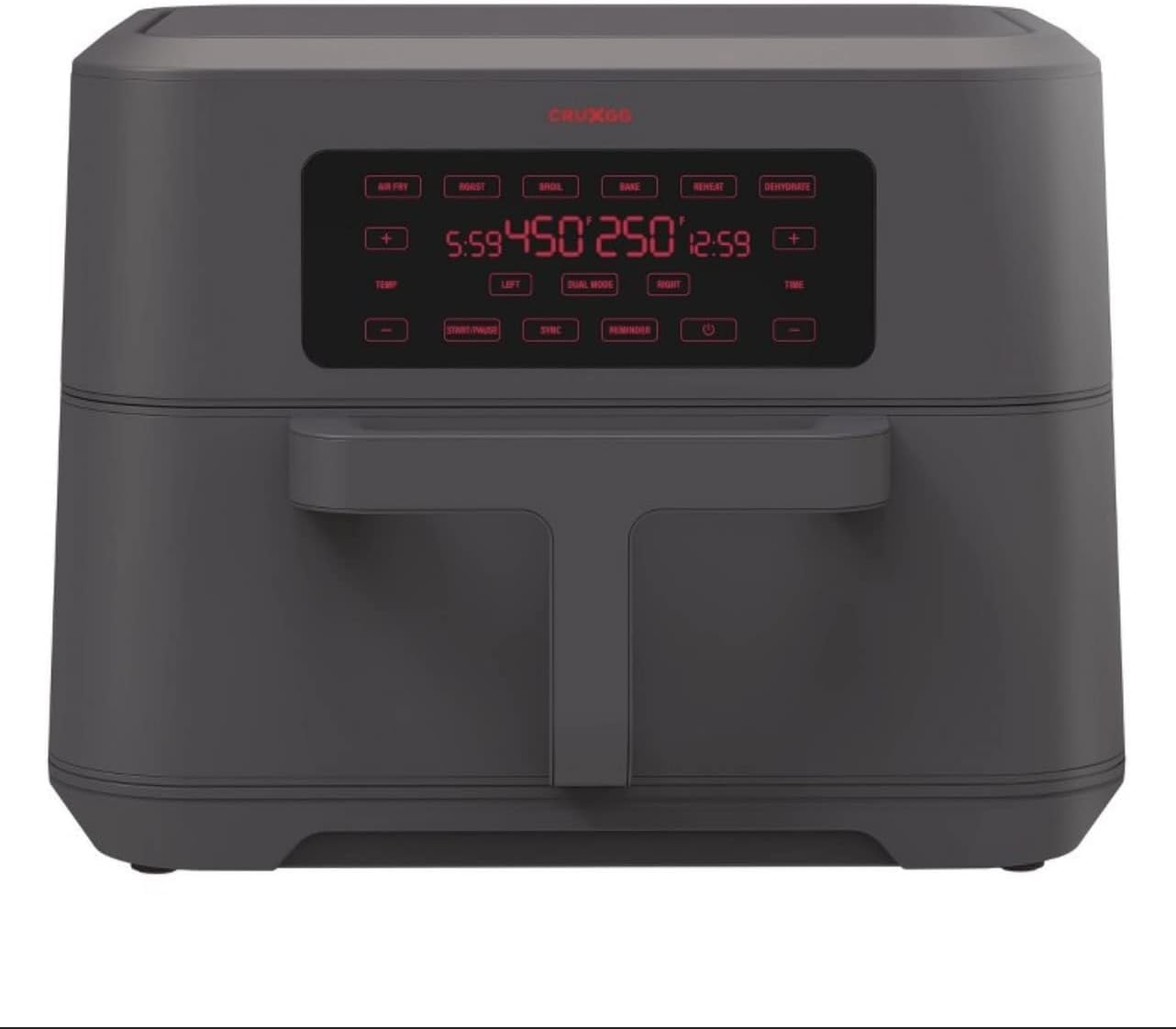
ຮູບ 1: ດ້ານຫນ້າ view of the Cruxgg Air Fryer, showcasing its digital display and sleek design.

Figure 2: The air fryer with both cooking baskets pulled out, revealing the interior compartments and removable divider.
ການຕັ້ງຄ່າແລະການນໍາໃຊ້ຄັ້ງທໍາອິດ
- ແກະກ່ອງ: ເອົາວັດສະດຸຫຸ້ມຫໍ່, ສະຕິກເກີ ແລະປ້າຍກຳກັບທັງໝົດອອກຈາກເຄື່ອງໃຊ້ຢ່າງລະມັດລະວັງ.
- ສະອາດ: Wash the cooking baskets and crisper trays with hot water, dish soap, and a non-abrasive sponge. Rinse thoroughly and dry completely. Wipe the interior and exterior of the main unit with a damp ຜ້າ.
- ການຈັດວາງ: ວາງເຕົາອົບອາກາດຢູ່ເທິງພື້ນທີ່ຄົງທີ່, ທົນທານຕໍ່ຄວາມຮ້ອນ, ຫ່າງຈາກຝາຫຼືເຄື່ອງໃຊ້ອື່ນໆເພື່ອໃຫ້ການໄຫຼວຽນຂອງອາກາດທີ່ເຫມາະສົມ.
- ໃສ່ອົງປະກອບ: Place the crisper trays into the cooking baskets. Insert the cooking baskets into the main unit. If using TriZone, ensure the divider is properly seated.
- ເປີດ: ສຽບສາຍໄຟເຂົ້າກັບປລັກໄຟຟ້າທີ່ມີສາຍດິນ. ຈໍສະແດງຜົນດິຈິຕອນຈະສະຫວ່າງຂຶ້ນ.
- ການແລ່ນເບື້ອງຕົ້ນ (ທາງເລືອກແຕ່ແນະນຳ): For first use, it is recommended to run the air fryer empty for about 10-15 minutes at 350°F (175°C) to burn off any manufacturing residues. A slight odor may be present, which is normal. Ensure good ventilation.
ຄໍາແນະນໍາການດໍາເນີນງານ
Digital Touchscreen Controls:
- ປຸ່ມເປີດປິດ: ເປີດ/ປິດ ໜ່ວຍ.
- ປຸ່ມຟັງຊັນ: Select from Air Fry, Roast, Broil, Bake, Reheat, Dehydrate.
- ການຄວບຄຸມອຸນຫະພູມ (+/-): Adjust temperature for each zone (LEFT/RIGHT) or combined.
- ການຄວບຄຸມເວລາ (+/-): Adjust cooking time for each zone (LEFT/RIGHT) or combined.
- ປຸ່ມຊ້າຍ/ຂວາ: Select which cooking zone to adjust.
- DUAL MODE Button: Activates simultaneous cooking in both zones with independent settings.
- ປຸ່ມ SYNC: Synchronizes the finish time of both zones when using DUAL MODE.
- SHAKE/FLIP Reminder: Activates a reminder to shake or flip food during cooking.
- ປຸ່ມ START/PAUSE: ເລີ່ມ ຫຼື ຢຸດຊົ່ວຄາວຮອບວຽນການປຸງແຕ່ງອາຫານ.
ການດໍາເນີນງານພື້ນຖານ:
- Place food in the cooking basket(s). Do not overfill.
- Insert the basket(s) firmly into the main unit.
- Press the Power Button to turn on the display.
- ເລືອກຟັງຊັນແຕ່ງກິນທີ່ທ່ານຕ້ອງການ (ເຊັ່ນ: Air Fry).
- Adjust the temperature and time using the +/- buttons. If using a single zone, ensure the correct LEFT/RIGHT button is selected or the divider is removed for full capacity.
- For dual-zone cooking, press DUAL MODE, then set independent temperatures and times for LEFT and RIGHT zones. Use SYNC if you want both zones to finish at the same time.
- ກົດ START/PAUSE ເພື່ອເລີ່ມການປຸງອາຫານ.
- Some recipes may require shaking or flipping food halfway through. The SHAKE/FLIP reminder can be set for this purpose.
- ເມື່ອປຸງແຕ່ງອາຫານສຳເລັດແລ້ວ, ເຄື່ອງຈະມີສຽງດັງ. ຄ່ອຍໆເອົາກະຕ່າອອກ ແລະ ຍ້າຍອາຫານໃສ່ຖ້ວຍ.

Figure 3: The air fryer in use, demonstrating the dual basket functionality with different food items in each compartment.
ການດູແລແລະບໍາລຸງຮັກສາ
ທໍາຄວາມສະອາດ:
- ຖອດປລັກເຕົາອົບອອກອາກາດສະເໝີ ແລະປ່ອຍໃຫ້ມັນເຢັນໝົດກ່ອນທຳຄວາມສະອາດ.
- The cooking baskets and crisper trays are ບໍ່ແມ່ນເຄື່ອງລ້າງຈານປອດໄພ. Wash them with hot water, dish soap, and a non-abrasive sponge.
- For stubborn food residue, soak the baskets and trays in warm, soapy water for 10-15 minutes before cleaning.
- ເຊັດດ້ານນອກຂອງເຕົາອົບອາກາດທີ່ມີໂຄສະນາamp ຜ້າ. ຢ່າໃຊ້ເຄື່ອງເຮັດຄວາມສະອາດຂັດຫຼືແຜ່ນຂັດ.
- ເຮັດຄວາມສະອາດອົງປະກອບຄວາມຮ້ອນພາຍໃນເຕົາອົບດ້ວຍແປງເຮັດຄວາມສະອາດເພື່ອເອົາສິ່ງເສດເຫຼືອອອກຈາກອາຫານ.
- ຮັບປະກັນວ່າທຸກຊິ້ນສ່ວນແຫ້ງໝົດກ່ອນເກັບຮັກສາ ຫຼື ນຳໃຊ້ຄືນ.
ການເກັບຮັກສາ:
ເກັບຮັກສາເຄື່ອງທອດລົມໄວ້ໃນບ່ອນທີ່ເຢັນແລະແຫ້ງ. ໃຫ້ແນ່ໃຈວ່າສາຍໄຟຖືກຫໍ່ຢ່າງເປັນລະບຽບ ແລະ ຮັດແໜ້ນເພື່ອປ້ອງກັນຄວາມເສຍຫາຍ.
ການແກ້ໄຂບັນຫາ
| ບັນຫາ | ສາເຫດທີ່ເປັນໄປໄດ້ | ການແກ້ໄຂ |
|---|---|---|
| ເຕົາອົບອາກາດບໍ່ເປີດ. | ບໍ່ສຽບ; ປລັກສຽບໄຟເຮັດວຽກຜິດປົກກະຕິ; ຫນ່ວຍງານບໍ່ໄດ້ຖືກປະກອບຢ່າງຖືກຕ້ອງ. | Ensure plug is firmly in outlet. Check circuit breaker. Ensure baskets are fully inserted. |
| ອາຫານບໍ່ໄດ້ຖືກປຸງແຕ່ງຢ່າງເທົ່າທຽມກັນ. | ກະຕ່າເກີນ; ອາຫານບໍ່ສັ່ນ/ພິກ. | ແຕ່ງກິນເປັນຊຸດນ້ອຍໆ. ສັ່ນ ຫຼືພິກອາຫານເຄິ່ງໜຶ່ງຜ່ານການປຸງອາຫານ. |
| ຄວັນສີຂາວມາຈາກເຄື່ອງໃຊ້. | ເສດໄຂມັນຈາກການນໍາໃຊ້ທີ່ຜ່ານມາ; ການປຸງອາຫານທີ່ມີໄຂມັນສູງ. | Clean the basket and crisper tray thoroughly. For high-fat foods, drain excess oil. |
| ເຄື່ອງໃຊ້ມີກິ່ນຄືພາດສະຕິກ. | ກິ່ນເຄື່ອງໃໝ່. | This is normal for first few uses. Run empty for 10-15 minutes in a well-ventilated area. |
ຂໍ້ມູນຈໍາເພາະຂອງຜະລິດຕະພັນ
- ຍີ່ຫໍ້: Cruxgg
- ຊື່ຕົວແບບ: 072-04-4160
- ຄວາມອາດສາມາດ: 9 Quarts (total)
- ສີ: Smoke Gray
- ຂະໜາດຜະລິດຕະພັນ: 15"D x 19"W x 16"H
- ນ້ໍາຫນັກລາຍການ: 19.31 ປອນ
- ວັດສະດຸ: ພາດສະຕິກ
- ວັດtage: 1700 ວັດ (ວັດຜົນຜະລິດtage: 1500 ວັດ)
- ການຕັ້ງຄ່າອຸນຫະພູມສູງສຸດ: 450 ອົງສາຟາເຣນຮາຍ
- ວິທີການຄວບຄຸມ: ແຕະ
- ຄຸນນະສົມບັດພິເສດ: Temperature Control, TriZone Technology
- ການເຄືອບ Nonstick: ແມ່ນແລ້ວ
- ເຄື່ອງລ້າງຈານປອດໄພ: No (Baskets/Trays)
- UPC: 829486173394
ຂໍ້ມູນການຮັບປະກັນ
For detailed warranty information, please refer to the warranty card included with your product packaging or visit the official Cruxgg webເວັບໄຊ. ຮັກສາໃບຮັບເງິນການຊື້ຂອງທ່ານໄວ້ເປັນຫຼັກຖານການຊື້ສໍາລັບການຮຽກຮ້ອງການຮັບປະກັນໃດໆ.
ການຊ່ວຍເຫຼືອລູກຄ້າ
If you have any questions, concerns, or require assistance with your Cruxgg Air Fryer, please contact our customer support team. Contact details can be found on the Cruxgg webເວັບໄຊ ຫຼືໃນເອກະສານທີ່ສະໜອງໃຫ້ກັບເຄື່ອງໃຊ້ຂອງເຈົ້າ.


