ແນະນຳ
This manual provides comprehensive instructions for the installation, operation, and maintenance of your Ozone Smart Rim Lock, Model OZ-DRL. This advanced security device offers multiple access methods for enhanced convenience and protection.
ຄຸນນະສົມບັດທີ່ສໍາຄັນ
- Wi-Fi Connectivity for Smart Control
- Multiple Access Modes: Fingerprint, User Password, OzoLife Mobile App, RFID Card, Emergency Key
- High Fingerprint Capacity (100 fingerprints)
- Durable Stainless Steel and Alloy Steel Construction
- ການຕິດຕັ້ງງ່າຍ
ສ່ວນປະກອບເກີນview
The Ozone Smart Rim Lock system consists of the main lock unit and the external keypad/reader. Familiarize yourself with the key parts:
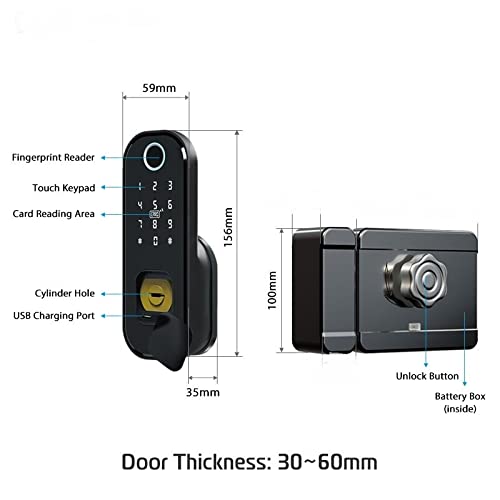
Figure 1: Smart Rim Lock Components and Dimensions
This diagram illustrates the main components of the lock. The external unit features a Fingerprint Reader, Touch Keypad, Card Reading Area, Cylinder Hole for emergency key access, and a USB Charging Port. The internal unit includes an Unlock Button and a Battery Box. The lock is designed for door thicknesses between 30mm and 60mm.
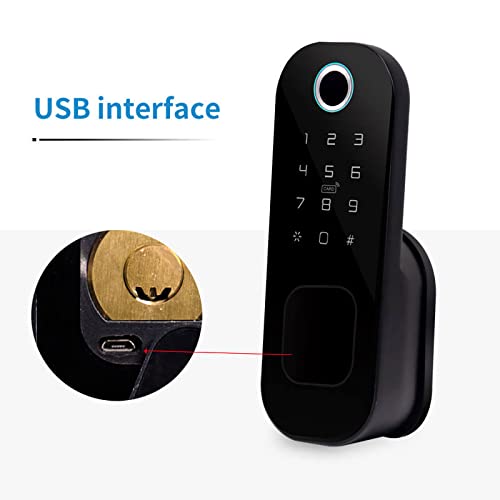
Figure 2: USB Charging Port Detail
ລາຍລະອຽດ view of the USB interface, located near the cylinder hole, used for emergency power or charging.
ເນື້ອໃນຊຸດ
- Ozone Smart Rim Lock Unit (External and Internal)
- ຮາດແວຕິດຕັ້ງ
- ກະແຈສຸກເສີນ
- RFID Cards (Quantity may vary)
- ຄູ່ມືຜູ້ໃຊ້ (ເອກະສານນີ້)
ຂໍ້ມູນຈໍາເພາະ

Figure 3: Technical Parameters and Specifications
ຮູບພາບນີ້ໃຫ້ຂໍ້ມູນຄົບຖ້ວນview of the lock's technical parameters and detailed specifications.
| ຄຸນສົມບັດ | ລາຍລະອຽດ |
|---|---|
| ຕົວແບບ | OZ-DRL |
| ວັດສະດຸ | ສະແຕນເລດ, ເຫຼັກໂລຫະປະສົມ |
| ສີ | ດຳ |
| ຂະໜາດ (L x W x H) | 25.4 x 20.3 x 10.2 cm |
| ປະເພດລັອກ | Key Lock (with smart features) |
| ການເຊື່ອມຕໍ່ | Wi-Fi |
| ວິທີການຄວບຄຸມ | App, Fingerprint, Keypad, RFID Card, Emergency Key |
| ຄວາມອາດສາມາດລາຍນິ້ວມື | 100 |
| ຄວາມຍາວລະຫັດຜ່ານ | 4-8 ຕົວເລກ |
| ລະຫັດຜ່ານສະເໝືອນ | ເຖິງ 32 ຕົວເລກ |
| ຄວາມໜາຂອງປະຕູ | 30-60 ມມ |
| ພະລັງງານ | DC 6V |
| ພະລັງງານສຸກເສີນ | DC 5V (ຜ່ານໄມໂຄຣ USB) |
| ອຸນຫະພູມປະຕິບັດການ | -25°C ເຖິງ 60°C |
| ການເຮັດວຽກຄວາມຊຸ່ມຊື່ນພີ່ນ້ອງ | 20%-90%RH |
ຄູ່ມືການຕິດຕັ້ງ
The Ozone Smart Rim Lock is designed for easy installation, retrofitting with regular rim locks without additional cutouts.
ກ່ອນທີ່ຈະຕິດຕັ້ງ
- Ensure your door thickness is between 30mm and 60mm.
- Verify all components are present as listed in the "Package Contents" section.
- Prepare necessary tools (screwdriver, drill if required for new installations).
ຂັ້ນຕອນການຕິດຕັ້ງ (ທົ່ວໄປ)
- ກະກຽມປະຕູ: Remove any existing rim lock. Ensure the door frame and door edge are clean and clear.
- Mount the External Unit: Position the external keypad/reader unit on the outside of the door. Secure it using the provided mounting hardware.
- Install the Internal Unit: Align the internal lock unit with the external unit, ensuring the spindle and wiring (if any) connect properly. Secure the internal unit to the door.
- ເຊື່ອມຕໍ່ພະລັງງານ: Insert the required batteries into the battery box within the internal unit.
- ການປະຕິບັດການທົດສອບ: After installation, test the mechanical lock function with the emergency key.
ໝາຍເຫດ: For detailed, step-by-step installation instructions, please refer to the specific installation diagram or video provided with your product packaging, or consult a professional installer.
Operating Your Smart Rim Lock
Your Ozone Smart Rim Lock offers multiple convenient ways to unlock your door.
Initial Setup and Administrator
Upon first power-up, you will need to set up an administrator. This is typically the first fingerprint or password registered. Refer to the lock's voice prompts or the OzoLife App for guided setup.
ຮູບແບບການເຂົ້າເຖິງ

Figure 4: Available Access Modes
This image highlights the five primary methods for unlocking the Ozone Smart Rim Lock.
1. ການເຂົ້າເຖິງລາຍນິ້ວມື
- ການລົງທະບຽນ: As an administrator, follow the voice prompts or app instructions to enroll new fingerprints. Place the finger firmly on the fingerprint reader until successful registration is confirmed.
- ປົດລັອກ: Place your registered finger on the fingerprint reader. The lock will unlock if the fingerprint is recognized.
2. User Password Access
- ການຕັ້ງຄ່າລະຫັດຜ່ານ: Administrators can set or modify user passwords (4-8 digits) via the keypad or OzoLife App.
- ປົດລັອກ: Enter your registered password on the touch keypad, followed by the '#' key.
- ລະຫັດຜ່ານສະເໝືອນ: To prevent peeping, you can enter random digits before or after your actual password (e.g.,
XXXXລະຫັດຜ່ານYYYY).
3. OzoLife Mobile App Control
- ດາວໂຫຼດ ແລະເຊື່ອມຕໍ່: Download the "OzoLife" app from your smartphone's app store. Follow the in-app instructions to connect your lock to your home Wi-Fi network and pair it with the app.
- ການປົດລັອກໄລຍະໄກ: Once connected, you can remotely unlock the door, manage users, view access logs, and receive notifications through the app.
4. ການເຂົ້າເຖິງບັດ RFID
- ການລົງທະບຽນ: Register RFID cards through the administrator mode or OzoLife App.
- ປົດລັອກ: Present a registered RFID card to the card reading area on the external unit. The lock will unlock upon recognition.
5. ການເຂົ້າເຖິງກະແຈສຸກເສີນ
In case of battery depletion or electronic malfunction, the emergency key provides mechanical access.
- Insert the emergency key into the cylinder hole.
- ໝຸນກະແຈເພື່ອປົດລັອກປະຕູ.
ການຄຸ້ມຄອງຫມໍ້ໄຟ
The lock will provide a low power warning when batteries are running low. Replace batteries promptly to ensure continuous operation. In an emergency, the USB charging port can be used for temporary power.
ບໍາລຸງຮັກສາ
- ທໍາຄວາມສະອາດ: ເຊັດພື້ນຜິວຂອງລັອກດ້ວຍຜ້າອ່ອນ, ແຫ້ງ. ຫຼີກລ້ຽງການເຮັດຄວາມສະອາດຂັດຫຼືສານລະລາຍ.
- ການປ່ຽນແບັດເຕີຣີ: Replace all batteries with new ones when the low power warning is activated. Use high-quality alkaline batteries.
- ການດູແລເຊັນເຊີລາຍນິ້ວມື: ຮັກສາເຊັນເຊີລາຍນິ້ວມືໃຫ້ສະອາດ ແລະແຫ້ງເພື່ອປະສິດທິພາບທີ່ດີທີ່ສຸດ.
- ອັບເດດຊອບແວ: Regularly check the OzoLife App for firmware updates to ensure your lock has the latest features and security enhancements.
ການແກ້ໄຂບັນຫາ
If you encounter issues with your Ozone Smart Rim Lock, refer to the following common problems and solutions:
- Lock is not responding.
- ກວດເບິ່ງລະດັບຫມໍ້ໄຟແລະປ່ຽນແທນຖ້າຈໍາເປັນ.
- Use the emergency key to open the door.
- Try connecting a power bank to the USB charging port for temporary power.
- ບໍ່ຮູ້ຈັກລາຍນິ້ວມື.
- ໃຫ້ແນ່ໃຈວ່ານິ້ວມືຂອງທ່ານສະອາດແລະແຫ້ງ.
- ວາງນິ້ວມືຂອງທ່ານໄວ້ເທິງເຊັນເຊີຢ່າງແໜ້ນໜາ ແລະ ສະອາດ.
- ລົງທະບຽນລາຍນິ້ວມືຂອງທ່ານຄືນໃໝ່ຖ້າບັນຫາຍັງຄົງຢູ່.
- ບັນຫາການເຊື່ອມຕໍ່ແອັບຯ.
- Ensure your Wi-Fi network is stable and the lock is within range.
- Restart your router and the lock.
- Re-pair the lock with the OzoLife App.
- ປຸ່ມບໍ່ຕອບສະ ໜອງ.
- Check for low battery warning.
- Ensure no foreign objects are obstructing the keypad.
ຂໍ້ມູນການຮັບປະກັນ
The Ozone Smart Rim Lock (Model OZ-DRL) comes with a ຮັບປະກັນ 12 ເດືອນ ຈາກວັນທີ່ຊື້. ການຮັບປະກັນນີ້ກວມເອົາຄວາມບົກຜ່ອງດ້ານການຜະລິດແລະການເຮັດວຽກຜິດປົກກະຕິພາຍໃຕ້ການນໍາໃຊ້ປົກກະຕິ.
ການຮັບປະກັນບໍ່ໄດ້ກວມເອົາ:
- Damage caused by improper installation or unauthorized repairs.
- Damage due to misuse, abuse, or neglect.
- ການສວມໃສ່ແລະ້ໍາຕາປົກກະຕິ.
- ຄວາມເສຍຫາຍທີ່ເກີດຈາກໄພພິບັດທໍາມະຊາດຫຼືອຸປະຕິເຫດ.
ກະລຸນາເກັບຮັກສາໃບຮັບເງິນການຊື້ຂອງທ່ານເປັນຫຼັກຖານຂອງການຊື້ສໍາລັບການຮ້ອງຂໍການຮັບປະກັນ.
ການຊ່ວຍເຫຼືອລູກຄ້າ
For further assistance, technical support, or warranty claims, please contact Ozone customer service:
- ໂທລະສັບ: +91-9310012300
- Webເວັບໄຊ: www.ozonesecutech.com
- ອີເມວ: info@ozonesecutech.com
When contacting support, please have your product model (OZ-DRL) and purchase details ready.


