ສິນຄ້າເກີນview
The One For All URC 3661 is a universal remote control designed to consolidate multiple remote controls into a single, easy-to-use device. It is compatible with a wide range of electronic devices, including televisions, set-top boxes, audio systems, DVD players, and Blu-ray players. This remote features backlit keys for improved visibility in low-light conditions and includes a learning function to copy commands from original remotes.

ຮູບທີ 1: ມຸມ view of the URC 3661 Universal Remote Control.
ຕັ້ງຄ່າ
1. ການຕິດຕັ້ງຫມໍ້ໄຟ
The URC 3661 remote control requires two (2) AA batteries for operation. Follow these steps to install them:
- ຊອກຫາຊ່ອງໃສ່ຫມໍ້ໄຟຢູ່ດ້ານຫຼັງຂອງການຄວບຄຸມໄລຍະໄກ.
- ເລື່ອນຝາປິດແບັດເຕີຣີລົງລຸ່ມ ແລະຍົກມັນອອກ.
- ໃສ່ແບັດເຕີຣີ AA ສອງກ້ອນ, ຮັບປະກັນວ່າຂົ້ວບວກ (+) ແລະຂົ້ວລົບ (-) ສອດຄ່ອງກັບເຄື່ອງໝາຍພາຍໃນຊ່ອງ.
- ປ່ຽນຝາປິດແບັດເຕີຣີໂດຍການເລື່ອນມັນກັບຄືນໃສ່ບ່ອນເກົ່າຈົນກວ່າມັນຈະກົດຢ່າງປອດໄພ.
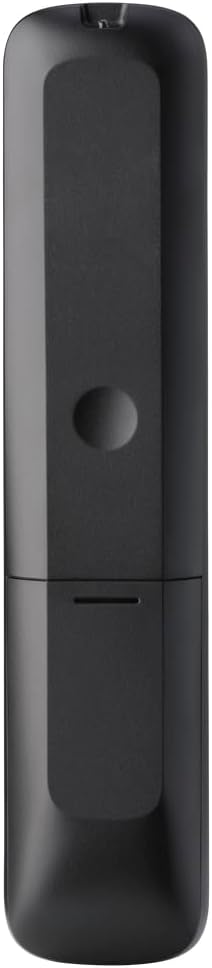
ຮູບ 2: ກັບຄືນໄປບ່ອນ view ຂອງຣີໂໝດ, ເນັ້ນໃສ່ຊ່ອງແບັດເຕີຣີ.
2. ການຂຽນໂປແກຼມຄວບຄຸມໄລຍະໄກ
The URC 3661 can be programmed using direct code entry, auto code search, or the learning function. It is recommended to try direct code entry first.
ການປ້ອນລະຫັດໂດຍກົງ:
- ເປີດອຸປະກອນທີ່ທ່ານຕ້ອງການຄວບຄຸມ (ເຊັ່ນ: ໂທລະພາບ, ເຄື່ອງຫຼິ້ນ DVD).
- ກົດຄ້າງໄວ້ ຕັ້ງຄ່າ button until the LED light under the device key (e.g., TV, DVD) blinks twice and stays lit.
- ກົດປຸ່ມອຸປະກອນທີ່ທ່ານຕ້ອງການທີ່ຈະດໍາເນີນໂຄງການ (ເຊັ່ນ: TV). LED ຈະຍັງຄົງສະຫວ່າງ.
- Enter the 4-digit or 5-digit setup code for your brand and device. Refer to the code list provided with your remote or visit the One For All website for the most up-to-date codes.
- After entering the code, the LED will blink twice and turn off if the code is valid. If it blinks once and stays lit, the code is invalid; re-enter the code.
- ທົດສອບໄລຍະໄກໂດຍການກົດປຸ່ມ ພະລັງງານ button. If the device turns off, try other functions like volume or channel. If it works, programming is complete. If not, try the next code for your brand or use the Auto Code Search.
ຄົ້ນຫາລະຫັດອັດຕະໂນມັດ:
- ເປີດອຸປະກອນທີ່ທ່ານຕ້ອງການຄວບຄຸມ.
- ກົດຄ້າງໄວ້ ຕັ້ງຄ່າ ກົດປຸ່ມຈົນກ່ວາ LED ກະພິບສອງຄັ້ງແລະຍັງຄົງສະຫວ່າງ.
- Press the device key you want to program.
- ເລັງຣີໂມດໃສ່ອຸປະກອນ ແລະກົດປຸ່ມ ພະລັງງານ ກົດປຸ່ມຊ້ຳໆ (ປະມານທຸກໆ 3 ວິນາທີ) ຈົນກວ່າອຸປະກອນຈະປິດ.
- ເມື່ອອຸປະກອນປິດ, ໃຫ້ກົດທັນທີ ຕັ້ງຄ່າ button to save the code. The LED will blink twice and turn off.
- Test the remote. If it doesn't work correctly, repeat the process.
ຟັງຊັນການຮຽນຮູ້:
The learning function allows the URC 3661 to copy functions directly from your original remote control, which is useful for commands not available via direct code entry or auto search.
- Place the URC 3661 and your original remote on a flat surface, facing each other, about 1-2 inches apart.
- ກົດຄ້າງໄວ້ ຕັ້ງຄ່າ ກົດປຸ່ມຈົນກ່ວາ LED ກະພິບສອງຄັ້ງແລະຍັງຄົງສະຫວ່າງ.
- Press the button on the URC 3661 that you want to teach a function to (e.g., a specific input button). The LED will blink rapidly.
- Press and hold the corresponding button on your original remote control until the LED on the URC 3661 blinks twice, indicating successful learning.
- ເຮັດເລື້ມຄືນສໍາລັບທຸກປຸ່ມທີ່ຕ້ອງການ.
- ເພື່ອອອກຈາກໂໝດການຮຽນຮູ້, ກົດປຸ່ມ ຕັ້ງຄ່າ button. The LED will blink twice and turn off.
ດໍາເນີນການຄວບຄຸມໄລຍະໄກ
The URC 3661 is designed for intuitive operation. Familiarize yourself with the button layout and their primary functions.

ຮູບ 3: ດ້ານຫນ້າ view of the URC 3661 with button layout.
ໜ້າຫຼັກ:
- Device Keys (TV, STB, AUDIO, BLURAY, DVD, STREAM): Select the device you wish to control. The LED under the selected device key will illuminate.
- ພະລັງງານ: ເປີດ ຫຼືປິດອຸປະກອນທີ່ເລືອກ.
- VOL +/-: ປັບລະດັບສຽງ.
- CH +/-: ປ່ຽນຊ່ອງ.
- Navigation Pad (UP, DOWN, LEFT, RIGHT, OK): ໃຊ້ສໍາລັບການນໍາທາງເມນູແລະການເລືອກ.
- ເມນູ: ເປີດເມນູຫຼັກຂອງອຸປະກອນ.
- ຄູ່ມື: ສະແດງຄູ່ມືໂປຣແກຣມເອເລັກໂຕຣນິກ (ຖ້າອຸປະກອນຮອງຮັບ).
- ຂໍ້ມູນ: ສະແດງຂໍ້ມູນກ່ຽວກັບໂຄງການຫຼືການປ້ອນຂໍ້ມູນໃນປະຈຸບັນ.
- ບ້ານ: ກັບຄືນໄປຫາໜ້າຈໍຫຼັກຂອງອຸປະກອນ.
- ອອກ: ອອກຈາກເມນູ ຫຼື ແອັບພລິເຄຊັນຕ່າງໆ.
- Playback Controls (PLAY, PAUSE, STOP, REWIND, FAST FORWARD, SKIP): ຄວບຄຸມການຫຼິ້ນສື່.
- ລະຫັດຕົວເລກ (0-9): ສຳລັບການປ້ອນຂໍ້ມູນຊ່ອງທາງໂດຍກົງ ຫຼື ການປ້ອນຂໍ້ມູນຕົວເລກ.
- App Shortcut Keys (Netflix, Prime Video, YouTube): ເຂົ້າເຖິງບໍລິການສະຕີມຍອດນິຍົມໂດຍກົງ.
- ແສງຫຼັງ: The keys are backlit for easy use in dark environments. The backlight activates automatically when a button is pressed.
ບໍາລຸງຮັກສາ
ການທຳຄວາມສະອາດຣີໂໝດ:
To maintain the remote's appearance and functionality, clean it regularly:
- ໃຊ້ຜ້າອ່ອນໆແຫ້ງເຊັດໜ້າຜິວຂອງຣີໂໝດ.
- ສໍາລັບຝຸ່ນ stubborn, ເລັກນ້ອຍ dampໃສ່ຜ້າດ້ວຍນ້ໍາຫຼືຢາເຮັດຄວາມສະອາດອ່ອນໆ, ບໍ່ມີສານຂັດ. ຫຼີກເວັ້ນຄວາມຊຸ່ມຊື່ນຫຼາຍເກີນໄປ.
- Do not use harsh chemicals, solvents, or abrasive cleaning agents, as these can damage the remote's finish or internal components.
ການປ່ຽນແບັດເຕີຣີ:
Replace batteries when the remote's performance degrades or the LED indicator blinks unusually. Refer to the "Battery Installation" section under Setup for detailed instructions.
ການແກ້ໄຂບັນຫາ
If you encounter issues with your URC 3661 remote control, try the following troubleshooting steps:
| ບັນຫາ | ສາເຫດທີ່ເປັນໄປໄດ້ | ການແກ້ໄຂ |
|---|---|---|
| ຣີໂໝດບໍ່ເຮັດວຽກອຸປະກອນ. | ເລືອກອຸປະກອນບໍ່ຖືກຕ້ອງ. ແບັດເຕີຣີເຫຼືອໜ້ອຍ ຫຼືໃສ່ບໍ່ຖືກຕ້ອງ. Incorrect code programmed. | Ensure the correct device key (TV, DVD, etc.) is pressed. ກວດເບິ່ງທິດທາງຫມໍ້ໄຟແລະປ່ຽນແທນຖ້າຈໍາເປັນ. Re-program the remote using a different code or the Auto Code Search/Learning function. |
| ບາງປຸ່ມບໍ່ເຮັດວຽກ. | Incomplete programming. Device does not support the function. | Use the Learning function to copy specific commands from your original remote. Verify if the original remote has that function. |
| LED blinks once and stays lit during code entry. | Invalid code entered. | Ensure you are entering the correct 4 or 5-digit code. Try another code from the list or use Auto Code Search. |
| ໄຟ LED ໄລຍະໄກບໍ່ສະຫວ່າງ. | ໝໍ້ໄຟຕາຍ. | ປ່ຽນແບັດເຕີລີ່ AA ໃໝ່. |
For further assistance, visit the official One For All support website or consult the comprehensive online manual.
ຂໍ້ມູນຈໍາເພາະ
| ຄຸນສົມບັດ | ລາຍລະອຽດ |
|---|---|
| ໝາຍເລກຕົວແບບ | URC ປີ 3661 |
| ຍີ່ຫໍ້ | ຫນຶ່ງສໍາລັບທຸກຄົນ |
| ຂະໜາດສິນຄ້າ | 0.39 x 0.39 x 0.39 ນິ້ວ |
| ນ້ໍາຫນັກລາຍການ | 6.7 ອອນ |
| ຕ້ອງໃຊ້ແບັດເຕີຣີ | 2 ຫມໍ້ໄຟ AA |
| ຈຳນວນສູງສຸດຂອງອຸປະກອນທີ່ຮອງຮັບ | ສູງເຖິງ 6 ອຸປະກອນ |
| ອຸປະກອນທີ່ເຂົ້າກັນໄດ້ | Television, Set-top Box, Audio, Blu-ray, DVD, Streaming devices |
| ຄຸນນະສົມບັດພິເສດ | Universal, Learning Function, Backlit Keys |

Figure 4: Product packaging indicating compatibility with up to 6 devices.
ການຮັບປະກັນແລະການສະຫນັບສະຫນູນ
Warranty information for the One For All URC 3661 Universal Remote Control is typically provided with your purchase documentation. Please refer to the warranty card or leaflet included in the product packaging for details regarding coverage, terms, and conditions.
For technical support, frequently asked questions, or to find the latest programming codes, please visit the official One For All webເວັບໄຊ. ຂໍ້ມູນຕິດຕໍ່ສໍາລັບການບໍລິການລູກຄ້າອາດຈະພົບເຫັນຢູ່ໃນຜູ້ຜະລິດ webເວັບໄຊທ໌ຫຼືໃນເອກະສານຜະລິດຕະພັນຂອງທ່ານ.
One For All ຢ່າງເປັນທາງການ Webເວັບໄຊ: www.oneforall.com


