1. ບົດແນະນຳ
The SmallRig NP-F Battery Adapter Mount Plate 3168B is designed to provide a versatile power solution for various cameras, including BMPCC 4K, 6K, 6K Pro, Canon R5 C, and other mirrorless cameras. It supports a wide range of NP-F series batteries (NP-F970, NP-F550, NP-F770, etc.) and features dual DC outputs (7.4V and 12V) as well as a bi-directional USB-C port for charging and power output. This manual provides detailed instructions for setup, operation, maintenance, and troubleshooting.
2. ສິ່ງທີ່ຢູ່ໃນກ່ອງ
ກະລຸນາກວດສອບເນື້ອໃນຂອງຊຸດຂອງທ່ານເພື່ອໃຫ້ແນ່ໃຈວ່າລາຍການທັງຫມົດມີຢູ່:
- NP-F Battery Adapter Mount Plate (Advanced Edition) x 1
- 1/4''-20 Screw x 1
- 5/32'' L-Shaped Allen Wrench x 1
- ຄູ່ມືຜູ້ໃຊ້ x 1

Image: Contents of the product package, including the battery plate, screw, and wrench.
3. ຜະລິດຕະພັນເກີນview ແລະຄຸນສົມບັດ
The SmallRig NP-F Battery Adapter Mount Plate 3168B is engineered for durability and high performance. Key features include:
- ຄວາມເຂົ້າກັນໄດ້ຢ່າງກວ້າງຂວາງ: Supports NP-F970, NP-F550, NP-F770, and other NP-F series batteries, including original Sony and third-party batteries.
- Dual DC Outputs: Provides 7.4V (max 22W) and 12V (max 36W) DC outputs, compatible with DC 5521 and DC 5525 cables.
- ຜອດ USB-C: Bi-directional 36W USB-C interface for power output or charging NP-F batteries.
- Automatic Wake-up and Sleep Modes: Plug-and-play functionality with short circuit and high current protection.
- ຕົວຊີ້ວັດຫມໍ້ໄຟ: Four LED lights to check battery connection and remaining life.
- ການກໍ່ສ້າງທົນທານ: Made from premium CNC aluminum alloy with gold-plated electrical contacts and a rubber pad to prevent scratches.
3.1 ການກໍານົດອົງປະກອບ

Image: Detailed diagram of the battery plate's components.
- DC 12V Output Port: ຜົນຜະລິດສູງສຸດ 36W.
- ປຸ່ມເປີດປິດ: Press to check battery status.
- ຕົວຊີ້ວັດຫມໍ້ໄຟ: Four LED lights to show battery life.
- DC 7.4V Output Port: ຜົນຜະລິດສູງສຸດ 22W.
- USB-C In/Output Port: Bi-directional, maximum input/output 36W.
- USB-C Charging Indicator: Orange for slow charge / slow discharge, blue for fast charge / fast discharge.
- Gold-plated Electrical Contacts: For stable and conductive connection.
- Screw Mounting: 1/4''-20 threaded hole for attachment.
- Inner Thread: For mounting/removing screws.
- Self-locking Button: For quick and secure battery installation.
- ແຜ່ນຢາງ: Prevents scratches to cameras and devices.
4. ຕັ້ງຄ່າ
Follow these steps to set up your SmallRig NP-F Battery Adapter Mount Plate:
- Attach to Camera Rig/Cage: Use the integrated 1/4''-20 threaded hole and the provided screw to securely attach the battery plate to your camera cage, handle, or other mounting points. Ensure it is firmly tightened using the L-shaped Allen wrench.
- Insert NP-F Battery: Align your NP-F series battery (e.g., NP-F970, NP-F550) with the battery slot on the plate. Gently slide the battery into place until the self-locking button engages, securing the battery.
- ເຊື່ອມຕໍ່ຫາອຸປະກອນ:
- For DC-powered devices (e.g., BMPCC 4K/6K, Canon R5 C): Use a compatible DC 5521 or DC 5525 cable (not included) to connect the appropriate DC output port (7.4V or 12V) on the plate to your camera or device.
- For USB-C powered devices: Use a USB-C to USB-C cable (not included) to connect the USB-C port on the plate to your device (e.g., smartphone, tablet, camera).

Image: Battery plate mounted on a camera setup.
5. ຄໍາແນະນໍາການດໍາເນີນງານ
5.1 ອຸປະກອນເປີດ
Once a compatible NP-F battery is inserted, the plate automatically wakes up and is ready to supply power. Simply connect your device to the desired output port.

Image: Higher output power details for DC 12V and USB-C ports.
5.2 ການກວດສອບສະຖານະຫມໍ້ໄຟ
Press the red power button on the side of the plate to check the remaining battery life. The four LED indicators will illuminate according to the charge level:
- 75% - 100%
- 50% - 75%
- 25% - 50%
- 10% - 25%
When the power level falls below 10%, the last indicator will start flashing to alert you to a low battery.
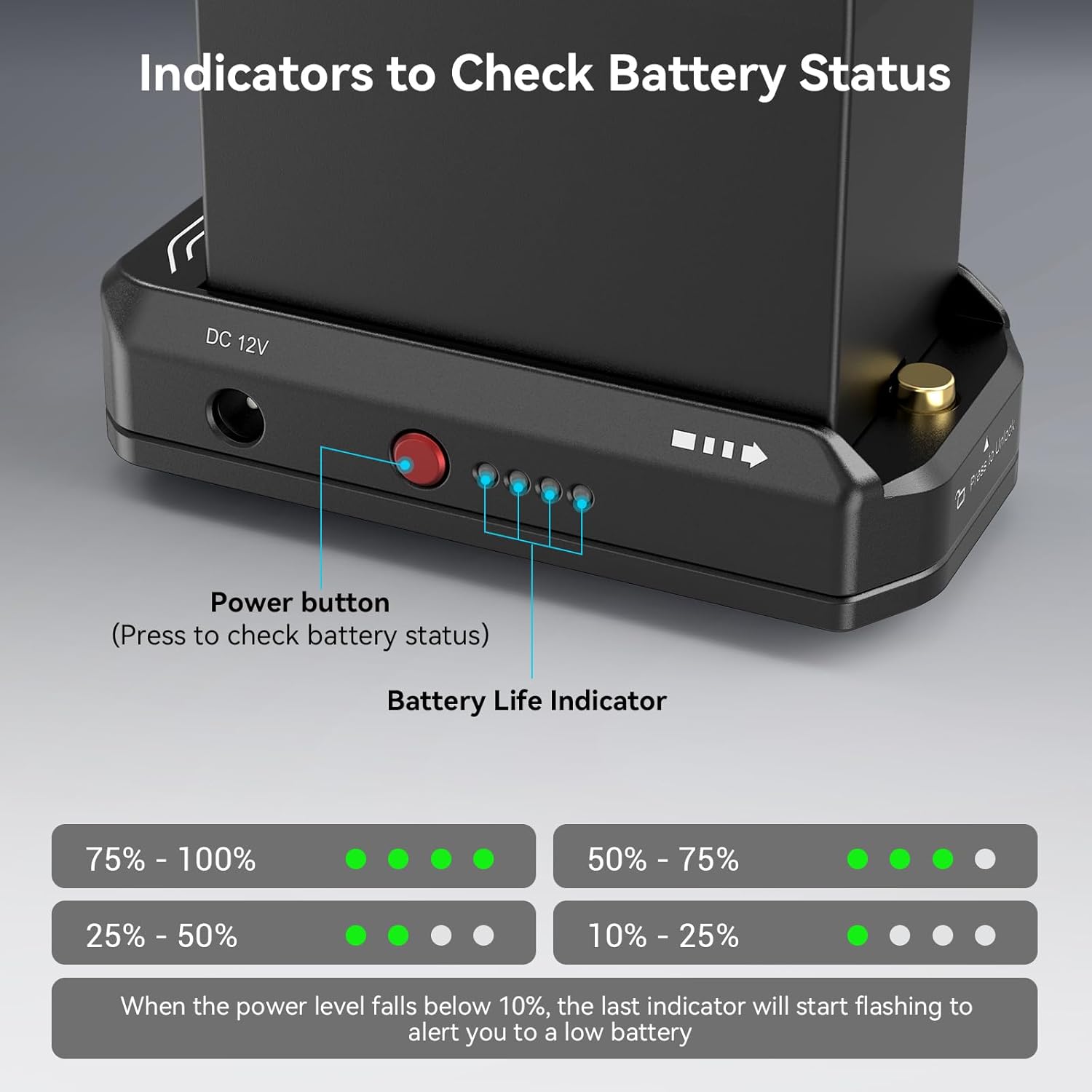
Image: Battery status indicators.
5.3 Charging NP-F Batteries via USB-C
The USB-C port supports bi-directional power. To charge an NP-F battery inserted in the plate, connect a USB-C power source (e.g., wall adapter, power bank) to the USB-C port on the plate using a USB-C to USB-C cable. The USB-C charging indicator will show:
- ສີສົ້ມ: Slow charge / slow discharge.
- ສີຟ້າ: Fast charge / fast discharge.
6. ບໍາລຸງຮັກສາ
- ທໍາຄວາມສະອາດ: Use a soft, dry cloth to clean the surface of the battery plate. Do not use harsh chemicals or abrasive materials.
- ການເກັບຮັກສາ: Store the plate in a cool, dry place away from direct sunlight and extreme temperatures when not in use.
- ຕິດຕໍ່ພົວພັນ: Periodically inspect the gold-plated electrical contacts for any debris or corrosion. Clean gently if necessary to ensure optimal conductivity.
- ຫຼີກລ້ຽງການນ້ໍາ: ຜະລິດຕະພັນນີ້ບໍ່ກັນນ້ຳ. ຫຼີກລ່ຽງການສຳຜັດກັບນ້ຳ ຫຼື ຄວາມຊຸ່ມຊື່ນສູງ.
7. ການແກ້ໄຂບັນຫາ
| ບັນຫາ | ສາເຫດທີ່ເປັນໄປໄດ້ | ການແກ້ໄຂ |
|---|---|---|
| No power output from DC ports. | ໝໍ້ໄຟໃສ່ບໍ່ຖືກ ຫຼືໝົດ. | Ensure battery is fully seated and charged. Press power button to check status. |
| USB-C port not charging or powering device. | Incorrect cable, power source insufficient, or battery depleted. | Use a compatible USB-C to USB-C cable. Ensure power source meets 36W requirement for optimal charging. Check battery level. |
| Battery indicator LEDs not lighting up. | Battery not inserted, or power button not pressed. | Ensure battery is fully inserted. Press the red power button firmly. |
| Plate feels warm during operation. | Normal operation under heavy load. | This is normal. If it becomes excessively hot, disconnect and allow to cool. Ensure proper ventilation. |
8. ຂໍ້ມູນຈໍາເພາະ
| ຄຸນສົມບັດ | ລາຍລະອຽດ |
|---|---|
| ໝາຍເລກຕົວແບບ | 3168 ບ |
| ຂະໜາດສິນຄ້າ | 3.69 x 1.85 x 0.92 ນິ້ວ (94.0 x 47.0 x 23.0 ມມ) |
| ນ້ໍາຫນັກລາຍການ | 0.176 ອອນສ໌ (5g) |
| ວັດສະດຸ | CNC ອະລູມິນຽມໂລຫະປະສົມ |
| DC 12V ຜົນຜະລິດ | Max 36W (compatible with DC 5525 cable) |
| DC 7.4V ຜົນຜະລິດ | Max 22W (compatible with DC 5521 cable) |
| USB-C Input/Output | Bi-directional, Max 36W |
| ແບດເຕີລີ່ທີ່ເຂົ້າກັນໄດ້ | NP-F970, NP-F550, NP-F770, NP-F960, NP-F950, NP-F930, NP-F750, NP-F730, NP-F570 (Sony original and third-party) |
| ປະເພດການຕິດຕັ້ງ | 1/4" threaded hole |

Image: Product dimensions and specifications.
9. ການຮັບປະກັນແລະການສະຫນັບສະຫນູນ
SmallRig products are designed and manufactured to high-quality standards. For warranty information and technical support, please visit the official SmallRig webເວັບໄຊ ຫຼືຕິດຕໍ່ບໍລິການລູກຄ້າຂອງເຂົາເຈົ້າໂດຍກົງ.
Official SmallRig Webເວັບໄຊ: www.smallrig.com
For further assistance, refer to the user guide PDF available at: SmallRig NP-F Battery Adapter Mount Plate User Guide (PDF)


