1. ບົດແນະນຳ
Thank you for choosing the Dalton 2000VA Uninterruptible Power Supply (UPS). This device is designed to provide reliable power backup and protection for your electronic equipment against power outages, surges, and fluctuations. Please read this manual thoroughly before installation and operation to ensure optimal performance and safety.
2. ຄໍາແນະນໍາຄວາມປອດໄພທີ່ສໍາຄັນ
ປະຕິບັດຕາມຄວາມລະມັດລະວັງດ້ານຄວາມປອດໄພຂັ້ນພື້ນຖານສະເໝີເພື່ອຫຼຸດຜ່ອນຄວາມສ່ຽງຕໍ່ການເກີດອັກຄີໄພ, ໄຟໄໝ້, ແລະການບາດເຈັບ:
- ຫ້າມເປີດ UPS ຄasing. ບໍ່ມີສ່ວນທີ່ຜູ້ໃຊ້ບໍລິການພາຍໃນ. ອ້າງອີງການບໍລິການກັບພະນັກງານບໍລິການທີ່ມີຄຸນວຸດທິ.
- Do not use the UPS in environments with excessive dust, humidity, or extreme temperatures.
- ກວດໃຫ້ແນ່ໃຈວ່າ UPS ເຊື່ອມຕໍ່ກັບປລັກສຽບໄຟທີ່ມີດິນ.
- Do not connect non-computer related items like medical equipment, life support equipment, or household appliances to the UPS.
- Position the UPS in a well-ventilated area, away from direct sunlight or heat sources.
- ໃນກໍລະນີສຸກເສີນ, ໃຫ້ກົດປຸ່ມເປີດປິດເພື່ອປິດ UPS ແລະຖອດມັນອອກຈາກແຫຼ່ງພະລັງງານ AC.
3. ເນື້ອໃນຊຸດ
ກວດສອບວ່າລາຍການທັງຫມົດແມ່ນມີຢູ່ໃນຊຸດຂອງທ່ານ:
- Dalton 2000VA UPS Unit
- ສາຍໄຟ
- USB Communication Cable (if applicable)
- ຄູ່ມືຜູ້ໃຊ້ (ເອກະສານນີ້)

ຮູບ 3.1: ດ້ານຫນ້າ view of the Dalton 2000VA UPS unit, showing the display screen and power button.
4. ການຕິດຕັ້ງແລະການຕິດຕັ້ງ
Follow these steps to set up your UPS:
- ການຫຸ້ມຫໍ່: ເອົາ UPS ອອກຈາກເຄື່ອງຫຸ້ມຫໍ່ຂອງມັນຢ່າງລະມັດລະວັງ. ກວດກາເບິ່ງຄວາມເສຍຫາຍຂອງການຂົນສົ່ງ.
- ການຈັດວາງ: Place the UPS on a flat, stable surface in a cool, dry, and well-ventilated area. Ensure there is adequate space around the unit for airflow.
- ຄ່າ ທຳ ນຽມ: Before connecting any devices, plug the UPS power cord into a grounded wall outlet. Allow the unit to charge for at least 8 hours to ensure the battery is fully charged. The display will indicate charging status.
- ອຸປະກອນເຊື່ອມຕໍ່:
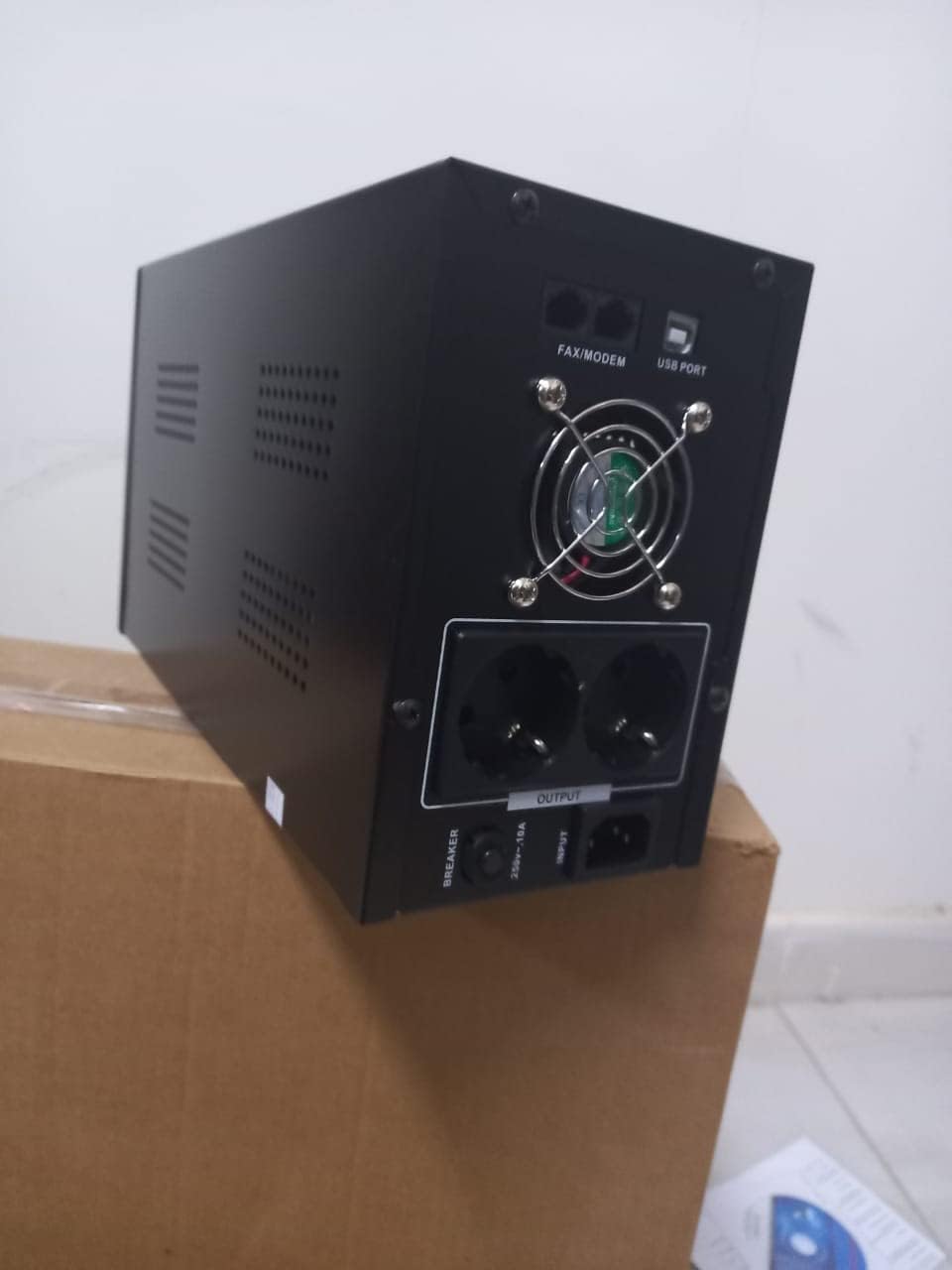
ຮູບ 4.1: ດ້ານຫລັງ view of the Dalton 2000VA UPS, highlighting the input power port, output sockets, and USB/Modem ports.
- Once the battery is charged, connect your computer, monitor, and other critical electronic devices to the UPS output sockets.
- Do not overload the UPS. Refer to the specifications section for maximum load capacity.
- If applicable, connect the USB communication cable from the UPS to your computer for monitoring software (software not included, check manufacturer's webເວັບໄຊ).
5. ປະຕິບັດການ UPS
5.1 ການເປີດ/ປິດ
- ເພື່ອເປີດເຄື່ອງ: After connecting to AC power and charging, press and hold the power button on the front panel for approximately 3 seconds until you hear a beep and the display illuminates.
- ປິດເຄື່ອງ: Press and hold the power button for approximately 3 seconds until you hear a beep and the display turns off. If the UPS is running on battery, it will shut down immediately. If connected to AC, it will switch to bypass mode before shutting down.
5.2 ຄວາມເຂົ້າໃຈກ່ຽວກັບຈໍສະແດງຜົນ
The front panel LCD display provides real-time status information:
- ໃນ: ສະແດງການປ້ອນຂໍ້ມູນ voltage from the utility power.
- ອອກ: ສະແດງຜົນຜະລິດ voltage provided by the UPS to connected devices.
- ປົກກະຕິ: ຊີ້ບອກວ່າ UPS ກຳລັງເຮັດວຽກດ້ວຍພະລັງງານໄຟຟ້າ.
- ເຈຍ: ສະແດງລະດັບການສາກແບັດເຕີຣີປັດຈຸບັນ.
- ໂຫຼດ: ຊີ້ໃຫ້ເຫັນເຖິງເປີເຊັນtagຂອງຄວາມຈຸຂອງ UPS ທີ່ອຸປະກອນເຊື່ອມຕໍ່ໃຊ້.
- Battery Mode Icon: Appears when the UPS is running on battery power during an outage.

ຮູບ 5.1: ຂ້າງ view of the UPS, showing the illuminated display with power status indicators.
5.3 Battery Backup Function
ໃນກໍລະນີຂອງພະລັງງານ outage, the UPS will automatically switch to battery power, providing continuous power to your connected devices. The duration of backup power depends on the load connected and the battery's charge level. The UPS will emit an audible alarm during battery operation.
When utility power returns, the UPS will automatically switch back to AC power and begin recharging its battery.
6. ບໍາລຸງຮັກສາ
- ການດູແລຫມໍ້ໄຟ: To maximize battery life, ensure the UPS is always connected to an AC outlet to keep the battery charged. If the UPS is stored for an extended period, recharge it every three months for at least 8 hours.
- ທໍາຄວາມສະອາດ: Disconnect the UPS from all power sources before cleaning. Use a soft, dry cloth to wipe the exterior. Do not use liquid or aerosol cleaners.
- ການລະບາຍອາກາດ: Regularly check that the ventilation openings are not blocked by dust or debris to prevent overheating.
7. ການແກ້ໄຂບັນຫາ
ເບິ່ງຕາຕະລາງຂ້າງລຸ່ມນີ້ສໍາລັບບັນຫາທົ່ວໄປແລະການແກ້ໄຂຂອງພວກເຂົາ:
| ບັນຫາ | ສາເຫດທີ່ເປັນໄປໄດ້ | ການແກ້ໄຂ |
|---|---|---|
| UPS ບໍ່ເປີດ. | Battery not charged or power cord disconnected. | Ensure power cord is securely plugged in and allow battery to charge for 8 hours. |
| UPS beeps continuously in normal mode. | ເງື່ອນໄຂການໂຫຼດເກີນ. | Disconnect non-essential equipment until the alarm stops. Check total load. |
| ເວລາສຳຮອງຂໍ້ມູນສັ້ນ. | Battery not fully charged or battery nearing end of life. | Allow UPS to charge for 8 hours. If issue persists, battery may need replacement (contact service center). |
| UPS does not provide power during outage. | Battery discharged or internal fault. | Ensure UPS was fully charged. If problem persists, contact authorized service center. |
8. ຂໍ້ກໍານົດດ້ານວິຊາການ
| ຄຸນສົມບັດ | ລາຍລະອຽດ |
|---|---|
| ຂະໜາດສິນຄ້າ | 12.5 x 22.5 x 38 cm |
| ຜູ້ຜະລິດ | ດາລຕັນ |
| ຊື່ຍີ່ຫໍ້ | ທົ່ວໄປ |
| ສີ | ດຳ |
| ວັດສະດຸ | ໂລຫະ |
| ປະຈຸບັນ | 5 Ampແມ່ນແລ້ວ |
| ປັດໄຈແບບຟອມ | Rack |
| ຊ່ວງຄວາມຖີ່ | 50-60 Hz |
| ຜົນໄດ້ຮັບ Voltage | 220 ໂວນ |
| ປະເພດຕົວເຊື່ອມຕໍ່ | AC |
9. ການຮັບປະກັນແລະການສະຫນັບສະຫນູນ
Dalton provides an authorized maintenance center for all Uninterruptible Power Supply units. For warranty claims, technical support, or service inquiries, please contact your local Dalton authorized distributor or service center. Keep your purchase receipt as proof of purchase for warranty validation.
For further assistance, please visit the official Dalton webເວັບໄຊທ໌ຫຼືຕິດຕໍ່ສະຫນັບສະຫນູນລູກຄ້າ.


