1. ບົດແນະນຳ
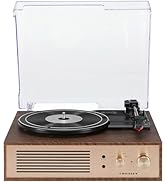
This manual provides essential instructions for the safe and efficient operation of your Crosley CR6252A-YS Portfolio 3-Speed Bluetooth Turntable. Please read this manual thoroughly before using the product and retain it for future reference.
The Crosley Portfolio turntable is designed to play vinyl records at three speeds and features built-in speakers, Bluetooth connectivity for wireless audio streaming, and a moving magnetic cartridge for audio reproduction.

Figure 1.1: Crosley CR6252A-YS Portfolio Turntable (Open View)
2. ຄໍາແນະນໍາຄວາມປອດໄພ
- ອ່ານຄໍາແນະນໍາທັງຫມົດກ່ອນທີ່ຈະນໍາໃຊ້.
- ຮັກສາຜະລິດຕະພັນໃຫ້ຫ່າງຈາກນ້ໍາຫຼືຄວາມຊຸ່ມຊື່ນ.
- ຢ່າວາງຢູ່ໃກ້ກັບແຫຼ່ງຄວາມຮ້ອນເຊັ່ນ: radiators, ເຄື່ອງບັນທຶກຄວາມຮ້ອນ, ເຕົາ, ຫຼືອຸປະກອນອື່ນໆທີ່ຜະລິດຄວາມຮ້ອນ.
- ເຮັດຄວາມສະອາດດ້ວຍຜ້າແຫ້ງເທົ່ານັ້ນ.
- ໃຊ້ໄຟລ໌ແນບ/ອຸປະກອນເສີມທີ່ຜູ້ຜະລິດລະບຸໄວ້ເທົ່ານັ້ນ.
- ຖອດອຸປະກອນນີ້ອອກໃນລະຫວ່າງການມີພາຍຸຟ້າຜ່າ ຫຼືເມື່ອບໍ່ໄດ້ໃຊ້ເປັນເວລາດົນນານ.
- ອ້າງອີງການບໍລິການທັງໝົດໃຫ້ກັບພະນັກງານບໍລິການທີ່ມີຄຸນວຸດທິ. ການບໍລິການແມ່ນຕ້ອງການເມື່ອອຸປະກອນໄດ້ຮັບຄວາມເສຍຫາຍໃນທາງໃດກໍ່ຕາມເຊັ່ນ: ສາຍໄຟຫຼືປລັກສຽບຖືກເສຍຫາຍ, ແຫຼວຮົ່ວໄຫຼຫຼືສິ່ງຂອງຕົກເຂົ້າໄປໃນອຸປະກອນ, ອຸປະກອນຖືກຝົນຫຼືຄວາມຊຸ່ມຊື່ນ, ບໍ່ເຮັດວຽກຕາມປົກກະຕິ. , ຫຼືໄດ້ຖືກຫຼຸດລົງ.
3. ເນື້ອໃນຊຸດ
ກວດສອບວ່າລາຍການທັງຫມົດທີ່ລະບຸໄວ້ຂ້າງລຸ່ມນີ້ແມ່ນລວມຢູ່ໃນຊຸດຂອງທ່ານ:
- Crosley CR6252A-YS Portfolio Turntable
- Power Adapter
- ຄູ່ມືຜູ້ໃຊ້ (ເອກະສານນີ້)
4. ຄຸນສົມບັດ ແລະ ອົງປະກອບຂອງຜະລິດຕະພັນ
The Crosley CR6252A-YS Portfolio Turntable includes the following key features and components:
- 3-Speed Turntable: ຮອງຮັບການບັນທຶກ 33 1/3, 45, ແລະ 78 RPM.
- Built-in Bluetooth Receiver: Allows wireless streaming from compatible devices.
- ການຄວບຄຸມລະດັບສຽງທີ່ສາມາດປັບໄດ້: Fine-tune record speed.
- Moving Magnetic Cartridge: Pre-mounted for optimal sound.
- ການປ້ອນຂໍ້ມູນຊ່ວຍ: ເຊື່ອມຕໍ່ແຫຼ່ງສຽງພາຍນອກ.
- USB Enabled: For PC connection.
- ລຳໂພງໃນຕົວ: ຜົນຜະລິດສຽງປະສົມປະສານ.

Figure 4.1: Turntable Mechanism and Controls
ຮູບທີ 4.2: ລາຍລະອຽດແຜງຄວບຄຸມ

ຮູບທີ 4.3: ການເຊື່ອມຕໍ່ແຜງດ້ານຫລັງ
5. ຕັ້ງຄ່າ
5.1 ການຈັດວາງເບື້ອງຕົ້ນ
Place the turntable on a flat, stable surface away from direct sunlight, heat sources, and excessive dust or vibrations.
5.2 ການເຊື່ອມຕໍ່ພະລັງງານ
- Connect the power adapter to the DC 12V input jack on the rear of the turntable.
- ສຽບອະແດບເຕີໄຟເຂົ້າໄປໃນບ່ອນສຽບຝາທີ່ເຫມາະສົມ.
5.3 Turntable Preparation
- Carefully remove any protective packaging materials from the turntable platter and tonearm.
- Ensure the tonearm is unlocked from its rest.
6. ຄໍາແນະນໍາການດໍາເນີນງານ
6.1 ການຫຼິ້ນເພງ
- ຫັນ ເປີດ/ປິດ knob clockwise to power on the unit.
- Select the desired speed (33 1/3, 45, or 78 RPM) using the speed selector switch. Note: A 78 RPM stylus (not included) is required for 78 RPM records.
- Place a record on the turntable platter. If playing a 45 RPM single, place the 45 RPM adapter (if included) over the spindle.
- Lift the tonearm using the cueing lever and position it over the desired track on the record.
- Lower the tonearm slowly onto the record using the cueing lever. The record will begin to play.
- ປັບລະດັບສຽງໂດຍໃຊ້ ປະລິມານ ລູກບິດ.
- ໃຊ້ PITCH control knob to fine-tune the playback speed if necessary.
- To stop playing, lift the tonearm, return it to its rest, and turn the ເປີດ/ປິດ ບິດຕ້ານໂມງເຂັມໂມງ.
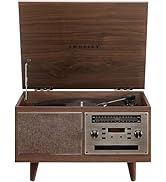
Figure 6.1: Stylus on Record
6.2 ການດໍາເນີນງານ Bluetooth
- ຫັນ ເປີດ/ປິດ knob clockwise to power on the unit.
- Slide the function switch to the Bluetooth position. The indicator light will flash, indicating pairing mode.
- Enable Bluetooth on your external device (e.g., smartphone, tablet) and search for "Crosley Portfolio".
- Select "Crosley Portfolio" from the list of available devices to pair. Once paired, the indicator light will stop flashing and remain solid.
- You can now stream audio wirelessly from your device to the turntable's built-in speakers.
- ປັບລະດັບສຽງໂດຍໃຊ້ ປະລິມານ knob on the turntable and/or your external device.
6.3 ຊ່ອງສຽບເສີມ (AUX IN)
- ຫັນ ເປີດ/ປິດ knob clockwise to power on the unit.
- ເຊື່ອມຕໍ່ອຸປະກອນສຽງພາຍນອກ (ເຊັ່ນ: ເຄື່ອງຫຼິ້ນ MP3, ເຄື່ອງຫຼິ້ນ CD) ເຂົ້າກັບ AUX ໃນ ພອດໂດຍໃຊ້ສາຍສຽງ 3.5 ມມ (ບໍ່ລວມ).
- ແຜ່ນສຽງຈະປ່ຽນເປັນໂໝດ AUX IN ໂດຍອັດຕະໂນມັດ.
- ປັບລະດັບສຽງໂດຍໃຊ້ ປະລິມານ knob on the turntable and/or your external device.
6.4 ການເຊື່ອມຕໍ່ USB
The turntable features a PC-USB port for connecting to a computer. This allows for digital conversion of your vinyl records using appropriate software (not included). Refer to your chosen software's instructions for recording procedures.
7. ບໍາລຸງຮັກສາ
7.1 ການເຮັດຄວາມສະອາດ Turntable
- ຕ້ອງຖອດປລັກແຜ່ນສຽງອອກຈາກປລັກໄຟກ່ອນທຳຄວາມສະອາດສະເໝີ.
- ໃຊ້ຜ້າອ່ອນແລະແຫ້ງເຊັດພື້ນຜິວພາຍນອກ. ຢ່າໃຊ້ນໍ້າຢາທໍາຄວາມສະອາດທີ່ມີສີຂັດ ຫຼື ຕົວລະລາຍ.
- ຄ່ອຍໆຖູປາກກາດ້ວຍແປງອ່ອນໆທີ່ອອກແບບມາສຳລັບການທຳຄວາມສະອາດປາກກາ, ໂດຍເຄື່ອນຍ້າຍຈາກຫຼັງໄປຫາໜ້າ.
7.2 ການປ່ຽນປາກກາປາກກາ
The stylus (needle) is a consumable part and will wear out over time. A worn stylus can damage your records and degrade sound quality. Replace the stylus after approximately 200-300 hours of playback. Consult your retailer or Crosley support for compatible replacement styli.
8. ການແກ້ໄຂບັນຫາ
| ບັນຫາ | ສາເຫດທີ່ເປັນໄປໄດ້ | ການແກ້ໄຂ |
|---|---|---|
| ບໍ່ມີພະລັງງານ | ອະແດບເຕີໄຟບໍ່ໄດ້ເຊື່ອມຕໍ່ ຫຼືປລັກສຽບເກີດຄວາມຜິດພາດ. | ໃຫ້ແນ່ໃຈວ່າອະແດບເຕີໄຟເຊື່ອມຕໍ່ຢ່າງປອດໄພ ແລະປລັກສຽບໃຊ້ໄດ້. |
| ບໍ່ມີສຽງຈາກ ລຳ ໂພງ | Volume too low; function switch in wrong position; Bluetooth not paired. | Increase volume; ensure function switch is set to PHONO or Bluetooth is correctly paired. |
| ບັນທຶກການຂ້າມ | Record is dirty or damaged; stylus is worn; turntable not level. | Clean record; replace stylus; ensure turntable is on a level surface. |
| ອຸປະກອນ Bluetooth ຈະບໍ່ຈັບຄູ່ | Turntable not in pairing mode; device too far; device already paired to another unit. | Ensure turntable is in Bluetooth pairing mode; move device closer; disconnect from other Bluetooth devices. |
9. ຂໍ້ມູນຈໍາເພາະ
- ຂະໜາດຜະລິດຕະພັນ: 12.4 x 15.28 x 6.5 ນິ້ວ
- ນ້ໍາຫນັກລາຍການ: 13 ປອນ
- ໝາຍເລກຕົວແບບ: CR6252A-YS
- ຍີ່ຫໍ້: ຄຣອສລີ
- ອົງປະກອບລວມ: CR6252A-YS Portfolio Turntable
- ຮູບແບບ: ວິນtage
- ສີ: Yellow Submarine
- ຮູບແບບສັນຍານ: ອະນາລັອກ
- ແຫຼ່ງພະລັງງານ: ໄຟຟ້າສາຍ
- UPC: 710244246569
10. ການຮັບປະກັນແລະການສະຫນັບສະຫນູນ
For warranty information and technical support, please refer to the warranty card included with your product or visit the official Crosley webເວັບໄຊ. ຮັກສາໃບຮັບເງິນການຊື້ຂອງທ່ານໄວ້ເປັນຫຼັກຖານການຊື້ສໍາລັບການຮຽກຮ້ອງການຮັບປະກັນໃດໆ.
ຜູ້ຜະລິດ: ຄຣອສລີ
ວັນທີທໍາອິດທີ່ມີ: ວັນທີ 30 ພະຈິກ 2021