ແນະນຳ
This manual provides comprehensive instructions for the setup, operation, and maintenance of your Reloop RP-7000 MK2 Professional Upper Torque Turntable System. Please read this manual thoroughly before using the product to ensure proper functionality and longevity.
ຄໍາແນະນໍາຄວາມປອດໄພ
- Ensure the turntable is placed on a stable, level surface away from direct sunlight, heat sources, and excessive moisture.
- ຫ້າມບໍ່ໃຫ້ອຸປະກອນຖືກຝົນ ຫຼື ຄວາມຊຸ່ມຊື້ນເພື່ອປ້ອງກັນໄຟ ຫຼື ໄຟຟ້າຊັອດ.
- Always disconnect the power cord from the outlet before cleaning or performing any maintenance.
- ຢ່າພະຍາຍາມໃຫ້ບໍລິການຫນ່ວຍງານດ້ວຍຕົວເອງ. ອ້າງອີງການບໍລິການທັງໝົດໃຫ້ກັບພະນັກງານບໍລິການທີ່ມີຄຸນວຸດທິ.
- ຮັກສາໃຫ້ໄກຈາກເດັກນ້ອຍ.
ເນື້ອໃນຊຸດ
Your Reloop RP-7000 MK2 Professional Upper Torque Turntable System package should include the following items:
- 2 x Reloop RP-7000 MK2 Professional Upper Torque Turntable System
- 2 x Reloop Dust Cover for RP-7000/8000
- Knox Gear Vinyl Record Care System (includes brush, velvet cleaner, stylus brush, and cleaning solution)
- ສາຍໄຟ
- ສາຍ RCA
- ນ້ຳໜັກໂຕ
- Slipmats
- ຄູ່ມືຜູ້ໃຊ້

Image: The complete bundle including two Reloop RP-7000 MK2 turntables, two dust covers, and the Knox Gear vinyl record care solution.
ຕັ້ງຄ່າ
1. ການຫຸ້ມຫໍ່ແລະການຈັດວາງ
Carefully remove all components from the packaging. Place the turntable on a flat, stable surface. Ensure there is adequate space around the unit for ventilation and cable connections.

ຮູບພາບ: ເປັນມຸມ view of the Reloop RP-7000 MK2 turntable, highlighting its main components.
2. Attaching the Dust Cover
Gently place the dust cover onto the turntable. The dust cover helps protect the platter and tonearm from dust and debris when the turntable is not in use.
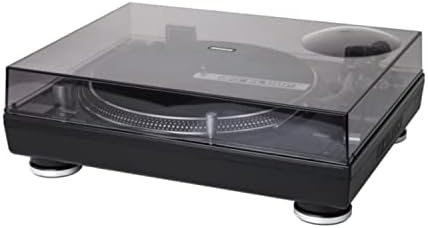
Image: The Reloop RP-7000 MK2 turntable with its protective dust cover in place.
3. ການເຊື່ອມຕໍ່ສາຍສຽງ
Connect the RCA cables from the turntable's output to the appropriate input on your mixer or amplifier. Ensure the ground wire is also connected to prevent hum.

Image: Rear panel of the Reloop RP-7000 MK2, displaying the RCA audio outputs, ground terminal, and power connection.
4. ການເຊື່ອມຕໍ່ພະລັງງານ
Connect the power cable to the turntable and then to a suitable power outlet. Ensure the power switch is in the OFF position before connecting.
ຄໍາແນະນໍາການດໍາເນີນງານ
1. ເປີດ ແລະ ປິດ
To power on the turntable, flip the power switch located on the front left side to the ON position. To power off, flip the switch back to OFF.

ຮູບພາບ: overhead view of the Reloop RP-7000 MK2 turntable, illustrating the arrangement of its controls and components.
2. ຫຼິ້ນບັນທຶກ
- ເອົາບັນທຶກໃສ່ແຜ່ນ.
- Select the appropriate speed (33, 45, or 78 RPM) using the speed buttons.
- ກົດ ເລີ່ມ/ຢຸດ button to begin platter rotation.
- Carefully lower the tonearm onto the record using the cue lever.

Image: The Reloop RP-7000 MK2 turntable with a record playing, demonstrating the tonearm's position.
3. Pitch Control and Reverse Function
Use the pitch fader to adjust the playback speed. The ກັບຄືນ button allows for reverse playback of the record.
ບໍາລຸງຮັກສາ
1. ເຮັດຄວາມສະອາດ Turntable ໄດ້
Regularly wipe the turntable's surface with a soft, dry cloth. For the dust cover, use a slightly damp cloth and avoid abrasive cleaners. The included Knox Gear Vinyl Record Care System can be used for cleaning records and the stylus.

Image: The Knox Gear Vinyl Record Care System, showing the velvet record brush, stylus brush, and cleaning solution bottle.
2. ການດູແລປາກກາປາກກາ
Gently clean the stylus using the provided stylus brush. Always brush from back to front. A dirty stylus can degrade sound quality and damage records.
ການແກ້ໄຂບັນຫາ
| ບັນຫາ | ສາເຫດທີ່ເປັນໄປໄດ້ | ການແກ້ໄຂ |
|---|---|---|
| ບໍ່ມີພະລັງງານ | ສາຍໄຟບໍ່ໄດ້ເຊື່ອມຕໍ່; ປລັກສຽບໄຟມີບັນຫາ | ກວດສອບການເຊື່ອມຕໍ່ສາຍໄຟ; ລອງຮ້ານອື່ນ |
| ບໍ່ມີສຽງ | RCA cables not connected; Amplifier/mixer input incorrect; Stylus damaged | Check RCA connections; Select correct input on amplifier/mixer; Inspect and replace stylus if necessary |
| ສຽງດັງ | Ground wire not connected; Interference | Ensure ground wire is securely connected; Move turntable away from other electronic devices |
| ຄວາມໄວການຫຼິ້ນບໍ່ຖືກຕ້ອງ | Wrong speed selected; Pitch fader not centered | Select correct RPM; Adjust pitch fader to center position |
ຂໍ້ມູນຈໍາເພາະ
- ຍີ່ຫໍ້: Reloop
- ຕົວແບບ: RP-7000 MK2
- ເຕັກໂນໂລຍີການເຊື່ອມຕໍ່: ມີສາຍ
- ຄຸນນະສົມບັດພິເສດ: Balanced S-shaped Tone Arm, Dual Start/Stop Buttons, Precise Motor Control, Reverse Function, Freely Movable Aluminum LED Target Light
- ວັດສະດຸ: ພາດສະຕິກ
- ນ້ໍາຫນັກລາຍການ: 4.5 Kilograms (per turntable)
- ສີ: Deep black or classic silver metallic
- ອຸປະກອນທີ່ເຂົ້າກັນໄດ້: ລຳ ໂພງ, ຫູຟັງ
ການຮັບປະກັນແລະການສະຫນັບສະຫນູນ
Reloop products are designed and manufactured to the highest quality standards. For warranty information and technical support, please refer to the official Reloop webສະຖານທີ່ຫຼືຕິດຕໍ່ຜູ້ຈັດຈໍາຫນ່າຍທ້ອງຖິ່ນຂອງທ່ານ. ຮັກສາຫຼັກຖານການຊື້ຂອງທ່ານສໍາລັບການຮ້ອງຂໍການຮັບປະກັນ.
ສໍາລັບການຊ່ວຍເຫຼືອເພີ່ມເຕີມ, ໄປຢ້ຽມຢາມ Reloop Store on Amazon.


