1. ບົດແນະນຳ
This manual provides detailed instructions for the proper setup, operation, and maintenance of your Bower 12-inch RGB LED Selfie Ring Light Studio Kit. Please read this manual thoroughly before using the product to ensure optimal performance and longevity.
2. ສິ່ງທີ່ຢູ່ໃນກ່ອງ
- 1 x ວົງແຫວນ
- 1 x Tripod
- 1 x Remote (Wireless)
3. ຄຸນສົມບັດ
- Premium 12-inch RGB LED Ring Light: Offers 9 dynamic RGB colors, 3 white light modes (White, Natural, Warm), and 7 special effects for diverse lighting needs.
- Adjustable 62-Inch Tripod: Customizable height from 16 inches (fully collapsed) to 62 inches (fully extended) for various shooting angles and setups.
- In-line & Wireless Remote Controls: Manage lighting modes, effects, and brightness instantly with the attached in-line remote and a convenient wireless remote for maximum flexibility.
- 360-Degree Ball Head Adapter & Smartphone Mount: Provides versatile setup options for professional photography and videography, securely holding your smartphone.
- ຄວາມສະຫວ່າງທີ່ສາມາດປັບໄດ້: Features 12 levels of brightness, suitable for capturing quality photos and videos in any lighting condition.
- USB ຂັບເຄື່ອນ: Conveniently powered via USB, enhancing portability for content creators.
4. ຄໍາແນະນໍາການຕິດຕັ້ງ
- ປະກອບ Tripod:
Unfold the tripod legs to create a stable base. Extend the tripod to your desired height by loosening the locking knobs on the center column and then tightening them once the desired height is reached. The tripod can extend from 16 inches to 62 inches.
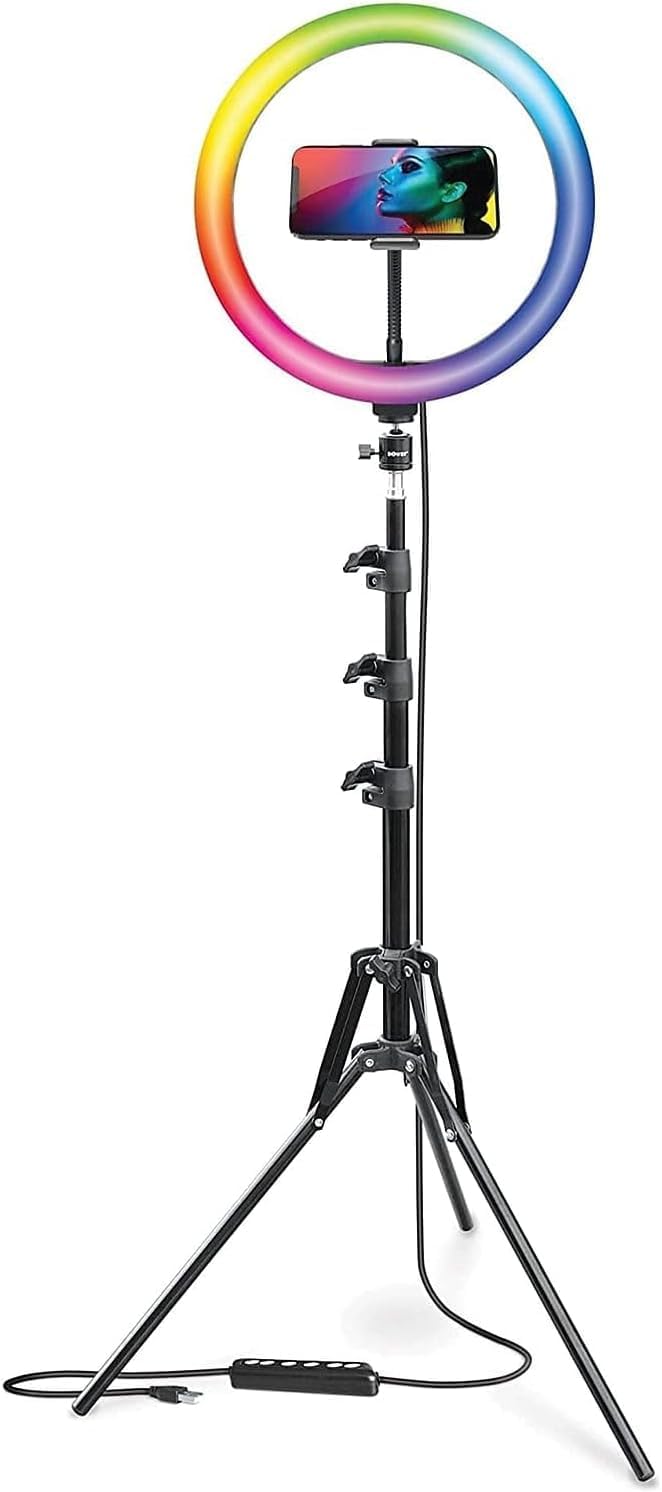
Figure 4.1: Fully assembled ring light kit on its adjustable tripod.
- ຕິດໄຟວົງແຫວນ:
Securely screw the 12-inch RGB LED ring light onto the top of the tripod stand. Ensure it is firmly attached to prevent wobbling.

ຮູບ 4.2: ດ້ານຫນ້າ view of the ring light and tripod.
- Install the Smartphone Mount:
Attach the 360-degree ball head adapter and smartphone mount to the center of the ring light. Adjust the mount to securely hold your smartphone in either vertical or horizontal orientation.

ຮູບທີ 4.3: ລາຍລະອຽດ view of the adjustable smartphone mount.
- ການເຊື່ອມຕໍ່ພະລັງງານ:
Connect the USB cable from the ring light to a compatible USB power source (e.g., computer, wall charger, power bank). The in-line remote is integrated into this cable.

Figure 4.4: USB power cable with in-line remote.
5. ຄໍາແນະນໍາການດໍາເນີນງານ
- ເປີດ/ປິດ:
Press the power button on the in-line remote or the wireless remote to turn the ring light on or off.
- ການປັບຄວາມສະຫວ່າງ:
Use the '+' and '-' buttons on the in-line remote or the wireless remote to cycle through 12 levels of brightness.
- Changing White Light Modes:
Press the mode button on the in-line remote or the wireless remote to switch between the 3 white light modes: White, Natural, and Warm.

Figure 5.1: Ring light displaying various white light modes.
- Changing RGB Colors and Special Effects:
Press the RGB/Effect button on the in-line remote or the wireless remote to cycle through 9 RGB colors and 7 special effects (Spectrum, Cycle, Cycle 2, Strobe, Transition, Transition 2, Swirl).

ຮູບ 5.2: ເກີນview of RGB colors and special effects.
- Using the Wireless Remote:
The wireless remote connects via Bluetooth to your smartphone. Pair the remote with your device to control photo and video capture remotely, in addition to light settings.
6. ບໍາລຸງຮັກສາ
- ທໍາຄວາມສະອາດ: Use a soft, dry cloth to clean the ring light and tripod. Avoid abrasive cleaners or solvents.
- ການເກັບຮັກສາ: When not in use, collapse the tripod and store the kit in a dry, cool place away from direct sunlight and moisture.
- ການຈັດການ: Handle the ring light and tripod with care to prevent damage to the LED bulbs or mechanical components.
7. ການແກ້ໄຂບັນຫາ
- ແສງບໍ່ເປີດ: Ensure the USB cable is securely connected to a working power source. Check if the power button on the in-line remote has been pressed.
- Wireless remote not connecting: Ensure Bluetooth is enabled on your smartphone and the remote is in pairing mode. Refer to your smartphone's manual for Bluetooth pairing instructions.
- Unstable tripod: Ensure the tripod legs are fully extended and the locking knobs are tightened. Place the tripod on a flat, stable surface.
- Smartphone not fitting in mount: The mount is designed to fit most smartphones up to 3.6 inches wide. Ensure your phone is within this size range and remove any bulky cases if necessary.
8. ຂໍ້ມູນຈໍາເພາະ
| ຄຸນສົມບັດ | ລາຍລະອຽດ |
|---|---|
| ຂະໜາດສິນຄ້າ | 62 x 12 x 62 ນິ້ວ |
| ນ້ໍາຫນັກລາຍການ | 3.09 ປອນ |
| ASIN | B09MMG4DZ7 |
| ໝາຍເລກຕົວແບບ | WA-RLSRGB12 |
| ເຕັກໂນໂລຊີການເຊື່ອມຕໍ່ | Bluetooth |
| ການໂຕ້ຕອບຮາດແວ | USB |
| UPC | 636980879468 |
| ຜູ້ຜະລິດ | Bower |
| ວັນທີທໍາອິດທີ່ມີ | ວັນທີ 26 ພະຈິກ 2021 |
9. ການຮັບປະກັນແລະການສະຫນັບສະຫນູນ
For warranty information and customer support, please refer to the official Bower webເວັບໄຊ ຫຼືຕິດຕໍ່ບໍລິການລູກຄ້າຂອງເຂົາເຈົ້າໂດຍກົງ. ຮັກສາໃບຮັບເງິນການຊື້ຂອງທ່ານສໍາລັບການຮຽກຮ້ອງການຮັບປະກັນໃດໆ.
10. ວິດີໂອຜະລິດຕະພັນຢ່າງເປັນທາງການ
No official product videos from the seller were available in the provided data. Please refer to the manufacturer's webເວັບໄຊທ໌ສໍາລັບຊັບພະຍາກອນວິດີໂອທີ່ມີຢູ່.


