1. ຄໍາແນະນໍາຄວາມປອດໄພທີ່ສໍາຄັນ
Please read all instructions carefully before using this fan heater. Failure to follow these instructions may result in electric shock, fire, or serious injury.
- Always plug heaters directly into a wall outlet. Never use with an extension cord or relocatable power tap.
- ຢ່າໃຊ້ເຄື່ອງເຮັດຄວາມຮ້ອນນີ້ໃນຫ້ອງນ້ຳ, ບໍລິເວນຊັກລີດ, ຫຼື ສະຖານທີ່ພາຍໃນທີ່ຄ້າຍຄືກັນທີ່ມີນ້ຳຢູ່.
- Do not cover the heater. Covering the heater can cause overheating and fire. Keep flammable materials at least 1 meter (3 feet) away from the heater.
- ຖອດເຄື່ອງເຮັດຄວາມຮ້ອນໃນເວລາທີ່ບໍ່ໃຊ້.
- ຫ້າມສຽບ ຫຼື ອະນຸຍາດໃຫ້ສິ່ງຂອງຕ່າງປະເທດເຂົ້າໄປໃນທໍ່ລະບາຍອາກາດ ຫຼື ທໍ່ລະບາຍອາກາດ ເພາະອາດເຮັດໃຫ້ເກີດໄຟຊັອດ ຫຼື ໄຟໄໝ້ ຫຼື ເຮັດໃຫ້ເຄື່ອງເຮັດຄວາມຮ້ອນເສຍຫາຍໄດ້.
- ເຄື່ອງເຮັດຄວາມຮ້ອນນີ້ຮ້ອນເມື່ອໃຊ້. ເພື່ອຫຼີກເວັ້ນການບາດແຜ, ບໍ່ໃຫ້ຜິວຫນັງເປົ່າແຕະພື້ນຜິວຮ້ອນ.
- ຮັບປະກັນ voltage ຊີ້ບອກຢູ່ໃນປ້າຍການຈັດອັນດັບແມ່ນເທົ່າກັບ mains voltage ໃນເຮືອນຂອງທ່ານ.
- ເຄື່ອງໃຊ້ນີ້ບໍ່ໄດ້ມີຈຸດປະສົງເພື່ອໃຊ້ໂດຍບຸກຄົນ (ລວມທັງເດັກນ້ອຍ) ທີ່ມີຄວາມສາມາດທາງຮ່າງກາຍ, ຄວາມຮູ້ສຶກ ຫຼືຈິດໃຈທີ່ຫຼຸດລົງ, ຫຼືຂາດປະສົບການ ແລະຄວາມຮູ້, ເວັ້ນເສຍແຕ່ວ່າພວກເຂົາໄດ້ຮັບການຊີ້ນໍາ ຫຼືຄໍາແນະນໍາກ່ຽວກັບການນໍາໃຊ້ເຄື່ອງໃຊ້ໂດຍບຸກຄົນທີ່ຮັບຜິດຊອບຄວາມປອດໄພຂອງເຂົາເຈົ້າ.
2. ຜະລິດຕະພັນເກີນview
The SATURN ST-HT7645K is a floor-standing fan heater designed for indoor use, providing efficient heating with a metal heating element and multiple power settings. It features a built-in thermostat and overheat protection for safety.
ອົງປະກອບ:
- Main Unit (Fan Heater)
- ສາຍໄຟ
- Control Knobs (Thermostat, Power/Mode Selector)
- Air Inlet/Outlet Grilles
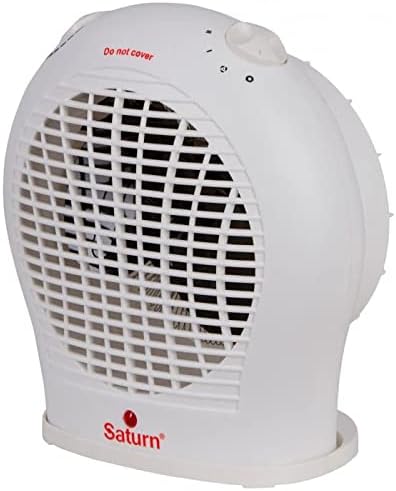
ຮູບ 2.1: ດ້ານຫນ້າ view of the SATURN ST-HT7645K fan heater, displaying the main body, front grille, and the 'Saturn' logo at the base.

ຮູບທີ 2.2: ທາງເທິງ view of the fan heater, highlighting the two rotary control knobs for temperature and power settings, along with a visible 'Do not cover' safety warning.

ຮູບ 2.3: ດ້ານຫລັງ view of the fan heater, illustrating the back air intake grille and the attached power cord extending from the lower right side.
3. ຕັ້ງຄ່າ
- ການຫຸ້ມຫໍ່: ເອົາເຄື່ອງເຮັດຄວາມຮ້ອນອອກຈາກເຄື່ອງຫຸ້ມຫໍ່ຂອງມັນຢ່າງລະມັດລະວັງ. ຮັກສາການຫຸ້ມຫໍ່ສໍາລັບການເກັບຮັກສາຫຼືການຂົນສົ່ງໃນອະນາຄົດ.
- ການຈັດວາງ: Place the heater on a firm, level surface. Ensure there is at least 1 meter (3 feet) of clear space around the heater from walls, furniture, curtains, and other flammable materials. Do not place it directly under a power outlet.
- ການເຊື່ອມຕໍ່ພະລັງງານ: Ensure the heater is switched off (mode selector set to '0'). Plug the power cord directly into a suitable 220-240V AC, 50Hz wall outlet. Do not use extension cords or multi-plugs.
4. ຄໍາແນະນໍາການດໍາເນີນງານ
The SATURN ST-HT7645K fan heater features two control knobs: one for the thermostat and one for power/mode selection.
Power/Mode Selector Knob:
- 0 (ປິດ): ປິດເຄື່ອງເຮັດຄວາມຮ້ອນ.
- ພັດລົມເທົ່ານັ້ນ: Activates the fan without heat, providing cool air circulation.
- ຂ້ອຍ (ຄວາມຮ້ອນຕ່ຳ): Provides low heat output (e.g., 1000W).
- II (ຄວາມຮ້ອນສູງ): Provides high heat output (e.g., 2000W).
ປຸ່ມຄວບຄຸມເຄື່ອງຄວບຄຸມອຸນຫະພູມ:
This knob allows you to set the desired room temperature. The heater will cycle on and off to maintain this temperature.
- Turn the thermostat knob to its maximum setting.
- Select the desired heat setting (I or II) using the power/mode selector knob.
- Once the room reaches your desired temperature, slowly turn the thermostat knob counter-clockwise until the heater switches off. The heater will now automatically maintain this temperature.
5. ບໍາລຸງຮັກສາ
Regular maintenance ensures optimal performance and extends the life of your heater.
ທໍາຄວາມສະອາດ:
- ຖອດເຄື່ອງເຮັດຄວາມຮ້ອນອອກສະເໝີ ແລະປ່ອຍໃຫ້ມັນເຢັນໝົດກ່ອນທຳຄວາມສະອາດ.
- ເຊັດພື້ນຜິວພາຍນອກດ້ວຍຜ້າອ່ອນໆ, ງamp ຜ້າ. ຢ່າໃຊ້ເຄື່ອງເຮັດຄວາມສະອາດຂັດຫຼືສານລະລາຍ.
- ໃຊ້ເຄື່ອງດູດຝຸ່ນທີ່ມີແປງຕິດຢູ່ເພື່ອກຳຈັດຝຸ່ນອອກຈາກຕະແກງລະບາຍອາກາດເຂົ້າ ແລະ ອອກ.
- ຢ່າເອົາເຄື່ອງເຮັດຄວາມຮ້ອນໃສ່ນ້ຳ ຫຼືຂອງແຫຼວອື່ນໆ.
ການເກັບຮັກສາ:
- ຖ້າເກັບຮັກສາເຄື່ອງເຮັດຄວາມຮ້ອນສໍາລັບໄລຍະເວລາທີ່ຍາວນານ, ເຮັດຄວາມສະອາດມັນຢ່າງລະອຽດ.
- ເກັບຮັກສາເຄື່ອງເຮັດຄວາມຮ້ອນໄວ້ໃນການຫຸ້ມຫໍ່ເດີມຂອງມັນໄວ້ໃນບ່ອນທີ່ເຢັນແລະແຫ້ງ.
6. ການແກ້ໄຂບັນຫາ
| ບັນຫາ | ສາເຫດທີ່ເປັນໄປໄດ້ | ການແກ້ໄຂ |
|---|---|---|
| ເຄື່ອງເຮັດຄວາມຮ້ອນບໍ່ເປີດ. | ບໍ່ມີການສະຫນອງພະລັງງານ. ເຄື່ອງຄວບຄຸມອຸນຫະພູມຕໍ່າເກີນໄປ. ການປ້ອງກັນຄວາມຮ້ອນເກີນໄປ. |
ກວດສອບຊ່ອງສຽບ ແລະ ປລັກໄຟ. Turn thermostat knob to a higher setting. Unplug, let cool for 10-15 minutes, then plug back in. |
| ເຄື່ອງເຮັດຄວາມຮ້ອນຜະລິດຄວາມຮ້ອນບໍ່ພຽງພໍ. | ເລືອກການຕັ້ງຄ່າຄວາມຮ້ອນຕ່ຳແລ້ວ. ຫ້ອງໃຫຍ່ເກີນໄປສຳລັບເຄື່ອງເຮັດຄວາມຮ້ອນ. ຊ່ອງສຽບອາກາດ / ຊ່ອງສຽບໄດ້ຖືກສະກັດ. |
Select 'II' (High Heat) setting. Ensure heater is appropriate for room size (up to 20m²). Clean grilles and ensure no obstructions. |
| ເຄື່ອງເຮັດຄວາມຮ້ອນເປີດ ແລະ ປິດເລື້ອຍໆ. | Thermostat setting is too close to room temperature. ການປ້ອງກັນຄວາມຮ້ອນເກີນກຳລັງເປີດໃຊ້ງານ. |
Adjust thermostat to a slightly higher or lower setting. Ensure proper ventilation and no obstructions. |
ຖ້າບັນຫາຍັງຄົງຢູ່ຫຼັງຈາກພະຍາຍາມແກ້ໄຂເຫຼົ່ານີ້, ກະລຸນາຕິດຕໍ່ຝ່າຍຊ່ວຍເຫຼືອລູກຄ້າ.
7. ຂໍ້ມູນຈໍາເພາະ
- ຕົວແບບ: ST-HT7645K
- ຍີ່ຫໍ້: SATURN (Generic)
- ປະເພດ: Fan Heater
- ປະເພດສະຖານທີ່: ຊັ້ນເທິງ
- ອົງປະກອບຄວາມຮ້ອນ: ໂລຫະ
- ພະລັງງານ: 2000 ວັດ (ສູງສຸດ)
- ລະບຽບການພະລັງງານ: 3 Modes (Fan Only, Low Heat, High Heat)
- ການຄຸ້ມຄອງຄວາມຮ້ອນ: ເຖິງ 20 ຕາແມັດ
- ຄຸນນະສົມບັດພິເສດ: Thermostat, Overheat Protection
- ສີ: ສີຂາວ
- ປັດໄຈແບບຟອມ: ແທ່ນ
- ການນໍາໃຊ້ພາຍໃນ / ນອກ: ພາຍໃນ
- ແຫຼ່ງພະລັງງານ: ໄຟຟ້າສາຍ
- ນ້ໍາຫນັກລາຍການ: ປະມານ 2 ກິໂລກຣາມ
- ຂະໜາດແພັກເກດ: ຂະໜາດປະມານ 30 x 30 x 30 cm
8. ການຮັບປະກັນແລະການສະຫນັບສະຫນູນ
This product is covered by a standard manufacturer's warranty against defects in materials and workmanship. Please refer to the warranty card included with your purchase for specific terms and conditions, including the warranty period and claim procedures.
For technical support, troubleshooting assistance, or warranty claims, please contact the retailer where the product was purchased or refer to the contact information provided in your product documentation.
ກະລຸນາຮັກສາຫຼັກຖານການຊື້ຂອງທ່ານໄວ້ເພື່ອຈຸດປະສົງການຮັບປະກັນ.


