1. ບົດແນະນຳ
Thank you for choosing the Mesqool CR1009Pro DAB/FM Portable Emergency Radio. This device is designed to provide reliable communication and essential features in various situations, from daily use to outdoor adventures and emergencies. It combines DAB+ and FM radio reception with multiple power sources, including a hand crank, solar panel, and a 5000mAh internal battery, which also functions as a power bank. Additional features include an LED flashlight, a reading lamp, and an SOS alarm.
Please read this manual thoroughly before operating the device to ensure proper use and to maximize its lifespan.
2. ຂໍ້ມູນຄວາມປອດໄພ
- ຢ່າໃຫ້ອຸປະກອນຖືກອຸນຫະພູມສູງ ຫຼື ແສງແດດໂດຍກົງເປັນເວລາດົນ (ຫຼັງຈາກສາກໄຟແລ້ວ) ຫຼື ຄວາມຊຸ່ມຊື່ນສູງ.
- The device has an IPX4 water resistance rating, meaning it is protected against splashing water from any direction. Do not immerse the device in water.
- ຮັກສາອຸປະກອນໃຫ້ຫ່າງຈາກສະຫນາມແມ່ເຫຼັກທີ່ເຂັ້ມແຂງ.
- ຢ່າພະຍາຍາມຖອດປະກອບ ຫຼືແກ້ໄຂອຸປະກອນ. ນີ້ຈະເປັນການຍົກເລີກການຮັບປະກັນ ແລະອາດຈະເຮັດໃຫ້ເກີດຄວາມເສຍຫາຍ ຫຼືການບາດເຈັບ.
- ໃຊ້ສາຍສາກໄຟ ແລະ ອະແດບເຕີໄຟຟ້າທີ່ລະບຸໄວ້ເທົ່ານັ້ນ.
- ຮັກສາໃຫ້ໄກຈາກເດັກນ້ອຍ.
3. ຜະລິດຕະພັນເກີນview
Familiarize yourself with the components and controls of your Mesqool CR1009Pro radio.

ຮູບທີ 3.1: ດ້ານໜ້າ view of the radio with display and controls.
ການຄວບຄຸມ ແລະພອດ:
- ປຸ່ມເປີດປິດ: ເປີດ/ປິດວິທະຍຸ.
- ປຸ່ມ MODE: ສະຫຼັບລະຫວ່າງໂໝດ DAB, FM ແລະ ໂໝດອື່ນໆ.
- ປຸ່ມສະແກນ: ເລີ່ມການສະແກນສະຖານີອັດຕະໂນມັດ.
- ປຸ່ມ ENTER: ຢືນຢັນການເລືອກ.
- ປຸ່ມເມນູ: Accesses settings menu.
- ປຸ່ມຂໍ້ມູນ: Displays station information (RDS/DAB data).
- PRESET/RECALL/STORE Buttons: Manages preset radio stations.
- ປຸ່ມລະດັບສຽງ (+/-): ປັບລະດັບສຽງ.
- Tune Buttons (Up/Down): Manually tunes frequencies or navigates menus.
- ເສົາອາກາດ Telescopic: ສໍາລັບການປັບປຸງການຮັບວິທະຍຸ.
- ໄຟສາຍ LED: ຕັ້ງຢູ່ຂ້າງ.
- ອ່ານ Lamp: ພັບໄດ້ lamp located on top.
- SOS Alarm Button: Activates emergency alarm.
- Hand Crank: ສຳລັບການຜະລິດພະລັງງານດ້ວຍມື.
- ແຜງແສງອາທິດ: ສຳລັບການສາກໄຟດ້ວຍແສງຕາເວັນ.
- ການປ້ອນຂໍ້ມູນ USB ຈຸນລະພາກ: ສໍາລັບການຊາດຫມໍ້ໄຟພາຍໃນ.
- USB Output: ສໍາລັບການສາກໄຟອຸປະກອນພາຍນອກ (ຟັງຊັນ power bank).
- Jack ຫູຟັງ 3.5 ມມ: ສໍາລັບການຟັງສ່ວນຕົວ.
- AAA Battery Compartment: For optional AAA battery power.
4. ຕັ້ງຄ່າ
4.1 ການສາກໄຟເບື້ອງຕົ້ນ
Before first use, fully charge the internal 5000mAh battery using the provided Micro USB cable and a 5V/2A power adapter (not included). The battery indicator on the display will show charging status.
4.2 Inserting AAA Batteries (Optional)
For an additional power source, open the battery compartment and insert 3 AAA batteries (not included), ensuring correct polarity. The radio can automatically switch to AAA battery power if the internal Li-ion battery is low.
4.3 ການຂະຫຍາຍເສົາອາກາດ
For optimal radio reception, fully extend the telescopic antenna.
5. ຄໍາແນະນໍາການດໍາເນີນງານ
5.1 ເປີດ/ປິດ
ກົດ ພະລັງງານ ປຸ່ມເພື່ອເປີດຫຼືປິດວິທະຍຸ.
5.2 Radio Operation (DAB/FM)

ຮູບທີ 5.1: ຊ່ອງສຽບຫູຟັງສຳລັບການຟັງສ່ວນຕົວ.
- ເລືອກໂໝດ: ກົດ ໂໝດ button to switch between DAB and FM radio modes.
- ສະແກນອັດຕະໂນມັດ: ໃນໂຫມດ DAB ຫຼື FM, ກົດປຸ່ມ ສະແກນ button to automatically search for available stations. The radio will store them.
- ຄູ່ມືການປບັຄູ່ມື: ໃຊ້ TUNE Up/Down ປຸ່ມເພື່ອປັບຄວາມຖີ່ດ້ວຍຕົນເອງ.
- ບັນທຶກການຕັ້ງຄ່າໄວ້ລ່ວງໜ້າ: After finding a station, press the PRESET/STORE ປຸ່ມ, ເລືອກໝາຍເລກທີ່ຕັ້ງຄ່າໄວ້ລ່ວງໜ້າໂດຍໃຊ້ TUNE Up/Down ປຸ່ມ, ແລະກົດ ປ້ອນ to save. The radio supports up to 30 preset stations.
- Presets ທີ່ລະລຶກ: ກົດ PRESET/RECALL ປຸ່ມແລະນໍາໃຊ້ TUNE Up/Down buttons to select a saved station.
- DRC Function (DAB): In DAB mode, access the menu to adjust the Dynamic Range Control (DRC) compression rate, which helps balance volume levels.
- RDS Function (FM): In FM mode, the RDS (Radio Data System) function displays station information on the screen, such as program name or song title.
- ການໃຊ້ຫູຟັງ: Plug 3.5mm headphones into the headphone jack for private listening.
5.3 ການສາກວິທະຍຸ

ຮູບທີ 5.2: Hand crank charging.

ຮູບທີ 5.3: Five ways to charge the radio.
- ການສາກ USB: Connect the Micro USB cable to the radio's input port and a power source.
- ສາກໄຟແສງຕາເວັນ: Place the radio with the solar panel facing direct sunlight. This method is primarily for maintaining charge or slow charging.
- ການສາກດ້ວຍມື Crank: Rotate the hand crank clockwise or counter-clockwise at a steady pace for manual power generation. A few minutes of cranking can provide power for basic functions.
- ໝໍ້ໄຟ AAA: If inserted, the radio can draw power from AAA batteries when the internal rechargeable battery is low.
5.4 ໃຊ້ເປັນ Power Bank
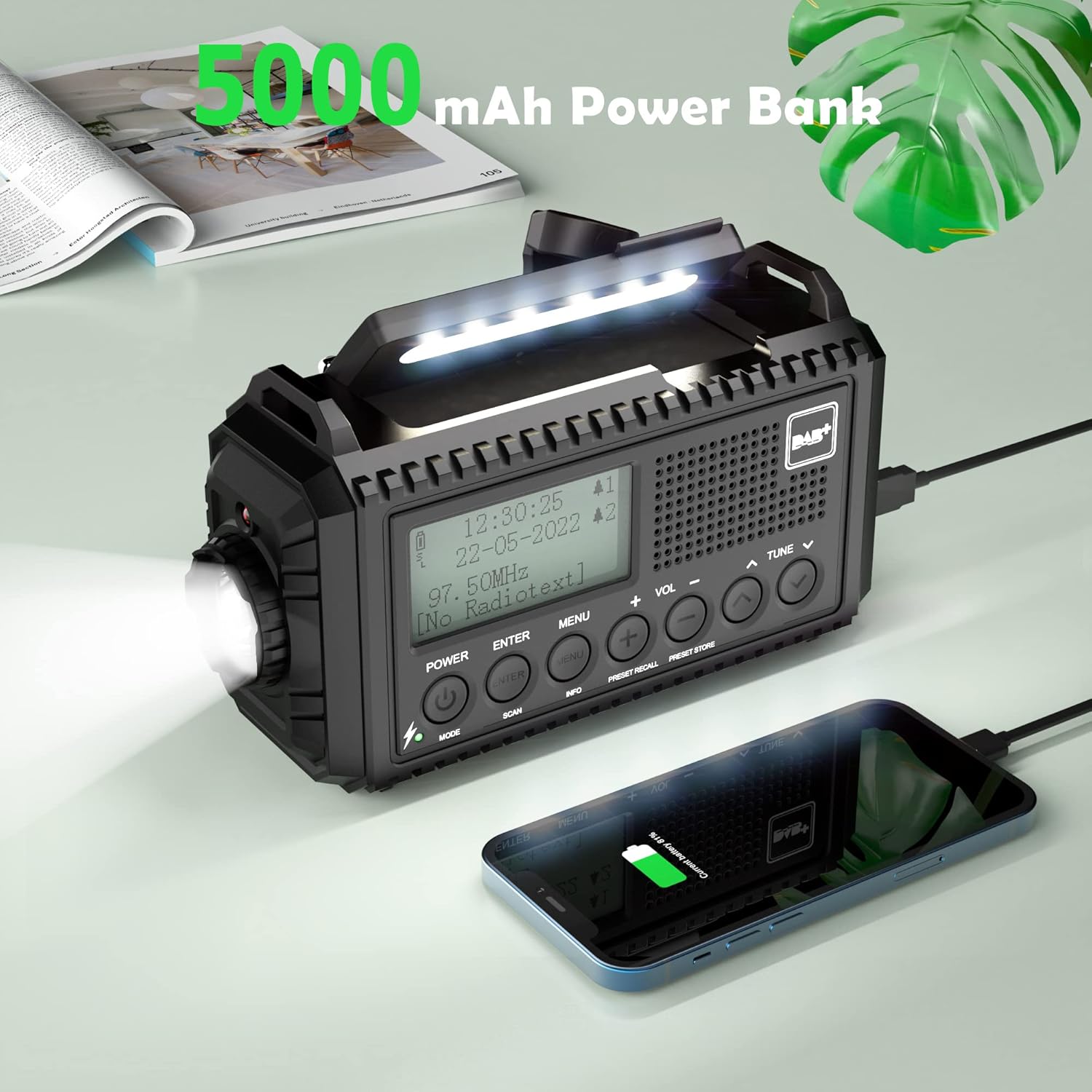
ຮູບທີ 5.4: Charging a smartphone using the radio's power bank function.
Connect your smartphone or other USB-powered device to the radio's USB output port using a compatible charging cable. The radio's internal 5000mAh battery will begin charging the external device.
5.5 ໜ້າທີ່ຂອງໄຟສ່ອງສະຫວ່າງ

ຮູບທີ 5.5: Reading with the integrated lamp.

ຮູບທີ 5.6: Using the flashlight for navigation.
- ໄຟສາຍ: Press the dedicated flashlight button (usually on the side) to turn it on. Press again to cycle through brightness levels (High/Normal) or turn off.
- ອ່ານ Lamp: Fold out the reading lamp from the top of the radio. Press its button to turn it on and cycle through brightness levels (High/Normal) or turn off.
5.6 SOS ປຸກ
ໃນກໍລະນີສຸກເສີນ, ໃຫ້ກົດຄ້າງໄວ້ SOS button. The radio will emit a loud siren sound and flash a red light to attract attention. Press the SOS button again to deactivate it.
5.7 ໂມງປຸກ ແລະໂມງຈັບເວລານອນ
- ໂມງປຸກຄູ່: Access the menu to set up to two independent alarms. You can configure alarm duration (e.g., 15, 30, 45, 60, 90, 120 minutes) and volume.
- ເຄື່ອງຈັບເວລານອນ: Access the menu to set a sleep timer (e.g., 15, 30, 45, 60, 90 minutes). The radio will automatically turn off after the set time.
5.8 ການຕັ້ງຄ່າພາສາ ແລະ ແສງພື້ນຫຼັງ
- ພາສາ: Navigate to the system settings in the menu to select your preferred language (English, Portuguese, French, Italian, German).
- ແສງຫຼັງ: Adjust the display backlight brightness (High, Medium, Low) and duration (10s, 20s, 30s, 45s, 60s, 90s, 120s, 180s) via the menu settings.
6. ບໍາລຸງຮັກສາ

ຮູບທີ 6.1: IPX4 water resistance for outdoor use.
- ທໍາຄວາມສະອາດ: ເຊັດວິທະຍຸດ້ວຍສຽງອ່ອນ, ງamp ຜ້າ. ຢ່າໃຊ້ເຄື່ອງເຮັດຄວາມສະອາດຂັດຫຼືສານລະລາຍ.
- ການດູແລຫມໍ້ໄຟ: For optimal battery life, fully charge the internal battery at least once every three months if not in regular use.
- ການເກັບຮັກສາ: ເກັບຮັກສາວິທະຍຸໃນບ່ອນທີ່ເຢັນ, ແຫ້ງ, ຫ່າງຈາກແສງແດດໂດຍກົງແລະອຸນຫະພູມທີ່ສຸດ.
- ຄວາມຕ້ານທານນ້ໍາ: While IPX4 rated, avoid prolonged exposure to heavy rain or submersion in water. Ensure all port covers are securely closed.
7. ການແກ້ໄຂບັນຫາ
| ບັນຫາ | ສາເຫດທີ່ເປັນໄປໄດ້ | ການແກ້ໄຂ |
|---|---|---|
| ວິທະຍຸບໍ່ເປີດ. | Low battery or no power source. | Charge the internal battery via USB, solar, or hand crank. Check if AAA batteries are inserted correctly and have charge. |
| ການຮັບວິທະຍຸທີ່ບໍ່ດີ. | ແອນເຕນນາບໍ່ໄດ້ຍືດອອກ, ສັນຍານອ່ອນ, ຫຼື ລົບກວນ. | Fully extend the telescopic antenna. Try repositioning the radio. Perform an automatic scan for stations. |
| ບໍ່ສາມາດສາກອຸປະກອນພາຍນອກໄດ້. | Radio's internal battery is low or cable is incompatible. | Ensure the radio's internal battery is sufficiently charged. Use a compatible USB charging cable for your device. |
| SOS alarm activates accidentally. | SOS button is highly sensitive. | Be mindful of the SOS button's location when handling the radio. Avoid placing objects that might press it. |
| Lights (flashlight/reading lamp) do not work. | Low battery or light function not activated. | Charge the radio. Ensure you are pressing the correct button for the desired light function. |
8. ຂໍ້ມູນຈໍາເພາະ
- ຍີ່ຫໍ້: Mesqool
- ຕົວແບບ: CR1009Pro DAB
- ສີ: ດຳ
- ການເຊື່ອມຕໍ່: USB
- ຄຸນນະສົມບັດພິເສດ: SOS Alarm, Built-in Clock, Portable, Rechargeable, LED Flashlight, Reading Lamp
- ວັດສະດຸ: ພາດສະຕິກ
- ພອດ USB: 1 (ຜົນຜະລິດ)
- ອຸປະກອນທີ່ເຂົ້າກັນໄດ້: ຫູຟັງ, ໂທລະສັບສະຫຼາດ
- ຂະໜາດ: 17.2L x 9.4W x 6.3ຊມ
- ເຕັກໂນໂລຊີການປັບແຕ່ງ: DAB+
- ແຫຼ່ງພະລັງງານ: Solar panel, Hand crank, Micro USB input, Internal 5000mAh rechargeable battery, 3 AAA batteries (not included)
- ແຖບວິທະຍຸທີ່ຮອງຮັບ: FM, DAB+
- ຄວາມຕ້ານທານນ້ໍາ: IPX4
9. ການຮັບປະກັນແລະການສະຫນັບສະຫນູນ
For warranty information or technical support, please refer to the warranty card included with your product or contact Mesqool customer service directly. You can often find support contact details on the official Mesqool webເວັບໄຊທ໌ຫຼືຜ່ານຮ້ານຂາຍຍ່ອຍຂອງທ່ານ.
Manufacturer: Mesqool E-commerce Co.Ltd


