ແນະນຳ
This manual provides comprehensive instructions for the safe and efficient use of your Coby True Wireless Earbuds (Model CETW535). Please read this manual thoroughly before using the product and retain it for future reference.
The Coby True Wireless Earbuds offer a seamless audio experience with Bluetooth 5.3 technology, a smart battery display, and intuitive controls for music and calls. They are designed for comfort and convenience, featuring a built-in microphone for hands-free communication.
ເນື້ອໃນຊຸດ
- Coby True Wireless Earbuds (Left and Right)
- Charging Case with Smart Battery Display
- ສາຍສາກ USB
- ຄູ່ມືຜູ້ໃຊ້ (ເອກະສານນີ້)
ຕັ້ງຄ່າ
1. ການສາກໄຟເບື້ອງຕົ້ນ
Before first use, fully charge the earbuds and the charging case. Connect the charging case to a USB power source using the provided USB cable. The digital display on the case will indicate the charging status and battery level.

Image: The Coby True Wireless Earbuds are shown inside their open charging case, which displays "100%" on its digital screen, indicating a full charge. The earbuds are black and fit snugly into their respective slots.
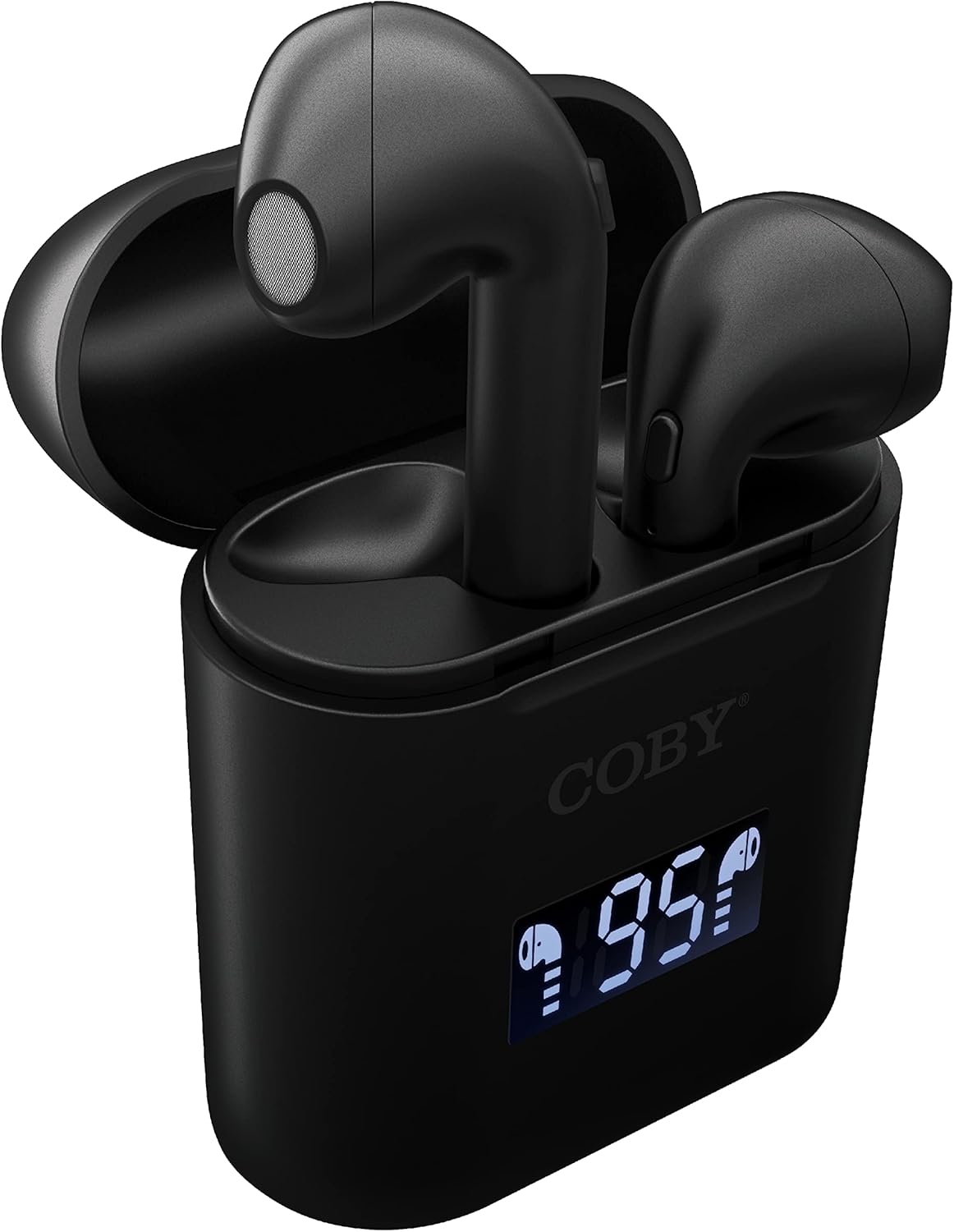
ຮູບພາບ: A close-up view of the Coby True Wireless Earbuds resting in their open charging case. The case features a digital display showing "95%", indicating the current battery level of the case. The black earbuds are visible, with their microphones facing upwards.
2. ການຈັບຄູ່ກັບອຸປະກອນ Bluetooth
- ກວດໃຫ້ແນ່ໃຈວ່າໄດ້ສາກຫູຟັງຫູຟັງ ແລະຢູ່ພາຍໃນກ່ອງສາກ.
- ເປີດກ່ອງສາກໄຟ. ຫູຟັງເອຍບັດຈະເປີດເຄື່ອງອັດຕະໂນມັດ ແລະເຂົ້າສູ່ໂໝດຈັບຄູ່.
- ໃນອຸປະກອນຂອງທ່ານ (ໂທລະສັບສະຫຼາດ, ແທັບເລັດ, ແລະອື່ນໆ), ເປີດໃຊ້ Bluetooth.
- ຊອກຫາ "CETW535" or "Coby Earbuds" in the list of available Bluetooth devices.
- Select the device name to connect. Once connected, you will hear a confirmation tone.
- The earbuds will automatically re-pair with the last connected device when removed from the case, if Bluetooth is enabled on the device.
3. ພໍດີກັບຫູຟັງ
Gently insert each earbud into the corresponding ear (L for left, R for right). Adjust them slightly until they feel secure and comfortable. A proper fit ensures optimal sound quality and comfort.

Image: A woman is shown smiling while wearing a black Coby True Wireless Earbud in her right ear, demonstrating a comfortable and secure fit.
ຄໍາແນະນໍາການດໍາເນີນງານ
ເປີດ/ປິດ
- ເປີດ: Open the charging case, or press and hold the touch control area on each earbud for 3 seconds.
- ປິດພະລັງງານ: Place the earbuds back into the charging case and close the lid, or press and hold the touch control area on each earbud for 5 seconds.
ການຄວບຄຸມດົນຕີ
The earbuds feature touch-sensitive controls for easy management of your audio playback.
- ຫຼິ້ນ/ຢຸດ: ແຕະໃສ່ຫູຟັງຫູຟັງໜຶ່ງຄັ້ງ.
- ເພງຕໍ່ໄປ: ແຕະສອງເທື່ອໃສ່ຫູຟັງທາງຂວາ.
- ຕິດຕາມກ່ອນ ໜ້າ ນີ້: ແຕະສອງເທື່ອໃສ່ຫູຟັງທາງຊ້າຍ.
- ປະລິມານຂຶ້ນ: ແຕະສາມເທື່ອໃສ່ຫູຟັງເບື້ອງຂວາ.
- ປະລິມານລົງ: ແຕະສາມເທື່ອໃສ່ຫູຟັງທາງຊ້າຍ.

Image: A man is shown wearing a Coby True Wireless Earbud in his right ear, taking a drink from a water bottle, illustrating the earbuds' use during active moments.
ການຄວບຄຸມການໂທ
Manage your calls effortlessly with the built-in microphone and touch controls.
- ຮັບ/ສາຍໂທ: ແຕະໃສ່ຫູຟັງຫູຟັງໜຶ່ງຄັ້ງ.
- ປະຕິເສດການໂທ: ກົດຫູຟັງອັນໃດອັນໜຶ່ງຄ້າງໄວ້ 2 ວິນາທີ.

Image: A man is depicted wearing a Coby True Wireless Earbud in his left ear while concentrating on a laptop screen, highlighting the earbuds' suitability for work or study environments.
ການເປີດ ນຳ ໃຊ້ຜູ້ຊ່ວຍສຽງ
Activate your device's voice assistant (Siri or Google Assistant) for hands-free commands.
- ກະຕຸ້ນຜູ້ຊ່ວຍສຽງ: Press and hold either earbud for 3 seconds (after powering on, before powering off gesture).
Intelligent Digital Battery Display
The charging case features a digital display that shows the remaining battery percentage of the case and individual charging status of the earbuds.
- The large number indicates the charging case's battery percentage.
- Small icons next to the percentage indicate the charging status of the left and right earbuds.

Image: The Coby True Wireless Earbuds are shown in their open charging case, with the digital display indicating "95%" battery life for the case. The black earbuds are visible, ready for use or charging.
ບໍາລຸງຮັກສາ
- ທໍາຄວາມສະອາດ: ໃຊ້ຜ້າແພທີ່ອ່ອນ, ແຫ້ງ, ບໍ່ມີເສັ້ນດ່າງເພື່ອທຳຄວາມສະອາດຫູຟັງຫູຟັງ ແລະ ກ່ອງສາກ. ຢ່າໃຊ້ສານເຄມີທີ່ຮຸນແຮງຫຼືວັດສະດຸຂັດ.
- ການເກັບຮັກສາ: ເມື່ອບໍ່ໄດ້ໃຊ້, ໃຫ້ເກັບຫູຟັງເອຍບັດໃສ່ໃນກະເປົ໋າສາກໄຟເພື່ອປົກປ້ອງພວກມັນ ແລະ ສືບຕໍ່ສາກໄຟ. ເກັບຮັກສາໄວ້ໃນບ່ອນທີ່ເຢັນ, ແຫ້ງ, ຫ່າງຈາກອຸນຫະພູມທີ່ສຸດ.
- ການສາກໄຟ: To prolong battery life, avoid fully discharging the battery frequently. Charge the case and earbuds regularly, even if not in constant use.
ການແກ້ໄຂບັນຫາ
| ບັນຫາ | ການແກ້ໄຂທີ່ເປັນໄປໄດ້ |
|---|---|
| ຫູຟັງບໍ່ຈັບຄູ່ກັບອຸປະກອນ. |
|
| ມີຫູຟັງຫູຟັງອັນດຽວເທົ່ານັ້ນກຳລັງຫຼິ້ນສຽງ. |
|
| ກ່ອງສາກບໍ່ສາກ. |
|
| ຄຸນນະພາບສຽງບໍ່ດີ ຫຼືການຕັດການເຊື່ອມຕໍ່. |
|
ຂໍ້ມູນຈໍາເພາະ
| ຄຸນສົມບັດ | ລາຍລະອຽດ |
|---|---|
| ຍີ່ຫໍ້ | ໂຄບີ |
| ຊື່ຕົວແບບ | ຫູຟັງໄຮ້ສາຍທີ່ແທ້ຈິງ |
| ໝາຍເລກຕົວແບບ | CETW535 |
| ເຕັກໂນໂລຊີການເຊື່ອມຕໍ່ | Bluetooth 5.3 |
| ສີ | ດຳ |
| ເວລາຫຼິ້ນຫູຟັງ | ສູງສຸດ 6.5 ຊົ່ວໂມງ (ໃນການສາກເຕັມ) |
| ເວລາຫຼິ້ນທັງໝົດ (ພ້ອມກໍລະນີ) | ສູງສຸດ 22 ຊົ່ວໂມງ |
| ໄມໂຄຣໂຟນ | ໃນຕົວ |
| ສະຫນັບສະຫນູນຜູ້ຊ່ວຍສຽງ | Siri, ຜູ້ຊ່ວຍ Google |
| ຂະໜາດ (L x W x H) | 0.99 x 1.85 x 2.44 ນິ້ວ (ກ່ອງສາກ) |
| ນ້ໍາຫນັກລາຍການ | 6.1 ອອນ |
| UPC | 643620020982 |
| ຜູ້ຜະລິດ | Summit Electronics, LLC |
ການຮັບປະກັນແລະການສະຫນັບສະຫນູນ
Specific warranty information for the Coby True Wireless Earbuds (Model CETW535) is not provided within this manual. For details regarding warranty coverage, terms, and conditions, please refer to the warranty card included with your product packaging or visit the official Coby webເວັບໄຊ.
For technical support or further assistance, please contact Coby customer service through the contact information provided on their official webສະຖານທີ່ຫຼືການຫຸ້ມຫໍ່ຜະລິດຕະພັນ.