1. ບົດແນະນຳ
Thank you for choosing the Boompods Bassline GO True Wireless Earbuds. This manual provides essential information for setting up, operating, and maintaining your earbuds to ensure optimal performance and longevity. Please read this manual thoroughly before use.

Image: Boompods Bassline GO True Wireless Earbuds, showcasing ການອອກແບບສີດໍາ sleek ຂອງເຂົາເຈົ້າ.
2. ເນື້ອໃນຊຸດ
ໃຫ້ແນ່ໃຈວ່າທຸກລາຍການຢູ່ໃນຊຸດຂອງທ່ານ:
- Boompods Bassline GO True Wireless Earbuds (Left and Right)
- ກ່ອງສາກ
- ສາຍສາກ USB-A ຫາ USB-C
- ຄູ່ມືຜູ້ໃຊ້ (ເອກະສານນີ້)
3. ຕັ້ງຄ່າ
3.1. ການສາກຫູຟັງ ແລະ ເຄສ
ກ່ອນທີ່ຈະໃຊ້ຄັ້ງທຳອິດ, ໃຫ້ສາກຫູຟັງຫູຟັງ ແລະ ຊ່ອງສາກໃຫ້ເຕັມ. ກະເປົ໋າສາກໄຟໃຫ້ອາຍຸແບັດເຕີຣີເພີ່ມເຕີມສຳລັບຫູຟັງເອຍບັດຂອງເຈົ້າໃນເວລາເດີນທາງ.
- ວາງຫູຟັງໃສ່ໃນກະເປົ໋າສາກໄຟ, ຮັບປະກັນວ່າພວກມັນຖືກນັ່ງຢ່າງຖືກຕ້ອງ.
- ເຊື່ອມຕໍ່ສາຍສາກ USB-C ກັບຜອດສາກໄຟຢູ່ບ່ອນສາກ ແລະອີກສົ້ນກັບແຫຼ່ງພະລັງງານ USB (ເຊັ່ນ: ອະແດບເຕີຝາ, ພອດ USB ຂອງຄອມພິວເຕີ).
- ໄຟສະແດງຢູ່ໃນກໍລະນີຈະສະແດງສະຖານະການສາກໄຟ. ເມື່ອສາກໄຟເຕັມແລ້ວ, ໄຟຈະສະແດງວ່າສໍາເລັດຫຼືປິດ.
A full charge provides up to 7 hours of playback for the earbuds, with the charging case extending total battery life to approximately 23 hours.

Image: Boompods Bassline GO earbuds inside their charging case, illustrating the charging process and extended battery life.
3.2. ການຈັບຄູ່ Bluetooth
ປະຕິບັດຕາມຂັ້ນຕອນເຫຼົ່ານີ້ເພື່ອຈັບຄູ່ຫູຟັງຂອງທ່ານກັບອຸປະກອນຂອງທ່ານ:
- ເປີດກ່ອງສາກໄຟ. ຫູຟັງເອຍບັດຈະເຂົ້າສູ່ໂໝດຈັບຄູ່ໂດຍອັດຕະໂນມັດ.
- ໃນອຸປະກອນຂອງທ່ານ (ໂທລະສັບສະຫຼາດ, ແທັບເລັດ, ແລັບທັອບ), ເປີດໃຊ້ Bluetooth.
- ຊອກຫາ available Bluetooth devices and select "Boompods Bassline GO" from the list.
- ເມື່ອເຊື່ອມຕໍ່ແລ້ວ, ທ່ານຈະໄດ້ຍິນສຽງຢືນຢັນ, ແລະໄຟຊີ້ບອກຢູ່ຫູຟັງຫູຟັງຈະປ່ຽນໄປ.
The earbuds feature Bluetooth 5.0 for a fast and stable wireless connection.
4. ປະຕິບັດການຫູຟັງ
4.1. ແຕະການຄວບຄຸມ
The Boompods Bassline GO earbuds utilize sensitive touch controls for various functions:
| ການປະຕິບັດ | ຟັງຊັນ |
|---|---|
| ແຕະເທື່ອດຽວ (ຫູຟັງຊ້າຍ/ຂວາ) | ຫຼິ້ນ/ຢຸດເພງ, ຮັບສາຍ/ວາງສາຍ |
| ແຕະສອງເທື່ອ (ຫູຟັງຂວາ) | ຕິດຕາມຕໍ່ໄປ |
| ແຕະສອງເທື່ອ (ຫູຟັງຊ້າຍ) | ເພງກ່ອນໜ້າ |
| ແຕະສາມເທື່ອ (ຫູຟັງຊ້າຍ/ຂວາ) | ເປີດໃຊ້ຜູ້ຊ່ວຍສຽງ |
| ກົດຄ້າງໄວ້ (ຫູຟັງຂວາ) | ປະລິມານຂຶ້ນ |
| ກົດຄ້າງໄວ້ (ຫູຟັງຊ້າຍ) | ປະລິມານລົງ |
| ກົດຄ້າງໄວ້ (ໃນລະຫວ່າງການໂທເຂົ້າ) | ປະຕິເສດການໂທ |
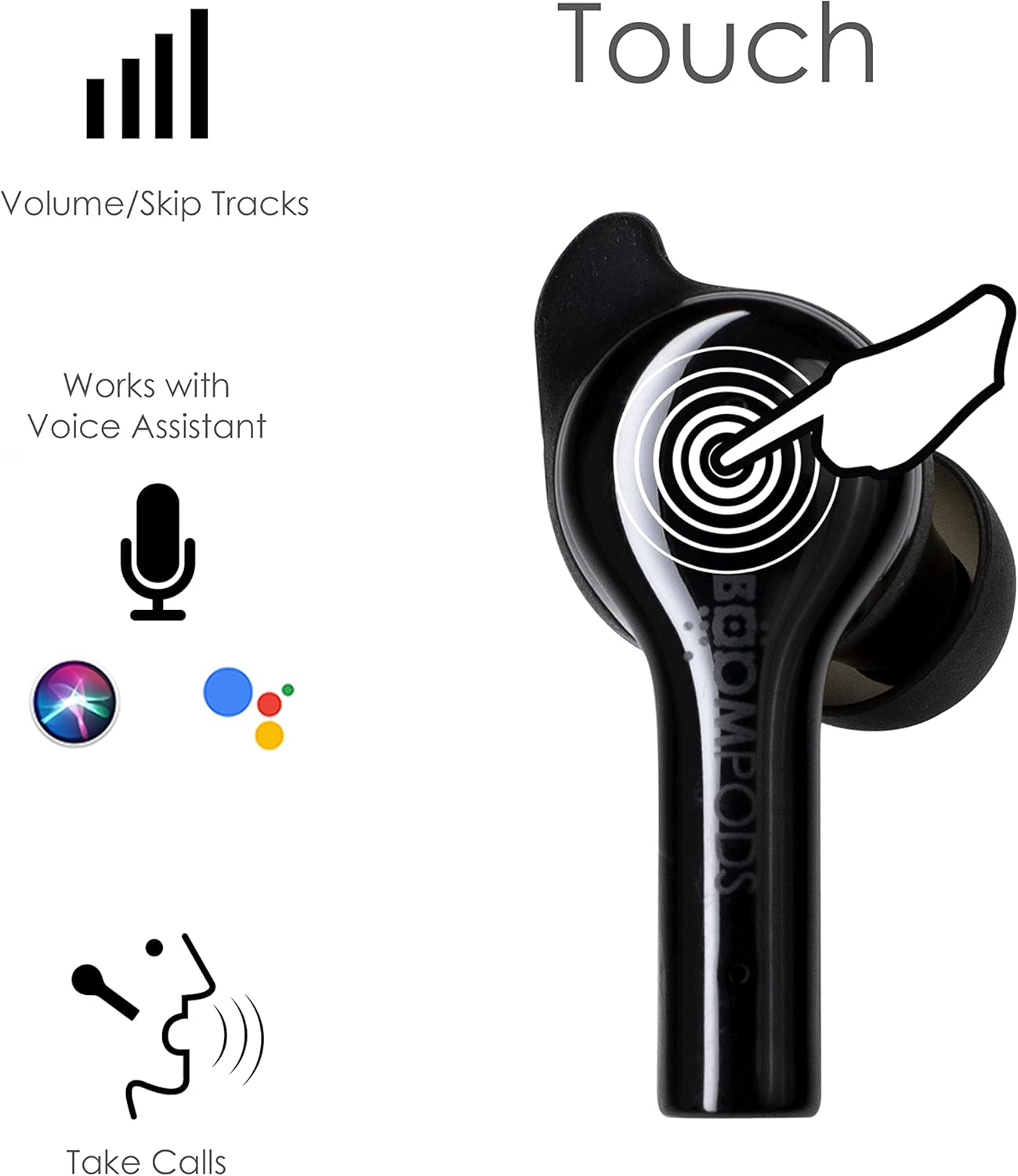
Image: Diagram illustrating the touch control areas on the Boompods Bassline GO earbuds for various functions.
4.2. ຜູ້ຊ່ວຍສຽງ
The earbuds support voice assistant activation (e.g., Siri, Google Assistant). Triple tap either earbud to activate your device's voice assistant for hands-free control.
4.3. ໂທອອກ
The Boompods Bassline GO features an ENC (Environmental Noise Cancellation) microphone, perfectly positioned to capture your voice while reducing background noise for crystal-clear phone calls.
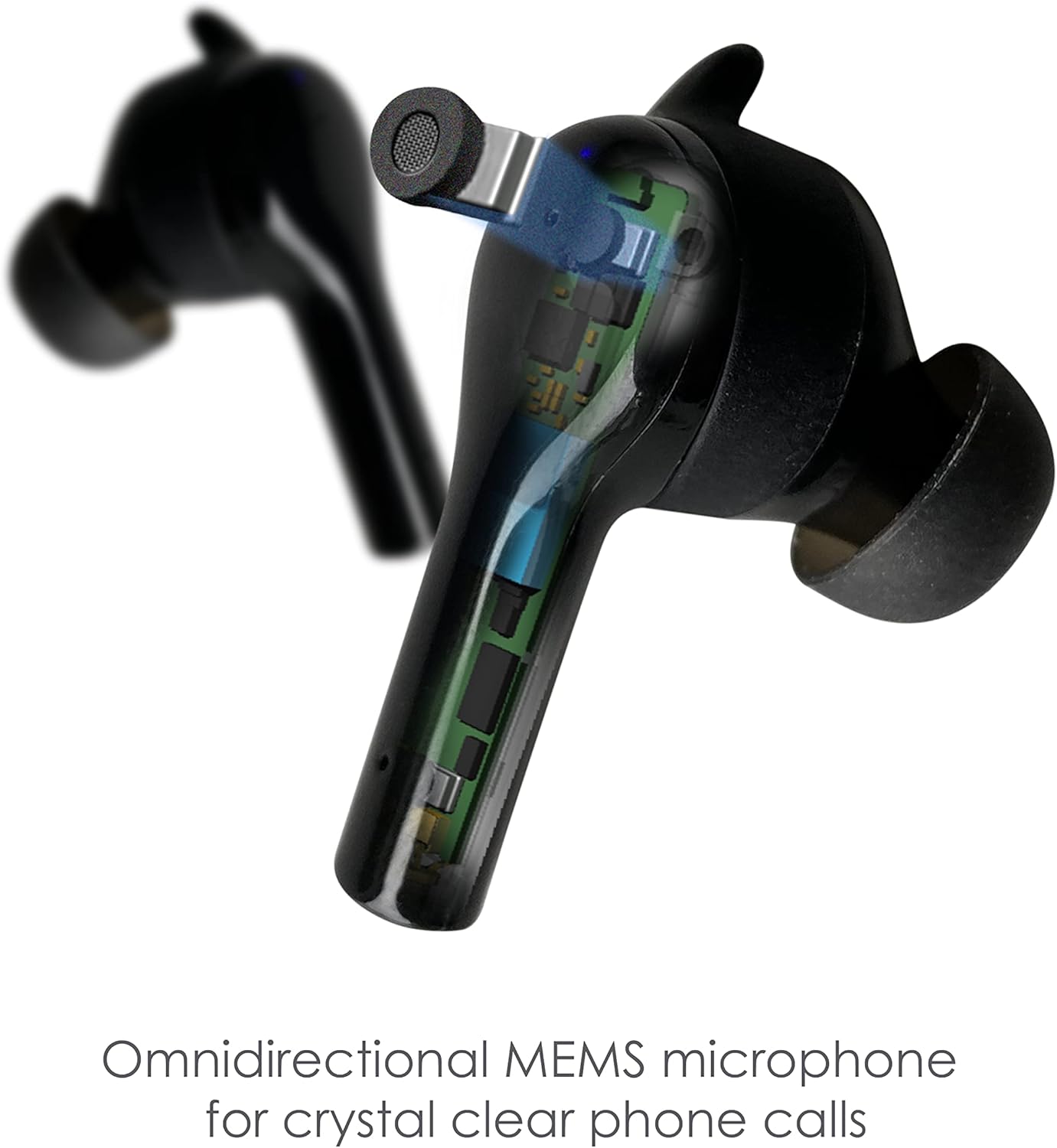
ຮູບພາບ: ລາຍລະອຽດ view of the Boompods Bassline GO earbud, highlighting the omnidirectional MEMS microphone for clear calls.
4.4. Secure Fit and IPX4 Rating
The earbuds are designed for a secure and comfortable in-ear fit, suitable for various activities. They also boast an IPX4 water resistance rating, making them resistant to splashes and sweat, ideal for workouts or outdoor use.

Image: A person wearing the Boompods Bassline GO earbuds, demonstrating their secure fit during active use.
5. ບໍາລຸງຮັກສາ
To ensure the longevity and optimal performance of your Boompods Bassline GO earbuds, follow these maintenance guidelines:
- ທໍາຄວາມສະອາດ: ອະນາໄມຫູຟັງຫູຟັງ ແລະກະເປົ໋າສາກໄຟເປັນປະຈຳດ້ວຍຜ້າແພທີ່ອ່ອນ, ແຫ້ງ, ບໍ່ມີສານຂັດ. ຢ່າໃຊ້ເຄື່ອງເຮັດຄວາມສະອາດຂັດຫຼືສານລະລາຍ. ຄ່ອຍໆເອົາຂີ້ຫູ ຫຼືສິ່ງເສດເຫຼືອອອກຈາກປາຍຫູ ແລະຕາໜ່າງລຳໂພງ ໂດຍໃຊ້ແປງນ້ອຍໆ ຫຼືຜ້າຝ້າຍ.
- ການເກັບຮັກສາ: ເມື່ອບໍ່ໄດ້ໃຊ້, ໃຫ້ເກັບຮັກສາຫູຟັງໃສ່ໃນກະເປົ໋າສາກໄຟເພື່ອປົກປ້ອງພວກມັນຈາກຝຸ່ນ ແລະຄວາມເສຍຫາຍ. ເກັບຮັກສາກໍລະນີດັ່ງກ່າວໄວ້ໃນບ່ອນທີ່ເຢັນ, ແຫ້ງ, ຫ່າງຈາກແສງແດດໂດຍກົງແລະອຸນຫະພູມທີ່ສຸດ.
- ການສາກໄຟ: Avoid fully depleting the battery for extended periods. Charge the earbuds and case regularly, even if not in frequent use, to maintain battery health.
- ການເປີດເຜີຍນ້ໍາ: While IPX4 rated for splash resistance, do not submerge the earbuds in water or expose them to heavy rain. Dry them thoroughly if they get wet.
6. ການແກ້ໄຂບັນຫາ
If you encounter issues with your Boompods Bassline GO earbuds, refer to the following common solutions:
6.1. ຫູຟັງບໍ່ສາມາດຈັບຄູ່/ເຊື່ອມຕໍ່ໄດ້
- ກວດໃຫ້ແນ່ໃຈວ່າໄດ້ສາກຫູຟັງທັງສອງອັນແລ້ວ.
- ປິດ Bluetooth ໃນອຸປະກອນຂອງທ່ານ ແລະເປີດມັນຄືນໃໝ່.
- Forget/delete "Boompods Bassline GO" from your device's Bluetooth list and attempt to pair again.
- ວາງຫູຟັງເອຍບັດທັງສອງກັບໃສ່ກ່ອງສາກ, ປິດຝາປິດ, ລໍຖ້າສອງສາມວິນາທີ, ຈາກນັ້ນເປີດຝາປິດເພື່ອເລີ່ມໂໝດການຈັບຄູ່ຄືນໃໝ່.
6.2. ບໍ່ມີສຽງ ຫຼືສຽງຕໍ່າ
- ກວດເບິ່ງລະດັບສຽງໃນທັງຫູຟັງເອຍບັດຂອງທ່ານ (ຜ່ານການຄວບຄຸມການສໍາພັດ) ແລະອຸປະກອນທີ່ເຊື່ອມຕໍ່ຂອງທ່ານ.
- ໃຫ້ແນ່ໃຈວ່າຫູຟັງເອຍບັດຢູ່ໃນຫູຂອງທ່ານຢ່າງຖືກຕ້ອງ.
- ອະນາໄມສິ່ງເສດເຫຼືອຕ່າງໆອອກຈາກຕາໜ່າງລຳໂພງຫູຟັງ.
- Try disconnecting and reconnecting the earbuds to your device.
6.3. ບັນຫາການສາກໄຟ
- ໃຫ້ແນ່ໃຈວ່າສາຍ USB-C ເຊື່ອມຕໍ່ຢ່າງປອດໄພກັບທັງກໍລະນີ ແລະແຫຼ່ງພະລັງງານ.
- ລອງໃຊ້ສາຍ USB-C ຫຼືອະແດັບເຕີໄຟອື່ນ.
- ກວດໃຫ້ແນ່ໃຈວ່າຕົວຕິດຕໍ່ການສາກໄຟຢູ່ຫູຟັງເອຍບັດ ແລະ ພາຍໃນເຄສນັ້ນສະອາດ ແລະ ບໍ່ມີສິ່ງເສດເຫຼືອ.
7. ຂໍ້ມູນຈໍາເພາະ
| ຄຸນສົມບັດ | ລາຍລະອຽດ |
|---|---|
| ຊື່ຕົວແບບ | Bassline GO |
| ໝາຍເລກຕົວແບບ | BAGO |
| ເຕັກໂນໂລຊີການເຊື່ອມຕໍ່ | ໄຮ້ສາຍ (Bluetooth 5.0) |
| ການຈັດວາງຫູ | ໃນຫູ |
| ປະເພດການຄວບຄຸມ | ແຕະການຄວບຄຸມ |
| ໄມໂຄຣໂຟນ | ENC (ການຍົກເລີກສິ່ງລົບກວນສິ່ງແວດລ້ອມ) |
| ການຕໍ່ຕ້ານນ້ໍາ | IPX4 |
| ອາຍຸແບັດເຕີຣີ (ຫູຟັງ) | ສູງສຸດເຖິງ 7 ຊົ່ວໂມງຕໍ່ການສາກໄຟ |
| ເວລາຫຼິ້ນທັງໝົດ (ພ້ອມກໍລະນີ) | ສູງສຸດ 23 ຊົ່ວໂມງ |
| ພອດສາກໄຟ | USB-C |
| ຊ່ວງຄວາມຖີ່ | 20 Hz - 20,000 Hz |
| ອຸປະກອນທີ່ເຂົ້າກັນໄດ້ | Smartphones, tablets, laptops, gaming consoles, smart speakers, car audio systems |
| ສີ | ດຳ |
8. ການຮັບປະກັນແລະການສະຫນັບສະຫນູນ
Warranty information for the Boompods Bassline GO earbuds is not explicitly provided within the product details. For specific warranty terms and conditions, please refer to the official Boompods website ຫຼືຕິດຕໍ່ສະຫນັບສະຫນູນລູກຄ້າຂອງເຂົາເຈົ້າໂດຍກົງ.
For further assistance or technical support, please visit the official Boompods website or contact their customer service team through the contact information provided on their site.